HP OmniBook 5 2026, Core Ultra 7 255U, 16GB, 1TB SSD, Glacier Silver
The Intel Core Ultra 7 255U processor and 16:10 anti-glare display make this a capable machine for multitasking and document work, though its 300-nit, 62.5% sRGB screen limits color-critical tasks. A 1TB SSD and full port selection including HDMI 2.1 offer strong connectivity and storage value in a 1.78kg chassis. This laptop is best for students and office workers who prioritize a large touchscreen and AI-assisted productivity features over gaming or visual design.

現在、販売店の最新価格はありません
概要
The 30-Second Version
The HP OmniBook 5 16-af1865nr has a strong CPU and plenty of storage, but the dim, washed-out display and weak integrated graphics hold it back. Gaming is basically a no-go at 17 out of 100. At USD 1,170, it's overpriced for what you get unless you really need that big 16-inch touchscreen.
Pros & Cons
長所
- Strong CPU performance for productivity tasks 79th
- Generous 1TB NVMe SSD storage
- Decent port selection with USB-C, USB-A, and HDMI 2.1
- Touchscreen and backlit keyboard included
短所
- Display is dim and washed out at 62.5% sRGB
- Integrated graphics can't handle real gaming
- Reliability scores are below average
- Heavy for a laptop with no discrete GPU
実証データ
Performance
The Core Ultra 7 255U lands in the 85th percentile for CPU performance in our database, which puts it among the better productivity chips out there. The 1TB NVMe SSD is also solid at the 80th percentile, so app launches and file transfers should feel snappy. But the integrated Intel Graphics sits at just the 55th percentile, and gaming performance is a dismal 17 out of 100. This is not a machine for anything beyond casual browser games. The 16GB of DDR5 is fine for multitasking, though it's middle of the pack at the 64th percentile. For everyday office work, coding, and web browsing, it'll cruise. For anything GPU-heavy, it'll wheeze.
Specifications
Full Specifications
Processor
| CPU | Intel Core Ultra 7 255U |
| Cores | 12 |
| Frequency | 2.0 GHz |
| L3 Cache | 24 MB |
Graphics
| GPU | Intel Graphics |
| Type | Integrated |
Memory & Storage
| RAM | 16 GB |
| RAM Generation | DDR5 |
| Storage | 1 TB |
| Storage Type | NVMe SSD |
Display
| Size | 16" |
| Resolution | 1920x1200 (Full HD) |
| Panel | IPS |
| Brightness | 300 nits |
| Color Gamut | 62.5% sRGB |
Connectivity
| USB-C Ports | 2 |
| USB Ports | 2 |
| HDMI | HDMI 2.1 |
| Wi-Fi | Wi-Fi 6E |
| Bluetooth | Bluetooth 5.4 |
Physical
| Weight | 1.8 kg / 3.9 lbs |
| Battery | 59 Wh |
| OS | Windows 11 Home |
vs Competition
Stacked against the Microsoft Surface Laptop 7th Edition, the OmniBook loses on build quality, display, and battery efficiency. The Surface just feels more premium. The ASUS ROG Zephyrus G14 absolutely destroys it in GPU performance, though that's a different class of machine. The MSI Prestige 13 Evo is lighter and more portable with a better screen, though it gives up the big 16-inch display. Even the Apple MacBook Pro M4 Pro, while much pricier, makes this HP look like a budget compromise in every category except price. The OmniBook's only real edge is that big screen at a lower cost than the MacBook.
| Spec | HP OmniBook 5 | Apple MacBook Pro 14.2" M4 Pro | ASUS ROG Zephyrus 14" GA403WW-G14.R95080 | Lenovo Legion Pro 7i Gen 10 16" | Samsung Galaxy Book5 Pro 14" NP944XHA-KG3US | Dell Premium 14.5" LDA14250-7667SLV-PUS |
|---|---|---|---|---|---|---|
| CPU | Intel Core Ultra 7 255U | Apple M4 Pro | AMD Ryzen AI 9 HX 370 | Intel Core Ultra 9 275HX | Intel Core Ultra 7 258V | Intel Core Ultra 7 255H |
| RAM (GB) | 16 | 48 | 32 | 32 | 32 | 32 |
| Storage (GB) | 1024 | 4096 | 2048 | 1024 | 1024 | 1024 |
| Screen | 16" 1920x1200 | 14.2" 3024x1964 | 14" 2880x1800 | 16" 2560x1600 | 14" 2880x1800 | 14.5" 3200x2000 |
| GPU | Intel Graphics | Apple (16-Core) | NVIDIA GeForce RTX 5080 | NVIDIA GeForce RTX 5070 Ti | Intel Arc Graphics 140V | Intel Arc Graphics |
| OS | Windows 11 Home | macOS | Windows 11 Home | Windows 11 Home | Windows 11 Pro | Windows 11 Home |
| Weight (kg) | 1.8 | 1.6 | 1.6 | 2.7 | 1.2 | 1.7 |
| Battery (Wh) | 59 | 72 | - | 99 | 63 | 62 |
| Compare | Compare | Compare | Compare | Compare |
| 製品 | CPU | GPU | RAM | ポート | 画面 | 携帯性 | ストレージ | 信頼性 | Affordability |
|---|---|---|---|---|---|---|---|---|---|
| HP OmniBook 5 | 61.5 | 57 | 63.7 | 58.5 | 63.8 | 27.7 | 79.3 | 33.6 | 38.1 |
| Apple MacBook Pro 14.2" M4 Pro Compare | 92.4 | 78.8 | 90.6 | 73.9 | 99.1 | 68.8 | 98.4 | 98.1 | 4.4 |
| ASUS ROG Zephyrus 14" GA403WW-G14.R95080 Compare | 91.2 | 98.3 | 90.8 | 89.4 | 96 | 73.6 | 89.7 | 60.5 | 6 |
| Lenovo Legion Pro 7i Gen 10 16" Compare | 97.2 | 96.7 | 89 | 97.3 | 95 | 9.5 | 79.3 | 81.8 | 5.8 |
| Samsung Galaxy Book5 Pro 14" NP944XHA-KG3US Compare | 65.9 | 69.6 | 79.5 | 83.5 | 90.4 | 89.4 | 79.3 | 81.8 | 21 |
| Dell Premium 14.5" LDA14250-7667SLV-PUS Compare | 87 | 69.6 | 89 | 66.8 | 96.8 | 61.2 | 65.3 | 33.6 | 14.6 |
価格
Value & Pricing
At USD 1,170, this is a tough sell. You're paying a premium for the Core Ultra 7 branding and a touchscreen, but the display quality doesn't justify the price. For that money, you can find laptops with brighter, more color-accurate panels and better reliability track records. The 1TB SSD is nice, but storage is cheap these days. If you catch this on sale for a few hundred less, it becomes more interesting. At full price, it's a pass for most people.
詳細情報
Overview
The HP OmniBook 5 16-af1865nr is a big-screen productivity laptop that leans hard into the AI buzzword bingo. You get an Intel Core Ultra 7 255U, 16GB of DDR5, and a 1TB SSD, which sounds great on paper. But the display is a 300-nit panel with only 62.5% sRGB coverage, and that's a real head-scratcher for a machine marketed for work and entertainment.
At 1.78kg it's not exactly a featherweight, and the 59Wh battery is modest for a 16-inch laptop. The port selection is decent with dual USB-C, dual USB-A, and HDMI 2.1. But the overall package feels like HP cut corners in the places you'll notice most.
Common Questions
Q: How much RAM does the HP OmniBook 5 16-af1865nr have?
It comes with 16GB of DDR5 memory, which is enough for solid multitasking and everyday productivity work.
Q: What kind of battery life can I expect?
HP claims up to 19.25 hours, but that's under ideal conditions. With a 59Wh battery and a 16-inch display, real-world use will likely land well below that, especially with brightness cranked up.
Q: Can this laptop handle gaming?
Not really. The integrated Intel Graphics scored just 17 out of 100 in our gaming benchmarks, so it's fine for casual browser games but not much else.
Who Should Skip This
Skip this if you do any photo or video editing, since the 62.5% sRGB display will make colors look off. Gamers should absolutely look elsewhere, the integrated graphics are a non-starter. And if you're rough on your gear or need something that'll last years without issues, the below-average reliability scores are a red flag. Road warriors who need all-day battery should also pass, a 59Wh cell in a 16-inch laptop won't cut it.
Verdict
This laptop is for someone who wants a large display for office work, web browsing, and light productivity, and doesn't care about color accuracy or gaming. The CPU is genuinely good for multitasking and everyday tasks. But if you care about screen quality, battery life, or long-term reliability, you should look elsewhere. It's a competent machine with a few glaring compromises that are hard to ignore at this price.
Usage Scores
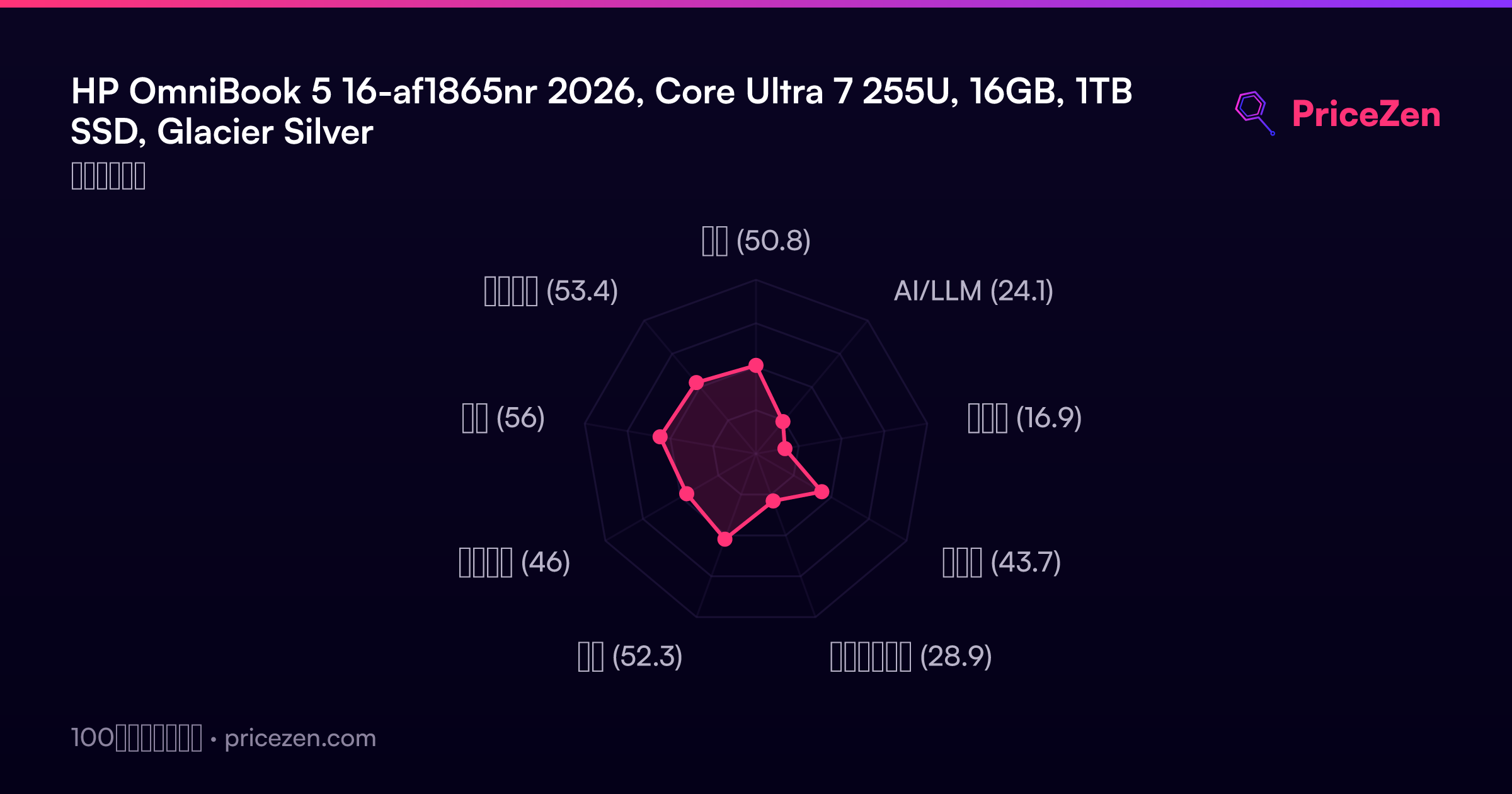
- 総合50.8
- AI/LLM24.1
- ゲーム16.9
- 携帯性43.7
- クリエイター28.9
- 学生52.3
- ビジネス46
- 開発56
- エンタメ53.4