HP OmniBook 3 /D44V2UA#ABA 2025, Core Ultra 7 255U, 16GB, 1TB SSD, Mica Silver
The 17.3-inch IPS display with 300 nits and 178-degree viewing angles delivers clear, wide visuals, while the Intel Core Ultra 7 255U processor handles everyday multitasking and AI tasks efficiently. The 41Wh battery and Wi-Fi 7 connectivity support on-the-go productivity, and the 16GB DDR5 RAM and 1TB SSD provide responsive storage. This laptop is best for developers and entertainment users who need a large-screen, reliable workhorse for coding, streaming, and video calls, though its integrated graphics limit gaming performance.

現在、販売店の最新価格はありません
概要
The 30-Second Version
The HP OmniBook 3 17 is a big-screen everyday laptop with a Core Ultra 7 255U, 16GB RAM, and 1TB SSD. It's great for browsing and office work, especially if you find it near the $465 end of its price range. Skip it if you want to game or need long battery life.
Pros & Cons
長所
- Big 17.3-inch screen for comfortable multitasking 78th
- 16GB DDR5 RAM and 1TB SSD at a reasonable price 76th
- Wi-Fi 7 and Bluetooth 6.0 for future-proof connectivity 65th
- Good port selection including Thunderbolt and HDMI 2.1
- Backlit keyboard included
短所
- Gaming performance is nearly nonexistent
- 41Wh battery is small for a 17-inch laptop
- Display brightness and color are mediocre
- Heavy at 2.01kg and not compact at all
- Reliability scores are below average
オーナーの声
購入者の評価が時間とともにどう変化したか
独自顧客が実際にレビューを書いた時期に基づいています。発売当初の高評価が続いたかどうかがわかります。
書かれたレビュー 11件、2026/05~2026/07:満足 10件、不満 1件
ストア評価全59件:4.7★。 多くの購入者はレビューを書かずに評価だけを付けています。 グラフは書かれたレビュー11件を数えています。
各点は書かれたレビュー1件で、書かれた月に置いています。満足 = 4〜5★、普通 = 3★、不満 = 1〜2★。
実証データ
Performance
The Core Ultra 7 255U lands in the 62nd percentile for CPUs in our database. That's above average, but not a barn burner. For everyday tasks like web browsing, document editing, and video streaming, it's plenty. The 16GB of DDR5 RAM sits right at the 50th percentile, which is fine for most people but won't future-proof you for heavy workloads.
The integrated Intel Graphics score puts it at the 56th percentile for GPUs. That means it's fine for casual stuff, but the gaming score of 14.7 out of 100 tells the real story. This is not a gaming laptop. Don't expect to run anything beyond light indie titles or older games at low settings. The 1TB PCIe Gen4 SSD is a nice touch and lands in the 65th percentile for storage, so file transfers and app launches feel snappy.
The 17.3-inch FHD IPS display is a mixed bag. The 300 nits brightness and 62.5 percent color gamut put it at the 53rd percentile for screens. It's fine for indoor use, but it won't wow you with vivid colors, and outdoor visibility will be rough. The 60Hz refresh rate is standard for this class.
Specifications
Full Specifications
Processor
| CPU | Intel Core Ultra 7 255U |
| Cores | 12 |
| L3 Cache | 12 MB |
Graphics
| GPU | Intel Graphics |
| Type | Integrated |
Memory & Storage
| RAM | 16 GB |
| RAM Generation | DDR5 |
| Storage | 1 TB |
| Storage Type | SSD |
Display
| Size | 17.3" |
| Resolution | 1920x1080 (Full HD) |
| Panel | IPS |
| Refresh Rate | 60 Hz |
| Brightness | 300 nits |
| Color Gamut | 62.5 percent |
Connectivity
| USB-C Ports | 2 |
| USB Ports | 2 |
| Thunderbolt | 0 |
| HDMI | HDMI 2.1 |
| Wi-Fi | Wi-Fi 7 |
| Bluetooth | Bluetooth 6.0 |
Physical
| Weight | 2.0 kg / 4.4 lbs |
| Battery | 41 Wh |
| OS | Windows 11 Home |
vs Competition
Compared to the Apple MacBook Air M4, the OmniBook 3 loses on build quality, battery life, and display quality, but wins on screen size and price. The MacBook Air is a better laptop in almost every way, but it costs more and has a smaller display. If you want macOS and all-day battery, the Air is the obvious choice.
The Lenovo ThinkPad T14 Gen 6 is a different beast entirely. It's built for business users who need durability and a great keyboard. The ThinkPad will outlast the OmniBook in terms of reliability, and its build quality is in another league. But you'll pay more for it, and you won't get a 17-inch screen.
The ASUS Vivobook Pro 15 N6506CU-PS97 is worth a look if you want more GPU power. It has a dedicated graphics card, which makes it far better for creative work and light gaming. The Samsung Galaxy Book5 Pro and Microsoft Surface Laptop 7th Edition both have superior displays and build quality, but they're also more expensive and smaller. The OmniBook's main advantage is raw screen size per dollar.
| Spec | HP OmniBook 3 /D44V2UA#ABA | Apple MacBook Pro 14.2" M4 Max | ASUS ROG Zephyrus 14" GA403WW-G14.R95080 | Lenovo Legion Pro 7i Gen 10 16" | Samsung Galaxy Book5 Pro 14" NP944XHA-KG3US | Dell Premium 14.5" LDA14250-7667SLV-PUS |
|---|---|---|---|---|---|---|
| CPU | Intel Core Ultra 7 255U | Apple M4 Max | AMD Ryzen AI 9 HX 370 | Intel Core Ultra 9 275HX | Intel Core Ultra 7 258V | Intel Core Ultra 7 255H |
| RAM (GB) | 16 | 64 | 32 | 32 | 32 | 32 |
| Storage (GB) | 1024 | 4096 | 2048 | 1024 | 1024 | 1024 |
| Screen | 17.3" 1920x1080 | 14.2" 3024x1964 | 14" 2880x1800 | 16" 2560x1600 | 14" 2880x1800 | 14.5" 3200x2000 |
| GPU | Intel Graphics | Apple (40-Core) | NVIDIA GeForce RTX 5080 | NVIDIA GeForce RTX 5070 Ti | Intel Arc Graphics 140V | Intel Arc Graphics |
| OS | Windows 11 Home | macOS | Windows 11 Home | Windows 11 Home | Windows 11 Pro | Windows 11 Home |
| Weight (kg) | 2 | 1.6 | 1.6 | 2.7 | 1.2 | 1.7 |
| Battery (Wh) | 41 | 72 | - | 99 | 63 | 62 |
| Compare | Compare | Compare | Compare | Compare |
| 製品 | CPU | GPU | RAM | ポート | 画面 | 携帯性 | ストレージ | 信頼性 | ユーザー評価 | Affordability |
|---|---|---|---|---|---|---|---|---|---|---|
| HP OmniBook 3 /D44V2UA#ABA | 61.5 | 57 | 50 | 77.8 | 50.5 | 6.6 | 65.3 | 33.6 | 76.3 | 0 |
| Apple MacBook Pro 14.2" M4 Max Compare | 93.7 | 91.5 | 95.6 | 73.9 | 99.1 | 68.8 | 98.4 | 98.1 | 72.6 | 1.8 |
| ASUS ROG Zephyrus 14" GA403WW-G14.R95080 Compare | 91.2 | 98.3 | 90.8 | 89.4 | 96 | 73.6 | 89.7 | 60.5 | 95.5 | 6 |
| Lenovo Legion Pro 7i Gen 10 16" Compare | 97.2 | 96.7 | 89 | 97.3 | 95 | 9.5 | 79.3 | 81.8 | 99.7 | 5.8 |
| Samsung Galaxy Book5 Pro 14" NP944XHA-KG3US Compare | 65.9 | 69.6 | 79.5 | 83.5 | 90.4 | 89.4 | 79.3 | 81.8 | 95.5 | 21 |
| Dell Premium 14.5" LDA14250-7667SLV-PUS Compare | 87 | 69.6 | 89 | 66.8 | 96.8 | 61.2 | 65.3 | 33.6 | 95.5 | 14.6 |
価格
Value & Pricing
The HP OmniBook 3 17 has a weird pricing situation. US listings range from $465 to $897, which is a $432 spread. At the low end, this is a genuinely good deal for a 17-inch laptop with 16GB of RAM and a 1TB SSD. At the high end, you're dangerously close to better-built machines. The affordability percentile is dead last at 0th, which means compared to other products in our database, this thing is not cheap. But that's partly because it's a large-screen laptop with decent specs. If you can find it near the $465 mark, the value proposition flips completely. Shop around before you buy.
詳細情報
Overview
The HP OmniBook 3 17 is a big-screen everyday laptop aimed at people who want a lot of display real estate without spending MacBook money. It sits in the budget-to-midrange bracket, with US listings ranging from $465 to $897 depending on the vendor. You're getting a 17.3-inch FHD IPS panel, an Intel Core Ultra 7 255U, 16GB of DDR5, and a 1TB SSD. That's a solid spec sheet for browsing, streaming, office work, and video calls.
Is the HP OmniBook 3 good for everyday use? Mostly yes. The Core Ultra 7 255U is a 12-core chip that handles multitasking fine, and 16GB of RAM means you won't choke when you've got 30 browser tabs open. The 1TB SSD is generous at this price. But there are trade-offs, and we'll get into those.
People searching for a 17-inch laptop under $900 will find this on their radar, but it's not the only option. The big screen is the headline feature, and for anyone who hates squinting at a 13-inch display, that alone might sell it.
Common Questions
Q: Is the HP OmniBook 3 17 good for gaming?
No, the HP OmniBook 3 17 is not good for gaming. It uses integrated Intel Graphics and scores just 14.7 out of 100 in our gaming benchmarks, so it can only handle light indie titles or older games at low settings.
Q: How long does the HP OmniBook 3 17 battery last?
The HP OmniBook 3 17 has a 41Wh battery, which is small for a 17-inch laptop. Expect moderate battery life for light tasks, but don't count on all-day use without a charger nearby.
Q: Does the HP OmniBook 3 17 have a backlit keyboard?
Yes, the HP OmniBook 3 17 includes a backlit keyboard, which is handy for typing in low-light environments.
Q: Is the HP OmniBook 3 17 good for programming?
The HP OmniBook 3 17 scores 52.9 out of 100 for developer use. The 16GB of RAM and 1TB SSD help, but the integrated graphics and mediocre display hold it back for more demanding development work.
Who Should Skip This
Skip the HP OmniBook 3 17 if you're a gamer, a video editor, or anyone who needs serious GPU power. The integrated Intel Graphics can't handle modern games or heavy creative workloads. Also skip it if you travel a lot. At 2.01kg with a 17.3-inch footprint, it's not compact, and the 41Wh battery won't get you through a full day away from an outlet. If you need portability and battery life, the MacBook Air M4 or Surface Laptop 7th Edition are better picks. If you need a big screen but also want some GPU muscle, check out the ASUS Vivobook Pro 15 instead.
Verdict
Should you buy the HP OmniBook 3 17? If you want a big screen for everyday tasks and you can find it at the lower end of that $465 to $897 range, yes. It's a comfortable machine for browsing, streaming, and office work. The 16GB of RAM and 1TB SSD mean it won't feel sluggish for daily use.
But if you care about gaming, battery life, or display quality, look elsewhere. The 41Wh battery is small for a 17-inch chassis, and the screen's color and brightness are nothing special. This is a laptop for people who prioritize screen size and price over everything else.
Usage Scores
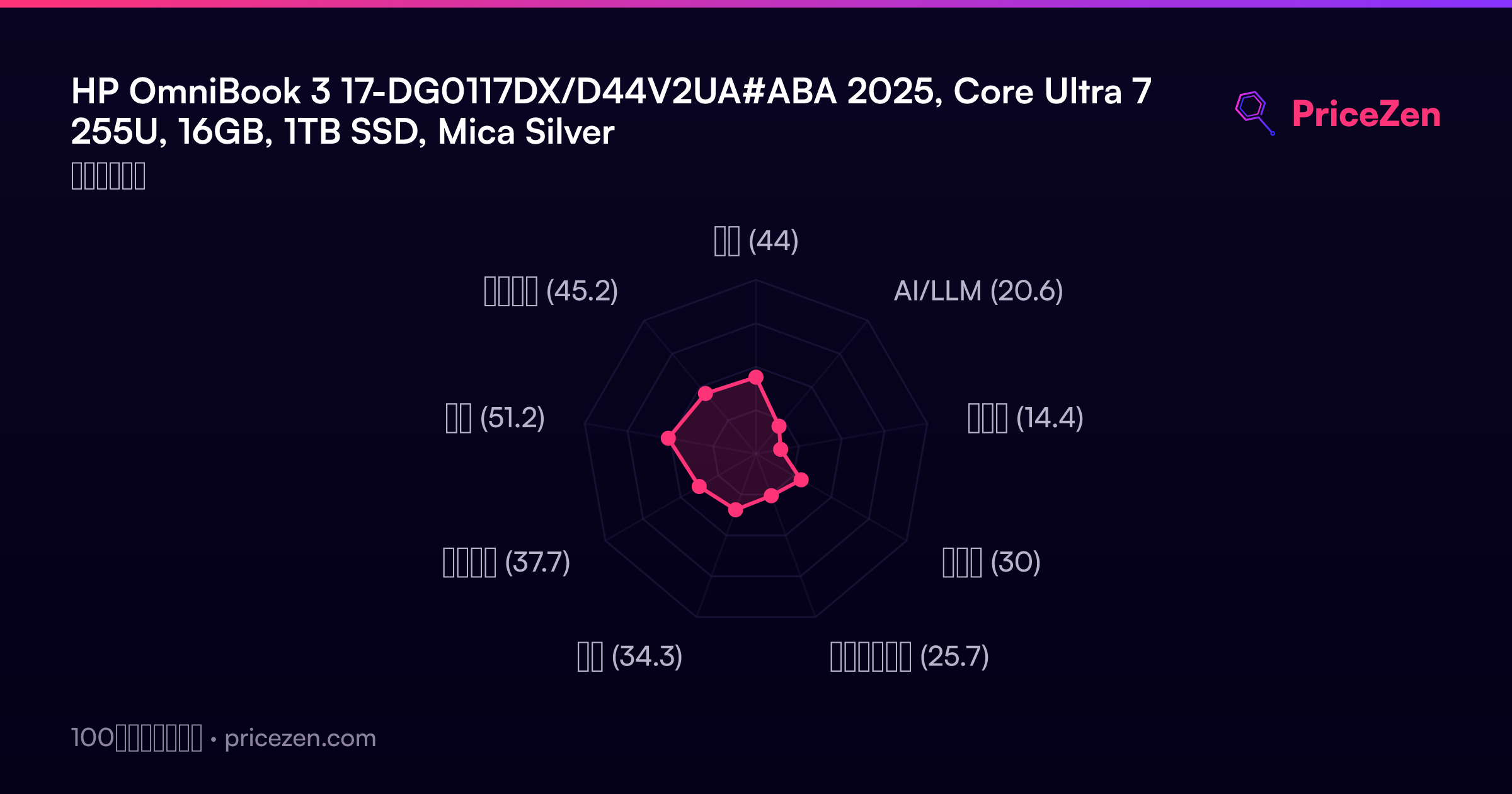
- 総合44
- AI/LLM20.6
- ゲーム14.4
- 携帯性30
- クリエイター25.7
- 学生34.3
- ビジネス37.7
- 開発51.2
- エンタメ45.2