Lenovo IdeaPad Slim 3 15IWC11 2026, Core 7 350, 16GB, 512GB SSD, Cosmic Blue

タップもスワイプもメモもできるタッチスクリーン 11月29日に確認済み
47/100 総合スコア 5.0 オーナー評価4件の平均
- CPU
- Intel Core 7 350
- RAM
- 16 GB
- Storage
- 512 GB
- Screen
- 15.3" 1920x1200
- GPU
- Intel Graphics
- OS
- Windows 11 Home
- Weight
- 1.5 kg
- Battery
- 50 Wh
概要
The 30-Second Version
The IdeaPad Slim 3 nails the basics: 16GB DDR5 RAM, a 15.3-inch touchscreen, and an 82nd percentile reliability score. But the integrated GPU is at the 7th percentile, so gaming and heavy graphics work are off the table. At CAD 1,350, it's a sensible buy for students and office workers who want something light and dependable.
Pros & Cons
長所
- 16GB DDR5 RAM at the 60th percentile, plenty for multitasking 82nd
- Reliability ranks at the 82nd percentile, a strong trust signal
- 15.3-inch touchscreen with 100% sRGB and 300 nits
- Lightweight at 1.49kg, easy to carry around
- Wi-Fi 6 and Bluetooth 5.3 for solid wireless connectivity
短所
- Integrated GPU at the 7th percentile, one of the worst we've seen
- 512GB QLC SSD puts storage at the 36th percentile
- Only 1x USB-A and 1x USB-C, port selection is thin
- HDMI 1.4 limits external display output to 4K at 30Hz
- 50Wh battery is average, not the long-lasting claim Lenovo makes
オーナーの声
The Word on the Street
- Multiple owners report the battery life is better than expected and lasts through a full day of use.
- Buyers appreciate the overall quality and say the laptop meets all their everyday requirements.
- Several reviewers mention fast service and a smooth purchasing experience at Staples.
購入者の評価が時間とともにどう変化したか
独自顧客が実際にレビューを書いた時期に基づいています。発売当初の高評価が続いたかどうかがわかります。
書かれたレビュー 2件、2026/09~2026/10:満足 2件
ストア評価全4件:5.0★。 多くの購入者はレビューを書かずに評価だけを付けています。 グラフは書かれたレビュー2件を数えています。
各点は書かれたレビュー1件で、書かれた月に置いています。満足 = 4〜5★、普通 = 3★、不満 = 1〜2★。
実証データ
Performance
The Core 7 350 is a middle-of-the-road performer, landing at the 52nd percentile for CPU in our database. That's about average for this class of laptop. The 6 cores and 2.0GHz base clock handle everyday tasks fine, and the E-cores can boost up to 3.60GHz when you need a little extra. But this is not a powerhouse. The integrated Intel Graphics sit at the 7th percentile for GPU, which is one of the weakest results we've seen. You can forget about modern games or any serious GPU-accelerated work.
Where this laptop does shine is memory and storage speed. 16GB of DDR5 RAM puts it at the 60th percentile, which is solid for multitasking and having a pile of browser tabs open. The 512GB SSD is a PCIe Gen4 drive, though it's QLC flash, which means it's not the fastest or most durable option out there. Storage capacity lands at the 36th percentile, so you might want an external drive if you keep a lot of files. The 15.3-inch 1920x1200 IPS panel hits 300 nits and 100% sRGB, good enough for everyday work but not a standout for creative pros.
Specifications
Full Specifications
Processor
| CPU | Intel Core 7 350 |
| Cores | 6 |
| Frequency | 2.0 GHz |
| L3 Cache | 6 MB |
Graphics
| GPU | Intel Graphics |
| Type | Integrated |
Memory & Storage
| RAM | 16 GB |
| RAM Generation | DDR5 |
| Storage | 512 GB |
| Storage Type | SSD |
Display
| Size | 15.3" |
| Resolution | 1920x1200 (Full HD) |
| Panel | IPS |
| Refresh Rate | 60 Hz |
| Brightness | 300 nits |
| Color Gamut | 100% sRGB |
Connectivity
| USB-C Ports | 1 |
| USB Ports | 1 |
| HDMI | HDMI 1.4 |
| Wi-Fi | Wi-Fi 6 |
| Bluetooth | Bluetooth 5.3 |
| Ethernet | No |
Physical
| Weight | 1.5 kg / 3.3 lbs |
| Battery | 50 Wh |
| OS | Windows 11 Home |
vs Competition
Stacked against the competition, the IdeaPad Slim 3 is a different animal entirely. The Apple MacBook Pro M4 Max and ASUS ROG Zephyrus GA403WW are in a completely different performance class, with dedicated GPUs and CPUs that would embarrass the Core 7 350. The HP OMEN Transcend 14 and MSI Raider are gaming machines, which makes the IdeaPad's 7th percentile GPU look even more out of place. The Dell Premium LDA14250 is closer in spirit, but even that likely has a stronger processor. Where the IdeaPad wins is portability and price. At 1.49kg, it's lighter than most of those competitors, and CAD 1,350 is a fraction of what you'd pay for a MacBook Pro M4 Max. If you need raw power, look elsewhere. If you need a light, reliable laptop for school or office work, this one holds its own.
| Spec | Lenovo IdeaPad Slim 3 15IWC11 | Apple MacBook Pro 14.2" M4 Pro | ASUS ROG Zephyrus 14" GA403WW-G14.R95080 | HP OMEN Transcend | Samsung Galaxy Book5 Pro 14" NP944XHA-KG3US | Dell Premium 14.5" LDA14250-7667SLV-PUS |
|---|---|---|---|---|---|---|
| CPU | Intel Core 7 350 | Apple M4 Pro | AMD Ryzen AI 9 HX 370 | Intel Core Ultra 9 285H | Intel Core Ultra 7 258V | Intel Core Ultra 7 255H |
| RAM (GB) | 16 | 48 | 32 | 32 | 32 | 32 |
| Storage (GB) | 512 | 4096 | 2048 | 1024 | 1024 | 1024 |
| Screen | 15.3" 1920x1200 | 14.2" 3024x1964 | 14" 2880x1800 | 14" 2880x1800 | 14" 2880x1800 | 14.5" 3200x2000 |
| GPU | Intel Graphics | Apple (16-Core) | NVIDIA GeForce RTX 5080 | NVIDIA GeForce RTX 5070 | Intel Arc Graphics 140V | Intel Arc Graphics |
| OS | Windows 11 Home | macOS | Windows 11 Home | Windows 11 Home | Windows 11 Pro | Windows 11 Home |
| Weight (kg) | 1.5 | 1.6 | 1.6 | 1.6 | 1.2 | 1.7 |
| Battery (Wh) | 50 | 72 | - | 71 | 63 | 62 |
| Compare | Compare | Compare | Compare | Compare |
| 製品 | CPU | GPU | RAM | ポート | 画面 | 携帯性 | ストレージ | 信頼性 | ユーザー評価 | Affordability |
|---|---|---|---|---|---|---|---|---|---|---|
| Lenovo IdeaPad Slim 3 15IWC11 | 50.9 | 6.6 | 59.9 | 48.5 | 63.7 | 59 | 35.8 | 82 | 56.4 | 55.3 |
| Apple MacBook Pro 14.2" M4 Pro Compare | 92.4 | 78.9 | 90.6 | 73.8 | 99.1 | 68.9 | 98.4 | 98.2 | 99.7 | 4.7 |
| ASUS ROG Zephyrus 14" GA403WW-G14.R95080 Compare | 91.2 | 98.3 | 90.8 | 89.4 | 96 | 73.6 | 89.7 | 60.6 | 95.6 | 6.2 |
| HP OMEN Transcend Compare | 90.1 | 93.5 | 89.6 | 89.4 | 96 | 72.2 | 65.4 | 33.7 | 93.2 | 9.1 |
| Samsung Galaxy Book5 Pro 14" NP944XHA-KG3US Compare | 65.8 | 69.6 | 79.5 | 83.5 | 90.3 | 89.4 | 79.3 | 82 | 95.6 | 21.4 |
| Dell Premium 14.5" LDA14250-7667SLV-PUS Compare | 87 | 69.6 | 89 | 66.7 | 96.8 | 61.3 | 65.4 | 33.7 | 95.6 | 14.8 |
価格
Value & Pricing
At CAD 1,350, the IdeaPad Slim 3 is priced at the 45th percentile for affordability in our database. That's not a screaming deal, but it's not outrageous either. You're paying for the touchscreen, the 16GB of RAM, and the lightweight build. The problem is the integrated graphics and the QLC SSD drag down the overall value proposition. For the same money, you might find something with a dedicated GPU or a larger, faster SSD. But if you need a reliable, portable Windows machine with a touchscreen, this price is fair. Just don't expect it to punch above its weight.
詳細情報
Overview
The Lenovo IdeaPad Slim 3 15IWC11 lands at CAD 1,350 with a spec sheet that reads like a sensible daily driver. You get 16GB of DDR5 RAM, a 512GB Gen4 SSD, and a 15.3-inch WUXGA touchscreen that covers 100% sRGB. The Intel Core 7 350 is a 6-core chip clocked at 2.0GHz, and it's paired with integrated Intel Graphics. That combo puts this laptop at the 52nd percentile for CPU and a rough 7th percentile for GPU in our database. So yeah, don't expect to game on this thing.
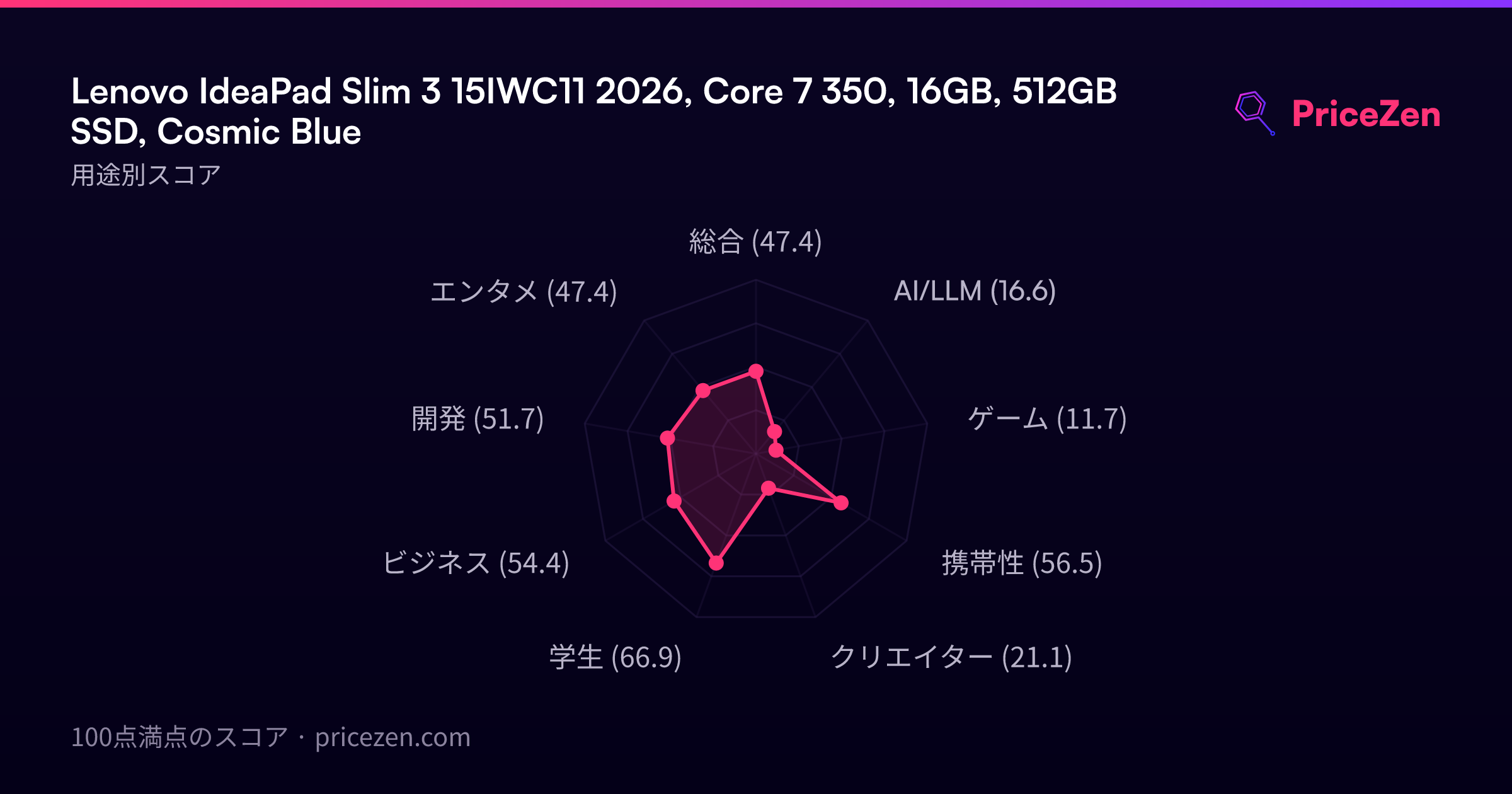
But gaming isn't the point. This is a student and business machine, and the scores back that up: 68.3 for student use, 57.5 for business. The reliability ranking sits at the 82nd percentile, which is genuinely reassuring for a budget-friendly laptop. The screen is solid at the 66th percentile, and the whole package weighs just 1.49kg. It's light, it's got a touchscreen, and it won't break your back or your bank account. The 50Wh battery gets a thumbs up from early buyers too.
Common Questions
Q: Can this laptop handle gaming?
No. The integrated Intel Graphics sit at the 7th percentile in our database, which is one of the weakest GPU results we've seen. You can play very light or older games at low settings, but anything modern will struggle. This is not a gaming laptop.
Q: Is the battery life actually good?
The 50Wh battery is average for this class. Early buyers report it lasts longer than expected, but Lenovo's marketing claims about long battery life should be taken with a grain of salt. Expect a full workday of light use, but not much more.
Q: Is the touchscreen worth it?
The 15.3-inch WUXGA touchscreen covers 100% sRGB and hits 300 nits, which puts it at the 66th percentile for screens. It's a nice panel for everyday use, and the touch capability is handy for scrolling and note-taking. Just don't expect OLED-level contrast or brightness.
Who Should Skip This
If you need any kind of graphics performance, skip this. The 7th percentile GPU means no gaming, no video editing, no 3D work. The 512GB QLC SSD at the 36th percentile is also a weak spot if you store a lot of files locally. And if you need more than one USB-A port or want to drive a 4K external display at 60Hz, the port selection and HDMI 1.4 will frustrate you. Power users and creators should look at something with a dedicated GPU and a faster SSD, even if it costs more.
Verdict
The Lenovo IdeaPad Slim 3 15IWC11 is a solid choice for students and office workers who value portability and reliability over raw performance. The 82nd percentile reliability score is the headline here, and the 16GB of RAM plus the touchscreen make it a practical daily driver. But the 7th percentile GPU is a real limitation, and the 512GB QLC SSD is underwhelming. At CAD 1,350, it's a fair deal if you know exactly what you're getting: a light, dependable laptop for everyday tasks. If you need more power, you'll need to spend more money or look at a different category.
Usage Scores
- 総合47.4
- AI/LLM16.6
- ゲーム11.7
- 携帯性56.5
- クリエイター21.1
- 学生66.9
- ビジネス54.4
- 開発51.7
- エンタメ47.4