ASUS Chromebook Plus 14" CX5403CMA-DB588 2024, Core Ultra 5 115U, 8GB, 128GB SSD, Fog Silver

ChromeOS: 高速起動、自動アップデート 11月27日に確認済み
23/100 総合スコア 4.8 オーナー評価4件の平均
- CPU
- Intel Core Ultra 5 115U
- RAM
- 8 GB
- Storage
- 128 GB
- Screen
- 14" 2560x1600
- GPU
- Intel Graphics
- OS
- ChromeOS
- Weight
- 1.3 kg
- Battery
- 63 Wh











概要
The 30-Second Version
The ASUS Chromebook Plus CX54 pairs a stunning 14-inch 2560x1600 display with an Intel Core Ultra 5 and AI Boost NPU, which is rare horsepower for ChromeOS. The catch is 8GB of RAM and a 128GB SSD, which rank near the bottom of our database. At USD 600 to USD 700, it's a fair deal for display-obsessed Google users, but the storage limit and weak gaming score will push others away.
Pros & Cons
長所
- Gorgeous 14-inch 2560x1600 display with 500 nits brightness and 100% DCI-P3 89th
- Intel Core Ultra 5 with AI Boost NPU is unusual horsepower for a Chromebook 86th
- Excellent port selection including Thunderbolt 4, HDMI 2.1, and Ethernet 86th
- Lightweight at 1.30kg with a backlit keyboard 70th
- 8MP webcam with physical privacy shutter is a nice touch for video calls
短所
- 8GB RAM is limiting and ranks in the bottom quarter of our database
- 128GB storage is dead last among laptops we track
- Gaming performance is essentially nonexistent at 7.9 out of 100
- Customer rating of 2.7 out of 5 from only 7 reviews is concerning
- No price listed, making value hard to judge without hunting
オーナーの声
購入者の評価が時間とともにどう変化したか
独自顧客が実際にレビューを書いた時期に基づいています。発売当初の高評価が続いたかどうかがわかります。
書かれたレビュー 8件、2024/07~2026/05:満足 4件、不満 1件、星なし 3件
ストア評価全4件:4.8★。 グラフは書かれたレビュー8件を数えています。
各点は書かれたレビュー1件で、書かれた月に置いています。満足 = 4〜5★、普通 = 3★、不満 = 1〜2★。
実証データ
Performance
Let's talk about that Core Ultra 5 115U. It's an 8-core chip running at 1.5GHz base, and it's paired with Intel's integrated graphics. In our rankings, the CPU sits right around the 40th percentile for laptops overall. That's... fine. Not exciting, not embarrassing. For ChromeOS, which is lighter than Windows, it should handle a dozen browser tabs, Android apps, and even some light Linux container work without breaking a sweat. The AI Boost NPU is the wildcard here. ChromeOS has been adding AI features like Magic Eraser in Google Photos and enhanced dictation, and having a dedicated NPU means those tasks won't tank your CPU.
The GPU is integrated Intel Graphics, which lands at the 69th percentile. That sounds decent until you remember this is a Chromebook. You're not running Cyberpunk on this thing. You're not even running most Steam games well. The gaming score of 7.9 out of 100 is the weakest area by a mile. This is a work machine, not a play machine. The 8GB of LPDDR5X RAM is the real bottleneck. It's fast memory, sure, but 8GB is 8GB. Open too many tabs and you'll feel it. The 128GB NVMe SSD is quick for what it is, but it's the 9th percentile for storage capacity. You'll be leaning on cloud storage and that microSD slot more than you'd like.
Specifications
Full Specifications
Processor
| CPU | Intel Core Ultra 5 115U |
| Cores | 8 |
| Frequency | 1.5 GHz |
| L3 Cache | 10 MB |
Graphics
| GPU | Intel Graphics |
| Type | Integrated |
Memory & Storage
| RAM | 8 GB |
| RAM Generation | LPDDR5X |
| Storage | 128 GB |
| Storage Type | NVMe SSD |
Display
| Size | 14" |
| Resolution | 2560x1600 (QHD) |
| Panel | IPS |
| Refresh Rate | 60 Hz |
| Brightness | 500 nits |
| Color Gamut | 100% DCI-P3 |
Connectivity
| USB-C Ports | 2 |
| USB Ports | 2 |
| Thunderbolt | Thunderbolt 4 |
| HDMI | HDMI 2.1 |
| Wi-Fi | Wi-Fi 6E |
| Bluetooth | Yes |
| Ethernet | No |
Physical
| Weight | 1.3 kg / 2.9 lbs |
| Battery | 63 Wh |
| OS | ChromeOS |
vs Competition
The obvious comparison is the Apple MacBook Pro M5. That machine crushes this ASUS in raw performance, build quality, and storage. But it also costs dramatically more. If you're cross-shopping these two, you're either confused or you really value macOS. The MacBook is the better laptop, full stop. The CX54 is the better value if you live in Google's ecosystem and don't need local storage.
Against the HP OmniBook X Flip and Samsung Galaxy Book5 Pro, both Windows machines, the CX54 holds its own on display quality and port selection. The OmniBook and Galaxy Book both offer more RAM and storage at similar price points, but they run Windows, which some people actively avoid. The Lenovo Legion 5i is a gaming machine, so it's not really a fair fight. The MSI Creator A13V is aimed at creators, and it has the GPU and RAM to back that up. The CX54's advantage is simplicity, battery life from that 63Wh cell, and ChromeOS's low overhead. The trade-off is flexibility. You're locked into Google's world, and that 128GB SSD means you're living in the cloud whether you like it or not.
| Spec | ASUS Chromebook Plus 14" CX5403CMA-DB588 | Apple MacBook Pro 14.2" M4 Pro | Lenovo Legion Pro 7i Gen 10 16" | HP OMEN Transcend | Samsung Galaxy Book5 Pro 14" NP944XHA-KG3US | Dell Premium 14.5" LDA14250-7667SLV-PUS |
|---|---|---|---|---|---|---|
| CPU | Intel Core Ultra 5 115U | Apple M4 Pro | Intel Core Ultra 9 275HX | Intel Core Ultra 9 285H | Intel Core Ultra 7 258V | Intel Core Ultra 7 255H |
| RAM (GB) | 8 | 48 | 32 | 32 | 32 | 32 |
| Storage (GB) | 128 | 4096 | 1024 | 1024 | 1024 | 1024 |
| Screen | 14" 2560x1600 | 14.2" 3024x1964 | 16" 2560x1600 | 14" 2880x1800 | 14" 2880x1800 | 14.5" 3200x2000 |
| GPU | Intel Graphics | Apple (16-Core) | NVIDIA GeForce RTX 5070 Ti | NVIDIA GeForce RTX 5070 | Intel Arc Graphics 140V | Intel Arc Graphics |
| OS | ChromeOS | macOS | Windows 11 Home | Windows 11 Home | Windows 11 Pro | Windows 11 Home |
| Weight (kg) | 1.3 | 1.6 | 2.7 | 1.6 | 1.2 | 1.7 |
| Battery (Wh) | 63 | 72 | 99 | 71 | 63 | 62 |
| Compare | Compare | Compare | Compare | Compare |
| 製品 | CPU | GPU | RAM | ポート | 画面 | 携帯性 | ストレージ | 信頼性 | ユーザー評価 | Affordability |
|---|---|---|---|---|---|---|---|---|---|---|
| ASUS Chromebook Plus 14" CX5403CMA-DB588 | 38.6 | 69.6 | 20.8 | 89.4 | 85.9 | 86.4 | 9.4 | 60.6 | 34.5 | 57.1 |
| Apple MacBook Pro 14.2" M4 Pro Compare | 92.4 | 78.9 | 90.6 | 73.8 | 99.1 | 68.9 | 98.4 | 98.2 | 99.7 | 4.7 |
| Lenovo Legion Pro 7i Gen 10 16" Compare | 97.2 | 96.7 | 89 | 97.3 | 95 | 9.5 | 79.3 | 82 | 99.7 | 6 |
| HP OMEN Transcend Compare | 90.1 | 93.5 | 89.7 | 89.4 | 96 | 72.2 | 65.4 | 33.7 | 93.2 | 9 |
| Samsung Galaxy Book5 Pro 14" NP944XHA-KG3US Compare | 65.8 | 69.6 | 79.6 | 83.5 | 90.3 | 89.4 | 79.3 | 82 | 95.6 | 21.4 |
| Dell Premium 14.5" LDA14250-7667SLV-PUS Compare | 87 | 69.6 | 89 | 66.7 | 96.8 | 61.3 | 65.4 | 33.7 | 95.6 | 14.9 |
価格
Value & Pricing
Here's where things get tricky. The CX54 doesn't have a listed price from the retailer we pulled this from, but we found it selling for USD 600 to USD 700 across two US listings. That's a USD 100 spread, which is worth paying attention to. The best deal we saw was at Best Buy, so if you're in the US, start there. At USD 600, this is a compelling package. At USD 700, it starts bumping against some serious Windows ultrabook competition.
For context, the affordability score sits at the 63rd percentile. Not a bargain, not a ripoff. You're paying a premium for that display and the Core Ultra chip. The question is whether ChromeOS can actually use all that hardware. For most people, a cheaper Chromebook with a lesser screen would do the job. But if you want the best screen in the Chromebook world and don't mind the storage and RAM limits, USD 600 is a fair ask.
詳細情報
Overview
The ASUS Chromebook Plus CX54 is a weird one, and I mean that in the most interesting way possible. You've got a Chromebook, the platform most people associate with cheap plastic clamshells for schoolkids, packing an Intel Core Ultra 5 with a dedicated AI Boost NPU. That's a chip you'd normally expect to find in a midrange Windows ultrabook, not something running ChromeOS. And yet here we are. ASUS clearly wants this to be the Chromebook for people who think they've outgrown Chromebooks.
The headline feature is that 14-inch display. 2560x1600 resolution, 500 nits of brightness, and full DCI-P3 color coverage. That's a screen that would look right at home on a laptop costing twice as much. It ranks in the top 12% of all laptops we track for display quality. If you spend your day staring at documents, spreadsheets, or streaming video, this panel is going to spoil you.
But there's a catch, and it's a big one. 8GB of RAM and a 128GB SSD put this machine in the bottom quarter of our database for memory and dead last for storage. For a Chromebook, that might be workable. For a machine ASUS is positioning as a premium productivity device with AI features, it feels like putting racing tires on a car with a governor installed. The potential is there, but the ceiling is low.
Common Questions
Q: Can this Chromebook handle Android apps and Linux apps?
Yes. The Core Ultra 5 115U has enough headroom for Android apps from the Play Store and Linux containers via Crostini. The 8GB of RAM will be the limiting factor if you run multiple heavy apps at once, but for typical use like messaging apps, note-taking tools, and light development, it should be fine.
Q: Is 128GB of storage enough for a Chromebook?
It depends on your workflow. ChromeOS is designed around cloud storage, so if you use Google Drive, Docs, and streaming services, 128GB is workable. But if you download movies for offline viewing, keep a large photo library, or install many Android apps, you'll fill it up fast. The microSD card slot helps, but it's slower than the internal NVMe SSD.
Q: How good is the display for photo and video editing?
The display is excellent. 2560x1600 resolution, 500 nits brightness, and 100% DCI-P3 color coverage put it in the top 12% of laptops we track. For web-based editing tools like Google Photos or Lightroom on the web, it's great. But the 8GB of RAM and integrated graphics will limit how smoothly heavier editing tasks run.
Q: Does the Intel AI Boost NPU actually do anything useful?
It accelerates on-device AI tasks in ChromeOS, like background blur in video calls, enhanced dictation, and certain photo editing features. It also helps with battery efficiency since AI workloads don't hit the CPU as hard. It's not a reason to buy the laptop on its own, but it's a nice future-proofing feature as Google adds more AI capabilities to ChromeOS.
Who Should Skip This
Skip this if you need real storage. 128GB is the 9th percentile in our database, and that's just not enough for anyone who works with large files, keeps a big media library, or installs a lot of Android apps. You'll be fighting the storage limit within months. Look at the HP OmniBook X Flip or Samsung Galaxy Book5 Pro instead, both of which offer more storage and RAM at similar prices.
Also skip it if you want to game. The 7.9 out of 100 gaming score is one of the worst we've seen. Integrated Intel Graphics and ChromeOS's limited game library make this a non-starter for anything beyond browser games. The Lenovo Legion 5i is the obvious alternative if gaming matters. And if you're already deep in Apple's ecosystem, the MacBook Pro M5 is the better machine in every way except price.
Verdict
If you're a student or a professional who lives in Google Workspace, spends hours in Chrome, and wants a screen that makes everything look fantastic, the CX54 is a strong pick at USD 600. The Core Ultra 5 gives it enough headroom for the next few years of ChromeOS updates, and the port selection means you won't need dongles. The 8MP webcam is genuinely better than most laptops at this price, and the privacy shutter is a thoughtful touch.
But if you need local storage for photos, videos, or offline work, look elsewhere. 128GB is a joke in 2025, even for a Chromebook. And if you want to game even a little, this is not your machine. The 2.7 out of 5 customer rating from 7 reviews is a red flag, though with such a small sample size it's hard to know if that's a real pattern or just bad luck. I'd want to see more reviews before calling this a slam dunk.
Usage Scores
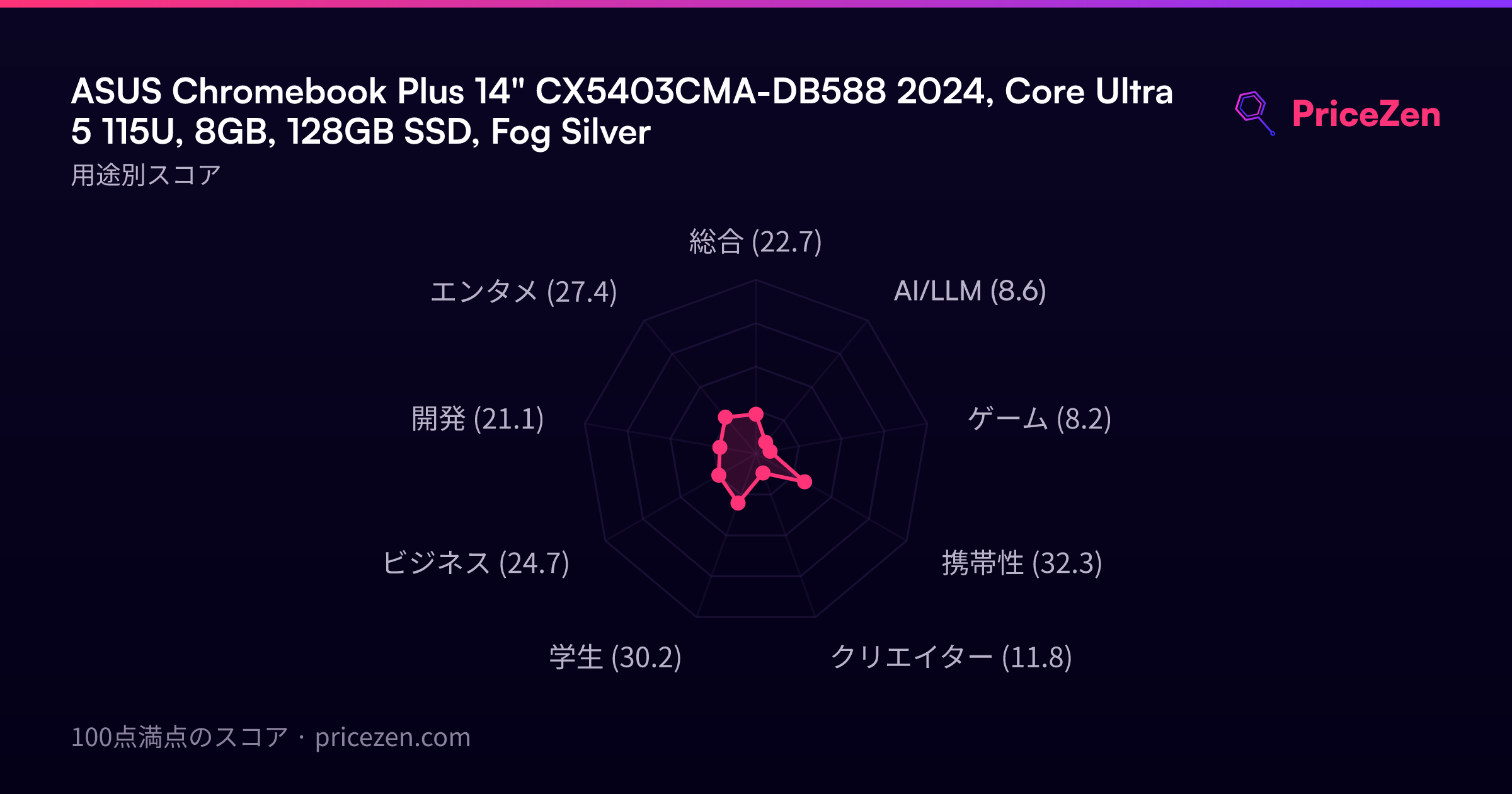
- 総合22.7
- AI/LLM8.6
- ゲーム8.2
- 携帯性32.3
- クリエイター11.8
- 学生30.2
- ビジネス24.7
- 開発21.1
- エンタメ27.4