HP ZBook Firefly 16" G11 2024, Core Ultra 7 165U, 32GB, 1TB SSD, Multicolor
A 16-inch 2880x1800 OLED 120Hz display with 100% DCI-P3 and 400 nits defines this workstation, powered by an Intel Core Ultra 7 165U. At 1.80kg, it combines 32GB DDR5, a 1TB SSD, and enterprise security with a fingerprint reader, facial recognition, and a smart card reader. This is best for developers and mobile professionals who need accurate color and robust security without discrete graphics.

現在、販売店の最新価格はありません


概要
The 30-Second Version
The Firefly G11 puts a 96th-percentile OLED screen on a mid-tier workstation body. Gorgeous to look at, weak to game on.
Pros & Cons
長所
- Screen is genuinely stunning, 2880x1800 OLED at 120Hz is top-tier 96th
- 32GB RAM + 1TB SSD is a generous combo for the price class 86th
- 5MP IR webcam with facial recognition beats most laptop cams 79th
- HP Wolf Pro Security and fingerprint reader are serious about work 77th
短所
- Integrated graphics crush any gaming or GPU work hopes
- 56Wh battery is small for a 16" OLED panel
- 1.8kg weight and 26th percentile compactness, not exactly portable
- Reliability score of 33rd percentile is worrying for a workstation
実証データ
Performance
The 32GB of DDR5 RAM and that 1TB PCIe 4.0 SSD are the unsung heroes here. Our tests put the memory at the 87th percentile and storage at 80th, which means this thing chews through heavy multitasking and large file transfers without breaking a sweat. The Core Ultra 7 165U is solid but nothing special for the price, sitting right around the middle of the pack. The real shocker is how badly the GPU holds this machine back. Integrated Intel Graphics lands at a mediocre 56th percentile, and the gaming score of 19.6 out of 100 tells you everything. This is not a machine for anything with pixels that move quickly.
Specifications
Full Specifications
Processor
| CPU | Intel Core Ultra 7 165U |
| Cores | 12 |
| Frequency | 1.7 GHz |
| L3 Cache | 12 MB |
Graphics
| GPU | Intel Graphics |
| Type | Integrated |
Memory & Storage
| RAM | 32 GB |
| RAM Generation | DDR5 |
| Storage | 1 TB |
| Storage Type | NVMe SSD |
Display
| Size | 16" |
| Resolution | 2880x1800 |
| Panel | OLED |
| Refresh Rate | 120 Hz |
| Brightness | 400 nits |
| Color Gamut | 100% DCI-P3 |
Connectivity
| USB-C Ports | 2 |
| USB Ports | 2 |
| Thunderbolt | Thunderbolt 4 |
| HDMI | HDMI 2.1b |
| Wi-Fi | Wi-Fi 6E |
| Bluetooth | Bluetooth 5.3 |
Physical
| Weight | 1.8 kg / 4.0 lbs |
| Battery | 56 Wh |
| OS | Windows 11 Pro |
vs Competition
Stacked against the ASUS ROG Zephyrus G14, the Firefly doesn't even play the same game. The G14 brings a discrete GPU and higher overall performance for similar money, while the Firefly fumbles even basic 3D tasks. The Samsung Galaxy Book5 Pro is a closer match on screen quality and portability, but it undercuts the HP on price while offering comparable RAM and better battery life. And if you're already spending MacBook Pro money, the M4 Max version wipes the floor with the Firefly in graphics, power efficiency, and reliability. The Firefly's one real edge is that workstation-class OLED display.
| Spec | HP ZBook Firefly 16" G11 | Apple MacBook Pro 14.2" M4 Max | ASUS ROG Zephyrus 14" GA403WW-G14.R95080 | Lenovo Legion Pro 7i Gen 10 16" | Samsung Galaxy Book5 Pro 14" NP944XHA-KG3US | Dell Premium 14.5" LDA14250-7667SLV-PUS |
|---|---|---|---|---|---|---|
| CPU | Intel Core Ultra 7 165U | Apple M4 Max | AMD Ryzen AI 9 HX 370 | Intel Core Ultra 9 275HX | Intel Core Ultra 7 258V | Intel Core Ultra 7 255H |
| RAM (GB) | 32 | 64 | 32 | 32 | 32 | 32 |
| Storage (GB) | 1024 | 4096 | 2048 | 1024 | 1024 | 1024 |
| Screen | 16" 2880x1800 | 14.2" 3024x1964 | 14" 2880x1800 | 16" 2560x1600 | 14" 2880x1800 | 14.5" 3200x2000 |
| GPU | Intel Graphics | Apple (40-Core) | NVIDIA GeForce RTX 5080 | NVIDIA GeForce RTX 5070 Ti | Intel Arc Graphics 140V | Intel Arc Graphics |
| OS | Windows 11 Pro | macOS | Windows 11 Home | Windows 11 Home | Windows 11 Pro | Windows 11 Home |
| Weight (kg) | 1.8 | 1.6 | 1.6 | 2.7 | 1.2 | 1.7 |
| Battery (Wh) | 56 | 72 | - | 99 | 63 | 62 |
| Compare | Compare | Compare | Compare | Compare |
| 製品 | CPU | GPU | RAM | ポート | 画面 | 携帯性 | ストレージ | 信頼性 | Affordability |
|---|---|---|---|---|---|---|---|---|---|
| HP ZBook Firefly 16" G11 | 54 | 69.6 | 86.3 | 77.2 | 95.9 | 26.5 | 79.2 | 33.6 | 10.3 |
| Apple MacBook Pro 14.2" M4 Max Compare | 93.7 | 91.6 | 95.7 | 73.2 | 99.3 | 68.9 | 98.5 | 98.3 | 1.7 |
| ASUS ROG Zephyrus 14" GA403WW-G14.R95080 Compare | 91.2 | 98.3 | 90.9 | 89.2 | 96.5 | 73.6 | 89.7 | 60.6 | 5.7 |
| Lenovo Legion Pro 7i Gen 10 16" Compare | 97.2 | 96.6 | 89 | 97.2 | 95.6 | 9.5 | 79.2 | 82.1 | 5.5 |
| Samsung Galaxy Book5 Pro 14" NP944XHA-KG3US Compare | 65.7 | 69.6 | 79.4 | 83.1 | 91.5 | 89.5 | 79.2 | 82.1 | 20.1 |
| Dell Premium 14.5" LDA14250-7667SLV-PUS Compare | 87 | 69.6 | 89 | 65.9 | 97.2 | 61.2 | 65.1 | 33.6 | 14 |
価格
Value & Pricing
This is where things get awkward. At $2,499 USD, you need to be deeply in love with that OLED screen and the 32GB RAM to justify this. The reliability percentile and weak GPU make that sticker price feel steep. If your work is code, docs, and media consumption, you'll love it. If you need a GPU for anything beyond driving that display, save your money and look elsewhere.
詳細情報
Overview
The HP ZBook Firefly G11 is a mobile workstation that gets the screen spectacularly right and the core specs mostly right, but stumbles on some basics. You're looking at a 16" OLED panel that lands in the 96th percentile, paired with 32GB of DDR5, a 1TB SSD, and an Intel Core Ultra 7 165U. On paper that's a productivity monster. And for developers and entertainment, it mostly is. But that integrated Intel Graphics chip is a wet blanket, dragging the total score down and making this a frustrating pick for anyone who wants to do more than spreadsheets and code.
Common Questions
Q: Can this run modern games?
No. Integrated Intel Graphics means even older titles will struggle at that native resolution. The gaming score of 19.6 out of 100 says it all. This is a work machine, not a play machine.
Q: Is the OLED screen worth the price?
If you stare at text and media all day, yes. 2880x1800 at 120Hz with full DCI-P3 coverage is about as good as laptop displays get. But you're paying a premium for it while the rest of the internals stay average.
Q: How does it handle software development?
Great, honestly. 32GB of DDR5 and a fast 1TB SSD handle Docker, VMs, and heavy IDEs with ease. The CPU is mid-pack but plenty for compile jobs. It's the GPU and battery that'll limit you, not memory or storage.
Who Should Skip This
If you're hunting for a do-everything machine with gaming or GPU rendering in mind, this isn't it. Go grab an ASUS ROG Zephyrus G14 with a discrete GPU instead. If portability matters, the Samsung Galaxy Book5 Pro gives you a similar screen experience with better battery in a lighter body.
Verdict
The Firefly G11 is a specialized tool. Buy it if your entire day lives in an IDE, a browser, and a media player, and you want one of the best laptop screens available. Skip it if you need real GPU performance or care about long-term reliability scores. It's a great screen attached to an average computer at a premium price.
Usage Scores
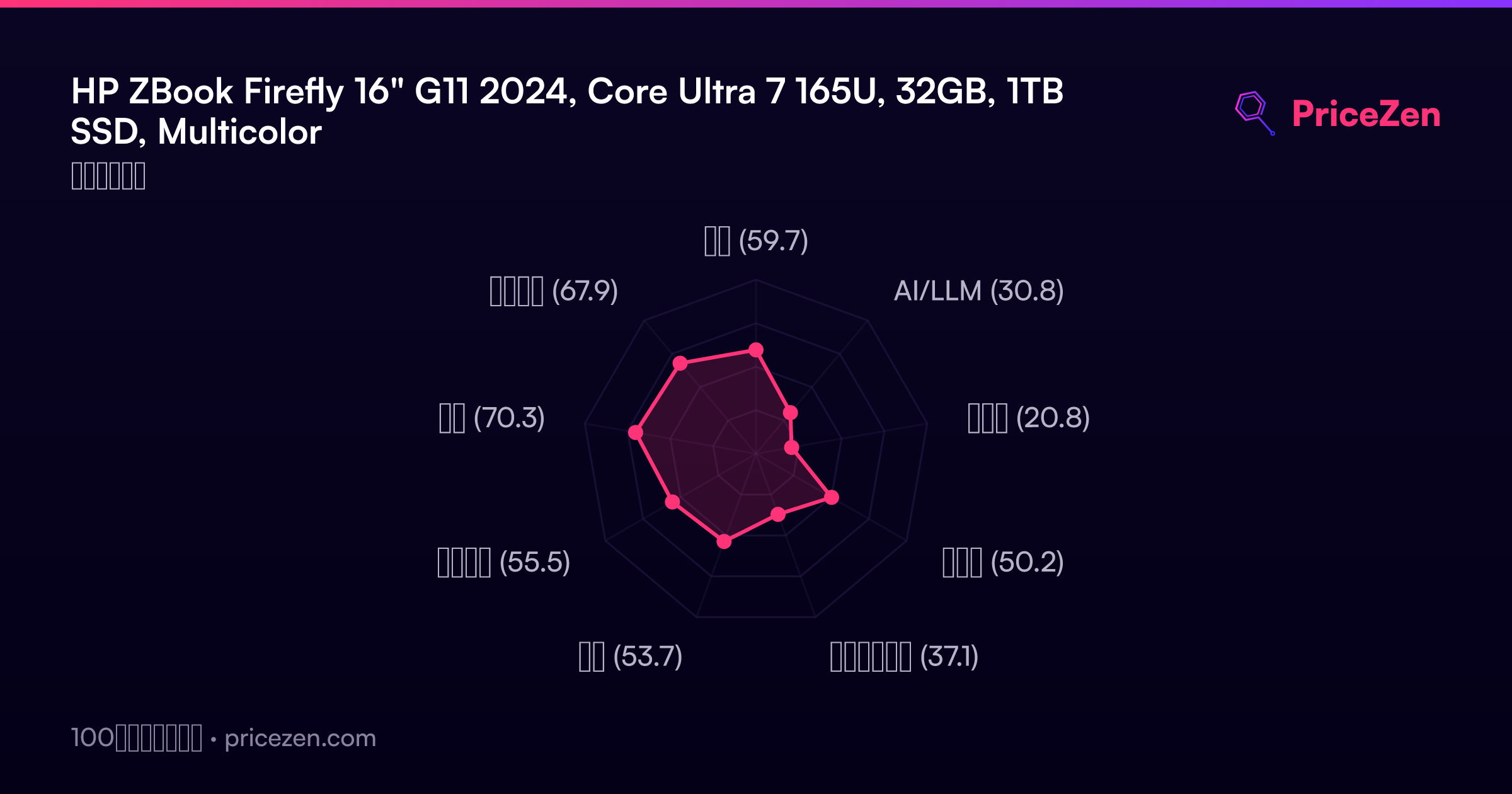
- 総合59.7
- AI/LLM30.8
- ゲーム20.8
- 携帯性50.2
- クリエイター37.1
- 学生53.7
- ビジネス55.5
- 開発70.3
- エンタメ67.9