Auusda Business Laptop 15.6" T156A, Intel N95, 16GB, 1TB SSD, Silver
The Intel N95 quad-core processor, 16GB DDR4 RAM, and 1TB NVMe SSD deliver smooth multitasking and rapid app launches for everyday workloads. Its 15.6-inch FHD IPS display with 180-degree hinge, backlit keyboard, and fingerprint reader add practical comfort and security for long sessions. This laptop suits students and office workers who need a dependable, portable machine for note-taking, browsing, and document editing, not for gaming.

現在、販売店の最新価格はありません











概要
The 30-Second Version
The Auusda T156A pairs a painfully slow Intel N95 CPU with a generous 16GB of RAM and a 1TB SSD. It's fine for basic office work and web browsing, but don't believe the gaming hype. At its lowest price around $350, it's an okay deal for a secondary machine. Reliability is a big question mark, so a refurbished business laptop is often a safer bet.
Pros & Cons
長所
- Massive 1TB NVMe SSD is a rarity at this price and loads everything fast. 85th
- 16GB of RAM out of the box keeps basic multitasking smooth. 83rd
- Backlit keyboard with numpad and fingerprint reader add real usability. 79th
- Windows 11 Pro gives you BitLocker and Remote Desktop, unusual for budget machines.
- Very affordable when priced at the low end around $350.
短所
- Intel N95 CPU is painfully slow, in the 4th percentile of all laptops.
- Integrated graphics are a dead end for gaming or any GPU-heavy work.
- Battery life is mediocre with a small 46Wh unit.
- Build quality and reliability score in the 3rd percentile, a real concern.
- Marketing claims of AAA gaming and 4K editing are misleading.
オーナーの声
The Word on the Street
購入者の評価が時間とともにどう変化したか
独自顧客が実際にレビューを書いた時期に基づいています。発売当初の高評価が続いたかどうかがわかります。
書かれたレビュー 1件、2026年6月:満足 1件
ストア評価全719件:4.3★。 多くの購入者はレビューを書かずに評価だけを付けています。 グラフは書かれたレビュー1件を数えています。
各点は書かれたレビュー1件で、書かれた月に置いています。満足 = 4〜5★、普通 = 3★、不満 = 1〜2★。
実証データ
Performance
Let's talk about what that N95 processor actually feels like day to day. With 4 cores boosting up to 3.4GHz, it can handle a handful of browser tabs and a Spotify stream without immediately crying uncle, but push it with a big Excel file or a Zoom call while you've got too much open, and you'll feel the lag. The 16GB of DDR4 RAM helps a lot here. It's the main reason this machine doesn't completely fall apart under light multitasking, and it's upgradeable to 32GB if you really want to push your luck. The 1TB NVMe SSD is a standout, landing in the 81st percentile for storage. Apps open quickly, and you've got room for a ton of files, which is more than you can say for a lot of budget Chromebooks.
The integrated graphics are what they are. You can stream video at 1080p without issues, and the IPS display is actually decent for the price, though it's nothing special, sitting right around the middle of the pack in our screen rankings. The 120Hz refresh rate mentioned in some listings is a head-scratcher, as the main specs point to a standard 60Hz panel. Either way, don't expect to game on this thing. Our gaming score for this laptop is a 9.3 out of 100, which is about as low as it gets. Stick to Solitaire or cloud gaming if you're feeling adventurous.
Specifications
Full Specifications
Processor
| CPU | Intel Processor N95 |
| Cores | 4 |
| Frequency | 3.4 GHz |
| L3 Cache | 6 MB |
Graphics
| GPU | Intel UHD Graphics |
| Type | Integrated |
Memory & Storage
| RAM | 16 GB |
| RAM Generation | DDR4 |
| Storage | 1 TB |
| Storage Type | NVMe SSD |
Display
| Size | 15.6" |
| Resolution | 1920x1080 (Full HD) |
| Panel | IPS |
Connectivity
| USB Ports | 2 |
| HDMI | Mini or standard HDMI |
| Wi-Fi | Wi-Fi 6 |
| Bluetooth | Bluetooth 5.0 |
Physical
| Weight | 1.7 kg / 3.7 lbs |
| Battery | 80 Wh |
| OS | Windows 11 Pro |
vs Competition
Stacked against something like a used Lenovo ThinkPad or Dell Latitude at a similar price, the Auusda wins on paper with its newer design, bigger out-of-box storage, and Windows 11 Pro. But those business machines will run circles around it in actual CPU performance and are built to survive years of abuse. A refurbished ThinkPad T480 with an 8th-gen Core i5 will feel snappier in daily use, even if it's older and chunkier. The Auusda's main advantage is that it's new, with a warranty and a fresh battery, even if that battery is on the small side.
If you're looking at new laptops, the Auusda competes with entry-level Chromebooks and the cheapest Windows machines from Acer and ASUS. Those will often have similar or slightly better processors but skimp hard on RAM and storage, offering 4GB of memory and 64GB of eMMC flash. The Auusda's 16GB and 1TB combo is a massive step up from that. The trade-off is that you're buying from a much smaller brand with questionable reliability and support. For a student who just needs a big screen and a keyboard for writing papers, the Auusda makes a case for itself. For anyone else, a refurbished business laptop is the smarter buy.
| Spec | Auusda Business Laptop 15.6" T156A | Lenovo Legion 15.1" 83F0CTO1WW | ASUS ROG Strix G16 Gaming Laptop | MSI Katana Thin 15 | Microsoft Surface Laptop 13.8" EP2-42030 | HP OMEN Transcend 14 |
|---|---|---|---|---|---|---|
| CPU | Intel Processor N95 | Intel Core Ultra 9 275HX | AMD Ryzen 9 8940HX | Intel Core i9 14900HX | Qualcomm Snapdragon X Plus X1P-64-100 | Intel Core Ultra 9 285H |
| RAM (GB) | 16 | 32 | 64 | 32 | 32 | 32 |
| Storage (GB) | 1024 | 2048 | 4096 | 2048 | 1024 | 1024 |
| Screen | 15.6" 1920x1080 | 15.1" 2560x1600 | 16" 1920x1200 | 15.6" 2560x1600 | 13.8" 2304x1536 | 14" 2880x1800 |
| GPU | Intel UHD Graphics | NVIDIA GeForce RTX 5070 | NVIDIA GeForce RTX 5070 Ti | NVIDIA GeForce RTX 5070 | Qualcomm Adreno | NVIDIA GeForce RTX 5070 |
| OS | Windows 11 Pro | Windows 11 Home | Windows 11 Pro | Windows 11 Home | Windows 11 Home | Windows 11 Home |
| Weight (kg) | 1.7 | 1.9 | 2.5 | 1.9 | 1.3 | 1.7 |
| Battery (Wh) | 80 | 80 | - | - | - | 71 |
| Compare | Compare | Compare | Compare | Compare |
| 製品 | CPU | GPU | RAM | ポート | 画面 | 携帯性 | ストレージ | 信頼性 | ユーザー評価 | Affordability |
|---|---|---|---|---|---|---|---|---|---|---|
| Auusda Business Laptop 15.6" T156A | 27.5 | 28.2 | 36.4 | 34.6 | 37.5 | 48.1 | 79.3 | 4 | 84.5 | 82.7 |
| Lenovo Legion 15.1" 83F0CTO1WW Compare | 97.2 | 93.5 | 86.3 | 94.6 | 93.5 | 57.2 | 97.3 | 81.8 | 6.1 | 16.7 |
| ASUS ROG Strix G16 Gaming Laptop Compare | 95.1 | 96.7 | 97.6 | 83.5 | 76.2 | 12.1 | 98.4 | 60.5 | 87.3 | 5.7 |
| MSI Katana Thin 15 Compare | 93.2 | 93.5 | 79.5 | 74.9 | 86.7 | 43.6 | 93.9 | 60.5 | 59.4 | 14.6 |
| Microsoft Surface Laptop 13.8" EP2-42030 Compare | 72.3 | 13.3 | 79.5 | 58.5 | 84.4 | 89.5 | 65.3 | 81.8 | 97.5 | 22.2 |
| HP OMEN Transcend 14 Compare | 90.1 | 93.5 | 79.5 | 77.8 | 96 | 71.8 | 79.3 | 33.6 | 21.7 | 8.9 |
価格
Value & Pricing
Value is where this gets complicated. The price spread across vendors is insane, ranging from $350 all the way up to over $7,000. Obviously, nobody should pay anything close to the high end for this machine. At $350 to maybe $450, the Auusda T156A is a compelling deal for a secondary laptop or a basic work machine. You're getting a lot of RAM and a huge SSD, plus a full Windows 11 Pro license, which alone costs a chunk of change. The cheapest vendor we spotted has it at that $350 mark, and at that price, it's hard to complain too loudly.
But once you creep above $500, the value proposition falls apart fast. You're suddenly in the territory of used business laptops from Dell or Lenovo with much faster Core i5 processors and far better build quality. The Auusda's rock-bottom reliability score means you're rolling the dice on long-term durability, so paying a premium makes zero sense. If you can snag it at the low end, it's an interesting budget pick. Otherwise, walk away.
価格履歴
詳細情報
Overview
The Auusda T156A is one of those laptops that looks incredible on a spec sheet until you squint a little. You get 16GB of RAM, a full terabyte of NVMe storage, a 15.6-inch FHD IPS display, and Windows 11 Pro, all wrapped in a slim silver chassis that weighs about as much as a light textbook. On paper, that's a killer deal for a student or anyone doing basic office work. And the price, when you catch it at the right vendor, can dip as low as $350, which is frankly wild for those specs. But there's a reason the price bounces around so much, and it starts with what's under the hood.
That processor is an Intel N95, a 4-core chip from the efficiency-focused N-series. It's not a Core i3 or i5. It's designed for cheap mini PCs and entry-level laptops, and it shows. Our database puts this CPU in the 4th percentile among all laptops we track, which is a polite way of saying it's one of the slowest processors you can buy in a new laptop right now. The integrated Intel UHD Graphics aren't any better, landing in the 12th percentile. This machine is built for web browsing, email, document editing, and maybe some very light photo work. Anyone hoping to run AAA games or 4K video edits, despite what some marketing copy might suggest, is going to have a rough time.
But here's the thing: for a lot of people, that's totally fine. If you're a student who lives in Google Docs and YouTube, or you need a cheap machine for a point-of-sale system or a dedicated writing laptop, the Auusda makes a weird kind of sense. The backlit keyboard with a numpad is genuinely useful, the fingerprint reader is a nice touch at this price, and the 180-degree hinge lets you lay the screen flat for sharing. Just know what you're signing up for. This is a basic productivity machine with a generous helping of RAM and storage, not a hidden powerhouse.
Common Questions
Q: Can this laptop run games like Fortnite or Minecraft?
Not really, despite some misleading marketing. The integrated Intel UHD Graphics are very basic, and our database puts this laptop's gaming capability in the bottom 10% of all machines. You might get playable frame rates in very light or old games at low settings, but anything remotely demanding will be a slideshow. Cloud gaming services like Xbox Cloud Gaming or GeForce Now are a better bet if you want to game on this machine.
Q: Is the RAM and storage really upgradeable?
Yes, and that's one of the better features here. The laptop comes with 16GB of DDR4 RAM and a 1TB NVMe SSD, but you can upgrade the RAM to 32GB and the storage up to a massive 8TB. That's a lot of headroom for a budget laptop, though the weak processor means you probably won't need that much memory for the kind of work this machine can handle.
Q: How long does the battery actually last?
The battery is a 46Wh unit, which is on the smaller side for a 15.6-inch laptop. You can expect around 4 to 6 hours of real-world use for web browsing and document work, less if you're streaming video or have the screen brightness cranked up. It's not an all-day machine, so keep the charger handy.
Q: Is this a good laptop for college students?
It can be, depending on your major. If you're mostly writing papers, doing research online, and using web-based tools, the Auusda's big screen, comfortable keyboard, and low price make it a decent choice. But if you need to run any specialized software for engineering, design, or data science, the slow processor will be a major bottleneck. A refurbished business laptop with a faster Core i5 is often a better investment for demanding coursework.
Who Should Skip This
Gamers and creative pros should absolutely skip this machine. The integrated graphics and low-power CPU make it a non-starter for any kind of rendering, video editing, or modern gaming. If you see marketing that says otherwise, ignore it. You'd be much better off with a used gaming laptop or a newer machine with at least an Intel Core i5 and Iris Xe graphics.
Also, anyone who values build quality and long-term reliability should look elsewhere. Our data puts this laptop's reliability in the 3rd percentile, which is a red flag. If you need a machine that will survive being tossed in a backpack every day for years, a refurbished Lenovo ThinkPad or Dell Latitude is a much safer bet. The Auusda is best treated as a stationary, light-use machine that doesn't travel much.
Verdict
If you need a cheap, new Windows laptop for writing, email, and web browsing, and you can find the Auusda T156A for under $400, it's worth a look. The 16GB of RAM and 1TB SSD are genuinely generous, and the backlit keyboard with a numpad is a productivity boon. Just keep your expectations in check. This is a machine for light office work and streaming, not for anything that needs real processing power. The Windows 11 Pro license is a nice bonus if you need BitLocker encryption or remote desktop access.
For anyone who needs to run demanding software, edit photos or video, or even just keep dozens of browser tabs open without slowdown, look elsewhere. A refurbished business laptop from Lenovo, Dell, or HP will give you a much better experience for the same money. And if you're a student who can live in a browser, a Chromebook might be simpler and more reliable. The Auusda fills a very specific niche: the buyer who wants a lot of RAM and storage in a new machine and is willing to sacrifice almost everything else to get it.
Usage Scores
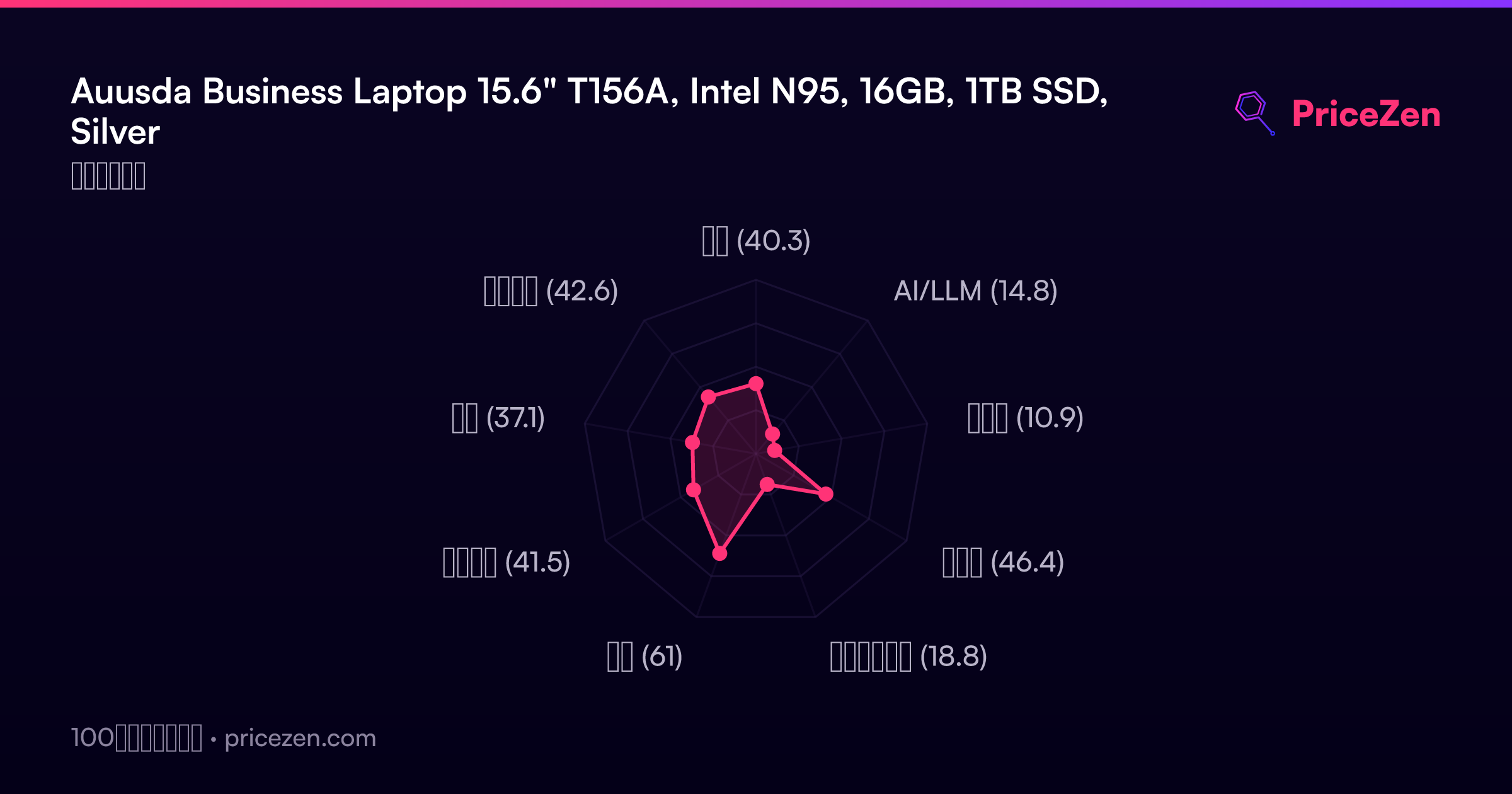
- 総合40.3
- AI/LLM14.8
- ゲーム10.9
- 携帯性46.4
- クリエイター18.8
- 学生61
- ビジネス41.5
- 開発37.1
- エンタメ42.6