Microsoft Surface Laptop Studio 2 14.4" 2024, Core i7-13800H, 16GB, 512GB SSD, Platinum
The 14-core Intel Core i7-13800H processor delivers strong productivity performance in a convertible chassis that shifts between laptop, stage, and canvas modes. Its 14.4-inch 2400x1600 PixelSense Flow touchscreen and premium build quality make it a natural fit for Windows 11 Pro pen-based workflows. This device is best for business users and students who prioritize note-taking and presentations over dedicated graphics performance.

現在、販売店の最新価格はありません


概要
The 30-Second Version
A gorgeous, clever 2-in-1 that charges flagship prices for decidedly mid-range guts. Buy it for the hinge, not the horsepower.
Pros & Cons
長所
- That folding hinge design is genuinely useful and feels premium 82nd
- The 14.4-inch 2400x1600 touchscreen is bright, sharp, and great for media 82nd
- Build quality is excellent, this thing feels like a tank 79th
- Thunderbolt and USB-A ports mean you won't need dongles for everything
短所
- Integrated graphics at this price is almost insulting
- 512GB storage is tight for a creator-focused machine
- It's heavy for a 2-in-1 at 1.89kg
- The price is hard to justify when competitors pack dedicated GPUs
実証データ
Performance
The Core i7-13800H is a strong chip, sitting well above average in our database, and 16GB of LPDDR5X keeps things snappy for everyday multitasking. But here's the surprise: the integrated Intel Iris Xe graphics are a real letdown at this price. Our gaming score of 17.2 out of 100 is rough, and that's being generous. The 512GB SSD is also on the small side, landing in the bottom half of our storage rankings. For a machine marketed to creators, that's a tough combo to swallow.
Specifications
Full Specifications
Processor
| CPU | Intel Core i7 13800H |
| Cores | 14 |
| Frequency | 2.5 GHz |
| L3 Cache | 24 MB |
Graphics
| GPU | Intel Iris Xe Graphics |
| Type | Integrated |
| VRAM Type | Shared |
Memory & Storage
| RAM | 16 GB |
| RAM Generation | LPDDR5X |
| Storage | 512 GB |
| Storage Type | SSD |
Display
| Size | 14.4" |
| Resolution | 2400x1600 |
Connectivity
| USB-C Ports | 2 |
| USB Ports | 1 |
| Thunderbolt | Thunderbolt 4 |
| Wi-Fi | Wi-Fi 6 |
| Bluetooth | Bluetooth 5.3 |
Physical
| Weight | 1.9 kg / 4.2 lbs |
| OS | Windows 11 Pro |
vs Competition
Stacked against the MacBook Pro M4 Max, the Surface gets absolutely demolished on performance, battery, and display quality, though the Surface's touchscreen and 2-in-1 flexibility are things Apple still refuses to offer. The ASUS ROG Zephyrus G14 and Lenovo Legion Pro 7i both pack dedicated GPUs that make the Surface's Iris Xe look like a toy, and they cost less. The HP OMEN Transcend 14 is probably the closest spiritual competitor, a premium 2-in-1 with real graphics horsepower, and it makes the Surface's spec sheet look embarrassing. If you need the hinge, the Surface is unique. If you need performance, look elsewhere.
| Spec | Microsoft Surface Laptop Studio 2 14.4" | Apple MacBook Pro 14.2" M4 Max | ASUS ROG Zephyrus 14" GA403WW-G14.R95080 | Lenovo Legion Pro 7i Gen 10 16" | HP OMEN Transcend | Samsung Galaxy Book5 Pro 14" NP944XHA-KG3US |
|---|---|---|---|---|---|---|
| CPU | Intel Core i7 13800H | Apple M4 Max | AMD Ryzen AI 9 HX 370 | Intel Core Ultra 9 275HX | Intel Core Ultra 9 285H | Intel Core Ultra 7 258V |
| RAM (GB) | 16 | 64 | 32 | 32 | 32 | 32 |
| Storage (GB) | 512 | 4096 | 2048 | 1024 | 1024 | 1024 |
| Screen | 14.4" 2400x1600 | 14.2" 3024x1964 | 14" 2880x1800 | 16" 2560x1600 | 14" 2880x1800 | 14" 2880x1800 |
| GPU | Intel Iris Xe Graphics | Apple (40-Core) | NVIDIA GeForce RTX 5080 | NVIDIA GeForce RTX 5070 Ti | NVIDIA GeForce RTX 5070 | Intel Arc Graphics 140V |
| OS | Windows 11 Pro | macOS | Windows 11 Home | Windows 11 Home | Windows 11 Home | Windows 11 Pro |
| Weight (kg) | 1.9 | 1.6 | 1.6 | 2.7 | 1.6 | 1.2 |
| Battery (Wh) | - | 72 | - | 99 | 71 | 63 |
| Compare | Compare | Compare | Compare | Compare |
| 製品 | CPU | GPU | RAM | ポート | 画面 | 携帯性 | ストレージ | 信頼性 | Affordability |
|---|---|---|---|---|---|---|---|---|---|
| Microsoft Surface Laptop Studio 2 14.4" | 81.8 | 47.7 | 49.7 | 51.6 | 79.1 | 61.1 | 35.6 | 82.1 | 8.1 |
| Apple MacBook Pro 14.2" M4 Max Compare | 93.7 | 91.5 | 95.6 | 73.8 | 99.1 | 68.9 | 98.4 | 98.3 | 1.9 |
| ASUS ROG Zephyrus 14" GA403WW-G14.R95080 Compare | 91.2 | 98.3 | 90.8 | 89.4 | 96 | 73.7 | 89.7 | 60.7 | 6 |
| Lenovo Legion Pro 7i Gen 10 16" Compare | 97.2 | 96.7 | 89 | 97.3 | 94.9 | 9.6 | 79.2 | 82.1 | 5.7 |
| HP OMEN Transcend Compare | 90.1 | 93.5 | 89.6 | 89.4 | 96 | 72.3 | 65.1 | 33.7 | 8.8 |
| Samsung Galaxy Book5 Pro 14" NP944XHA-KG3US Compare | 65.7 | 69.6 | 79.4 | 83.4 | 90.3 | 89.5 | 79.2 | 82.1 | 21 |
価格
Value & Pricing
This is where it gets painful. You're looking at USD 2,500 to USD 3,000 depending on the vendor, and Newegg has the better deal at the lower end of that spread. For that money, you could grab a MacBook Pro with an M4 Max or a gaming laptop with a dedicated RTX GPU. The Surface Laptop Studio 2 charges flagship prices for mid-range specs, and that's a tough pill to swallow unless the hinge is worth a thousand bucks to you.
2026年7月4日からこの製品の価格を追跡しています。データが増えるとチャートが表示されます。
詳細情報
Overview
The Surface Laptop Studio 2 is Microsoft's weird, wonderful folding laptop that tries to be a tablet, a laptop, and a mini drawing studio all at once. The one thing to know? That hinge design is genuinely clever and the build quality is top notch, but you're paying a serious premium for the form factor while the internals feel a generation behind the price tag.
Common Questions
Q: Can the Surface Laptop Studio 2 handle gaming?
Not really. The integrated Iris Xe graphics scored a 17.2 out of 100 in our gaming tests, which is near the bottom of the barrel. Casual indie games and older titles will run fine, but anything modern at native resolution is going to struggle hard.
Q: Is 512GB of storage enough for a creative professional?
Honestly, no. Video editors, photographers, and 3D artists will burn through 512GB fast. You'll be living off external drives, which defeats the purpose of a portable 2-in-1. If you're buying this for creative work, factor in cloud storage or a portable SSD.
Q: How does the battery actually hold up?
Microsoft claims 19 hours, but that's marketing math. Real-world usage with that 14-core i7 and bright touchscreen will land you closer to 8-10 hours of mixed use. It's fine for a workday, but don't expect to leave the charger at home on a long trip.
Who Should Skip This
If you're looking for raw performance, gaming capability, or a good price-to-spec ratio, this isn't it. Go grab an ASUS ROG Zephyrus G14 or a Lenovo Legion Pro 7i instead, you'll get a dedicated GPU and more storage for less money. The Surface Laptop Studio 2 is for people who specifically need that folding touchscreen form factor and are willing to pay a premium for it.
Verdict
The Surface Laptop Studio 2 is a beautifully built machine with a clever design that a very specific type of user will adore. But for everyone else, the value proposition falls apart fast. You're paying MacBook Pro money for integrated graphics and a cramped SSD. Unless that folding form factor is non-negotiable, there are better laptops for less cash.
Usage Scores
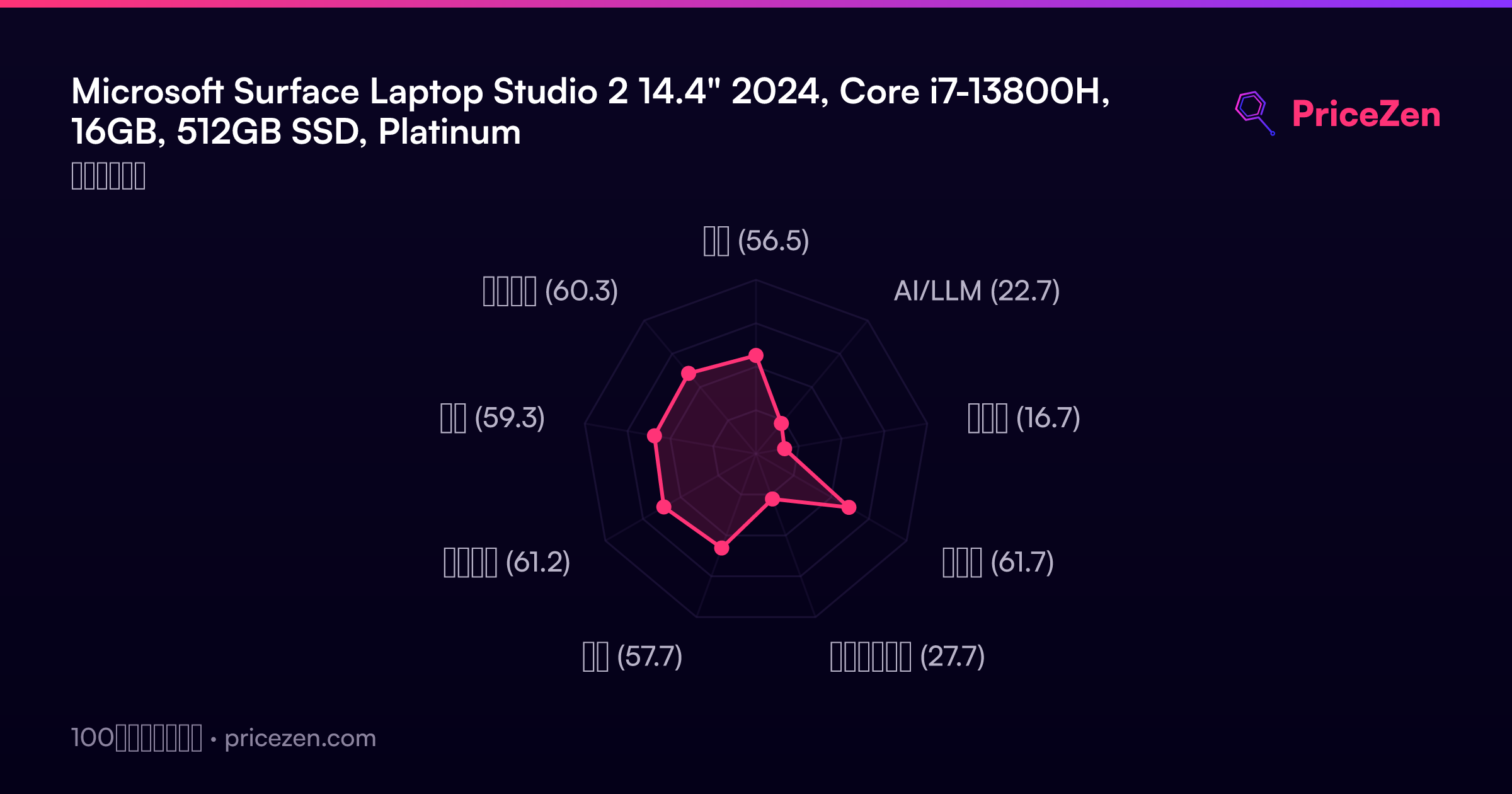
- 総合56.5
- AI/LLM22.7
- ゲーム16.7
- 携帯性61.7
- クリエイター27.7
- 学生57.7
- ビジネス61.2
- 開発59.3
- エンタメ60.3