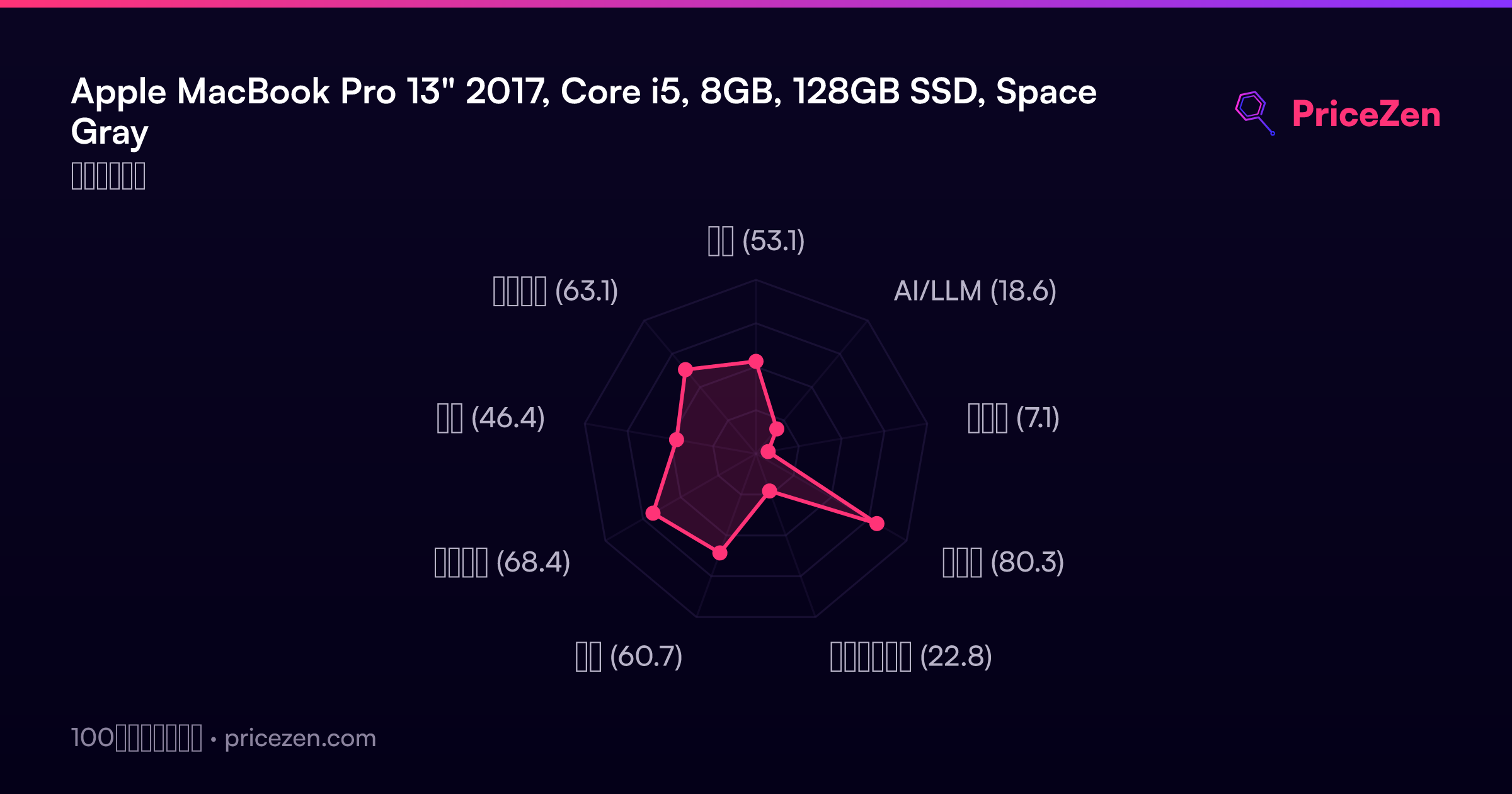
Apple MacBook Pro 13" 2017, Core i5, 8GB, 128GB SSD, Space Gray
The 2560x1600 Retina display with 500 nits brightness and P3 wide color gamut remains a standout for color-accurate work, paired with a fast 3.1 GB/s read speed PCIe SSD. Its 1.37kg weight and 10-hour battery life offer genuine portability, though the dual-core 7th Gen Intel i5 and 8GB RAM are limited by modern standards. This refurbished model is best for students or writers needing a lightweight macOS machine for basic productivity and media consumption.

現在、販売店の最新価格はありません
概要
The 30-Second Version
The 2017 MacBook Pro 13" refurb is a mixed bag that's getting harder to find by the day. You get a best-in-class Retina display and top-tier build quality for as little as $300, making it a tempting entry point into macOS, but it's now out of stock everywhere and the overall score has slipped to 49. The dual-core i5, 8GB of RAM, and tiny 128GB SSD are serious limitations, and owners frequently complain about overheating and fan noise. It's a great secondary laptop for basic tasks if you can track one down, but anyone needing more power should save up for an M1 MacBook Air instead.
Pros & Cons
長所
- Incredible value at $300-$520 for entering the Apple ecosystem 98th
- Stunning 13" Retina display with 500 nits brightness and P3 color 93rd
- Extremely portable at 2.98 lbs with a 94th percentile compact score 88th
- Top-tier reliability rating in the 97th percentile 77th
- Thunderbolt 3 ports with support for dual 4K external displays
短所
- 128GB storage is painfully small, landing in the 9th percentile
- 8GB of non-upgradeable RAM limits multitasking and future-proofing
- Dual-core i5 struggles with anything beyond basic tasks
- Frequent reports of overheating and loud fan noise from owners
- Battery life is inconsistent, with several users reporting quick drain
オーナーの声
The Word on the Street
購入者の評価が時間とともにどう変化したか
独自顧客が実際にレビューを書いた時期に基づいています。発売当初の高評価が続いたかどうかがわかります。
最近は満足した購入者が増加:2022/01~2023/09の54%に対し最近は94%
ストア評価全111件:3.7★。 グラフは星と投稿日のある書かれたレビュー78件を数えています。
星のない書かれたレビュー1件は推移に含めていません。
数値を表示
| 期間 | レビュー | 満足 | 普通 | 不満 | 満足の割合 |
|---|---|---|---|---|---|
| 2022/01~2023/09 | 13 | 7 | 1 | 5 | 54% |
| 2023/10~2023/12 | 11 | 8 | 2 | 1 | 73% |
| 2024/01~2024/06 | 16 | 8 | 1 | 7 | 50% |
| 2024/07~2024/09 | 10 | 7 | 1 | 2 | 70% |
| 2024/10~2025/03 | 11 | 7 | 0 | 4 | 64% |
| 2025/04~2026/05 | 17 | 16 | 1 | 0 | 94% |
各列は、星と投稿日のあるレビューが10件以上になるまで四半期をまとめています。満足 = 4〜5★、普通 = 3★、不満 = 1〜2★。
実証データ
Performance
The 2.3GHz dual-core i5 here is a known quantity, and it's pretty much exactly middle of the pack in our overall database. For single-core tasks like launching apps or scrolling through web pages, it still feels snappy thanks to macOS being well-optimized. The PCIe SSD helps a lot here, with those 3.1 GB/s read speeds making boot times and app launches feel instant. But push it with multitasking and that dual-core chip starts to show its age. The CPU and GPU both hover around the 52nd percentile, which means they're adequate, not exciting.
The integrated Intel Iris Plus Graphics 640 is the real bottleneck. Our gaming score for this machine is a brutal 7.8 out of 100, which is basically a polite way of saying don't even think about it. You can run Apple Arcade titles and maybe some older indie games, but anything remotely demanding will turn into a slideshow. The real-world implication is that this is strictly a productivity and media consumption machine. The fans will spin up under load, and multiple owners report they get loud and the chassis gets toasty even during what should be light work, which is something to keep in mind if you're sensitive to noise.
Specifications
Full Specifications
Processor
| CPU | Intel 7th Generation Core i5 |
| Cores | 2 |
| Frequency | 2.3 GHz |
Graphics
| GPU | Intel Iris Plus Graphics 640 |
| Type | Integrated |
Memory & Storage
| RAM | 8 GB |
| RAM Generation | LPDDR3 |
| Storage | 128 GB |
| Storage Type | SSD |
Display
| Size | 13.3" |
| Resolution | 2560x1600 (QHD) |
| Panel | IPS |
| Brightness | 500 nits |
| Color Gamut | P3 wide color gamut |
Connectivity
| USB-C Ports | 2 |
| USB Ports | 2 |
| Thunderbolt | Thunderbolt 3 |
| Wi-Fi | Wi-Fi 4 |
| Bluetooth | ✓ |
| Ethernet | 10/100/1000 |
Physical
| Weight | 1.4 kg / 3.0 lbs |
| OS | macOS |
vs Competition
Stacked against modern Windows alternatives like the ASUS Zenbook UX3405CA or the Lenovo Yoga 7, this MacBook Pro feels like a vintage car. Those newer machines come with 16GB of RAM, 512GB SSDs, and processors that run circles around this dual-core i5 while sipping power. The Samsung Galaxy Book5 Pro and Microsoft Surface Laptop also offer higher resolution touchscreens and better port selections. But none of them run macOS, and none of them can be found for $300. That's the trade-off in a nutshell.
The competitive landscape has shifted hard since this machine was relevant. The top of our rankings is now dominated by heavy hitters like the Apple MacBook Pro M4 Max, the ASUS ROG Zephyrus GA403WW-G14.R95080, the Lenovo Legion 5i 83F00008US, the HP OMEN Transcend 14-fb1023dx, and the MSI Raider RAIDERGE6814247. These are gaming and creator machines with performance that makes this 2017 Pro look like a calculator. The HP OmniBook X Flip is another interesting comparison, especially with its 2-in-1 flexibility. This MacBook Pro is a traditional clamshell, so you're not flipping the screen around or using a stylus. What you are getting is that industry-leading trackpad and a keyboard that, despite the butterfly mechanism's reputation, many users find perfectly fine for long typing sessions. If your workflow is tied to iMessage, AirDrop, and Final Cut Pro, the Windows machines aren't even in the conversation. But if you're platform-agnostic, the hardware value on the PC side is hard to ignore.
| Spec | Apple MacBook Pro 13" | ASUS ROG Zephyrus 14" GA403WW-G14.R95080 | Lenovo Legion Pro 7i Gen 10 16" | HP OMEN Transcend | Samsung Galaxy Book5 Pro 14" NP944XHA-KG3US | Dell Premium 14.5" LDA14250-7667SLV-PUS |
|---|---|---|---|---|---|---|
| CPU | Intel 7th Generation Core i5 | AMD Ryzen AI 9 HX 370 | Intel Core Ultra 9 275HX | Intel Core Ultra 9 285H | Intel Core Ultra 7 258V | Intel Core Ultra 7 255H |
| RAM (GB) | 8 | 32 | 32 | 32 | 32 | 32 |
| Storage (GB) | 128 | 2048 | 1024 | 1024 | 1024 | 1024 |
| Screen | 13.3" 2560x1600 | 14" 2880x1800 | 16" 2560x1600 | 14" 2880x1800 | 14" 2880x1800 | 14.5" 3200x2000 |
| GPU | Intel Iris Plus Graphics 640 | NVIDIA GeForce RTX 5080 | NVIDIA GeForce RTX 5070 Ti | NVIDIA GeForce RTX 5070 | Intel Arc Graphics 140V | Intel Arc Graphics |
| OS | macOS | Windows 11 Home | Windows 11 Home | Windows 11 Home | Windows 11 Pro | Windows 11 Home |
| Weight (kg) | 1.4 | 1.6 | 2.7 | 1.6 | 1.2 | 1.7 |
| Battery (Wh) | - | - | 99 | 71 | 63 | 62 |
| Compare | Compare | Compare | Compare | Compare |
| 製品 | CPU | GPU | RAM | ポート | 画面 | 携帯性 | ストレージ | User Sentiment | 信頼性 | ユーザー評価 | Affordability |
|---|---|---|---|---|---|---|---|---|---|---|---|
| Apple MacBook Pro 13" | 6.4 | 37.1 | 13.2 | 57.6 | 87.9 | 93.2 | 7.3 | 37.7 | 98.3 | 76.9 | 0 |
| ASUS ROG Zephyrus 14" GA403WW-G14.R95080 Compare | 91.2 | 98.3 | 90.9 | 89.3 | 96.5 | 73.6 | 89.7 | 99 | 60.6 | 96.5 | 5.7 |
| Lenovo Legion Pro 7i Gen 10 16" Compare | 97.2 | 96.6 | 89 | 97.2 | 95.6 | 9.5 | 79.2 | 90.9 | 82 | 99.7 | 5.5 |
| HP OMEN Transcend Compare | 90.1 | 93.6 | 89.7 | 89.3 | 96.5 | 72.2 | 65.2 | 81.4 | 33.6 | 94.1 | 8.4 |
| Samsung Galaxy Book5 Pro 14" NP944XHA-KG3US Compare | 65.8 | 69.7 | 79.5 | 83.1 | 91.5 | 89.5 | 79.2 | 0 | 82 | 96.5 | 20 |
| Dell Premium 14.5" LDA14250-7667SLV-PUS Compare | 87.1 | 69.7 | 89 | 65.9 | 97.2 | 61.1 | 65.2 | 90.9 | 33.6 | 96.5 | 14 |
価格
Value & Pricing
The price spread on this refurb is pretty wide, from $300 up to $520 depending on the vendor and condition, but right now that's all theoretical because the thing is out of stock everywhere. At the low end, you're getting a lot of laptop for the money when you can actually find one. That Retina display alone is better than what you'll find on most brand new Windows laptops under $500, and the build quality is in a different league. The reliability score in the 97th percentile backs up the idea that these machines, when they work, just keep on ticking.
At the higher end of that range, though, the value proposition gets shaky. For $520, you're creeping into used M1 MacBook Air territory, which would absolutely demolish this machine in performance, battery life, and thermals. If you can snag this for closer to $300, it's a steal for a secondary computer or a kid's homework machine. Just know that the 128GB SSD means you'll be living in the cloud or tethered to an external drive, which eats into that clean minimalist vibe. And with availability drying up, you may not get to be picky about price.
詳細情報
Overview
The 2017 MacBook Pro 13" is a bit of a time capsule at this point, and right now it's also a ghost. This certified refurbished unit has gone out of stock across every vendor we track, which means finding one is about to become a scavenger hunt. When they do pop up, you're looking at somewhere between $300 and $520 for that classic unibody design, a gorgeous Retina display, and a ticket into the Apple ecosystem. That's not nothing, but the window is closing.
Who's this for? Honestly, it's the ultimate student laptop or a secondary machine for someone who just needs a reliable keyboard for writing, browsing, and streaming. The compact score sits in the 94th percentile in our database, and at under three pounds, it basically disappears into a backpack. The screen is still a standout, landing well above average with that 2560x1600 resolution and P3 color support. It gets bright enough to fight off coffee shop glare, too.
But let's be real about what you're buying. This is a dual-core i5 from 2017 with integrated graphics that are, charitably, fine for basic tasks. The 128GB SSD is tiny by modern standards, and 8GB of RAM is the bare minimum for macOS these days. If you're just doing email, Netflix, and Google Docs, you'll be fine. If you have any aspirations of editing photos or having more than a dozen Chrome tabs open, you're going to feel the squeeze fast. And with the overall score dropping to 49, the market has spoken: this machine is fading.
Common Questions
Q: Is 128GB of storage enough for a MacBook Pro?
For most people, no. macOS and essential apps will eat up around 30-40GB right out of the box, leaving you with roughly 80GB for your files. That fills up fast if you store any photos, music, or videos locally. You can supplement with cloud storage or an external SSD, but it's an extra cost and hassle. If you're just using web apps and streaming everything, you might squeak by, but we'd strongly recommend budgeting for external storage.
Q: Can this MacBook Pro run the latest macOS version?
As a 2017 model, it's nearing the end of official macOS support. It can run macOS Ventura, but newer versions like Sonoma and beyond may not be supported or may run poorly. This means you'll eventually stop getting security updates, which is a real concern if this is your primary machine. For basic tasks, running an older OS is fine, but it's something to factor into the long-term value.
Q: How does the refurbished quality compare to a new one?
Certified refurbished units from major retailers like Best Buy are inspected and tested to function properly, and most owners report they arrive in pristine condition with minimal signs of wear. The main trade-off is that you might not get the original packaging or all accessories. Given the 97th percentile reliability score in our database, these machines tend to hold up well, but you're still buying a 7-year-old laptop, so set your expectations accordingly.
Q: Is the keyboard reliable on this model?
This generation uses Apple's butterfly keyboard mechanism, which had well-documented reliability issues with keys sticking or repeating when dust got under them. A refurbished unit should have been inspected for this, and Apple had a repair program for affected models. Many users find the keyboard perfectly fine for typing, but it's a known weak point. If you're a heavy typist, it's worth testing thoroughly during the return window.
Who Should Skip This
Anyone who needs to run demanding software should look elsewhere. The dual-core i5 and integrated graphics will choke on photo editing, video rendering, or any kind of development work. The 8GB of RAM is soldered to the board, so you can't upgrade it later, and 128GB of storage is a constant exercise in frustration. If you see yourself doing more than web browsing and document editing, this machine will hold you back.
Also, if you're sensitive to fan noise or heat, this isn't the laptop for you. Multiple owners report the fans spinning up loudly and the chassis getting hot even during light tasks like streaming video. A fanless M1 MacBook Air solves both the performance and thermal issues in one shot, and used models are getting cheaper every month. Spend the extra $200-$300 if you can, you won't regret it.
Verdict
If you need a cheap, reliable laptop for writing, browsing, and streaming, and you specifically want macOS, this is a solid buy at the lower end of the price range, assuming you can find one in stock. It's perfect for a student who lives in Google Docs or a writer who wants a distraction-free machine with a great screen and keyboard. The build quality and display are still better than most budget laptops, and the 97th percentile reliability score means you're not gambling as much as you might think with a refurb.
But if you're planning to do any creative work, run virtual machines, or keep this as your main computer for more than a couple of years, you should look elsewhere. The 8GB of RAM and 128GB SSD are serious constraints that will frustrate you daily. A used M1 MacBook Air is the obvious upgrade path, even if it costs a bit more. The performance jump is so massive that it's worth saving up for. This 2017 Pro is a charming secondary machine, not a daily driver for power users. And with the overall score now sitting at 49 and stock gone across the board, the market is telling you something: this one's for the nostalgic, not the practical.
Usage Scores
- 総合53.1
- AI/LLM18.6
- ゲーム7.1
- 携帯性80.3
- クリエイター22.8
- 学生60.7
- ビジネス68.4
- 開発46.4
- エンタメ63.1