HP ZBook 16" BX7V8UT#ABA 2025, Core Ultra 7 265H, 32GB, 2TB SSD, RTX 500 Ada, Silver
The Intel Core Ultra 7 265H with its dedicated NPU and NVIDIA RTX 500 Ada graphics drives certified pro-app AI tools and 3D design on a color-accurate 16-inch 120Hz display with full DCI-P3 coverage. At just 1.72kg, this workstation pairs a 77Wh battery with a comprehensive port selection including Thunderbolt 4, HDMI 2.1, and Wi-Fi 7 for true on-site mobility. It’s best for 3D designers and CAD engineers who need ISV-certified reliability and a wide-gamut screen in a portable chassis.












概要
The 30-Second Version
A brilliant, color-perfect screen and a monster CPU in a light body, but the weak GPU and questionable reliability make it a risky buy. Only get it if the display is your absolute priority.
Pros & Cons
長所
- The 120Hz display is a color-accurate masterpiece. 94th
- Blazing fast CPU and RAM combo for pro workflows. 92nd
- Incredibly light for a 16-inch workstation. 89th
- Port selection is best-in-class, including Ethernet and Wi-Fi 7. 87th
短所
- The RTX 500 Ada's 4GB VRAM is a serious limitation.
- Reliability score is worryingly low in our database.
- Battery life will vanish under any real GPU load.
- The price spread is wild, ranging from $3k to over $4.5k.
オーナーの声
購入者の評価が時間とともにどう変化したか
独自顧客が実際にレビューを書いた時期に基づいています。発売当初の高評価が続いたかどうかがわかります。
書かれたレビュー 1件、2026年4月:普通 1件
ストア評価全1件:3.0★。 グラフは書かれたレビュー1件を数えています。
各点は書かれたレビュー1件で、書かれた月に置いています。満足 = 4〜5★、普通 = 3★、不満 = 1〜2★。
実証データ
Performance
What surprised us most is the sheer speed of the CPU. That Core Ultra 7 265H lands in the 88th percentile, making it one of the best on the market for raw processing. It chews through code compiles and 3D renders without breaking a sweat. The 32GB of DDR5 RAM is also a standout, sitting in the 87th percentile. But the RTX 500 Ada GPU is the bottleneck. Its 4GB of VRAM puts it at a mediocre 59th percentile, which is fine for accelerating pro app viewports but a real letdown for local AI workloads, where it scored a dismal 38.5 out of 100. This machine is a processing beast that stumbles hard on GPU-heavy tasks.
Specifications
Full Specifications
Processor
| CPU | Intel Core Ultra 7 265H |
| Cores | 16 |
| Frequency | 2.2 GHz |
| L3 Cache | 24 MB |
Graphics
| GPU | NVIDIA RTX 500 Ada |
| Type | Discrete |
| VRAM | 4 GB |
| VRAM Type | GDDR6 |
Memory & Storage
| RAM | 32 GB |
| RAM Generation | DDR5 |
| Storage | 2 TB |
| Storage Type | NVMe SSD |
Display
| Size | 16" |
| Resolution | 2560x1600 (QHD) |
| Panel | IPS |
| Refresh Rate | 120 Hz |
| Brightness | 400 nits |
| Color Gamut | 100% Adobe RGB100% DCI-P3 |
Connectivity
| USB-C Ports | 3 |
| USB Ports | 1 |
| Thunderbolt | Thunderbolt 4 x 2 |
| HDMI | HDMI 2.1 |
| Wi-Fi | Wi-Fi 7 |
| Bluetooth | Bluetooth 5.4 |
| Ethernet | Gigabit Ethernet |
Physical
| Weight | 1.7 kg / 3.8 lbs |
| Battery | 77 Wh |
| OS | Windows 11 Pro |
vs Competition
The ZBook 8 G1i goes head-to-head with the Apple MacBook Pro M4 Max. The MacBook destroys it in GPU performance and AI tasks, but the ZBook fights back with a superior port selection and a more color-accurate screen for DCI-P3 work. If you need Windows and that specific display, the ZBook is your pick. For sheer GPU muscle, the ASUS ROG Zephyrus G14 is a gaming-focused alternative that will run circles around the RTX 500 Ada, though you'll sacrifice the 16-inch screen real estate and some professional ISV certifications.
| Spec | HP ZBook 16" BX7V8UT#ABA | ASUS ROG Strix SCAR 18" | Samsung Galaxy Book6 Pro 16" NP964XJG-KG2US | MSI Raider A18 HX A9WJG-037CA | Thunderobot Storm 17 18" | Acer TravelMate P4 16" TMP416-53-59NC |
|---|---|---|---|---|---|---|
| CPU | Intel Core Ultra 7 265H | Intel Core Ultra 9 275HX | Intel Core Ultra 7 356H | AMD Ryzen 9 9955HX3D | Intel Core Ultra 9 275HX | Intel Core Ultra 5 125U |
| RAM (GB) | 32 | 64 | 32 | 64 | 64 | 16 |
| Storage (GB) | 2048 | 8192 | 1024 | 2048 | 2048 | 512 |
| Screen | 16" 2560x1600 | 18" 2560x1600 | 16" 2880x1800 | 18" 3840x2400 | 18" 2560x1440 | 16" 1920x1200 |
| GPU | NVIDIA RTX 500 Ada | NVIDIA GeForce RTX 5090 | Intel Graphics | NVIDIA GeForce RTX 5090 | NVIDIA GeForce RTX 5080 | Intel UHD Graphics |
| OS | Windows 11 Pro | Windows 11 Pro | Windows 11 Pro | Windows 11 Pro | Windows 11 Home | Windows 11 Pro |
| Weight (kg) | 1.7 | 3.3 | 1.6 | 5 | - | 1.6 |
| Battery (Wh) | 77 | 90 | 78 | 100 | 53 | 53 |
| Compare | Compare | Compare | Compare | Compare |
| 製品 | CPU | GPU | RAM | ポート | 画面 | 携帯性 | ストレージ | 信頼性 | ユーザー評価 | Affordability |
|---|---|---|---|---|---|---|---|---|---|---|
| HP ZBook 16" BX7V8UT#ABA | 89.4 | 78.7 | 86.3 | 92.2 | 87 | 31.5 | 93.9 | 33.7 | 5.1 | 5.5 |
| ASUS ROG Strix SCAR 18" Compare | 97.2 | 99.5 | 95.6 | 97.3 | 91.7 | 1.2 | 99.8 | 60.6 | 44 | 0.2 |
| Samsung Galaxy Book6 Pro 16" NP964XJG-KG2US Compare | 90.8 | 57 | 79.5 | 58.4 | 97.2 | 35.8 | 65.4 | 81.9 | 0 | 7.4 |
| MSI Raider A18 HX A9WJG-037CA Compare | 99.9 | 99.5 | 98.5 | 99.7 | 99.6 | 0.2 | 93.9 | 60.6 | 10.3 | 0.2 |
| Thunderobot Storm 17 18" Compare | 97.2 | 98.3 | 95.6 | 77.8 | 83.1 | 2.7 | 93.9 | 4.1 | 32.5 | 3 |
| Acer TravelMate P4 16" TMP416-53-59NC Compare | 54.7 | 28.3 | 50 | 64.5 | 71.7 | 35.6 | 35.8 | 11 | 0 | 48 |
価格
Value & Pricing
Worth it? Only if you snag it at the low end. The price spread across vendors is a massive $1,484, so shopping around is mandatory. At $3,043, you're getting a phenomenal CPU and a world-class screen for a fair price in the workstation world. At $4,527, you're getting fleeced. Do not pay full price for this.
Amazon 1件の価格 最安 ¥702,201
2026年11月26日からこの製品の価格を追跡しています。データが増えるとチャートが表示されます。
詳細情報
Overview
The HP ZBook 8 G1i is a creator's dream wrapped in a mobile workstation chassis. The one thing you need to know is that the display is absolutely stunning, covering 100% of both Adobe RGB and DCI-P3, which makes it a serious tool for color-critical work right out of the box. It's packing a new Intel Core Ultra 7 265H, plenty of fast RAM, and a professional RTX 500 Ada GPU, all in a surprisingly portable 1.72kg package. But that professional GPU is a double-edged sword, and the reliability score in our database gives us pause.
Common Questions
Q: Can this laptop handle AAA gaming?
Not really. The RTX 500 Ada is a professional GPU, and its 4GB of VRAM is a major bottleneck for modern games. You'll be stuck at low-to-medium settings at best. Get an ASUS ROG Zephyrus if gaming is a priority.
Q: Is the RAM user-upgradeable?
On most ZBook models, yes, but you'll want to double-check the specific service manual for this G1i. HP typically uses SODIMM slots in their workstations, so you can likely swap out the 32GB sticks for 64GB down the line.
Q: How is the battery life for real-world work?
It's a 77Wh battery powering a high-res 120Hz screen and a hungry CPU. For basic office tasks, you might squeeze out 6-7 hours. Push the GPU, and you'll be hunting for a charger in under two hours.
Who Should Skip This
If you're looking for a machine to run local LLMs or do heavy 3D rendering, this isn't it. The 4GB VRAM on the RTX 500 Ada is a dealbreaker. Go get a system with an RTX 4080 or 4090, or just get the MacBook Pro M4 Max which will handle those tasks without breaking a sweat.
Verdict
The HP ZBook 8 G1i is a highly specialized tool. It's a top-tier choice for photographers, video editors, and developers who live in the CPU and need a perfect display but don't need to train AI models or play AAA games. The low reliability score is a red flag we can't ignore, so factor in a good warranty. If your workflow is GPU-bound, this is not your machine. If it's color and CPU-bound, you'll love it.
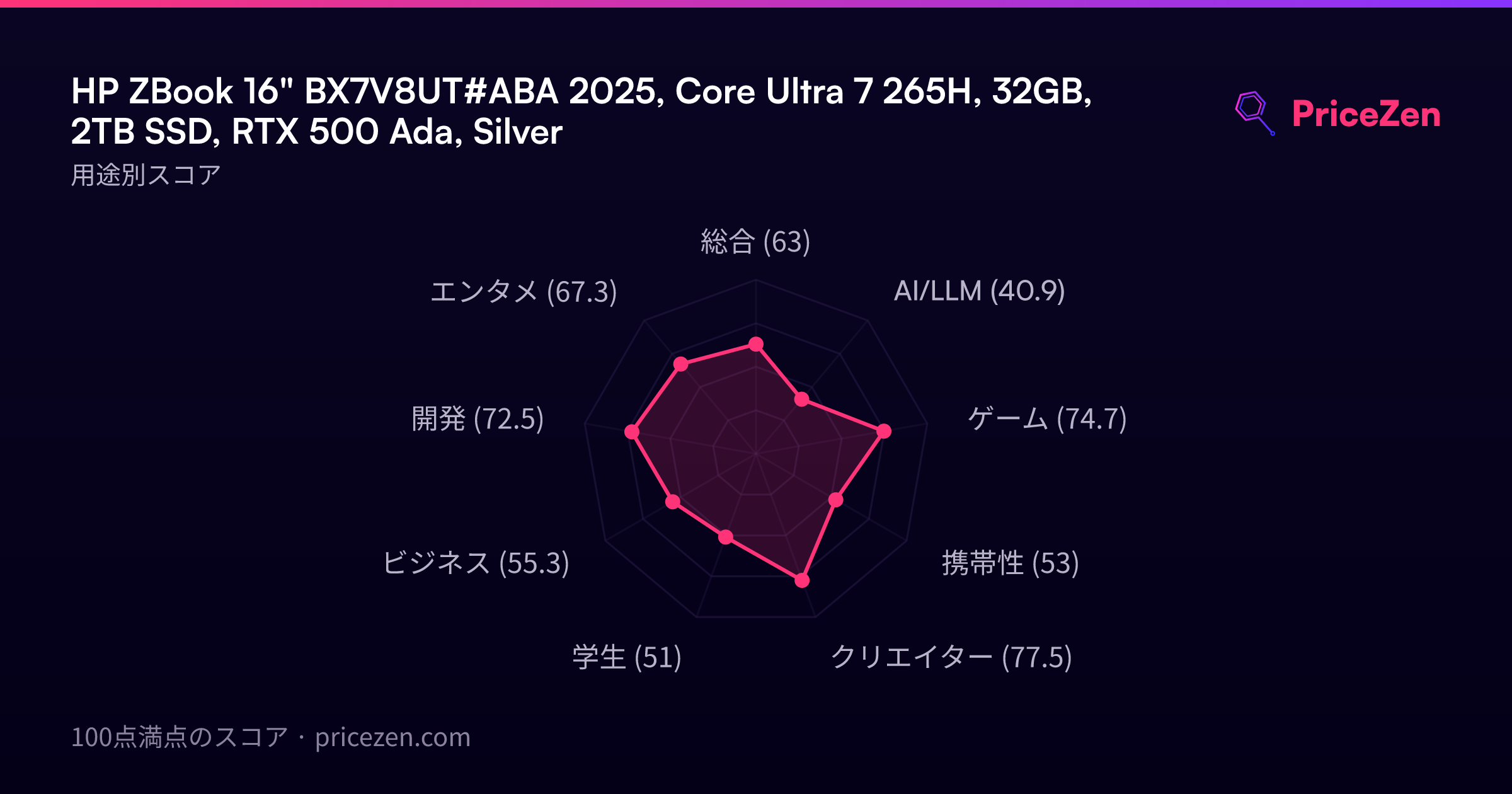
Usage Scores
- 総合63
- AI/LLM40.9
- ゲーム74.7
- 携帯性53
- クリエイター77.5
- 学生51
- ビジネス55.3
- 開発72.5
- エンタメ67.3