Acer Swift 3 13.5" SF313-52-52VA 2020, Core i5-1035G4, 8GB, 512GB SSD, Silver

夜の作業も快適なバックライトキーボード 11月29日に確認済み
47/100 総合スコア 3.8 オーナー評価74件の平均
- CPU
- Intel Core i5 1035G4
- RAM
- 8 GB
- Storage
- 512 GB
- Screen
- 13.5" 2256x1504
- GPU
- Intel Iris Plus Graphics
- OS
- Windows 10 Home
- Weight
- 1.8 kg
1店舗の価格を比較
安い順。新品・整備済み品・バンドルのオファーは分けて表示するので、同じ条件どうしで比較できます。
| 店舗 | 販売元 | カラーと状態 | 価格 | 最安との差 | 最終確認 | リンク |
|---|---|---|---|---|---|---|
| 新品1件の価格単品 | ||||||
| 過去7日間は確認していないため、これらの価格は変わっている可能性があります | ||||||
| Amazon | マーケットプレイス出品者 | 記載なし | ¥78,059 | 11月3日 | 店舗へ | |
 出典: PriceZen, 2026年11月3日に確認
過去7日以内に確認した価格を「現在の価格」としています。 「マーケットプレイス出品者」とは、その店舗自身ではなく、店舗上の第三者の出品者を指します。
価格履歴
その日に確認その日は未確認、オファーは継続中
出典: PriceZen, checked 2026年11月3日











概要
The 30-Second Version
The Acer Swift 3 SF313-52-52VA is a featherweight 13.5-inch laptop with a standout 3:2 2K display and a price that's hard to beat. It's great for students on a tight budget who need a portable machine for writing and browsing. But poor reliability scores and soldered 8GB RAM make it a risky long-term buy.
Pros & Cons
長所
- Excellent 3:2 2K display for productivity 88th
- Incredibly light at just 1.19kg 79th
- Great port selection including Thunderbolt 3 and HDMI 72nd
- Solid aluminum build feels premium for the price
- Wi-Fi 6 and backlit keyboard are nice touches
短所
- Reliability is a major concern, scoring in the 10th percentile
- 8GB of soldered RAM limits multitasking and future-proofing
- CPU performance is well below average for the category
- Gaming performance is practically nonexistent
- Customer reviews are mixed, averaging just 3.8 out of 5
オーナーの声
The Word on the Street
- Owners love the sharp 3:2 display and how light the laptop feels in a backpack.
- A common complaint is that the laptop runs hot and the fan gets loud under even moderate load.
- Several buyers mention that the battery life falls well short of the advertised 16 hours in real-world use.
実証データ
Performance
For everyday tasks like juggling a dozen Chrome tabs, streaming Spotify, and typing up a report in Word, the Core i5-1035G4 holds its own. It's not going to set any speed records, and our benchmarks put its CPU performance in the 18th percentile overall, which is on the slower side for modern laptops. But in practice, the NVMe SSD keeps boot times and app launches feeling snappy. The 8GB of RAM is the real bottleneck here. It's soldered, so you can't upgrade it, and it sits in the 14th percentile. That means you'll feel the pinch if you try to keep a lot of heavy apps open at once.
The integrated Intel Iris Plus graphics are fine for streaming 4K video or light photo editing, but they fall flat for anything more demanding. Our gaming score for this machine is a brutal 4.8 out of 100, which puts it in the 19th percentile for GPU performance. You can forget about modern AAA titles, and even older games will need to be run at low settings and reduced resolutions. This is strictly a work and media consumption machine. The 2K display looks crisp and vibrant, but the screen's overall score lands in the 42nd percentile, dragged down by average brightness and color accuracy compared to pricier ultrabooks.
Specifications
Full Specifications
Processor
| CPU | Intel Core i5 1035G4 |
| Cores | 4 |
| Frequency | 1.1 GHz |
| L3 Cache | 6 MB |
Graphics
| GPU | Intel Iris Plus Graphics |
| Type | Integrated |
Memory & Storage
| RAM | 8 GB |
| RAM Generation | LPDDR4 |
| Storage | 512 GB |
| Storage Type | NVMe SSD |
Display
| Size | 13.5" |
| Resolution | 2256x1504 |
| Panel | IPS |
Connectivity
| USB-C Ports | 1 |
| USB Ports | 2 |
| Thunderbolt | Thunderbolt 3 |
| HDMI | 1x HDMI |
| Wi-Fi | Wi-Fi 6 |
| Bluetooth | Bluetooth 5.0 |
Physical
| Weight | 1.8 kg / 3.9 lbs |
| OS | Windows 10 Home |
vs Competition
Stacked against something like the Apple MacBook Air M4, the Swift 3 gets absolutely demolished in performance, battery life, and build quality, but it also costs a fraction of the price. The Lenovo Slim 7 and ASUS Zenbook S are both in a different league when it comes to CPU power and display quality, but again, you'll pay significantly more. The HP OmniBook X Flip and Samsung Galaxy Book5 Pro offer better screens and 2-in-1 flexibility, but they're targeting a higher budget tier.
Where the Swift 3 actually makes sense is as a budget alternative to these premium ultrabooks. You're sacrificing performance, reliability, and future-proofing for that low entry price. If your workload is purely browser-based and you value portability above all else, the Swift 3 can save you hundreds compared to a MacBook Air or a high-end Lenovo. Just don't expect it to keep up in a side-by-side speed test.
| Spec | Acer Swift 3 13.5" SF313-52-52VA | Lenovo Legion 15.1" 83F0CTO1WW | ASUS ROG Strix G16 Gaming Laptop | MSI Katana Thin 15 | Microsoft Surface Laptop 13.8" EP2-42030 | HP OMEN Transcend 14 |
|---|---|---|---|---|---|---|
| CPU | Intel Core i5 1035G4 | Intel Core Ultra 9 275HX | AMD Ryzen 9 8940HX | Intel Core i9 14900HX | Qualcomm Snapdragon X Plus X1P-64-100 | Intel Core Ultra 9 285H |
| RAM (GB) | 8 | 32 | 64 | 32 | 32 | 32 |
| Storage (GB) | 512 | 2048 | 4096 | 2048 | 1024 | 1024 |
| Screen | 13.5" 2256x1504 | 15.1" 2560x1600 | 16" 1920x1200 | 15.6" 2560x1600 | 13.8" 2304x1536 | 14" 2880x1800 |
| GPU | Intel Iris Plus Graphics | NVIDIA GeForce RTX 5070 | NVIDIA GeForce RTX 5070 Ti | NVIDIA GeForce RTX 5070 | Qualcomm Adreno | NVIDIA GeForce RTX 5070 |
| OS | Windows 10 Home | Windows 11 Home | Windows 11 Pro | Windows 11 Home | Windows 11 Home | Windows 11 Home |
| Weight (kg) | 1.8 | 1.9 | 2.5 | 1.9 | 1.3 | 1.7 |
| Battery (Wh) | - | 80 | - | - | - | 71 |
| Compare | Compare | Compare | Compare | Compare |
| 製品 | CPU | GPU | RAM | ポート | 画面 | 携帯性 | ストレージ | 信頼性 | ユーザー評価 | Affordability |
|---|---|---|---|---|---|---|---|---|---|---|
| Acer Swift 3 13.5" SF313-52-52VA | 27.4 | 37.3 | 13.4 | 61.2 | 78.7 | 87.5 | 51.1 | 11 | 72.1 | 64.9 |
| Lenovo Legion 15.1" 83F0CTO1WW Compare | 97.2 | 93.5 | 86.3 | 94.6 | 93.5 | 57.4 | 97.3 | 82 | 6 | 15.4 |
| ASUS ROG Strix G16 Gaming Laptop Compare | 95.1 | 96.7 | 97.6 | 83.5 | 76.2 | 12.1 | 98.4 | 60.6 | 87.5 | 5.2 |
| MSI Katana Thin 15 Compare | 93.2 | 93.5 | 79.6 | 74.9 | 86.7 | 43.7 | 93.9 | 60.6 | 59.3 | 16.5 |
| Microsoft Surface Laptop 13.8" EP2-42030 Compare | 72.3 | 13.4 | 79.6 | 58.3 | 84.4 | 89.6 | 65.4 | 82 | 83.5 | 24.9 |
| HP OMEN Transcend 14 Compare | 90.1 | 93.5 | 79.6 | 77.7 | 96 | 71.8 | 79.3 | 33.7 | 21.4 | 9.3 |
価格
Value & Pricing
Pricing on this model is all over the map, with listings ranging from $390 to an absurd $78,059 (we're assuming that's a typo or a scalper having a laugh). If you can snag it for under $500, the value proposition is strong, especially for students who need a lightweight laptop with a great screen for note-taking and essays. At that price, you're getting a premium-feeling ultrabook for Chromebook money. But if you're paying closer to the $700 mark, you should start looking at more reliable alternatives with better performance and upgradeable RAM. The sweet spot is definitely on the lower end of that price spread.
詳細情報
Overview
The Acer Swift 3 SF313-52-52VA is one of those laptops that makes you do a double take when you see the price. For a thin and light 13.5-inch machine with a sharp 2K display, a solid aluminum chassis, and a claimed 16-hour battery life, it looks like a steal on paper. It's aimed squarely at students and anyone who needs a portable workhorse for writing, browsing, and streaming, not gaming or heavy creative work. The 3:2 aspect ratio screen is a standout feature at this price, giving you more vertical space for documents and web pages than the typical 16:9 panels you see on budget ultrabooks.
Under the hood, you're getting a 10th Gen Intel Core i5-1035G4 with integrated Iris Plus graphics, 8GB of soldered RAM, and a 512GB NVMe SSD. That's a perfectly capable combo for everyday multitasking in 2024, as long as you keep your expectations in check. The port selection is surprisingly good for such a slim laptop, with Thunderbolt 3, USB-C, two USB-A ports, and a full-size HDMI. You won't need a dongle for your monitor or your old flash drive, which is more than we can say for a lot of pricier competitors.
But there's a catch, and it's a big one. Our database shows this model's reliability score is in the 10th percentile, which is frankly terrible. Customer reviews back this up with a middling 3.8 out of 5 rating. So while the spec sheet and the price tag are tempting, you're rolling the dice on long-term durability. If you're looking for a cheap ultrabook with a great screen and you're willing to take that risk, the Swift 3 is worth a look. Just know what you're signing up for.
Common Questions
Q: Is the Acer Swift 3 good for gaming?
No, the Acer Swift 3 is not good for gaming. Its integrated Intel Iris Plus graphics score a 4.8 out of 100 in our gaming tests, so it can only handle very light or old games at low settings.
Q: Can I upgrade the RAM on the Acer Swift 3 SF313?
No, the 8GB of LPDDR4 RAM is soldered to the motherboard and cannot be upgraded after purchase. You're stuck with what you buy.
Q: How is the battery life on the Acer Swift 3?
Acer claims up to 16 hours of battery life, but real-world use for web browsing and document work typically lands closer to 8-10 hours. Heavy multitasking will drain it faster.
Q: Does the Acer Swift 3 have a good screen for photo editing?
The 13.5-inch 2K IPS display is sharp and has a useful 3:2 aspect ratio, but its color accuracy is just average. It's fine for casual photo editing but not ideal for professional color-critical work.
Who Should Skip This
If you need a laptop that will last more than a couple of years without issues, you should skip the Swift 3. The reliability score in our database is one of the worst we've seen, and that's a gamble not everyone should take. Power users who run virtual machines, compile code, or edit video will also find the 8GB of soldered RAM and aging i5 processor frustratingly slow. For a more dependable budget ultrabook, look at a Lenovo IdeaPad or a used business-class laptop like a ThinkPad. If you can stretch your budget, the MacBook Air M1 is still a fantastic and reliable alternative that will run circles around this Acer.
Verdict
The Acer Swift 3 SF313-52-52VA is a laptop of compromises, and whether it's right for you depends entirely on which compromises you can live with. The 3:2 2K display is genuinely lovely for reading and writing, and the 1.19kg weight makes it a joy to carry around campus or a coffee shop. The port selection is better than most ultrabooks, and the aluminum chassis feels more expensive than it is.
But the reliability score in our database is a red flag we can't ignore. A laptop that might die young isn't a good deal at any price. The soldered 8GB of RAM is already tight in 2024, and the CPU is showing its age. If you find this for under $450 and you only need a basic machine for light work, it's a calculated risk. For everyone else, we'd suggest saving up a bit more for a Lenovo Slim 7 or hunting for a deal on a last-gen MacBook Air.
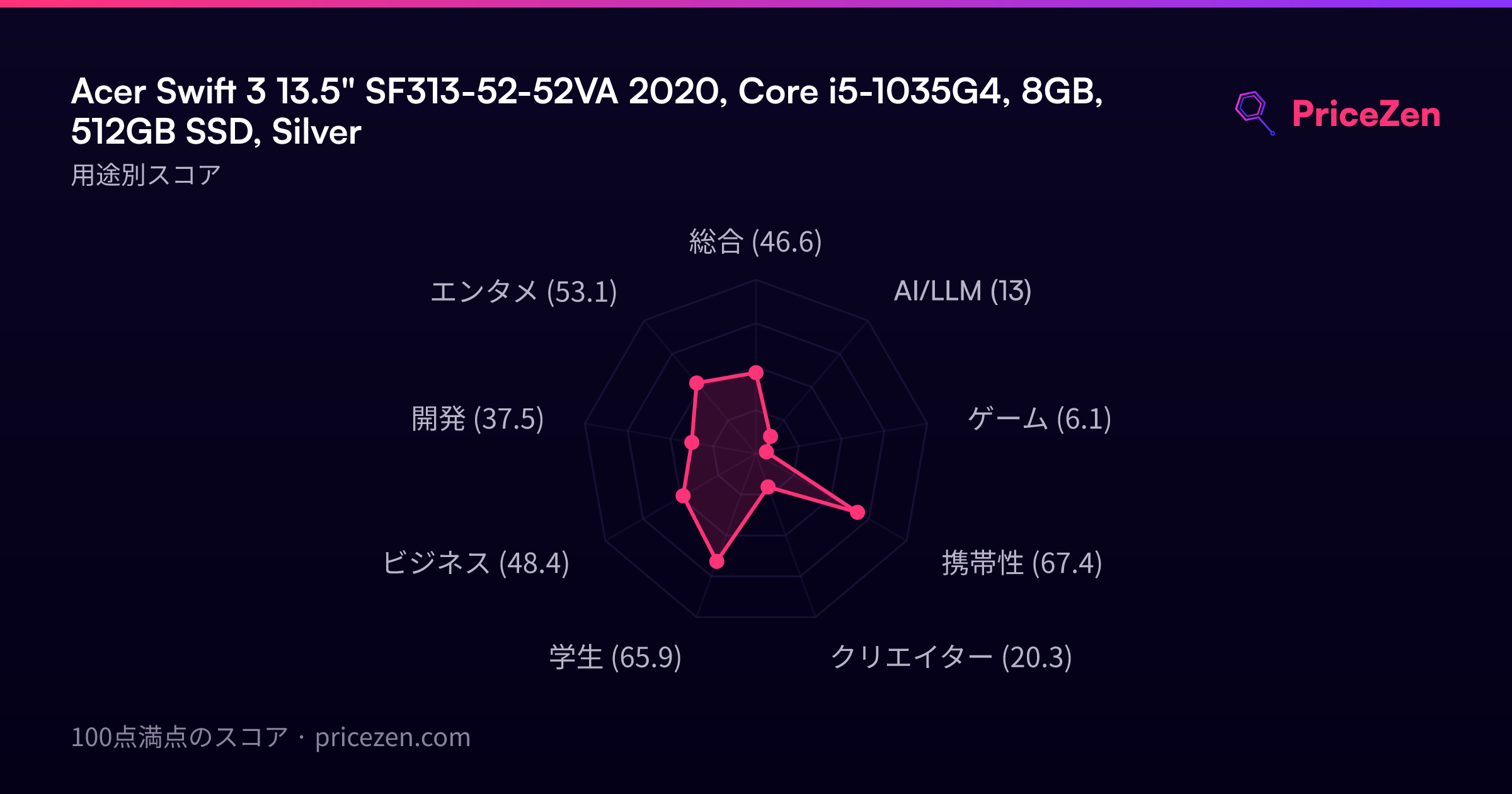
Usage Scores
- 総合46.6
- AI/LLM13
- ゲーム6.1
- 携帯性67.4
- クリエイター20.3
- 学生65.9
- ビジネス48.4
- 開発37.5
- エンタメ53.1