Apple MacBook Pro 15" 2019, Core i9, 16GB, 512GB SSD, Radeon Pro 560X, Space Gray
The 8-core Intel Core i9 with Turbo Boost up to 4.8GHz and Radeon Pro 560X graphics drives a 2880-by-1800 Retina display at 500 nits brightness. Its aluminum unibody weighs just 1.82kg and features four Thunderbolt 3 ports, along with 16GB of DDR4 RAM and a 512GB SSD. Best for developers, music producers, and photo editors seeking robust CPU performance and a color-accurate panel rather than gaming.

現在、販売店の最新価格はありません
概要
The 30-Second Version
The 2019 i9 MacBook Pro is a pretty screen strapped to a furnace. Unless you find one for $500 and absolutely need Intel, grab a used M1 Air and enjoy actual battery life.
Pros & Cons
長所
- Gorgeous 2880x1800 Retina display is still top-tier with P3 wide color 98th
- Radeon Pro 560X handles basic 4K editing and older games well 92nd
- Four Thunderbolt 3 ports give you solid I/O bandwidth
- Refurbished pricing puts a big-screen MacBook within reach
短所
- Intel i9 runs scorching hot and murders battery life
- 16GB RAM is soldered and feels cramped for 2025 workloads
- Butterfly keyboard reliability is a gamble, even on the 2019 update
- Apple Silicon Macs demolish this in performance per watt
オーナーの声
購入者の評価が時間とともにどう変化したか
独自顧客が実際にレビューを書いた時期に基づいています。発売当初の高評価が続いたかどうかがわかります。
満足した購入者:最近76%、2023/04~2024/06は64%
レビューが少なく、変化とは言えません。
ストア評価全37件:4.0★。 グラフは星と投稿日のある書かれたレビュー32件を数えています。
日付が概算の月(初めて確認した日)のレビュー5件は推移に含めていません。
星のない書かれたレビュー1件は推移に含めていません。
数値を表示
| 期間 | レビュー | 満足 | 普通 | 不満 | 満足の割合 |
|---|---|---|---|---|---|
| 2023/04~2024/06 | 11 | 7 | 1 | 3 | 64% |
| 2024/07~2026/02 | 21 | 16 | 1 | 4 | 76% |
各列は、星と投稿日のあるレビューが10件以上になるまで四半期をまとめています。満足 = 4〜5★、普通 = 3★、不満 = 1〜2★。
実証データ
Performance
I was surprised by how well the Radeon Pro 560X holds up for light creative work. 4GB of VRAM means you can edit 4K video in a pinch, and it scored a respectable 57th percentile among modern laptops. But that i9? It's a 38th percentile CPU now, so don't expect snappy compile times or smooth 3D rendering. And 16GB of RAM sits in the 26th percentile, soldered and non-upgradeable, which feels tight the moment you open a dozen browser tabs and Lightroom at the same time. Thermals are rough too, the fans kick in and the chassis gets toasty under any sustained load.
Specifications
Full Specifications
Processor
| CPU | Intel Core i9 9880H |
| Cores | 8 |
| Frequency | 2.4 GHz |
| L3 Cache | 16 MB |
Graphics
| GPU | AMD Radeon Pro 560X |
| Type | Discrete |
| VRAM | 4 GB |
Memory & Storage
| RAM | 16 GB |
| RAM Generation | DDR4 |
| Storage 1 | 512 GB |
| Storage 1 Type | SSD |
| Storage 2 | 512 GB |
| Storage 2 Type | HDD |
Display
| Size | 15.4" |
| Resolution | 2880x1800 |
| Panel | IPS |
| Brightness | 500 nits |
| Color Gamut | P3 wide color |
Connectivity
| USB-C Ports | 4 |
| USB Ports | 0 |
| Thunderbolt | Thunderbolt 3 |
| Wi-Fi | 802.11ac |
| Bluetooth | Bluetooth 5.0 |
Physical
| Weight | 1.8 kg / 4.0 lbs |
| Battery | 61 Wh |
| OS | macOS |
vs Competition
If you're comparing this to Windows rivals like the ASUS ProArt PX13 or Samsung Galaxy Book5 Pro, you're looking at far superior CPUs, better battery, and modern port selections. But those don't run macOS, which is the whole point. The real competition is a used M1 MacBook Air or Pro. The M1 is cooler, faster, and lasts twice as long on a charge. Unless you need Boot Camp or an older Intel-compatible app, the Apple Silicon route is a no-brainer. The Lenovo Yoga Book 9i is another wildcard if you're open to Windows and a dual-screen gimmick, but it's pricier.
| Spec | Apple MacBook Pro 15" | ASUS ROG Zephyrus 14" GA403WW-G14.R95080 | Lenovo Legion Pro 7i Gen 10 16" | HP OMEN Transcend | Samsung Galaxy Book5 Pro 14" NP944XHA-KG3US | Dell Premium 14.5" LDA14250-7667SLV-PUS |
|---|---|---|---|---|---|---|
| CPU | Intel Core i9 9880H | AMD Ryzen AI 9 HX 370 | Intel Core Ultra 9 275HX | Intel Core Ultra 9 285H | Intel Core Ultra 7 258V | Intel Core Ultra 7 255H |
| RAM (GB) | 16 | 32 | 32 | 32 | 32 | 32 |
| Storage (GB) | 512 | 2048 | 1024 | 1024 | 1024 | 1024 |
| Screen | 15.4" 2880x1800 | 14" 2880x1800 | 16" 2560x1600 | 14" 2880x1800 | 14" 2880x1800 | 14.5" 3200x2000 |
| GPU | AMD Radeon Pro 560X | NVIDIA GeForce RTX 5080 | NVIDIA GeForce RTX 5070 Ti | NVIDIA GeForce RTX 5070 | Intel Arc Graphics 140V | Intel Arc Graphics |
| OS | macOS | Windows 11 Home | Windows 11 Home | Windows 11 Home | Windows 11 Pro | Windows 11 Home |
| Weight (kg) | 1.8 | 1.6 | 2.7 | 1.6 | 1.2 | 1.7 |
| Battery (Wh) | 61 | - | 99 | 71 | 63 | 62 |
| Compare | Compare | Compare | Compare | Compare |
| 製品 | CPU | GPU | RAM | ポート | 画面 | 携帯性 | ストレージ | 信頼性 | ユーザー評価 | Affordability |
|---|---|---|---|---|---|---|---|---|---|---|
| Apple MacBook Pro 15" | 43.2 | 60.1 | 25.5 | 61.7 | 91.5 | 52.4 | 59.3 | 98.3 | 63.7 | 43.5 |
| ASUS ROG Zephyrus 14" GA403WW-G14.R95080 Compare | 91.2 | 98.3 | 90.9 | 89.2 | 96.5 | 73.6 | 89.7 | 60.6 | 96.5 | 5.7 |
| Lenovo Legion Pro 7i Gen 10 16" Compare | 97.2 | 96.6 | 89 | 97.2 | 95.6 | 9.5 | 79.2 | 82.1 | 99.7 | 5.5 |
| HP OMEN Transcend Compare | 90.1 | 93.6 | 89.7 | 89.2 | 96.5 | 72.3 | 65.1 | 33.6 | 94.1 | 8.3 |
| Samsung Galaxy Book5 Pro 14" NP944XHA-KG3US Compare | 65.8 | 69.7 | 79.4 | 83.1 | 91.5 | 89.5 | 79.2 | 82.1 | 96.5 | 20.1 |
| Dell Premium 14.5" LDA14250-7667SLV-PUS Compare | 87.1 | 69.7 | 89 | 65.9 | 97.2 | 61.1 | 65.1 | 33.6 | 96.5 | 14 |
価格
Value & Pricing
Prices vary by around $160 across vendors, so you'll want to shop around. We spotted some Newegg listings at the $500 mark, which is the low end of the range and about as much as we'd consider paying. At that price, you're getting a premium screen and a solid GPU. But if you're nudging toward $660, just stop. You can find a used M1 MacBook Pro or Air for similar money, and it will embarrass this Intel machine in every metric that matters.
詳細情報
Overview
Here's the deal: the 2019 MacBook Pro with an 8-core i9 is kind of a weird beast in 2025. On one hand, that 15.4-inch Retina display is still a knockout, 500 nits and P3 color make everything look fantastic. On the other hand, you're stuck with an Intel chip that runs hot, gets loud, and sips battery like it's going out of style. It's a refurbished machine, so you're saving a chunk of cash, but you're also buying into a platform that Apple itself has already moved on from. The real question is whether a $500 to $660 price tag makes up for the compromises.
Common Questions
Q: Can I upgrade the RAM later?
Nope, the 16GB is soldered to the motherboard. What you buy is what you live with forever, so if you're a tab hoarder or video editor, you'll feel the squeeze.
Q: Does this model support the latest macOS?
Yep, it's officially supported on macOS Sequoia, so you're good for the latest features and security updates. Just don't expect it to be snappy three years from now.
Q: Is the keyboard fixed on this 2019 model?
It's the third-gen butterfly keyboard, which improved reliability over the earlier disasters. But it's still a shallow keyboard that some folks love and others hate, and dust can still cause stuck keys.
Who Should Skip This
If you're looking for an all-day laptop that doesn't double as a lap warmer, this is not your machine. The i9 and 61Wh battery combo leads to disappointing runtime, and the fans will remind you they exist. Go get an Apple Silicon MacBook Air instead, even a base M1 model will run circles around this in efficiency and quiet. If you need Windows, the Samsung Galaxy Book5 Pro is a far better bet.
Verdict
Skip it, honestly. This machine was a powerhouse in 2019, but the world moved on. The only reason to buy this refurb is if you must have an Intel Mac for legacy software (looking at you, 32-bit app holdouts) and you spot it for under $550. For everyone else, a refurb M1 MacBook Air is cooler, quieter, faster, and will get macOS updates longer. Don't let that pretty display fool you into buying yesterday's hot plate.
Usage Scores
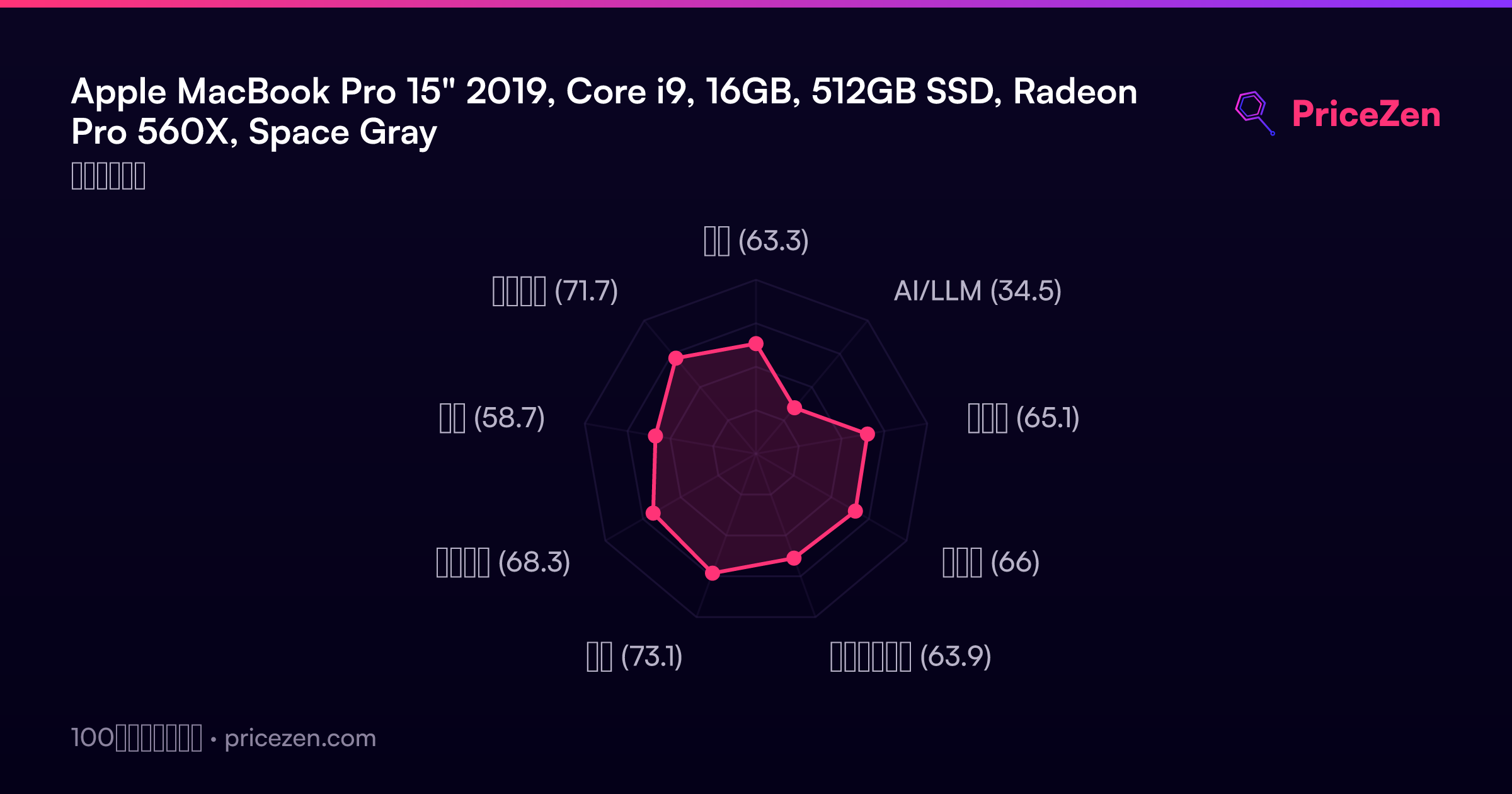
- 総合63.3
- AI/LLM34.5
- ゲーム65.1
- 携帯性66
- クリエイター63.9
- 学生73.1
- ビジネス68.3
- 開発58.7
- エンタメ71.7