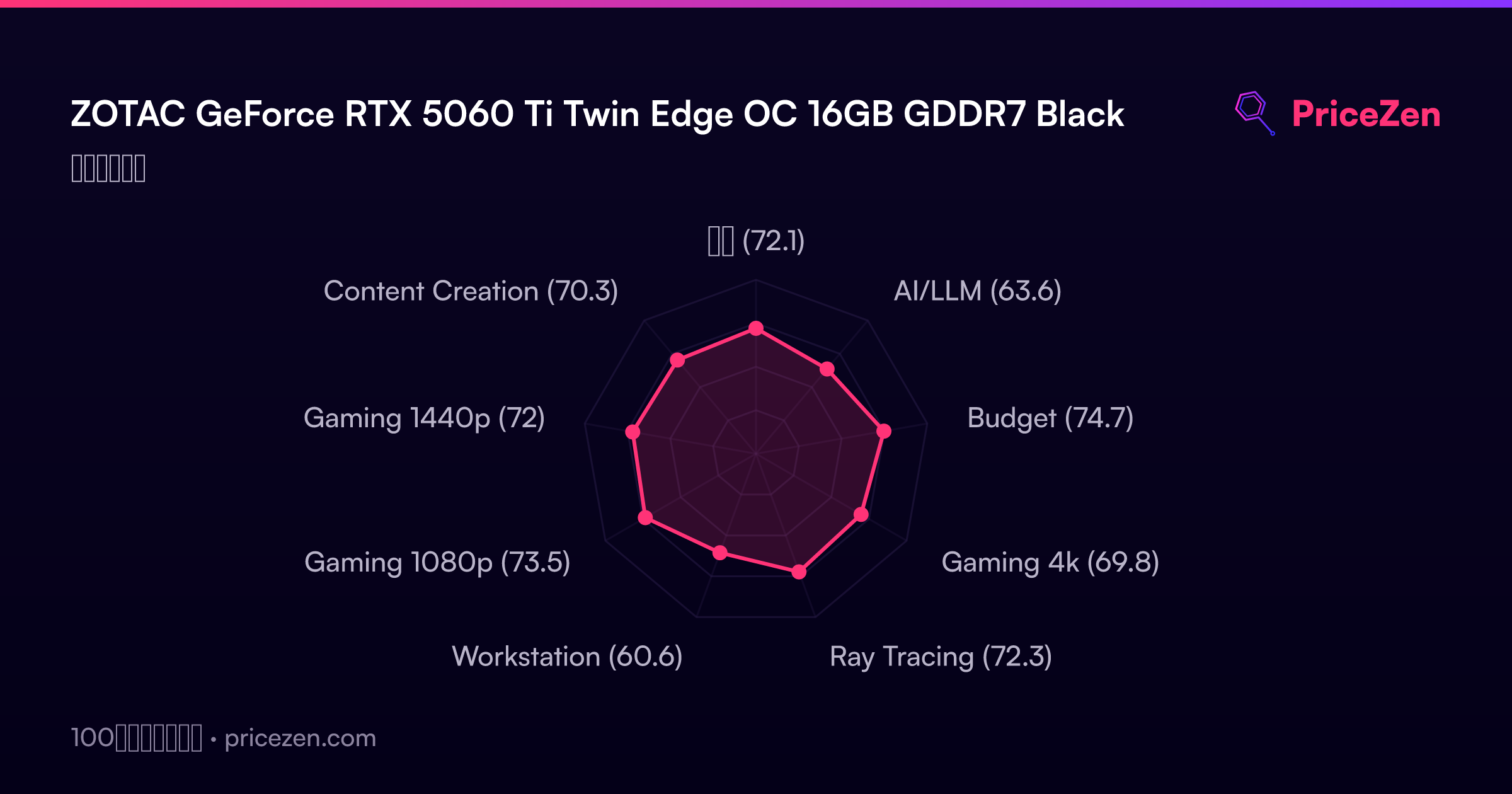
ZOTAC GeForce RTX 5060 Ti Twin Edge OC 16GB GDDR7 Black
The 16GB of GDDR7 memory and DLSS 4.0 support on the Blackwell architecture make this card a strong 1440p performer with ample VRAM for high-resolution textures. Its compact 221mm dual-fan design fits easily into small form factor builds without sacrificing the full PCIe 5.0 interface. This GPU is best for 1440p gamers who want future-proofed memory capacity in a space-constrained system.

現在、販売店の最新価格はありません











概要
The 30-Second Version
The ZOTAC RTX 5060 Ti Twin Edge OC packs 16GB of GDDR7 into a compact 221mm card that sips power at 180W. Gaming performance is solid for 1080p and 1440p, especially with DLSS 4.0 in the mix. US pricing is all over the place, from $870 to $1,490, so shop carefully. If you need a small card with big VRAM, this is one of the best options right now.
Pros & Cons
長所
- 16GB GDDR7 memory is generous for this price class 94th
- Compact 221mm dual-fan design fits small cases 89th
- Single 8-pin power connector, only 180W TDP 86th
- PCIe 5.0 x8 support with modern connectivity 83rd
- DLSS 4.0 and AV1 encode included
短所
- 128-bit memory bus limits bandwidth to 448 GB/s
- Ray tracing performance is middle of the pack
- Workstation score of 60.1 is underwhelming
- Affordability ranks in the bottom third
- Only 2 slots but dual fan cooling is just adequate
実証データ
Performance
Let's talk numbers. The PassMark G3D score of 22,099 puts this card in a solid position for its class. It's not going to embarrass a 5080, but it's not trying to. For 1080p gaming, we scored it 75.7 out of 100, and 1440p comes in at 73.7. Those are respectable numbers that translate to smooth framerates in most modern titles at high settings, especially once you factor in DLSS 4.0. The 4608 CUDA cores and 19.18 TFLOPS of FP32 compute give it enough raw grunt to handle anything short of 4K ultra with ray tracing maxed out.
The memory situation is interesting. You've got 16GB of GDDR7 on a 128-bit bus, which gives you 448 GB/s of bandwidth. That's a narrower bus than some competitors, but the GDDR7 speed helps compensate. In practice, the 16GB capacity matters more than the bus width for most gamers. You won't hit VRAM limits at 1440p, and even 4K with DLSS is feasible if you're willing to dial back a few settings. The ray tracing score sits at the 66th percentile, which means it's fine but not exceptional. DLSS 4.0 does a lot of heavy lifting here, and honestly, that's the smart way to use this card.
Specifications
Full Specifications
Chipset
| GPU Chipset | GeForce RTX 5060 Ti |
| Brand | NVIDIA |
| Architecture | Blackwell |
| Class | consumer |
| Process | 5 |
Memory
| VRAM | 16 GB |
| Memory Type | GDDR7 |
| Memory Bus | 128 |
| Bandwidth | 448 |
Compute
| CUDA Cores | 4608 |
| Tensor Cores | 144 |
| RT Cores | 36 |
| Base Clock | 2407 |
| Boost Clock | 2602 |
| FP16 TFLOPS | 23.7 |
| FP32 TFLOPS | 23.7 |
Performance
| PassMark G3D | 22099 |
| GPU Compute | 11371 |
Power & Cooling
| TDP | 180 |
| Recommended PSU | 600 |
| Power Connectors | 1 x 8-pin |
| Cooler | Dual Fan |
| Fans | 2 |
Connectivity
| Interface | PCIe 5.0 x8 |
| DisplayPort | 3 |
| HDMI | 1 |
| Max Displays | 4 |
| Max Resolution | 7680 x 4320 |
Physical
| Length | 221 |
| Slot Width | 2 |
| Form Factor | Full Height |
| Weight | 1.2 kg / 2.6 lbs |
Features
| Ray Tracing | Yes |
| Upscaling | DLSS 4.0 |
| AV1 Encode | Yes |
| VR Ready | Yes |
| DirectX | 12 Ultimate |
| RGB | No |
vs Competition
The natural comparison here is against the MSI Ventus RTX 5070 Ti 16G. Both have 16GB of memory, but the 5070 Ti has a wider memory bus and more raw compute. The Ventus will beat the 5060 Ti in most benchmarks, but it also costs more and runs hotter. If you're gaming at 1440p and want maximum framerates, the 5070 Ti is the better card. If you want something smaller and more power-efficient that still has 16GB, the ZOTAC makes a case for itself.
Against the ASUS PRIME RTX 5080 and Gigabyte AORUS 5080, there's really no contest. Those are in a completely different performance tier, and their prices reflect it. The Sapphire NITRO+ is an AMD option that trades blows differently depending on the workload, but it's also a larger card. The PNY ARGB OC 5080 is another step up. What the ZOTAC offers that none of these do is the combination of 16GB VRAM, a 221mm length, and a 180W power draw. That's a specific niche, but it's a real one. Small form factor builders who want modern features without a massive cooler will find this appealing.
| Spec | ZOTAC GeForce RTX 5060 Ti Twin Edge OC | MSI GeForce RTX 4070 Ti SUPER GAMING SLIM Gaming X | Gigabyte GeForce RTX 4080 SUPER AERO OC | ASUS GeForce RTX 5090 TUF Gaming | XFX Radeon RX 9070 XT Quicksilver | ASRock Radeon RX 9060 XT Steel Legend |
|---|---|---|---|---|---|---|
| Chipset | GeForce RTX 5060 Ti | GeForce RTX 4070 Ti SUPER | GeForce RTX 4080 SUPER | GeForce RTX 5090 | Radeon RX 9070 XT | Radeon RX 9060 XT |
| Vram | 16GB GDDR7 | 16GB GDDR6X | 16GB GDDR6X | 32GB GDDR7 | 16GB GDDR6 | 8GB GDDR6 |
| Boost Clock Mhz | 2602 | 2685 | 2595 | 2430 | 2970 | 3320 |
| Tdp W | 180 | 285 | 320 | 575 | 304 | 140 |
| Memory Bus Bits | 128 | 256 | 256 | 256 | 256 | 128 |
| Ray Tracing | true | true | true | true | true | true |
| GPU Class | consumer | consumer | consumer | consumer | consumer | consumer |
| Compare | Compare | Compare | Compare | Compare |
| 製品 | AI | Rt | Vram | Raster | Compute | Feature | Thermal | Efficiency | Connectivity | ユーザー評価 | Affordability |
|---|---|---|---|---|---|---|---|---|---|---|---|
| ZOTAC GeForce RTX 5060 Ti Twin Edge OC | 69.5 | 66 | 82.9 | 55.9 | 55.5 | 88.7 | 54.9 | 85.7 | 94.1 | 38.2 | 37.2 |
| MSI GeForce RTX 4070 Ti SUPER GAMING SLIM Gaming X Compare | 77 | 86.6 | 79.1 | 86.3 | 74.5 | 52.4 | 91.8 | 76.1 | 39.7 | 93.4 | 21.7 |
| Gigabyte GeForce RTX 4080 SUPER AERO OC Compare | 71.3 | 93.7 | 77.3 | 91.2 | 72.7 | 77.9 | 72.1 | 67.7 | 55.3 | 74.9 | 11.6 |
| ASUS GeForce RTX 5090 TUF Gaming Compare | 96 | 90.6 | 96.9 | 98.8 | 0 | 71.5 | 72.1 | 23.6 | 98.8 | 24.2 | 2.8 |
| XFX Radeon RX 9070 XT Quicksilver Compare | 88.1 | 46.7 | 73.5 | 74.9 | 79.2 | 33.1 | 72.1 | 44.9 | 37.4 | 32.8 | 35.8 |
| ASRock Radeon RX 9060 XT Steel Legend Compare | 47.1 | 46.4 | 35.6 | 46.4 | 57.8 | 38.2 | 72.1 | 96 | 51.1 | 0 | 71.9 |
価格
Value & Pricing
Here's where things get a little weird. The USD pricing on this card spans from $870 to $1,490 across just two listings. That's a $620 spread, which is frankly absurd for the same product. If you're shopping in the US, you need to be careful. The lower end of that range is competitive for a 16GB card with this feature set. The higher end is not. At $1,490, you're dangerously close to territory where a 5070 Ti or even a discounted 5080 starts looking like the smarter buy.
For Canadian buyers, the CAD 1,280 to 1,368 range is tighter and more reasonable. The single Japanese listing at JPY 246,372 and the Mexican listing at MXN 34,565 are harder to judge without local context, but they exist if you're in those markets. The affordability percentile ranking of 31st tells the story. This card is not a budget option. You're paying for the 16GB of VRAM and the compact form factor, not raw performance per dollar. If you can find it at the lower end of the USD range, it's a fair deal. If you can only find it at the top, walk away.
価格履歴
詳細情報
Overview
The ZOTAC GeForce RTX 5060 Ti Twin Edge OC is one of those cards that makes you do a double take. It packs 16GB of GDDR7 memory into a compact dual-fan design that's only 221mm long, which means it'll actually fit in smaller cases without requiring a shoehorn and a prayer. That's a bigger deal than it sounds, because most cards with this much VRAM tend to be chunky three-fan monsters that demand a full ATX tower. ZOTAC went the other direction and kept things sensible.
Who's this for? Mostly 1080p and 1440p gamers who want to crank settings without worrying about running out of video memory. The 16GB buffer is the headline feature here. We've seen plenty of cards in this price bracket ship with 8GB or 12GB, and those are already feeling tight in newer titles. This one gives you headroom for texture packs, mods, and whatever unoptimized mess the next big release throws at you.
The factory overclock is modest but real. You're looking at a 2602MHz boost clock out of the box, which is a small bump over reference. Nothing dramatic, but it's free performance and ZOTAC's cooling solution seems up to the task. The card pulls 180W, which is reasonable for what you're getting, and it only needs a single 8-pin connector. Your 600W power supply recommendation is easy to meet for most builds from the last few years.
Common Questions
Q: Will this card fit in my small form factor case?
At 221mm long and 2 slots thick, this is one of the more compact 16GB cards available. It should fit in most mini-ITX and micro-ATX cases that support dual-slot GPUs. Just make sure your case has at least 230mm of clearance to be safe, and check that your power supply has a single 8-pin PCIe connector available.
Q: Is 16GB of VRAM overkill for 1080p gaming?
For most current 1080p titles, 16GB is more than enough. But it's not about today, it's about the next few years. Games are already pushing past 8GB at high settings, and 12GB is becoming the new baseline. Having 16GB means you won't need to upgrade for texture-heavy games or if you decide to move up to a 1440p monitor later.
Q: How does the 128-bit memory bus affect performance?
The 128-bit bus is narrower than what you'd find on higher-end cards, which limits raw bandwidth to 448 GB/s. GDDR7's higher clock speeds help offset this, and in practice, gaming performance at 1080p and 1440p is still strong. The bus width matters more for 4K gaming and memory-intensive workstation tasks, where this card shows its limitations.
Q: Can this card handle ray tracing well?
Ray tracing performance is average for this class, sitting around the 66th percentile. You'll get playable framerates with ray tracing enabled at 1080p and 1440p, especially with DLSS 4.0 doing the heavy lifting. But if ray tracing at maximum settings is your priority, you'll want to look at a 5070 Ti or higher.
Who Should Skip This
If you're doing serious workstation work, 3D rendering, or AI model training, this card is not for you. The compute score sits at the 51st percentile, and the workstation score of 60.1 is the weakest area of the card. You'd be better served by something with more CUDA cores and a wider memory bus, even if it means spending more. The 5070 Ti or a used 4080 would be a better fit for those workloads.
Also skip this if you're gaming at 4K and expect high settings with ray tracing. The 128-bit bus and mid-tier ray tracing performance mean you'll be relying heavily on DLSS to hit playable framerates. If 4K is your target, save up for a 5080 or look at AMD's higher-end options. And if you find this card listed at the top of its USD price range, just don't. That money buys a lot more performance elsewhere.
Verdict
If you're building a compact gaming PC and want 16GB of VRAM without resorting to a three-slot behemoth, the ZOTAC Twin Edge OC is one of the easiest recommendations in its class. The 1080p and 1440p gaming scores are strong enough for high refresh rate monitors, and DLSS 4.0 extends the card's useful life considerably. The single 8-pin connector means you won't need to upgrade your power supply if you're already running something in the 600W range.
But if you're a content creator or someone who dabbles in workstation tasks, look elsewhere. The 60.1 workstation score is the weakest area here, and it shows. This is a gaming card first and foremost. If you need CUDA performance for rendering or AI workloads, you'll want something with more compute headroom. And if you're shopping in the US, patience is your friend. Wait for the price to drop toward the $870 end of the range. At that price, this card makes a lot of sense. At $1,490, it doesn't.
Usage Scores
- 総合72.1
- AI/LLM63.6
- Budget74.7
- Gaming 4k69.8
- Ray Tracing72.3
- Workstation60.6
- Gaming 1080p73.5
- Gaming 1440p72
- Content Creation70.3