SRhonyra GeForce GTX 750 Ti 4GB GDDR5
The 4GB GDDR5 memory and four native HDMI 2.0 ports on this 28nm Pascal-based card uniquely drive quad 4K displays or a spliced 8K video wall without external power, drawing just 65W. Its dual-slot design is entirely PCIe bus-powered, simplifying installation in compact or legacy systems that lack auxiliary power cables. This card is best for digital signage operators and multi-monitor productivity users who need reliable, high-resolution output, not for 1080p gaming or AI workloads.

現在、販売店の最新価格はありません


概要
The 30-Second Version
The SRhonyra GTX 750 Ti is a quad-HDMI display card disguised as a gaming GPU. Four native HDMI 2.0 ports, 65W bus-powered design, and 4GB of GDDR5 make it perfect for multi-monitor office and signage setups. At 123 USD, it's one of the cheapest ways to drive four 4K displays. Just don't expect to play modern games or do any compute-heavy work on it.
Pros & Cons
長所
- Four native HDMI 2.0 ports, no adapters needed 90th
- 65W TDP with no external power connector required
- 4GB GDDR5 handles 4K output on multiple displays
- Dual-fan cooler keeps a low-power card running cool and quiet
- Affordability ranks in the 90th percentile in our database
短所
- Raster performance sits in the 14th percentile, weak for gaming
- Compute and AI capabilities are near the bottom of our charts
- Thermal design ranks in the 32nd percentile despite low TDP
- Connectivity options are limited to HDMI only, no DisplayPort
- Customer reviews mention driver issues on Windows 11
オーナーの声
The Word on the Street
購入者の評価が時間とともにどう変化したか
独自顧客が実際にレビューを書いた時期に基づいています。発売当初の高評価が続いたかどうかがわかります。
書かれたレビュー 11件、2023/11~2026/01:満足 9件、不満 2件
ストア評価全97件:4.3★。 多くの購入者はレビューを書かずに評価だけを付けています。 グラフは書かれたレビュー11件を数えています。
- 2025/01~2025/033件中2件が満足
Mixed reviews: one buyer found it a good deal but noted poor black levels; another reported a port defect ignored by the seller; a third was very satisfied with easy installation.
- Port defect discovered after 2 months; seller ignored replacement request and denied warranty.
- Good value but monitor black levels appear hazy dark gray instead of true black.
- Very easy to install.
- 2024/01~2024/033件中3件が満足
Buyers report excellent multi-monitor support and value, though initial driver installation may require manual steps or Windows' automatic detection.
- Works well for multi-monitor setups (4-6 displays) without AMD software.
- Driver installation can be tricky; Windows auto-detection works, but manual download may be needed.
- Initial setup may fail if built-in GPU is active; requires booting with onboard video first.
- Requires PCIe power cable; included instructions recommend HDMI 2.0 cables.
各点は書かれたレビュー1件で、書かれた月に置いています。満足 = 4〜5★、普通 = 3★、不満 = 1〜2★。 期間ごとの要約は英語です。
実証データ
Performance
The PassMark G3D score of 3899 tells you most of what you need to know. For context, that's roughly where mid-range cards from 2014 landed. It'll handle desktop compositing, video playback, and basic productivity without breaking a sweat. The 512 CUDA cores running at a 1020MHz boost clock are fine for pushing pixels to four displays, but they're not going to impress anyone in a benchmark showdown. The 4GB of GDDR5 on a 128-bit bus gives you enough memory bandwidth for 4K video output, which is exactly what this card is designed to do.
The real performance story here is the display output configuration. Four HDMI 2.0 ports means you can run four 4K displays at 60Hz simultaneously, or do a 2x2 splice to create an 8K wall. That's the kind of capability you'd normally need a much more expensive card to achieve. The 65W TDP is also a big deal. It means no external power connectors, which makes installation a breeze in small form factor systems or older office PCs with modest power supplies. The dual-fan cooler is overkill for 65W, but it should keep things quiet and cool under sustained load.
Specifications
Full Specifications
Chipset
| GPU Chipset | GeForce GTX 750 Ti |
| Brand | NVIDIA |
| Architecture | Maxwell |
| Class | consumer |
| Process | 28 |
Memory
| VRAM | 4 GB |
| Memory Type | GDDR5 |
| Memory Bus | 128 |
Compute
| CUDA Cores | 512 |
| Base Clock | 1020 |
| Boost Clock | 1020 |
Performance
| PassMark G3D | 3899 |
| GPU Compute | 1741 |
Power & Cooling
| TDP | 65 |
| Recommended PSU | 400 |
| Power Connectors | None |
| Cooler | Dual Fan |
Connectivity
| Interface | PCI Express 3.0 x16 |
| DisplayPort | 0 |
| HDMI | 4 |
| Max Displays | 4 |
| Max Resolution | 7680 x 4320 |
Physical
| Slot Width | 2 |
| Form Factor | Full Height |
| Weight | 0.5 kg / 1.0 lbs |
Features
| Ray Tracing | No |
| DirectX | 11.2 |
vs Competition
The obvious comparison is against modern budget cards like the ASUS Dual RTX 4060 or the XFX Speedster RX-7600. Those cards absolutely destroy the GTX 750 Ti in gaming and compute performance. The RTX 4060 has more than triple the CUDA cores, much faster memory, and modern features like DLSS and ray tracing. But here's the thing: none of those cards give you four HDMI ports. They typically offer one HDMI and three DisplayPorts. If your entire setup is HDMI-based, you're buying adapters or replacing cables.
The MSI SHADOW RTX 5060 and Gigabyte WINDFORCE RTX 5060 are even further ahead in performance, but they're also in a completely different price class. You're paying for gaming performance you don't need if all you're doing is driving displays. The PNY Dual Fan OC RTX 5060 is another strong competitor in the modern space, but again, it's about gaming and content creation, not multi-monitor productivity. The SRhonyra card wins on simplicity and price for its specific niche, and loses everywhere else.
| Spec | SRhonyra GeForce GTX 750 Ti | ASUS GeForce RTX 5090 TUF Gaming OC | MSI GeForce RTX 5090 VANGUARD | PNY NVIDIA RTX PRO 6000 Blackwell Max-Q Workstation Edition | Gigabyte GeForce RTX 5090 Gaming | ZOTAC GeForce RTX 5090 SOLID White Edition |
|---|---|---|---|---|---|---|
| Chipset | GeForce GTX 750 Ti | GeForce RTX 5090 | GeForce RTX 5090 | NVIDIA RTX PRO 6000 Blackwell Max-Q Workstation Edition | GeForce RTX 5090 | GeForce RTX 5090 |
| Vram | 4GB GDDR5 | 32GB GDDR7 | 32GB GDDR7 | 96GB GDDR7 | 32GB GDDR7 | 32GB GDDR7 |
| Boost Clock Mhz | 1020 | 2580 | 2512 | 2280 | 2550 | 2422 |
| Tdp W | 65 | 575 | 575 | 300 | 575 | 575 |
| Memory Bus Bits | 128 | 512 | 512 | 512 | 512 | 512 |
| Ray Tracing | false | true | true | true | true | true |
| GPU Class | consumer | consumer | consumer | workstation | consumer | consumer |
| Compare | Compare | Compare | Compare | Compare |
| 製品 | AI | Rt | Vram | Raster | Compute | Feature | Thermal | Efficiency | Connectivity | ユーザー評価 | Affordability |
|---|---|---|---|---|---|---|---|---|---|---|---|
| SRhonyra GeForce GTX 750 Ti | 13.1 | 14 | 12.8 | 14.2 | 7.4 | 10.9 | 31 | 19.8 | 37.2 | 63.2 | 89.7 |
| ASUS GeForce RTX 5090 TUF Gaming OC Compare | 97.9 | 90.6 | 97.8 | 98.8 | 99 | 95.9 | 91.7 | 23.9 | 99.8 | 74.8 | 1.8 |
| MSI GeForce RTX 5090 VANGUARD Compare | 97.6 | 90.6 | 97.8 | 98.8 | 98.4 | 95.9 | 72.4 | 23.9 | 94.1 | 53.2 | 2 |
| PNY NVIDIA RTX PRO 6000 Blackwell Max-Q Workstation Edition Compare | 99.7 | 99.5 | 99.8 | 87.3 | 99.4 | 99.8 | 25.6 | 69.4 | 87.2 | 43.3 | 0.4 |
| Gigabyte GeForce RTX 5090 Gaming Compare | 97.7 | 84.2 | 97.8 | 98.8 | 98.6 | 95.9 | 72.4 | 23.9 | 94.1 | 0 | 1.1 |
| ZOTAC GeForce RTX 5090 SOLID White Edition Compare | 97.2 | 90.6 | 97.8 | 98.8 | 97.9 | 78 | 91.7 | 23.9 | 81.8 | 0 | 3.2 |
価格
Value & Pricing
At 123 USD in the US, this card is priced like a budget GPU, and for the right use case, it delivers. The value proposition isn't about raw performance. It's about the quad-HDMI configuration. Finding any other card with four native HDMI 2.0 ports at this price point is genuinely difficult. Most modern cards in this range give you one HDMI and a couple of DisplayPorts, which means dongles and adapters if you're running a multi-monitor HDMI setup.
If you're shopping in Europe, the price spread is worth paying attention to. Listings range from EUR 151 to EUR 194 across German, Spanish, French, and Italian retailers. That's a EUR 43 difference for the exact same card. Shop around before you buy. The affordability percentile of 90 means this is one of the cheapest ways to get a quad-display setup, but the efficiency and feature rankings are low enough that you should be very clear about what you're buying. This is a specialized tool, not a general-purpose GPU.
価格履歴
詳細情報
Overview
The SRhonyra GTX 750 Ti is one of those cards that makes you do a double take. It's a 2014-era Maxwell GPU slapped onto a board with four HDMI 2.0 ports, 4GB of GDDR5, and a dual-fan cooler. This isn't a card for gamers chasing frame rates. It's a workhorse for people running multi-monitor setups in offices, kiosks, and digital signage. The whole pitch is simple: four native HDMI outputs, no adapters, no fuss.
What makes this interesting is how it fills a weird niche. Modern GPUs have largely abandoned the idea of four identical display outputs on a budget card. You usually get a mix of DisplayPort and HDMI, or you're paying a premium for a workstation card. This thing costs around 123 USD and gives you a clean quad-HDMI setup that pulls all its power from the PCIe slot. For someone building a stock trading rig or a video wall, that's genuinely useful.
But let's be real about what this is. The GTX 750 Ti was a budget card when it launched over a decade ago. In our database, its raster performance sits in the 14th percentile, and its compute chops are near the bottom at the 6th percentile. If you're expecting to play modern games or do any kind of AI work, you're looking at the wrong product. This is a display adapter with a GPU attached, not the other way around.
Common Questions
Q: Can this card run four 4K displays at the same time?
Yes, that's exactly what it's designed for. The four HDMI 2.0 ports each support 4K output at 60Hz, so you can run four independent 4K displays simultaneously. The 4GB of GDDR5 memory and 128-bit memory bus provide enough bandwidth for this kind of multi-display workload. You can also do a 2x2 splice to create a single 8K display wall, which is useful for signage and presentation applications.
Q: Does this card need an external power connector?
According to the specs, no. The card is rated at 65W TDP and is designed to draw all its power from the PCIe slot. However, at least one customer review mentions receiving a card that required a 6-pin power connector, so there may be some inconsistency between batches. If your power supply doesn't have a 6-pin connector, you should verify with the seller before purchasing.
Q: Can I play modern games on this card?
Not really. The GTX 750 Ti was a budget card when it launched in 2014, and its PassMark G3D score of 3899 puts it in the 14th percentile of all GPUs in our database. You might be able to run older titles or esports games at low settings, but modern AAA games will struggle. This card is built for display output and productivity, not gaming.
Q: Will this work with Windows 11?
The manufacturer lists Windows 11 as a supported operating system, and many users report successful installations. However, some customer reviews mention driver installer issues on Windows 11 Home, where the installer complains about an unsupported OS. You may need to manually install drivers or use compatibility mode. It's worth checking the manufacturer's website for the latest driver package before you start.
Who Should Skip This
Gamers should absolutely skip this card. The raster performance is in the 14th percentile, which means even older titles will struggle at higher settings. If you want to play games at 1080p, look at something like the ASUS Dual RTX 4060 or the XFX Speedster RX-7600 instead. They cost more, but they're actually built for gaming.
Content creators and anyone doing compute-heavy work should also look elsewhere. The compute score of 6th percentile means video editing, 3D rendering, and AI workloads are basically off the table. If you need GPU acceleration for creative work, a modern card with more CUDA cores and faster memory will pay for itself in time saved. And if you need DisplayPort outputs for high-refresh-rate monitors, this card's HDMI-only design will be a constant annoyance.
Verdict
If you're building a quad-monitor setup for office work, stock trading, or digital signage, this card is a genuinely smart buy. The four HDMI 2.0 ports are the whole story, and they work. The 65W power draw means it'll drop into almost any system without a PSU upgrade. The 4GB of VRAM is plenty for pushing pixels to four 4K displays. At 123 USD, it's hard to beat for this specific use case.
But if you're a gamer, even a casual one, look elsewhere. The 14th percentile raster performance means you'll struggle with anything beyond older titles at low settings. The 6th percentile compute score rules out any kind of content creation or AI work. And if you need DisplayPort or mixed output types, this card's HDMI-only approach will frustrate you. The thermal design ranking in the 32nd percentile is also a bit concerning for a card that's supposed to run 24/7 in signage applications. Make sure you have decent case airflow.
Usage Scores
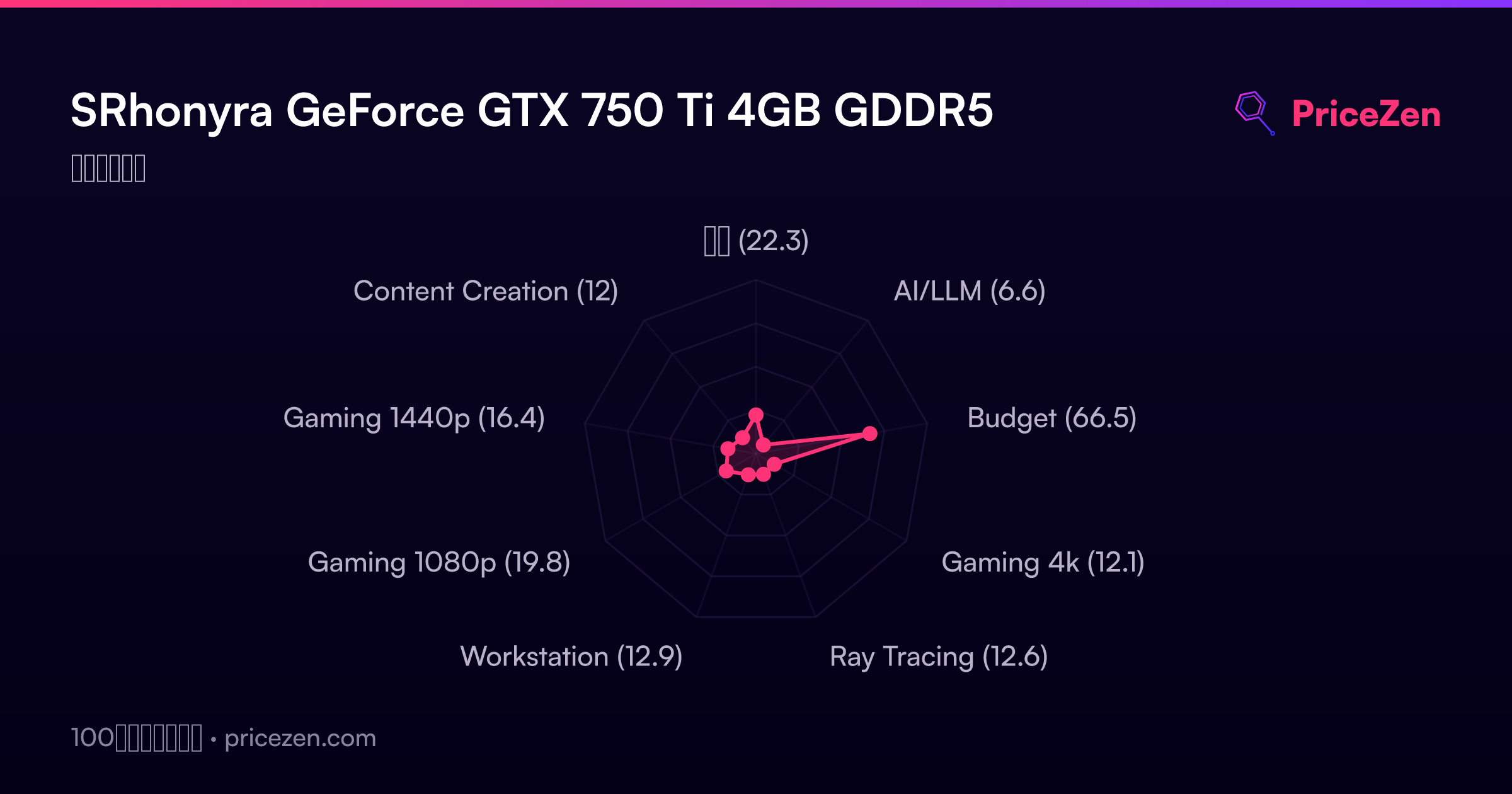
- 総合22.3
- AI/LLM6.6
- Budget66.5
- Gaming 4k12.1
- Ray Tracing12.6
- Workstation12.9
- Gaming 1080p19.8
- Gaming 1440p16.4
- Content Creation12