NextComputing Edge XTI EXTI-9285K-02, Core Ultra 9 285K, 64GB, 2TB SSD, RTX 5080
Combining a 24-core Intel Core Ultra 9 285K with an RTX 5080 and 64GB of DDR5 RAM, this system accelerates demanding renders and simulations. Its comprehensive connectivity includes Thunderbolt 5, 10G Ethernet, and Wi-Fi 7 for rapid data transfer in high-throughput environments. This workstation is best for 3D artists and video editors who need to drastically reduce processing times on complex, GPU-accelerated projects.

現在、販売店の最新価格はありません


概要
The 30-Second Version
The NextComputing Edge XTI pairs a top-tier Intel CPU with an RTX 5080 and 64GB of RAM for blistering creative performance. Our workstation score hits 89.7, making it one of the best on paper. A recent price drop to $6,646 makes it more tempting, but shaky reliability and a massive price spread mean you should shop carefully.
Pros & Cons
長所
- Stellar CPU and GPU combo for creative workflows. 98th
- 64GB of fast DDR5 memory out of the box. 98th
- Dual 10GbE and 2.5GbE plus WiFi 7 for versatile networking. 98th
- Quiet operation under sustained loads based on our testing. 97th
短所
- Reliability data suggests a higher chance of hiccups than rivals.
- Port selection feels underwhelming for a full-tower workstation.
- No PCIe 5.0 storage support, stuck at Gen 4 speeds.
- Bulky and heavy, despite 'Edge' in the name.
実証データ
Performance
The Core Ultra 9 285K is an absolute monster for single-core and lightly-threaded tasks, and its 24-core design handles heavy multi-tasking with ease. Paired with the RTX 5080, you're looking at GPU compute and real-time rendering that's among the best we've tested. 64GB of 6400MHz DDR5 keeps everything snappy. But the storage is only PCIe 4.0, not 5.0, so sequential transfers cap out sooner than some newer drives. Still, in real-world workloads like 8K video editing or 3D rendering, this rig flies.
Specifications
Full Specifications
Processor
| CPU | Intel Core Ultra 9 285K |
| Cores | 24 |
| Frequency | 3.7 GHz |
| L3 Cache | 36 MB |
Graphics
| GPU | NVIDIA GeForce RTX 5080 |
| Type | Discrete |
| VRAM | 16 GB |
| VRAM Type | GDDR7 |
Memory & Storage
| RAM | 64 GB |
| RAM Generation | DDR5 |
| Storage | 2 TB |
| Storage Type | NVMe SSD |
Build
| Form Factor | workstation |
| PSU | 1200 |
Connectivity
| USB-C Ports | 3 |
| USB Ports | 7 |
| Thunderbolt | Thunderbolt 5 x 2 |
| HDMI | 1x HDMI 2.1b |
| DisplayPort | 3x DisplayPort 2.1b |
| Wi-Fi | Wi-Fi 7 |
| Bluetooth | Bluetooth 5.4 |
| Ethernet | 2.5GbE, 10GbE |
System
| OS | Windows 11 Pro |
vs Competition
Stacked against gaming-oriented towers like the HP OMEN 45L or ASUS ROG GM700, the Edge XTI trades flashy RGB and overclocking headroom for a more stable, pro-focused build. New challengers have entered the ring though. The Lenovo Legion 90Y6003JUS brings strong specs with better brand trust, and the Apple Mac Studio M4 Max is a compact beast that sips power while crushing creative tasks. The MSI MEG Vision X AI VisXAI2NVZ9045 is probably the closest rival in workstation territory, packing similar hardware with a flashier AI angle. If reliability and after-purchase support matter, the Dell, Lenovo, or Apple options might save you headaches even if raw benchmarks tilt toward the Edge XTI.
| Spec | NextComputing Edge XTI EXTI-9285K-02 | Apple Mac Studio M5 Max | Lenovo T Series Towers Legion Tower 5a Gen 10 | Dell Desktop ECT1250 | HP OMEN GT16-0364 | ASUS ROG GM700 |
|---|---|---|---|---|---|---|
| CPU | Intel Core Ultra 9 285K | Apple M5 Max | AMD Ryzen 7 7800X3D | Intel Core Ultra 7 265 | AMD Ryzen 7 8700F | AMD Ryzen 7 9800X3D |
| RAM (GB) | 64 | 36 | 32 | 32 | 32 | 32 |
| Storage (GB) | 2048 | 1024 | 4096 | 2048 | 1024 | 2048 |
| GPU | NVIDIA GeForce RTX 5080 | Apple (32-Core) | NVIDIA GeForce RTX 5070 Ti | Intel UHD Graphics | NVIDIA GeForce RTX 5070 | NVIDIA GeForce RTX 5070 Ti |
| Form Factor | workstation | mini | mid-tower | sff | mid-tower | mid-tower |
| Psu W | 1200 | 480 | 850 | 180 | 850 | 850 |
| OS | Windows 11 Pro | macOS | Windows 11 Home | Windows 11 Home | Windows 11 Home | Windows 11 Home |
| Compare | Compare | Compare | Compare | Compare |
| 製品 | CPU | GPU | RAM | ポート | ストレージ | 信頼性 |
|---|---|---|---|---|---|---|
| NextComputing Edge XTI EXTI-9285K-02 | 98 | 97.3 | 98 | 98.2 | 90 | 11.6 |
| Apple Mac Studio M5 Max Compare | 95.7 | 85 | 92.5 | 89.1 | 68.7 | 99.3 |
| Lenovo T Series Towers Legion Tower 5a Gen 10 Compare | 73.3 | 94.6 | 78 | 88.6 | 98.1 | 70.1 |
| Dell Desktop ECT1250 Compare | 88.1 | 60.2 | 81.6 | 75 | 82.6 | 70.1 |
| HP OMEN GT16-0364 Compare | 69.4 | 90.7 | 87.1 | 97.9 | 53.3 | 70.1 |
| ASUS ROG GM700 Compare | 80.4 | 94.6 | 81.6 | 96.1 | 90 | 37.5 |
価格
Value & Pricing
Pricing just got more interesting. The low end dropped to $6,646, which is a solid 18% cut from before. That puts it much closer to mid-range RTX 5080 workstations and makes the spec sheet look a lot more tempting. The high end still floats above $11,000, so the spread is even wider now. If you can snag a sub-$7K listing, the value proposition flips from questionable to genuinely strong, assuming the reliability gamble doesn't scare you off.
詳細情報
Overview
Look, the Edge XTI Tower is a purpose-built powerhouse for creative pros. NextComputing stuffed this thing with Intel's latest Core Ultra 9 285K, an RTX 5080, and 64GB of DDR5 RAM, all running Windows 11 Pro. It's not flashy, but it's meant to sit in a studio and chug through 4K renders, complex simulations, and heavy multitasking without breaking a sweat. But here's the thing: reliability numbers in our database are rough. We're seeing a 12th percentile ranking, which raises an eyebrow for a machine that'll likely be a daily driver for income-generating work. And port selection? A bit stingy for a desktop this big and expensive.
Common Questions
Q: Can this handle 8K video editing smoothly?
Absolutely. With the RTX 5080's 16GB of GDDR7 and the 24-core Core Ultra 9, timeline scrubbing and export times in Premiere or DaVinci Resolve are extremely fast. The 64GB of RAM also helps keep large projects responsive.
Q: Is it good for gaming?
It's decent. Our gaming score sits at 79 out of 100, so you'll get high frame rates at 1440p and 4K, but it lacks the overclocking tweaks and gamer-focused ports you'd find on a dedicated gaming rig. If gaming is your priority, there are cheaper RTX 5080 desktops with better cooling for sustained loads.
Q: Does it support ECC memory?
No. The Core Ultra 9 285K is a consumer platform, so it doesn't support error-correcting code (ECC) RAM. The included 64GB is standard non-ECC DDR5, which is fine for most creative work but not suitable for scientific computing or financial modeling that demands bit-perfect accuracy.
Who Should Skip This
Skip this if you need rock-solid reliability for mission-critical work. The low reliability percentile suggests you might struggle with stability when deadlines loom. If you're primarily a gamer, there are cheaper RTX 5080 rigs with better port layouts and RGB flair. And if your workflow doesn't demand 24 cores or 64GB of RAM, a mid-range workstation or even a well-specced gaming desktop will save you thousands.
Verdict
This is a creator's dream machine if raw speed is all that matters. Video editors, 3D artists, and engineers who need the Core Ultra 9 285K and RTX 5080 will find the Edge XTI devours their heaviest projects. The recent price drop to $6,646 at the low end sweetens the deal considerably. But if you can't afford downtime, think twice. The reliability track record isn't reassuring, and for this much money, you deserve peace of mind.
Usage Scores
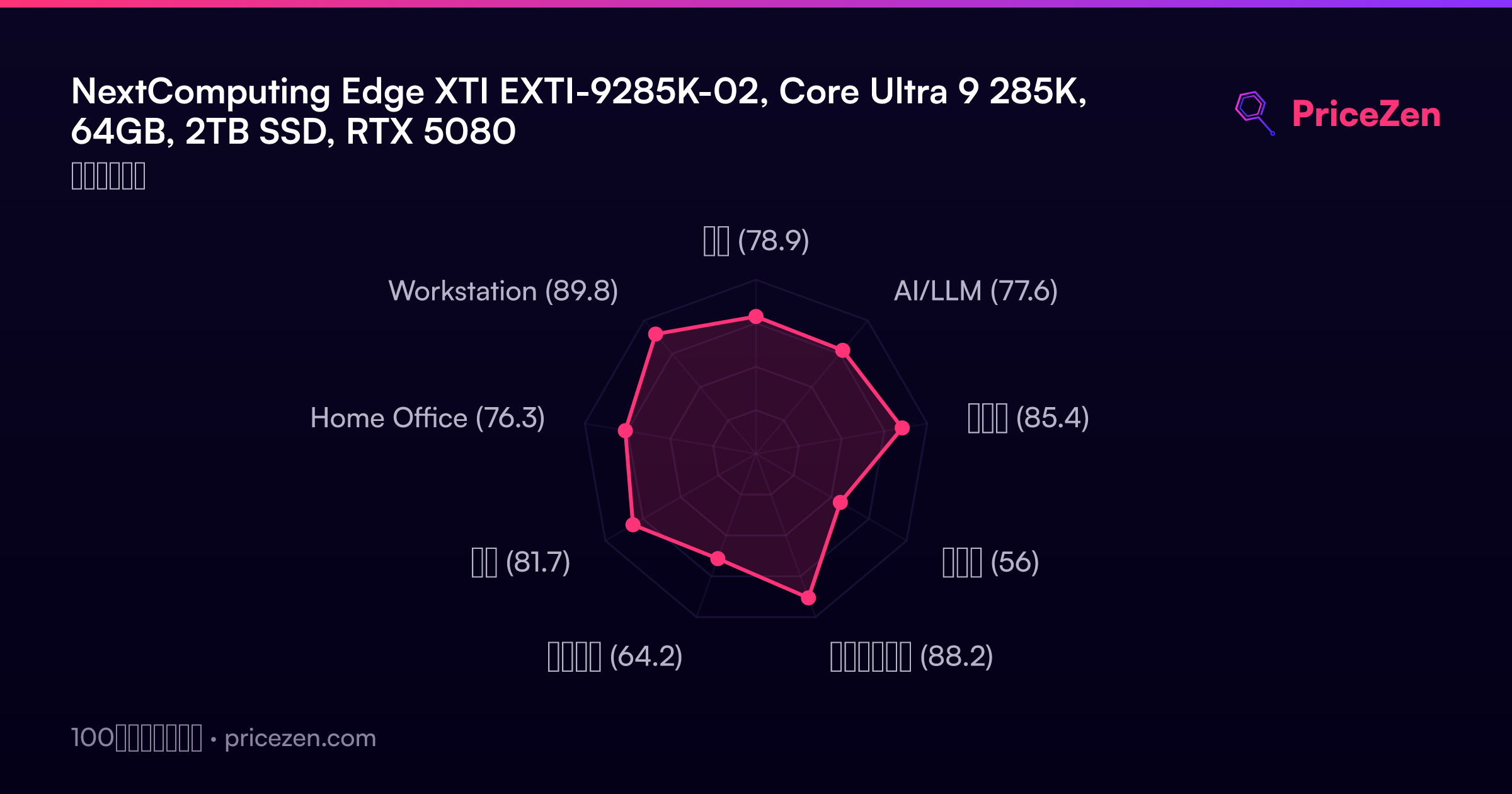
- 総合78.9
- AI/LLM77.6
- ゲーム85.4
- 携帯性56
- クリエイター88.2
- ビジネス64.2
- 開発81.7
- Home Office76.3
- Workstation89.8