Lenovo P Series 30GA005LUS 2024, Xeon w3-2423, 32GB, 1TB SSD, T1000

1000W電源でアップグレードにも余裕 11月28日に確認済み
67/100 総合スコア
- CPU
- Intel Xeon w3-2423
- RAM
- 32 GB
- Storage
- 1 TB
- GPU
- NVIDIA T1000
- Form factor
- workstation
- Psu
- 1000 W
- OS
- Windows 11 Pro for Workstations
1店舗の価格を比較
安い順。新品・整備済み品・バンドルのオファーは分けて表示するので、同じ条件どうしで比較できます。
| 店舗 | 販売元 | カラーと状態 | 価格 | 最安との差 | 最終確認 | リンク |
|---|---|---|---|---|---|---|
| 新品1件の価格単品 | ||||||
| 最後の確認時に在庫なし | ||||||
| Amazon | 不明 | 記載なし | 価格なし | 在庫切れ | 不明 | 店舗へ |
 出典: PriceZen
過去7日以内に確認した価格を「現在の価格」としています。 「マーケットプレイス出品者」とは、その店舗自身ではなく、店舗上の第三者の出品者を指します。











概要
The 30-Second Version
The ThinkStation P5 is a port-rich, rock-solid workstation for CAD and BIM pros. The 96th percentile port selection and ECC RAM are the highlights, but the 6-core Xeon CPU is a real weak spot. Worth it if you need workstation reliability, skip it if you need raw speed.
Pros & Cons
長所
- Port selection is best-in-class, with 96th percentile connectivity. 95th
- ECC RAM means fewer crashes on long renders. 76th
- Upgradeable to 512GB of RAM, which is absurd in a good way. 70th
- Rock solid build quality, as you'd expect from a ThinkStation. 69th
短所
- The 6-core CPU is a real bottleneck for multi-threaded work.
- 19kg means you're not moving this thing around.
- The T1000 is fine for CAD but weak for GPU rendering.
- No price listed, which usually means it's not cheap.
実証データ
Performance
The T1000 GPU is a professional card, not a gaming one. It's in the 62nd percentile, which means it handles viewport acceleration and light rendering fine, but don't expect to fire up Cyberpunk on this thing. The 32GB of ECC RAM is a nice touch for data integrity, and it's upgradeable to 512GB if you really need to go wild. The 1TB PCIe 4.0 SSD is fast enough for most workflows, though you'll probably want external storage for big projects. The weak spot is the CPU. A 6-core Xeon at 2.1GHz is going to feel sluggish if you're doing anything that scales across cores, like video encoding or complex simulations.
Specifications
Full Specifications
Processor
| CPU | Intel Xeon w3-2423 |
| Cores | 6 |
| Frequency | 2.1 GHz |
| L3 Cache | 15 MB |
Graphics
| GPU | NVIDIA T1000 |
| Type | Discrete |
| VRAM | 4 GB |
Memory & Storage
| RAM | 32 GB |
| RAM Generation | DDR5 |
| Storage | 1 TB |
| Storage Type | NVMe SSD |
Build
| Form Factor | workstation |
| PSU | 1000 |
| Weight | 19.0 kg / 41.9 lbs |
Connectivity
| USB-C Ports | 3 |
| USB Ports | 7 |
| HDMI | 4x Mini DisplayPort 1.4 Output |
| DisplayPort | 4x Mini DisplayPort 1.4 |
| Wi-Fi | Wi-Fi 6E |
| Bluetooth | Bluetooth 5.1 |
| Ethernet | Gigabit Ethernet |
System
| OS | Windows 11 Pro for Workstations |
vs Competition
Compared to the HP OMEN GT22-3080 or the Dell Aurora, this thing looks slow on paper. Those are gaming machines with high-core-count CPUs and beefy GPUs. But they don't have ECC RAM, and they don't have the same port selection or reliability. The Apple Mac Studio M5 Max is the real competitor here for creative pros, and it'll smoke this ThinkStation in most benchmarks. But if you're locked into Windows and need PCIe expansion or specific professional GPU drivers, the Lenovo makes sense. The ASUS ROG GM700 is another gaming option that'll beat it on raw speed but not on workstation features.
| Spec | Lenovo P Series 30GA005LUS | Apple Mac Studio M5 Max | HP OMEN GT16-0364 | Dell Desktop ECT1250 | ASUS ROG GM700 | MSI Aegis ZS2 A9NVP-1407US |
|---|---|---|---|---|---|---|
| CPU | Intel Xeon w3-2423 | Apple M5 Max | AMD Ryzen 7 8700F | Intel Core Ultra 7 265 | AMD Ryzen 7 9800X3D | AMD Ryzen 9 9900X |
| RAM (GB) | 32 | 48 | 32 | 32 | 32 | 32 |
| Storage (GB) | 1024 | 1024 | 1024 | 2048 | 2048 | 2048 |
| GPU | NVIDIA T1000 | Apple (40-Core) | NVIDIA GeForce RTX 5070 | Intel UHD Graphics | NVIDIA GeForce RTX 5070 Ti | NVIDIA GeForce RTX 5070 |
| Form Factor | workstation | mini | mid-tower | sff | mid-tower | mid-tower |
| Psu W | 1000 | 480 | 850 | 180 | 850 | 750 |
| OS | Windows 11 Pro for Workstations | macOS | Windows 11 Home | Windows 11 Home | Windows 11 Home | Windows 11 Home |
| Compare | Compare | Compare | Compare | Compare |
| 製品 | CPU | GPU | RAM | ポート | ストレージ | 信頼性 |
|---|---|---|---|---|---|---|
| Lenovo P Series 30GA005LUS | 43.3 | 66.7 | 76.3 | 95.2 | 68.6 | 70.2 |
| Apple Mac Studio M5 Max Compare | 95.7 | 84.9 | 95 | 89.1 | 68.6 | 99.3 |
| HP OMEN GT16-0364 Compare | 69.3 | 90.7 | 87 | 97.9 | 53.2 | 70.2 |
| Dell Desktop ECT1250 Compare | 88 | 60 | 81.6 | 75 | 82.5 | 70.2 |
| ASUS ROG GM700 Compare | 80.3 | 94.6 | 81.6 | 96.1 | 90 | 37.7 |
| MSI Aegis ZS2 A9NVP-1407US Compare | 92.3 | 90.7 | 87 | 90.4 | 82.5 | 37.7 |
価格
Value & Pricing
Here's the thing: we don't have a price for this exact config, but the same model is listed between USD 3,235 and USD 5,649 across US retailers. That's a massive spread, so shop around. For that kind of money, you're paying for the workstation pedigree, the ECC RAM, and the port selection. If you need those things, it's worth it. If you don't, you can get a lot more raw performance from a gaming desktop for less.
詳細情報
Overview
The Lenovo ThinkStation P5 is a proper workstation, not a gaming rig in a fancy case. It's built around a Xeon w3-2423 and an NVIDIA T1000, which tells you exactly who it's for: people doing CAD, BIM, or other professional workloads that need stability more than flash. The port selection is genuinely impressive, landing in the 96th percentile for this category. You get a ton of USB-A, USB-C, and Mini DisplayPort outputs, which is a dream if you're running multiple monitors or specialized peripherals.
But the CPU is the bottleneck here. A 6-core Xeon at 2.1GHz base clock puts it in the 36th percentile for processing power. That's fine for single-threaded CAD work, but it'll choke on heavy renders or multitasking. The 32GB of ECC DDR5 is solid, and the 1TB NVMe SSD is quick, but this machine is a specialist, not an all-rounder.
Common Questions
Q: Can I upgrade the RAM later?
Yes, it has eight DIMM slots and supports up to 512GB using 64GB modules. The included 32GB is just a starting point.
Q: Is the T1000 good for gaming?
Not really. It's a professional GPU built for CAD and viewport acceleration, not gaming. You'll get playable frame rates in older titles, but modern games will struggle.
Q: Does it come with a keyboard and mouse?
Yes, Lenovo includes a USB wired keyboard and mouse in the box, which is a nice touch for a workstation.
Who Should Skip This
Skip this if you're a gamer, a video editor, or anyone doing heavy multi-threaded rendering. The 6-core CPU will frustrate you, and the T1000 isn't built for that kind of load. You'd be better off with a high-core-count gaming desktop or a Mac Studio for less money and more performance.
Verdict
Buy this if you're a CAD designer, engineer, or BIM specialist who needs a stable, expandable Windows workstation with tons of ports. The ECC RAM and professional GPU drivers are the real selling points. If you're doing heavy rendering, video editing, or anything that scales across cores, look elsewhere. This CPU just doesn't have the muscle.
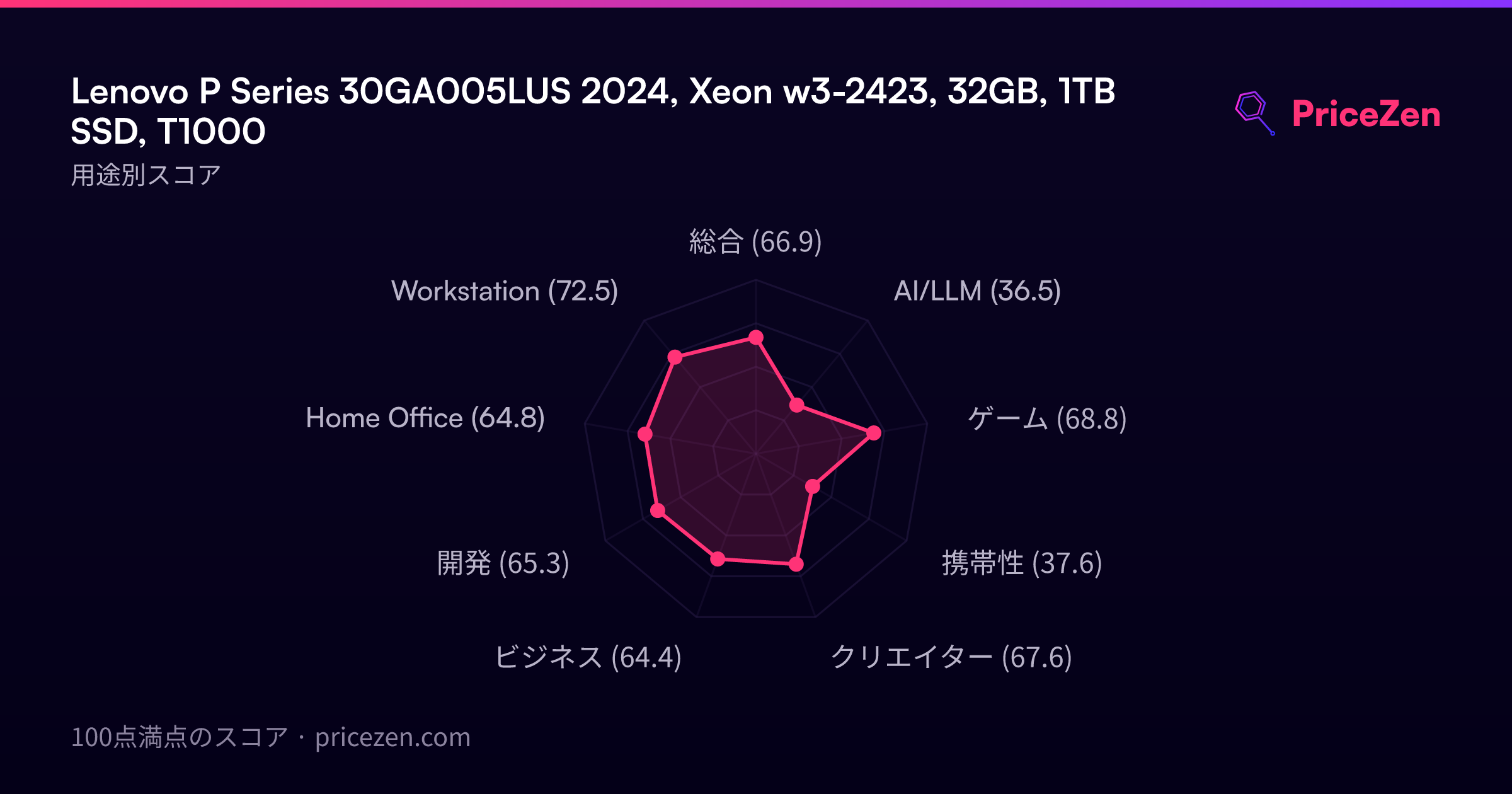
Usage Scores
- 総合66.9
- AI/LLM36.5
- ゲーム68.8
- 携帯性37.6
- クリエイター67.6
- ビジネス64.4
- 開発65.3
- Home Office64.8
- Workstation72.5