ASUS NUC 15 Pro RNUC15CRKC5063CU 2025, Core 5 210H, 16GB, 512GB SSD, Black

3基のUSB-Cポートで最新機器にも 11月29日に確認済み
59/100 総合スコア
- CPU
- Intel Core 5 210H
- RAM
- 16 GB
- Storage
- 512 GB
- GPU
- Intel Graphics
- Form factor
- mini
- Psu
- 120 W
- OS
- Windows 11 Pro
1店舗の価格を比較
安い順。新品・整備済み品・バンドルのオファーは分けて表示するので、同じ条件どうしで比較できます。
| 店舗 | 販売元 | カラーと状態 | 価格 | 最安との差 | 最終確認 | リンク |
|---|---|---|---|---|---|---|
| 新品1件の価格単品 | ||||||
| 過去7日間は確認していないため、これらの価格は変わっている可能性があります | ||||||
| Amazon | マーケットプレイス出品者 | 記載なし | ¥216,448 | 11月3日 | 店舗へ | |
 出典: PriceZen, 2026年11月3日に確認
過去7日以内に確認した価格を「現在の価格」としています。 「マーケットプレイス出品者」とは、その店舗自身ではなく、店舗上の第三者の出品者を指します。
価格履歴
その日に確認その日は未確認、オファーは継続中
出典: PriceZen, checked 2026年11月3日











概要
The 30-Second Version
The ASUS NUC 15 Pro is a tiny, well-connected mini PC built for students and home office work. The Core 5 210H and 16GB of DDR5 handle productivity tasks fine, but the integrated graphics kill any gaming ambitions. Pricing ranges from USD 999 to USD 1,429 in the US, so shop carefully. Buy it for the size and port selection, not for raw power.
Pros & Cons
長所
- Incredibly compact at 0.36kg, easy to mount or carry 78th
- Excellent port selection with Thunderbolt 4, Wi-Fi 7, and dual HDMI 2.1
- 16GB of fast DDR5 RAM handles multitasking well
- Windows 11 Pro included, no OS upgrade needed
- Low power draw at 120W keeps energy costs down
短所
- Integrated graphics can't handle gaming or GPU-heavy work
- 512GB storage fills up fast for media or large projects
- CPU performance is middle of the pack for the price
- Customer rating of 2.2 out of 5 from early buyers is concerning
- Price varies wildly across vendors, easy to overpay
実証データ
Performance
The Core 5 210H is a solid mid-range mobile chip that ASUS has dropped into a desktop form factor. The 8-core setup handles multitasking well, and the 16GB of 5600 MHz DDR5 gives Windows 11 Pro enough breathing room to keep dozens of browser tabs, a few Office apps, and a video call running without stuttering. The CPU lands in the 41st percentile for mini PCs, which puts it right around average. Not a barn burner, but not a slouch either.
The 512GB PCIe 4.0 SSD is quick for boot times and app launches, though the storage capacity itself sits in the 43rd percentile. That's fine for a student or office worker, but you'll want to keep an eye on it if you're storing lots of media or large project files. The integrated graphics are the real bottleneck here. The GPU score sits in the 52nd percentile, which sounds okay until you realize that's against other mini PCs, not gaming desktops. For everyday productivity, it's perfectly adequate. For anything graphics-heavy, it's going to struggle.
Specifications
Full Specifications
Processor
| CPU | Intel Core 5 210H |
| Cores | 8 |
| Frequency | 2.2 GHz |
| L3 Cache | 12 MB |
Graphics
| GPU | Intel Graphics |
| Type | Integrated |
Memory & Storage
| RAM | 16 GB |
| RAM Generation | DDR5 |
| Storage | 512 GB |
| Storage Type | NVMe SSD |
Build
| Form Factor | mini |
| PSU | 120 |
| Weight | 0.7 kg / 1.5 lbs |
Connectivity
| USB-C Ports | 3 |
| USB Ports | 3 |
| Thunderbolt | Thunderbolt 4 x 2 |
| HDMI | 2x HDMI 2.1 |
| DisplayPort | 1x DisplayPort |
| Wi-Fi | Wi-Fi 7 |
| Bluetooth | Bluetooth 5.4 |
| Ethernet | 2.5 GbE |
System
| OS | Windows 11 Pro |
vs Competition
Stacked against the Lenovo Legion Tower 5a Gen 10 or the HP OMEN GT16-0364, the NUC 15 Pro looks like it's playing a different sport. Those machines are full-size gaming desktops with dedicated GPUs and way more raw power. But they're also huge, power-hungry, and overkill for someone who just needs a reliable office machine. The NUC wins on footprint, portability, and power efficiency. It loses on every performance metric that matters for gaming or creative work.
The Dell Tower Plus EBT2250 is a more interesting comparison. It's a traditional desktop aimed at similar productivity use cases, but it gives you more room for upgrades and typically better CPU performance at a similar price. The trade-off is size and portability. If you never plan to move your computer and you want the option to add a GPU later, the Dell makes more sense. If you want something you can mount behind a monitor or carry between home and school, the NUC is the better fit.
| Spec | ASUS NUC 15 Pro RNUC15CRKC5063CU | Corsair ONE i600 | MSI Vision Elite ZS VisEZS9NVZ1481 | Cooler Master NR2 Pro AYG-M2C7-N68GII32-N1 | Lenovo Legion Tower 7i Gen 8 | HP 27inch All in One Desktop Computer All-In-One |
|---|---|---|---|---|---|---|
| CPU | Intel Core 5 210H | Intel Core Ultra 9 285K | AMD Ryzen 9 9950X3D | Intel Core Ultra 7 265KF | Intel Core i9 14900KF | Intel Core Ultra 7 155U |
| RAM (GB) | 16 | 64 | 64 | 32 | 32 | 64 |
| Storage (GB) | 512 | 4096 | 2048 | 2048 | 1024 | 4096 |
| GPU | Intel Graphics | NVIDIA GeForce RTX 5080 | NVIDIA GeForce RTX 5090 | NVIDIA GeForce RTX 5080 | NVIDIA GeForce RTX 4070 SUPER | Intel Graphics |
| Form Factor | mini | sff | mid-tower | mini | mid-tower | aio |
| Psu W | 120 | 1000 | 1300 | 850 | - | - |
| OS | Windows 11 Pro | Windows 11 Home | Windows 11 Pro | Windows 11 Home | Windows 11 Pro | Windows 11 Pro |
| Compare | Compare | Compare | Compare | Compare |
| 製品 | CPU | GPU | RAM | ポート | ストレージ | 信頼性 |
|---|---|---|---|---|---|---|
| ASUS NUC 15 Pro RNUC15CRKC5063CU | 47.4 | 50 | 53.9 | 78.3 | 40.5 | 37.7 |
| Corsair ONE i600 Compare | 98 | 97.4 | 98 | 97.2 | 98.1 | 32.5 |
| MSI Vision Elite ZS VisEZS9NVZ1481 Compare | 99.4 | 99.3 | 93.9 | 72.6 | 90 | 37.7 |
| Cooler Master NR2 Pro AYG-M2C7-N68GII32-N1 Compare | 96.1 | 97.4 | 87 | 67.2 | 82.5 | 11.7 |
| Lenovo Legion Tower 7i Gen 8 Compare | 94.8 | 93 | 76.4 | 98.3 | 53.3 | 70.2 |
| HP 27inch All in One Desktop Computer All-In-One Compare | 44.5 | 60.1 | 93.9 | 40.7 | 97 | 70.2 |
価格
Value & Pricing
Pricing on this thing is all over the place. In the US, you'll see it listed anywhere from USD 999 to USD 1,429 across six listings. That's a USD 430 spread for the exact same hardware. If you're shopping in Canada, the range is CAD 1,500 to CAD 1,914, a CAD 414 gap. The best US deal in our database comes from Newegg, so start there if you're buying stateside.
At the low end of that range, the NUC 15 Pro makes a decent case for itself. You're getting a compact, well-connected Windows 11 Pro machine with modern DDR5 and Wi-Fi 7. At the high end, though, you're paying a premium for the small form factor, and that's a harder sell. For USD 1,400, you could get a much more capable desktop with a dedicated GPU. The value here depends entirely on how much you care about size and how carefully you shop.
詳細情報
Overview
The ASUS NUC 15 Pro is one of those machines that makes you do a double take when you see it in person. It's tiny. Like, genuinely small. At 0.36kg, you could toss this thing in a backpack and forget it's there. But inside that little black box sits an Intel Core 5 210H, an 8-core chip running at 2.2GHz, paired with 16GB of DDR5 and a 512GB NVMe SSD. That's a real computer, not a toy.
ASUS is aiming this squarely at students, home office workers, and anyone who wants a clean desk without sacrificing a usable Windows 11 Pro machine. The port selection is honestly kind of wild for this size. You get Thunderbolt 4, three USB-C ports, three USB-A ports, dual HDMI 2.1, 2.5G Ethernet, and Wi-Fi 7. That's more connectivity than some full-size desktops we've seen. The port setup lands in the 79th percentile for mini PCs, which is well above average.
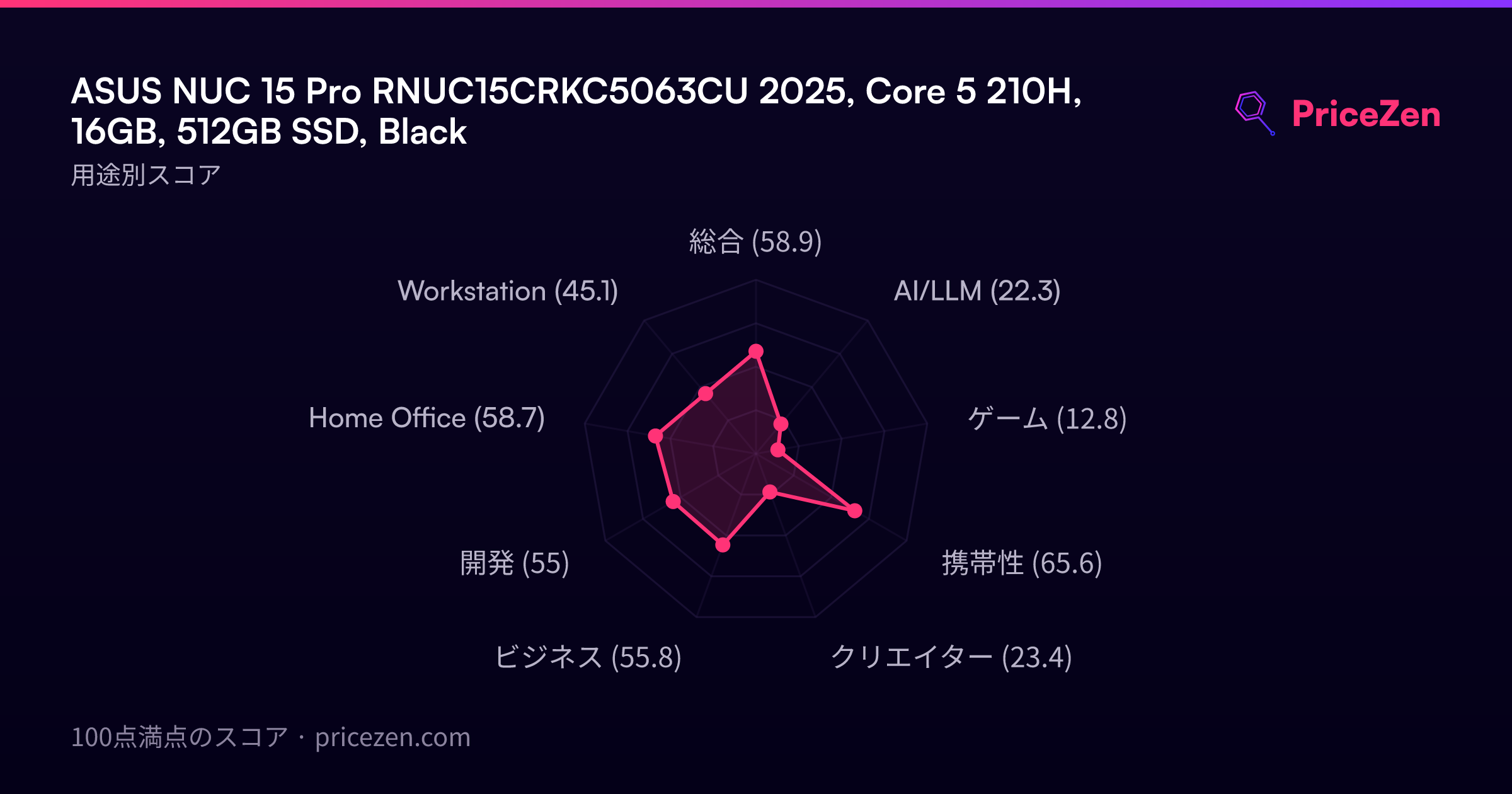
But here's the thing. The overall score in our database comes in at 55.8 out of 100, and the gaming score is a rough 12. This is not a machine for playing anything beyond casual indie titles. The integrated Intel Graphics are fine for spreadsheets, video calls, and web browsing, but they're not going to push frames in anything demanding. If you know that going in, this little box makes a lot of sense. If you don't, you'll be disappointed fast.
Common Questions
Q: What kind of tasks is the NUC 15 Pro actually good at?
This machine is built for everyday productivity. Think web browsing, document editing, video calls, spreadsheets, and light multitasking. The 8-core Core 5 210H and 16GB of DDR5 handle those workloads without breaking a sweat. It's not designed for gaming, video editing, or 3D rendering, so keep expectations in check.
Q: Can I upgrade the RAM or storage later?
The NUC 15 Pro uses standard DDR5 SODIMM slots and an M.2 2280 PCIe 4.0 SSD, so both are technically upgradeable. The 512GB drive is on the smaller side, so adding a larger SSD down the road is a reasonable upgrade path. Just keep in mind that the compact chassis means you'll be working in tight quarters.
Q: Does the integrated graphics handle any gaming at all?
You can play very light indie games, older titles, or browser-based games, but that's about it. The integrated Intel Graphics sit in the 52nd percentile for mini PCs, which is fine for display output and video playback but nowhere near enough for modern 3D games. If gaming matters at all, this is not the machine for you.
Q: Is the NUC 15 Pro good for a multi-monitor setup?
Yes, actually. With dual HDMI 2.1 ports, Thunderbolt 4, and multiple USB-C outputs, you can drive at least two monitors easily, possibly three with the right adapters. The integrated graphics can handle multiple displays for productivity work without issue. Just don't expect to run high-refresh-rate gaming across all of them.
Who Should Skip This
If you're a gamer, a video editor, or anyone who needs real GPU horsepower, skip this. The integrated graphics are a hard ceiling, and no amount of RAM or fast storage will fix that. You'd be much better off with a mid-range gaming desktop or a workstation with a dedicated GPU, even if it means giving up the tiny form factor.
Also skip it if you're on a tight budget and don't care about size. The compact design commands a premium, and you can get more raw performance for the same money in a traditional desktop. The Dell Tower Plus EBT2250 or similar machines offer better upgrade paths and stronger CPUs at comparable prices. The NUC only makes sense if the small footprint is a genuine priority.
Verdict
For students and home office workers who value desk space and portability, the NUC 15 Pro is a genuinely good option, especially if you can snag it at the lower end of the price range. The port selection is excellent, the DDR5 RAM keeps things snappy, and Windows 11 Pro means you're ready to go out of the box. The compact score of 64.4 in our database reflects that this is where the machine shines.
But if you're looking for a general-purpose desktop that can handle some gaming or creative work on the side, look elsewhere. The gaming score of 12 out of 100 tells the story. This is a productivity machine, full stop. And with a customer rating of just 2.2 out of 5 from early buyers, it's worth doing your homework before pulling the trigger. The hardware specs are fine, but that low rating suggests some buyers expected more than this little box can deliver.
Usage Scores
- 総合59
- AI/LLM22.3
- ゲーム12.8
- 携帯性65.7
- クリエイター23.4
- ビジネス55.9
- 開発55.1
- Home Office58.7
- Workstation45.1