Lenovo P Series P3 Tower Gen 2, Core Ultra 7 265K vPro, 48GB, 256GB SSD, RTX A400, Schwarz
The Intel Core Ultra 7 265K vPro 20-core 4.6GHz CPU and NVIDIA RTX A400 4GB VRAM deliver solid workstation performance, backed by 48GB DDR5 RAM and an 1100W PSU. Its 8.65kg mid-tower build and WiFi 7 connectivity make it a practical choice for office environments. Best for workstation users who need reliable multi-threaded processing and ISV-certified graphics for CAD or engineering tasks.

現在、販売店の最新価格はありません
概要
The 30-Second Version
The P3 Tower Gen 2 pairs a near-top-tier 20-core Core Ultra 7 265K with 48GB of DDR5, then cheapens the deal with a 256GB SSD and a 4GB RTX A400. Owners love the quiet, solid build, but sentiment lags the spec sheet. At EUR 4,799 from Lenovo, it's a great CPU-first workstation if you budget for storage and maybe a GPU upgrade. Graphics-heavy users should look elsewhere.
Pros & Cons
長所
- Core Ultra 7 265K vPro with 20 cores ranks in the 97th percentile for CPU 97th
- 48GB of DDR5 is one of the best memory configs in this category (93) 93rd
- Owners consistently praise the solid build quality and quiet operation 85th
- 1100W PSU and expandable mid-tower leave real room for upgrades 70th
- WiFi 7, HDMI 2.1 and six USB-A ports cover most desk setups
短所
- 256GB NVMe SSD is a real letdown, ranking at just 19 for storage
- RTX A400 with 4GB VRAM is only middle of the pack (64) for GPU work
- Owner sentiment ranks at 35, well below what the specs promise
- Only one USB-C port on a machine at this price
- EUR 4,799 with a single listing means no price competition to shop
オーナーの声
The Word on the Street
購入者の評価が時間とともにどう変化したか
独自顧客が実際にレビューを書いた時期に基づいています。発売当初の高評価が続いたかどうかがわかります。
書かれたレビュー 8件、2026/09~2026/10:満足 7件、不満 1件
ストア評価全34件:4.4★。 多くの購入者はレビューを書かずに評価だけを付けています。 グラフは書かれたレビュー8件を数えています。
- 2026/10~2026/123件中2件が満足
Buyers praised the compact size, cooling, and upgradability, but one criticized high RAM costs, NPU limitations, and performance versus an older machine.
- Compact size with good cooling and reliable performance.
- Upgradability for graphics and future use as a home server.
- Expensive RAM and need for discrete GPU to use NPU features.
- Performance not better than older CPU; bloatware slows system.
- 2026/07~2026/095件中5件が満足
Buyers in Q3 2026 praised the ThinkStation P3 Tower Gen 2 for its solid build, quiet operation, and strong performance in business, CAD, and virtualization tasks. Some noted the base GPU and RAM are limiting for heavier CAD work, suggesting upgrades.
- Fast, quiet, and well-built; handles business, IT, multitasking, and demanding workloads without issues.
- Proper tower with good expandability, making future upgrades easier than smaller systems.
- CAD performance is adequate for small assemblies, but base GPU and 16GB RAM are limiting; recommend higher specs.
- Quick setup, under 30 minutes, and runs virtualized environments like EVE-NG without hiccups.
各点は書かれたレビュー1件で、書かれた月に置いています。満足 = 4〜5★、普通 = 3★、不満 = 1〜2★。 期間ごとの要約は英語です。
実証データ
Performance
Start with the chip, because it's the reason to buy this thing. The Core Ultra 7 265K vPro brings 20 cores and a 4.6GHz clock, and our CPU ranking puts it at 97 out of 100 against comparable machines. For compiling code, running simulations, chewing through large datasets or juggling a dozen VMs, that's the kind of headroom you feel every single day. Pair it with 48GB of DDR5, which ranks at 93, and you've got a machine that won't start swapping the moment you open a big assembly file alongside your browser and your IDE. The vPro bit matters too if you're buying for a fleet, since it's the manageability layer IT departments actually ask for.
Then there's the other half of the equation. The RTX A400 carries 4GB of VRAM and our GPU ranking places it at 64, solidly middle of the pack. It's a display-and-light-3D card, fine for driving monitors and modest CAD viewports, not for GPU rendering or serious AI work. Storage is the weak spot: 256GB ranks at just 19, which lags behind most machines we track in this class, and Windows 11 Pro plus a couple of professional apps will eat that fast. The 1100W PSU is the silver lining, since there's clearly room in the chassis for a bigger card later, and owners repeatedly praise the expandable tower design. Ports land at 69, about average: DisplayPort, HDMI 2.1, one USB-C, six USB-A, Ethernet and WiFi 7. Plenty of USB-A, but only a single USB-C is stingy on a modern workstation.
Specifications
Full Specifications
Processor
| CPU | Intel Core Ultra 7 265K |
| Cores | 20 |
| Frequency | 4.6 GHz |
| L3 Cache | 30 MB |
Graphics
| GPU | NVIDIA RTX A400 |
| Type | Discrete |
| VRAM | 4 GB |
| VRAM Type | GDDR6 |
Memory & Storage
| RAM | 48 GB |
| RAM Generation | DDR5 |
| Storage | 256 GB |
| Storage Type | NVMe SSD |
Build
| Form Factor | mid-tower |
| PSU | 1100 |
| Weight | 8.7 kg / 19.1 lbs |
Connectivity
| USB-C Ports | 1 |
| USB Ports | 6 |
| HDMI | 1x HDMI 2.1 |
| DisplayPort | 2x DisplayPort 1.4 |
| Wi-Fi | WiFi 7 |
| Bluetooth | Bluetooth 5.4 |
| Ethernet | Ethernet (RJ45) |
System
| OS | Windows 11 Pro |
vs Competition
Cross-shopping this against the Apple Mac Studio M5 Max is the most interesting fork in the road. The P3 Tower wins on raw expandability and sheer memory: 48GB of DDR5 ranks at 93 in our data, the 1100W PSU leaves obvious headroom, and owners specifically call out the upgrade-friendly tower design. If you want to add cards and drives over the next few years rather than replace the whole box, the Lenovo is the more flexible bet. The trade-off is footprint, since our compact score for this machine is just 30.9/100 and it tips the scales at 8.65kg.
Against the Dell Desktop ECT1250 and the HP OMEN TPC-W062-MT, the argument shifts to what the machine is built for. Our model scores the P3 at 81.8 for workstation duty, and the 97-ranked 20-core vPro chip is the backbone of that. If your day is CAD, compilation and virtualization, that's where this config earns its keep. But the ASUS ROG GM700 and CLX SET TGMSETRTU5204BM are worth a look if graphics matter more to you, because the RTX A400's 4GB of VRAM and its 64 GPU ranking are the clearest place this machine gives ground. Buy the Lenovo for the processor and the memory, not the graphics.
| Spec | Lenovo P Series P3 Tower Gen 2 | Apple Mac Studio M5 Max | Dell Desktop ECT1250 | HP OMEN GT16-0364 | ASUS ROG GM700 | CLX SET TGMSETRTU5204BM |
|---|---|---|---|---|---|---|
| CPU | Intel Core Ultra 7 265K | Apple M5 Max | Intel Core Ultra 7 265 | AMD Ryzen 7 8700F | AMD Ryzen 7 9800X3D | Intel Core i9 14900KF |
| RAM (GB) | 48 | 36 | 32 | 32 | 32 | 64 |
| Storage (GB) | 256 | 1024 | 2048 | 1024 | 2048 | 8192 |
| GPU | NVIDIA RTX A400 | Apple (32-Core) | Intel UHD Graphics | NVIDIA GeForce RTX 5070 | NVIDIA GeForce RTX 5070 Ti | NVIDIA GeForce RTX 5070 |
| Form Factor | mid-tower | mini | sff | mid-tower | mid-tower | mid-tower |
| Psu W | 1100 | 480 | 180 | 850 | 850 | 850 |
| OS | Windows 11 Pro | macOS | Windows 11 Home | Windows 11 Home | Windows 11 Home | Windows 11 Home |
| Compare | Compare | Compare | Compare | Compare |
| 製品 | CPU | GPU | RAM | ポート | ストレージ | User Sentiment | 信頼性 | ユーザー評価 |
|---|---|---|---|---|---|---|---|---|
| Lenovo P Series P3 Tower Gen 2 | 96.8 | 65.8 | 92.5 | 68.7 | 18.7 | 34.5 | 69.9 | 85.3 |
| Apple Mac Studio M5 Max Compare | 95.7 | 85.2 | 92.4 | 88.9 | 68.9 | 95 | 99.3 | 81 |
| Dell Desktop ECT1250 Compare | 88.2 | 60.3 | 81.7 | 74.5 | 82.7 | 98.5 | 69.9 | 99 |
| HP OMEN GT16-0364 Compare | 69.6 | 90.8 | 87.1 | 97.8 | 53.6 | 98.5 | 69.9 | 99 |
| ASUS ROG GM700 Compare | 80.6 | 94.7 | 81.7 | 96 | 90.1 | 98.5 | 37.1 | 99.6 |
| CLX SET TGMSETRTU5204BM Compare | 94.9 | 90.8 | 96.5 | 84.1 | 99.1 | 98.5 | 11.5 | 94.8 |
価格
Value & Pricing
At EUR 4,799 from Lenovo, and that's the only listing we currently track for this config, you're paying a workstation premium for the CPU, the memory and the vPro platform. There's no cross-store price spread to play here, so the usual trick of waiting for a cheaper retailer doesn't apply. We track prices over time, partly through our community browser extension, and right now there's simply one door to walk through.
Is it worth it? Depends what you're buying it for. If your workload is CPU-bound and memory-hungry, the 97-ranked processor and 48GB of DDR5 justify a lot of that number. But you're also paying flagship money for a 256GB drive and a 4GB GPU, and several owners flag exactly that imbalance, with RAM upgrade costs coming up as a recurring complaint. Budget for a storage drive on day one, and possibly a graphics card down the line, before you call this a finished purchase.
詳細情報
Overview
The Lenovo P Series P3 Tower Gen 2 is a proper workstation, not a gaming box wearing a suit. Our system pulled the config with an Intel Core Ultra 7 265K vPro (20 cores, up to 4.6GHz), 48GB of DDR5, an NVIDIA RTX A400 with 4GB of VRAM and a 256GB NVMe SSD, all sitting behind a 1100W power supply in a mid-tower that weighs 8.65kg. Windows 11 Pro comes preinstalled. That spec sheet tells you exactly who this is aimed at: people running CAD, engineering tools, heavy spreadsheets and code, where CPU throughput and memory matter more than frame rates.
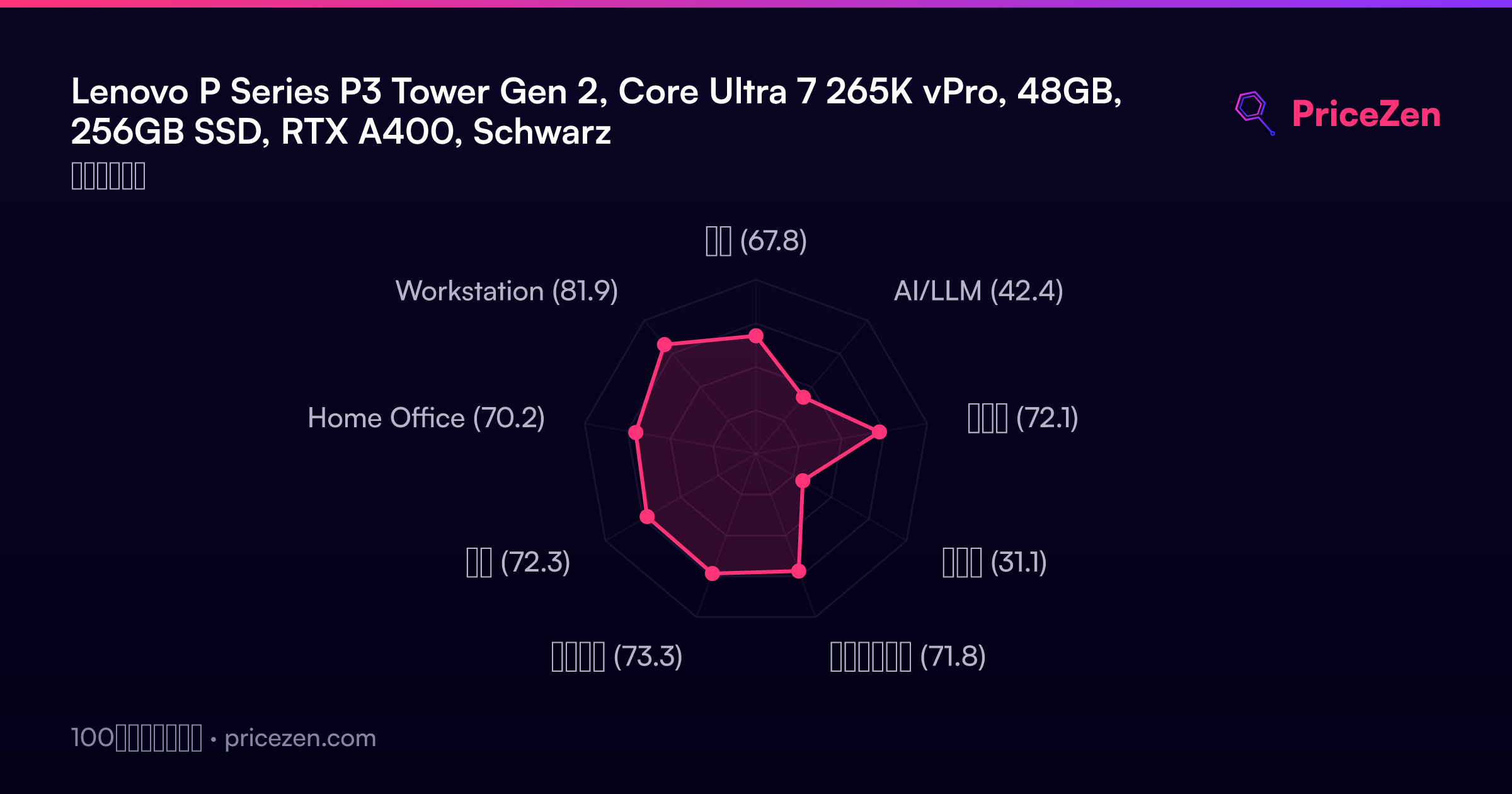
And the numbers back that up. In our ranking against everything else in this category, the CPU lands in the 97th percentile, which is about as close to the top as it gets, and the 48GB of RAM sits at 93, one of the best memory loads you'll find on a machine like this. Our scoring model gives it 81.8/100 for workstation use, 73.2 for business and 72.2 for developer work. Those are strong, focused scores rather than a jack-of-all-trades spread.
What makes it interesting is the mismatch baked into the config. You get a near-top-tier processor and a huge amount of memory paired with an entry-level professional GPU and a tiny boot drive. Owners mostly love the build and how quiet it runs, but the sentiment picture is softer than the spec sheet suggests, and that gap is the real story here.
Common Questions
Q: Is 256GB of storage really enough?
Honestly, no. Our storage ranking puts this config at 19, one of the weaker points on the whole machine, and Windows 11 Pro plus professional apps will fill it quickly. The expandable tower design owners praise means adding a drive is straightforward, but factor that cost into your budget from day one.
Q: Can the RTX A400 handle 3D rendering or AI workloads?
Not seriously. With 4GB of VRAM it ranks at 64 in our GPU data, middle of the pack, and it's built for display output and light CAD viewports rather than heavy rendering. The 1100W PSU gives you plenty of headroom to drop in a stronger card later, which several owners see as the point of this chassis.
Q: Is 48GB of RAM overkill for business use?
It's generous, and that's a good thing. The 48GB of DDR5 ranks at 93 against comparable machines, so you can run VMs, large datasets and heavy multitasking without hitting a wall. Given that owners complain about how expensive RAM upgrades are on this platform, getting it configured up front is the smarter move.
Q: How does it compare to a gaming tower at a similar price?
Different priorities. Our model scores it 81.8 for workstation use on the strength of a CPU that ranks in the 97th percentile, while the GPU sits mid-pack. If you want frames rather than compile times, machines like the ASUS ROG GM700 are worth cross-shopping, but for CAD and development the Lenovo's processor and memory are the better foundation.
Who Should Skip This
Skip this config if your work is GPU-first. Video editors, 3D artists and anyone running local AI models will bump straight into the RTX A400's 4GB of VRAM, and owner feedback backs that up, with the base graphics card being one of the most consistent gripes. Look at the ASUS ROG GM700 or CLX SET TGMSETRTU5204BM instead, or budget for a serious GPU swap using that 1100W PSU.
Also skip it if desk space is tight or you want a plug-and-play machine with zero tinkering. Our compact score is just 30.9/100 and it weighs 8.65kg, so the Apple Mac Studio M5 Max is the tidier alternative. And if you refuse to open the case, the 256GB drive means this isn't finished out of the box.
Verdict
For engineers, developers and business users whose work lives on the CPU, this is a genuinely strong pick. The 20-core Ultra 7 265K and 48GB of DDR5 are both near the top of our rankings, the 81.8 workstation score reflects that, and owners report quiet operation, solid build quality and fast setup. The 4.4/5 rating across 34 reviews says most buyers are happy. Just go in knowing you'll want to add storage immediately, because 256GB is not a working drive on a machine like this.
For anyone doing GPU-heavy work, 3D rendering, video effects or local AI, we'd hold off on this exact configuration. The RTX A400 is a modest card and owner sentiment overall ranks at 35, dragged down by complaints about the base GPU and upgrade pricing. The good news is the 1100W PSU and expandable chassis mean this tower can grow into that role later. Buy it as a CPU-first foundation you plan to build on, not as a turnkey graphics workstation.
Usage Scores
- 総合67.8
- AI/LLM42.4
- ゲーム72.1
- 携帯性31.1
- クリエイター71.8
- ビジネス73.3
- 開発72.3
- Home Office70.2
- Workstation81.9