ASUS ROG NUC15JNK 2025, Core Ultra 9 275HX, 32GB, 2TB SSD, RTX 5070, Black
Intel Core Ultra 9 275HX 24コアプロセッサとNVIDIA GeForce RTX 5070 GPUを搭載し、5.92kgのコンパクトな筐体で本格的なゲーミング性能を実現している点が際立ちます。Wi-Fi 7やThunderbolt 4を含む豊富な接続端子を備え、2TBのNVMe SSDと32GB DDR5メモリにより高速なデータアクセスと快適なマルチタスクを提供します。このマシンは、省スペースで高フレームレートのゲームプレイやAIワークロードを処理したい開発者に最適です。

現在、販売店の最新価格はありません


概要
The 30-Second Version
The ASUS ROG NUC packs a 92nd-percentile CPU and a 94th-percentile port selection into a mini desktop. It's an absolute powerhouse for gaming and development, but local AI performance is a letdown at 58.8. Reliability is also a concern, so maybe grab an extended warranty.
Pros & Cons
長所
- CPU is a beast, landing in the 92nd percentile 93rd
- Port selection is best-in-class at the 94th percentile 92nd
- 32GB of fast 6400 MHz DDR5 RAM 91st
- 2TB NVMe SSD is both spacious and quick 90th
- Incredibly compact for the power on tap
短所
- AI and LLM performance is a real weak spot at 58.8
- Reliability score is mediocre, only in the 37th percentile
- RTX 5070 is limited to 8GB of VRAM
- Weighs a hefty 5.92kg for a 'mini' PC
- Price swings wildly between vendors
オーナーの声
The Word on the Street
購入者の評価が時間とともにどう変化したか
独自顧客が実際にレビューを書いた時期に基づいています。発売当初の高評価が続いたかどうかがわかります。
書かれたレビュー 2件、2025/07~2025/09:星なし 2件
ストア評価全2件:5.0★。 グラフは書かれたレビュー2件を数えています。
各点は書かれたレビュー1件で、書かれた月に置いています。満足 = 4〜5★、普通 = 3★、不満 = 1〜2★。
実証データ
Performance
This thing rips through CPU-heavy tasks. The 24-core Ultra 9 275HX is a standout, making it one of the best compact workstations we've seen for compiling code or rendering. The RTX 5070 is no slouch either, sitting in the 84th percentile for GPUs. It'll push high frame rates at 1440p without breaking a sweat, though the 8GB of VRAM might make you think twice about cranking textures to ultra in a few years. The 2TB NVMe SSD is also a leader, ranking in the 92nd percentile for storage speed and capacity. Just don't expect to run massive local AI models, that's the one area where this NUC falls flat on its face with a score of 58.8.
Specifications
Full Specifications
Processor
| CPU | Intel Core Ultra 9 275HX |
| Cores | 24 |
| Frequency | 2.7 GHz |
| L3 Cache | 36 MB |
Graphics
| GPU | NVIDIA GeForce RTX 5070 |
| Type | Discrete |
| VRAM | 8 GB |
| VRAM Type | GDDR7 |
Memory & Storage
| RAM | 32 GB |
| RAM Generation | DDR5 |
| Storage | 2 TB |
| Storage Type | NVMe SSD |
Build
| Form Factor | mini |
| PSU | 330 |
| Weight | 5.9 kg / 13.1 lbs |
Connectivity
| USB-C Ports | 2 |
| USB Ports | 6 |
| Thunderbolt | Thunderbolt 4 |
| HDMI | 2x HDMI 2.1 Output |
| DisplayPort | 2x DisplayPort 2.1 Output |
| Wi-Fi | Wi-Fi 7 |
| Bluetooth | Bluetooth 5.4 |
| Ethernet | 2.5G Ethernet Port |
System
| OS | Windows 11 Home |
vs Competition
Stacked against the competition, the ROG NUC carves out a unique niche. The Apple Mac Studio M4 Max will run circles around it for AI tasks and sips power by comparison, but you lose out on gaming and Windows flexibility. A traditional tower like the HP OMEN GT22-3080 or MSI MEG Vision X will give you more GPU for the dollar and better cooling, but they're massive in comparison. The Lenovo Legion 90Y6003JUS is a closer fight, but the ASUS pulls ahead with a stronger CPU and a much richer set of ports.
| Spec | ASUS ROG NUC15JNK | Apple Mac Studio M5 Max | Lenovo T Series Towers Legion Tower 5a Gen 10 | Dell Desktop ECT1250 | HP OMEN GT16-0364 | MSI Aegis ZS2 A9NVP-1407US |
|---|---|---|---|---|---|---|
| CPU | Intel Core Ultra 9 275HX | Apple M5 Max | AMD Ryzen 7 7800X3D | Intel Core Ultra 7 265 | AMD Ryzen 7 8700F | AMD Ryzen 9 9900X |
| RAM (GB) | 32 | 36 | 32 | 32 | 32 | 32 |
| Storage (GB) | 2048 | 1024 | 4096 | 2048 | 1024 | 2048 |
| GPU | NVIDIA GeForce RTX 5070 | Apple (32-Core) | NVIDIA GeForce RTX 5070 Ti | Intel UHD Graphics | NVIDIA GeForce RTX 5070 | NVIDIA GeForce RTX 5070 |
| Form Factor | mini | mini | mid-tower | sff | mid-tower | mid-tower |
| Psu W | 330 | 480 | 850 | 180 | 850 | 750 |
| OS | Windows 11 Home | macOS | Windows 11 Home | Windows 11 Home | Windows 11 Home | Windows 11 Home |
| Compare | Compare | Compare | Compare | Compare |
| 製品 | CPU | GPU | RAM | ポート | ストレージ | 信頼性 | ユーザー評価 |
|---|---|---|---|---|---|---|---|
| ASUS ROG NUC15JNK | 92.9 | 90.7 | 90.4 | 92.1 | 90 | 37.4 | 57.4 |
| Apple Mac Studio M5 Max Compare | 95.7 | 85.1 | 92.4 | 88.9 | 68.7 | 99.3 | 66.8 |
| Lenovo T Series Towers Legion Tower 5a Gen 10 Compare | 73.3 | 94.6 | 78 | 88.3 | 98.1 | 70.1 | 99.9 |
| Dell Desktop ECT1250 Compare | 88.2 | 60.2 | 81.6 | 74.6 | 82.6 | 70.1 | 98.2 |
| HP OMEN GT16-0364 Compare | 69.5 | 90.7 | 87.1 | 97.9 | 53.4 | 70.1 | 98.2 |
| MSI Aegis ZS2 A9NVP-1407US Compare | 92.4 | 90.7 | 87.1 | 90.3 | 82.6 | 37.4 | 99.2 |
価格
Value & Pricing
Pricing is a rollercoaster on this one, with a spread of over $3000 between the lowest and highest offers we found. You can snag it for as little as $2915, which is a solid deal for this much power in a small footprint. But at the $5931 end, you're getting into territory where you could build a full-tower with a much beefier GPU. Shop around and don't pay a cent over the low end if you can help it.
詳細情報
Overview
The ASUS ROG NUC NUC15JNK is a spec monster crammed into a tiny box. Its Intel Core Ultra 9 275HX lands in the 92nd percentile for CPU performance in our database, and the 32GB of 6400 MHz DDR5 RAM sits in the 91st. That's a lot of muscle for a machine you can almost hide behind a monitor. The port selection is best-in-class too, hitting the 94th percentile, so you won't be hunting for dongles.
Common Questions
Q: Can this run demanding games at 4K?
It can, but it's really in its sweet spot at 1440p. The RTX 5070 is a strong GPU in the 84th percentile, but its 8GB of VRAM will be a bottleneck in the most demanding 4K titles. You'll get a much smoother experience on a high-refresh 1440p monitor.
Q: Is the RAM and storage upgradeable?
ASUS NUCs typically use standard SODIMM slots and M.2 sockets, so you should be able to swap out the 32GB of DDR5 and the 2TB NVMe SSD down the line. That's a big plus for longevity, especially since the starting specs are already in the 91st and 92nd percentiles respectively.
Q: How loud does it get under load?
With a 330W power supply and a compact chassis, the fans will definitely make themselves known when you're pushing the 24-core CPU and RTX 5070 simultaneously. It's the price you pay for cramming this much heat into a small box, but you can expect it to be audible during intense gaming or rendering sessions.
Who Should Skip This
Skip this if you're diving into local AI workloads. The 58.8 score in that category is a real letdown and there are far better options for the money. You should also look elsewhere if rock-solid reliability is a must-have, as its 37th percentile score in our database is underwhelming. And if you don't absolutely need the tiny footprint, a traditional mid-tower will give you better cooling and more GPU for your dollar.
Verdict
If you need a tiny desktop that can game hard and chew through CPU workloads, this is one of the best on the market. The port selection is phenomenal, and the core specs are top-tier. Just be aware of the trade-offs: local AI performance is disappointing, and long-term reliability is a question mark. Grab it at the right price and you'll be thrilled.
Usage Scores
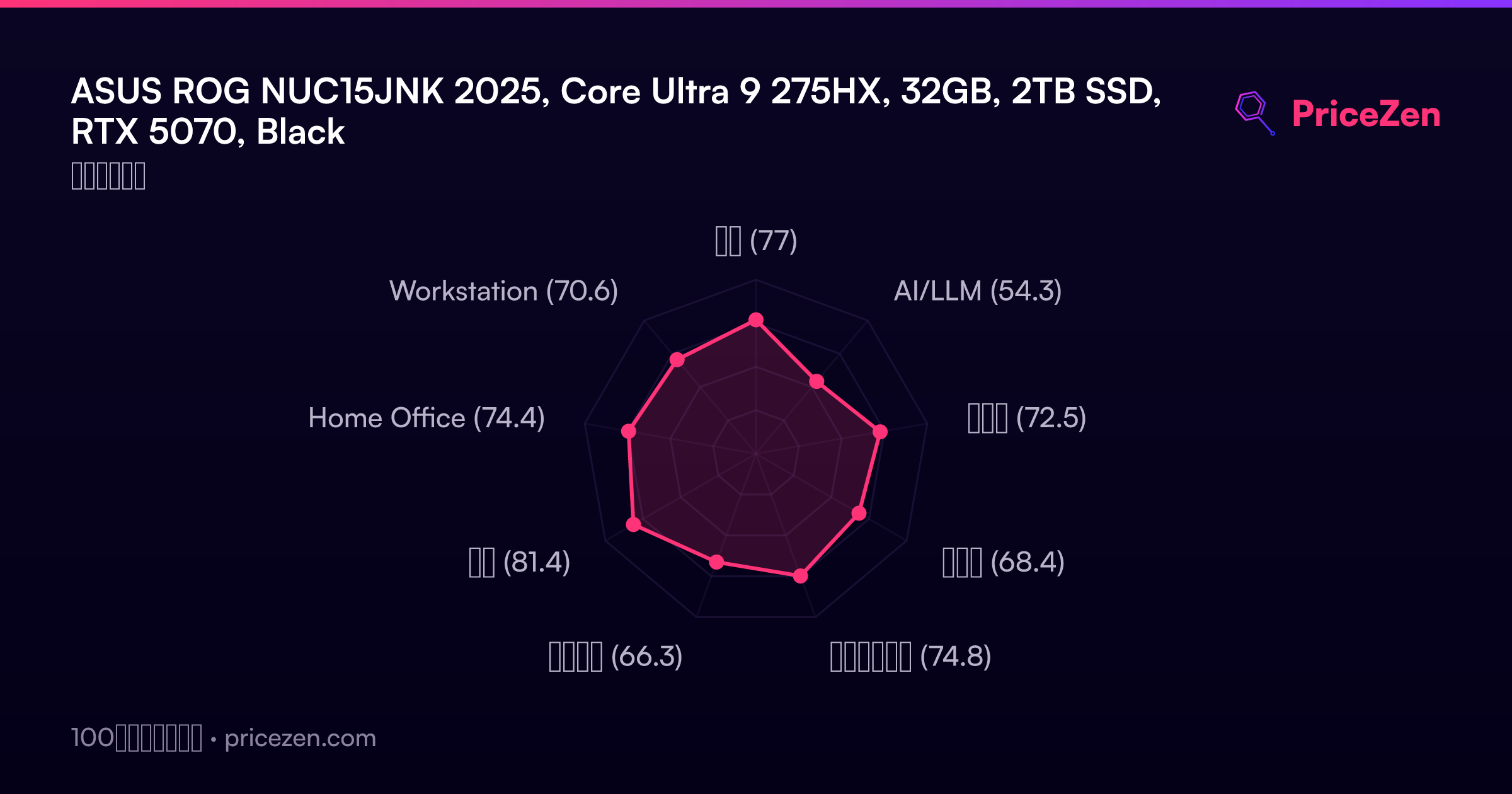
- 総合77
- AI/LLM54.3
- ゲーム72.5
- 携帯性68.4
- クリエイター74.8
- ビジネス66.3
- 開発81.4
- Home Office74.4
- Workstation70.6