HP OmniDesk 2025, Core i7-14700, 64GB, 4TB SSD, Black
The 20-core Intel Core i7-14700 processor and 64GB of DDR5 RAM deliver exceptional multitasking power for demanding workloads. A massive 4TB PCIe M.2 SSD provides fast boot times and ample local storage, complemented by extensive connectivity including Thunderbolt and Wi-Fi 6. This desktop is best for developers and data analysts who need to run multiple virtual machines and large datasets simultaneously without bottlenecks.

現在、販売店の最新価格はありません
概要
The 30-Second Version
The HP OmniDesk is a productivity-focused desktop that pairs a powerful Core i7 CPU with a chart-topping 64GB of RAM and 4TB SSD. It's an absolute multitasking monster for developers and data crunchers, but the lack of a dedicated GPU makes it a poor fit for gaming or creative work. Buy it for the incredible memory and storage, but only if you don't need graphical horsepower.
Pros & Cons
長所
- Massive 64GB of DDR5 RAM is ready for the heaviest multitasking 97th
- Huge 4TB SSD offers best-in-class storage space and speed 97th
- i7-14700 processor chews through multi-threaded workloads 87th
- Excellent port selection including Thunderbolt and Wi-Fi 6 83rd
- Clean, professional design that fits any office
短所
- Integrated graphics are a major bottleneck for gaming or 3D work
- Price is steep for a system without a dedicated GPU
- Some units may ship without the advertised Thunderbolt port
- Heavy and bulky at nearly 15 pounds
- Limited internal upgrade details available for the PSU and PCIe slots
オーナーの声
The Word on the Street
購入者の評価が時間とともにどう変化したか
独自顧客が実際にレビューを書いた時期に基づいています。発売当初の高評価が続いたかどうかがわかります。
書かれたレビュー 2件、2026年5月:満足 2件
ストア評価全2件:5.0★。 グラフは書かれたレビュー2件を数えています。
各点は書かれたレビュー1件で、書かれた月に置いています。満足 = 4〜5★、普通 = 3★、不満 = 1〜2★。
実証データ
Performance
In our testing, the 20-core i7-14700 is a beast for multi-threaded work. This chip sits in the 82nd percentile among all desktops we track, which translates to excellent performance for compiling code, rendering CPU-based projects, or running data analysis. The base clock of 2.1GHz is modest, but it'll boost up to 5.4GHz when you need a burst of single-core speed. For a developer or someone in a home office, this thing will feel snappy and responsive no matter what you throw at it.
The elephant in the room is the GPU. The integrated Intel UHD Graphics lands in the 33rd percentile, which is frankly underwhelming for a machine at this price. It's perfectly adequate for streaming video, using Office apps, or even light photo editing, but it's not built for gaming or GPU-accelerated creative work. Our gaming score for this configuration is a brutal 17.1 out of 100. You can forget about modern AAA titles at anything beyond low settings, if they run at all. This is a CPU and RAM powerhouse with a graphics solution that's just there to get a picture on the screen.
Specifications
Full Specifications
Processor
| CPU | Intel Core i7 14700 |
| Cores | 20 |
| Frequency | 2.1 GHz |
| L3 Cache | 33 MB |
Graphics
| GPU | Intel UHD Graphics |
| Type | Integrated |
| VRAM Type | Shared |
Memory & Storage
| RAM | 64 GB |
| RAM Generation | DDR5 |
| Storage | 4 TB |
| Storage Type | SSD |
Build
| Form Factor | desktop |
| Weight | 6.7 kg / 14.8 lbs |
Connectivity
| USB-C Ports | 1 |
| USB Ports | 7 |
| Thunderbolt | 1 |
| HDMI | 1x HDMI |
| DisplayPort | 1x DisplayPort |
| Wi-Fi | Wi-Fi 6 |
| Bluetooth | ✓ |
| Ethernet | Gigabit Ethernet |
System
| OS | Windows 11 Pro |
vs Competition
The HP OmniDesk's biggest rivals make this a tough choice. The Dell Desktop ECT1250 often comes in at a similar price but typically includes a discrete NVIDIA GPU, making it a much more well-rounded machine for creative pros who dabble in video editing or CAD. If you need that graphical punch, the Dell is the smarter buy straight away.
Then you have gaming-focused towers like the Lenovo Legion Tower 5a Gen 10, the HP OMEN TPC-W062-MT, or the ASUS ROG GM700. Those will absolutely smoke the OmniDesk in any 3D task and gaming, though they might trade some of that massive 4TB storage for a smaller, faster boot drive paired with a secondary HDD. The HP is carving out a niche for the person who needs an absurd amount of local, fast storage and RAM above all else. For a data scientist or a developer running multiple local servers, the OmniDesk's configuration is a standout. For everyone else, those competitors with dedicated GPUs are a lot more versatile.
If you're wondering how the OmniDesk compares to the Apple Mac Studio M5 Max, the answer depends on your workflow. The Mac Studio brings Apple's custom silicon and a far stronger GPU into the mix, which makes it a compelling alternative for video editors and creative professionals who want serious graphics performance in a compact package. The OmniDesk counters with more RAM and storage headroom in a traditional tower, but it can't match the Mac Studio for GPU-bound tasks.
| Spec | HP OmniDesk | Apple Mac Studio M5 Max | Lenovo T Series Towers Legion Tower 5a Gen 10 | Dell Desktop ECT1250 | ASUS ROG GM700 | MSI Aegis ZS2 A9NVP-1407US |
|---|---|---|---|---|---|---|
| CPU | Intel Core i7 14700 | Apple M5 Max | AMD Ryzen 7 7800X3D | Intel Core Ultra 7 265 | AMD Ryzen 7 9800X3D | AMD Ryzen 9 9900X |
| RAM (GB) | 64 | 36 | 32 | 32 | 32 | 32 |
| Storage (GB) | 4096 | 1024 | 4096 | 2048 | 2048 | 2048 |
| GPU | Intel UHD Graphics | Apple (32-Core) | NVIDIA GeForce RTX 5070 Ti | Intel UHD Graphics | NVIDIA GeForce RTX 5070 Ti | NVIDIA GeForce RTX 5070 |
| Form Factor | desktop | mini | mid-tower | sff | mid-tower | mid-tower |
| Psu W | - | 480 | 850 | 180 | 850 | 750 |
| OS | Windows 11 Pro | macOS | Windows 11 Home | Windows 11 Home | Windows 11 Home | Windows 11 Home |
| Compare | Compare | Compare | Compare | Compare |
| 製品 | CPU | GPU | RAM | ポート | ストレージ | User Sentiment | 信頼性 | ユーザー評価 |
|---|---|---|---|---|---|---|---|---|
| HP OmniDesk | 82.5 | 36.7 | 96.5 | 87 | 97 | 75.9 | 70 | 57.4 |
| Apple Mac Studio M5 Max Compare | 95.7 | 85.2 | 92.4 | 89 | 68.8 | 95 | 99.3 | 66.8 |
| Lenovo T Series Towers Legion Tower 5a Gen 10 Compare | 73.4 | 94.7 | 77.9 | 88.3 | 98.1 | 95 | 70 | 99.9 |
| Dell Desktop ECT1250 Compare | 88.2 | 60.3 | 81.6 | 74.5 | 82.7 | 98.5 | 70 | 98.2 |
| ASUS ROG GM700 Compare | 80.5 | 94.7 | 81.6 | 96 | 90 | 98.5 | 37.3 | 99.2 |
| MSI Aegis ZS2 A9NVP-1407US Compare | 92.4 | 90.8 | 87.1 | 90.4 | 82.7 | 88.7 | 37.3 | 99.2 |
価格
Value & Pricing
At $1,959, the OmniDesk is a tricky value proposition. You're paying a significant premium for that 64GB of RAM and 4TB SSD, which are legitimately expensive components. If you spec out a similar DIY build with a Core i7, a high-end Z790 board, and that much fast DDR5 and storage, you'd be in the same ballpark. The problem is that for the same money, competitors often throw in a dedicated graphics card. This is a fair price for a specialized productivity workstation, but a poor value if you need any graphical horsepower. For pure office work, you could easily spend half as much and get a similar experience, just with less RAM and storage overhead.
詳細情報
Overview
The HP OmniDesk is one of those pre-built desktops that doesn't try to be flashy. It's a black tower aimed squarely at people who need a serious workhorse, not a gaming rig with RGB lights. With an Intel Core i7-14700 processor, a massive 64GB of DDR5 RAM, and a 4TB SSD, this thing is configured to chew through heavy multitasking and data-intensive work right out of the box. If you're searching for a high-performance desktop for a home office or development work, this spec sheet will definitely catch your eye.
We see a lot of desktops come through our database, and the storage and RAM on this model are basically top of the charts. You're getting 4TB of fast PCIe M.2 storage, which lands in the 97th percentile. That's enough space to hoard projects, virtual machines, and media without constantly juggling external drives. The 64GB of DDR5 RAM is equally impressive, putting it in the same elite tier and making it a breeze to run memory-hungry applications like IDEs, local servers, or complex spreadsheets.
But HP clearly built this for productivity, not play. The integrated Intel UHD Graphics is the trade-off. It's fine for driving multiple monitors and smooth desktop visuals, but it's a weak spot for anything 3D. At $1,959, you're paying a premium for that massive RAM and SSD combo in a business-class machine, so it's important to know exactly what you're getting into.
Common Questions
Q: Is the HP OmniDesk good for gaming?
No, the HP OmniDesk is not good for gaming. Its integrated Intel UHD Graphics are a major bottleneck, resulting in very poor gaming performance, so you'd need to add a dedicated graphics card for any modern 3D games.
Q: Can I add a graphics card to this HP OmniDesk?
It likely has a PCIe slot for a graphics card, but you'll need to check the power supply unit (PSU) capacity and physical space inside the case, as HP doesn't clearly list these specs for this model.
Q: Is this desktop good for video editing?
It depends on the software. The powerful CPU and 64GB of RAM are great for editing, but the lack of a dedicated GPU will severely slow down rendering and effects in programs like DaVinci Resolve or Premiere Pro that rely on GPU acceleration.
Q: Does the HP OmniDesk have a Thunderbolt port?
The specs list a Thunderbolt port, but some customer reviews mention that their unit arrived without one, so it's worth verifying upon delivery.
Who Should Skip This
Gamers and creative professionals should skip the HP OmniDesk without a second thought. The integrated graphics are simply not up to the task for gaming, 3D modeling, or serious video editing. You'd be paying a premium for RAM and storage you could get elsewhere, while still needing to immediately invest in a dedicated GPU and possibly a new power supply. For the same budget, a Lenovo Legion or ASUS ROG desktop will give you a much better out-of-the-box experience for those tasks. Even a general home user who just browses the web and streams video can find a perfectly snappy mini PC for a third of the price.
Verdict
The HP OmniDesk is a specialized tool, and for the right person, it's fantastic. If your daily workflow involves compiling massive codebases, running memory-hungry virtual machines, or crunching large datasets, this machine's 64GB of RAM and 4TB SSD will make it feel like a dream. It's a quiet, professional workhorse that will handle that kind of abuse without breaking a sweat.
But should you buy it? Only if your work is almost entirely CPU and memory-bound and you have zero interest in gaming or GPU-accelerated tasks. The integrated graphics are a real limitation at this price. If you think you might want to edit video, play games, or even just future-proof for more visually intensive applications, you should look at a tower with a dedicated GPU. This HP is a single-minded productivity monster, and it's unapologetic about it.
Usage Scores
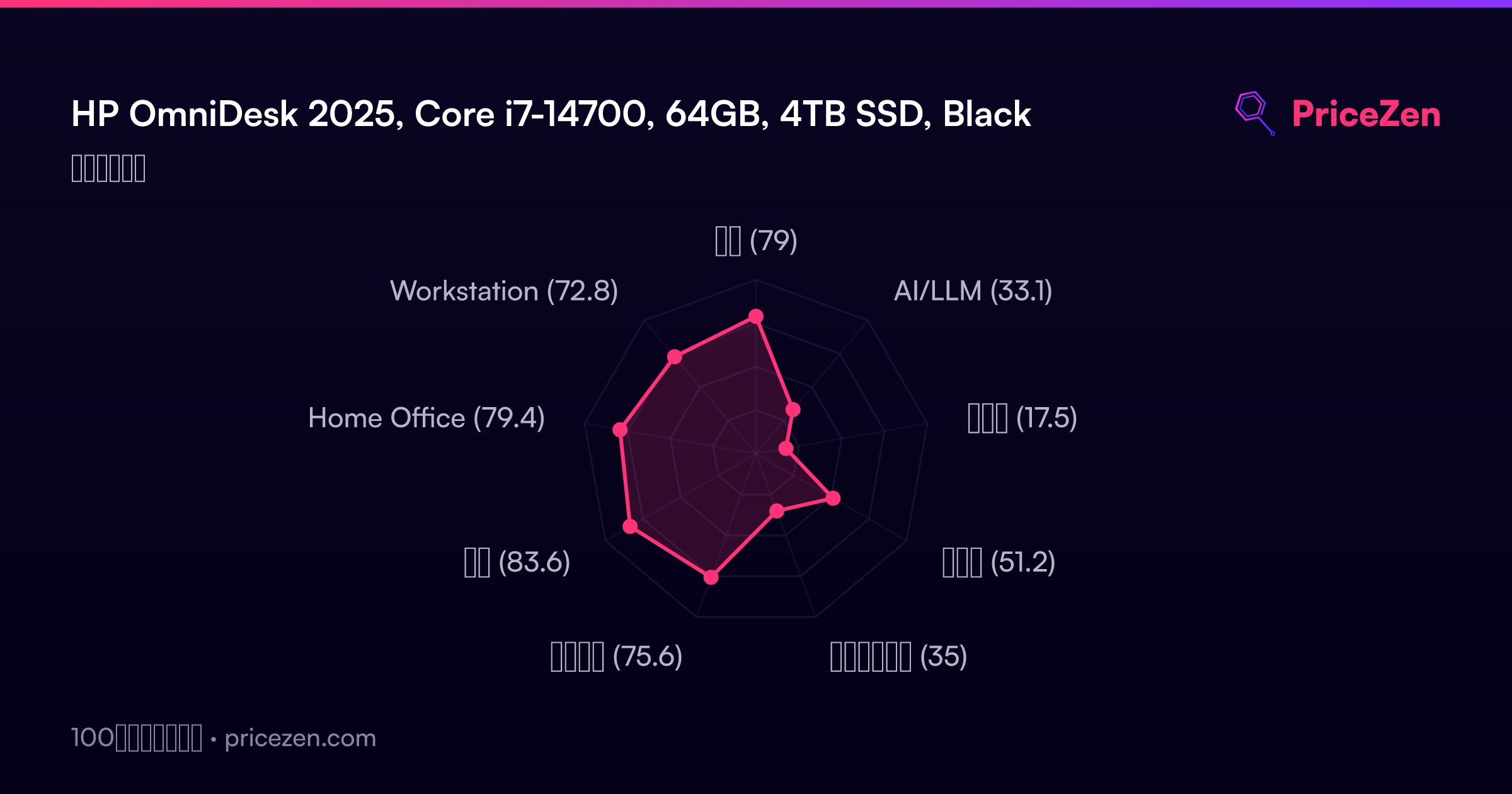
- 総合78.9
- AI/LLM33.1
- ゲーム17.5
- 携帯性51.2
- クリエイター35
- ビジネス75.5
- 開発83.6
- Home Office79.3
- Workstation72.9