LG UltraFine 32BN88U-B 31.5" Black Texture 2020
The 31.5-inch 4K IPS screen provides 95% DCI-P3 coverage and HDR10, paired with a C-Clamp stand that extends, retracts, swivels, pivots, and adjusts height and tilt. A USB-C port handles video, data, and 55W charging in a single cable, while AMD FreeSync reduces tearing during occasional gaming or video playback. It's best for desk professionals and designers who demand precise 4K detail and all-day ergonomic adaptability.

No current retailer price


Snapshot
The 30-Second Version
The LG UltraFine 32BN88U-B is a 31.5-inch 4K IPS monitor built for desk-bound professionals who need accurate color and serious ergonomic adjustability. Its Ergo C-clamp stand and 95% DCI-P3 coverage are standout features, ranking near the top of their categories. At USD 799 from Newegg, it's priced for people who'll actually use those strengths daily. Skip it if gaming or portability matter to you, because the performance and weight numbers make those use cases a bad fit.
Pros & Cons
Pros
- Ergo C-clamp stand ranks at the 91st percentile, offering extend, retract, swivel, pivot, height, and tilt adjustments that most monitors can't match 92nd
- 95% DCI-P3 with 10-bit color puts it in the top tier for color accuracy, ideal for creative and professional work 91st
- USB-C with 60W power delivery means one cable handles video, data, and laptop charging 88th
- 31.5-inch 4K IPS panel delivers sharp text and wide viewing angles, ranking at the 87th percentile for display quality 87th
- Connectivity scores at the 88th percentile with 2x HDMI, DisplayPort, USB-C, speakers, and a headphone jack covering most setup needs
Cons
- Performance ranks at only the 36th percentile, making it a poor fit for gaming or fast-motion content
- At 16765g, this is a heavy monitor that's not going anywhere once it's clamped to your desk
- Customer rating sits at 3 out of 5 across 15 reviews, suggesting some buyers have had mixed experiences
- 350 nits of brightness is adequate indoors but won't cut it in very bright rooms or for serious HDR work
- Portable score of 12.4 out of 100 confirms this is strictly a stay-at-your-desk product
The proof
Performance
Let's talk numbers. The 5ms response time and FreeSync support sound decent on paper, but our performance ranking puts this monitor at the 36th percentile across the category. That means it falls behind most competitors when it comes to motion handling and responsiveness. For spreadsheet jockeys, photo editors, and anyone doing static or slow-moving work, 5ms is perfectly fine and you'll never notice. But if you're gaming or doing anything with fast motion, this panel will feel sluggish compared to what's available elsewhere. FreeSync helps with tearing, but it can't fix a fundamentally slower panel.
Where this monitor absolutely shines is color. The color ranking is one of the best, reflecting that 95% DCI-P3 coverage with 10-bit depth, which is one of the best on the market right now. For photographers, video editors, and designers working in wide-gamut workflows, this is a standout spec. The 350-nit brightness is solid for indoor work, and HDR10 support adds some punch to compatible content, though don't expect the kind of HDR impact you'd get from a panel with local dimming. The display itself ranks at the 87th percentile overall, driven largely by that 4K resolution on a 31.5-inch IPS panel. Text is crisp, colors are consistent across viewing angles, and the pixel density hits a sweet spot where you get real workspace without needing to scale everything up to unreadable sizes.
Specifications
Full Specifications
Display
| Size | 31.5" |
| Resolution | 3840x2160 (4K UHD) |
| Panel Type | IPS |
| Aspect Ratio | 16:9 |
| Curved | No |
Performance
| Response Time | 5 |
| Adaptive Sync | FreeSync |
Color & HDR
| Brightness | 350 nits |
| Color Gamut | DCI-P3 95% (Typ.) |
| Color Depth | 10-bit |
| HDR | HDR10 |
| HDR Support | HDR10 |
Connectivity
| HDMI Ports | 2 |
| DisplayPort | 1 |
| USB-C | 1 |
| Speakers | Yes |
| Headphone Jack | Yes |
Ergonomics
| Height Adjustable | Yes |
| Tilt | Yes |
| Swivel | Yes |
| Pivot | Yes |
| VESA Mount | 100x100 |
Features
| Power | 55 |
| Weight | 16.8 kg / 37.0 lbs |
vs Competition
Stack the 32BN88U-B against the ASUS ROG Strix XG27UCDMG 27-inch or the MSI MAG 271QPX QD-OLED E2 27-inch, and the LG gives ground on performance pretty decisively. Those are gaming-oriented panels, and our performance ranking at the 36th percentile makes it clear the LG isn't playing in that arena. If gaming matters to you at all, cross-shop those two first. The Samsung Odyssey G60SD 27-inch is another competitor worth looking at if motion handling and responsiveness are priorities. The LG's 5ms response time and basic FreeSync just can't compete with what those monitors bring to the table.
Where the LG fights back hard is ergonomics and color. Against the Dell UltraSharp U4025QW 39.7-inch, you're looking at a very different form factor. The Dell is ultrawide and massive, while the LG sticks to a traditional 16:9 aspect ratio at 31.5 inches. If you want a standard-shaped 4K canvas with best-in-class stand adjustability and strong color coverage, the LG has a real argument. The Alienware AW3425DW 34-inch is another ultrawide option that trades the LG's ergonomic stand and color focus for a curved, immersive format. Our connectivity ranking at the 88th percentile also means the LG holds its own on ports and USB-C charging against most of these competitors. It really comes down to whether you prioritize comfort and color over speed and screen shape.
| Spec | LG UltraFine 32BN88U-B 31.5" | ASUS ROG Strix XG27UCDMG 27" | Dell UltraSharp U4025QW 39.7" | MSI MAG 271QPX QD-OLED E2 27" | Alienware AW-Series AW3425DW 34" | Samsung Odyssey G60SD 27" |
|---|---|---|---|---|---|---|
| Screen Size | 31.5 | 27 | 39.70000076293945 | 27 | 34 | 27 |
| Resolution | 3840 x 2160 | 3840 x 2160 | 5120 x 2160 | 2560 x 1440 | 3440 x 1440 | 2560 x 1440 |
| Panel Type | IPS | OLED | IPS | QD-OLED | QD-OLED | OLED |
| Refresh Rate | - | 240 | 120 | 240 | 240 | 360 |
| Response Time Ms | 5 | 0.029999999329447746 | 5 | 0.029999999329447746 | 0.029999999329447746 | 0.029999999329447746 |
| Adaptive Sync | FreeSync | FreeSync Premium Pro | Adaptive-Sync | FreeSync Premium Pro | FreeSync Premium Pro | FreeSync Premium Pro |
| Hdr | HDR10 | DisplayHDR True Black 400 | HDR600 | DisplayHDR True Black 400 | HDR400 | HDR10+ |
| Compare | Compare | Compare | Compare | Compare |
| Product | Color | Portability | Display | Feature | Performance | Connectivity |
|---|---|---|---|---|---|---|
| LG UltraFine 32BN88U-B 31.5" | 92.2 | 63.1 | 87.1 | 70.2 | 35.7 | 87.6 |
| ASUS ROG Strix XG27UCDMG 27" Compare | 96.5 | 57.6 | 97.7 | 85 | 97.9 | 81.2 |
| Dell UltraSharp U4025QW 39.7" Compare | 97.9 | 76.7 | 98.6 | 96.3 | 56 | 99.3 |
| MSI MAG 271QPX QD-OLED E2 27" Compare | 99.2 | 57.6 | 73.4 | 85 | 97.9 | 81.2 |
| Alienware AW-Series AW3425DW 34" Compare | 98.9 | 74.1 | 84.2 | 90.8 | 97.9 | 95.4 |
| Samsung Odyssey G60SD 27" Compare | 90.8 | 39.7 | 73.4 | 70.2 | 99.5 | 87.6 |
Price
Value & Pricing
At USD 799 from Newegg, the 32BN88U-B isn't trying to be a budget pick. You're paying a premium for that Ergo stand and the color-accurate 4K panel, and whether that's worth it depends entirely on what you do at your desk. If you're a designer or photographer who needs wide-gamut color and spends eight-plus hours a day staring at this screen, the ergonomic adjustability alone could justify the price by saving you from neck strain and a separate monitor arm purchase. The USB-C with 60W charging also simplifies your cable situation in a way that has real daily value.
But if you don't need the color accuracy or the fancy stand, USD 799 is a lot to spend on a monitor with middling performance scores. We track prices across stores, and right now Newegg is the only retailer listing it at USD 799. There's no price competition to drive it lower at the moment, so you're paying full freight. For pure office productivity, there are likely better deals out there. This monitor earns its price tag specifically when you need both the color chops and the ergonomic flexibility together.
Read more
Overview
The LG UltraFine 32BN88U-B is a 31.5-inch 4K IPS monitor that's clearly built for people who sit at a desk all day and want their screen to work around them, not the other way around. The headline feature here isn't just the sharp 3840x2160 panel or the wide color coverage, though both are genuinely strong. It's the Ergo stand with its C-clamp mount that lets you extend, retract, swivel, pivot, tilt, and adjust height with a range that puts this thing in the top tier of ergonomic monitors we track. If you've ever fought with a wobbly stock stand or wished your monitor could float exactly where your neck wants it, this is the kind of product that solves that problem properly.
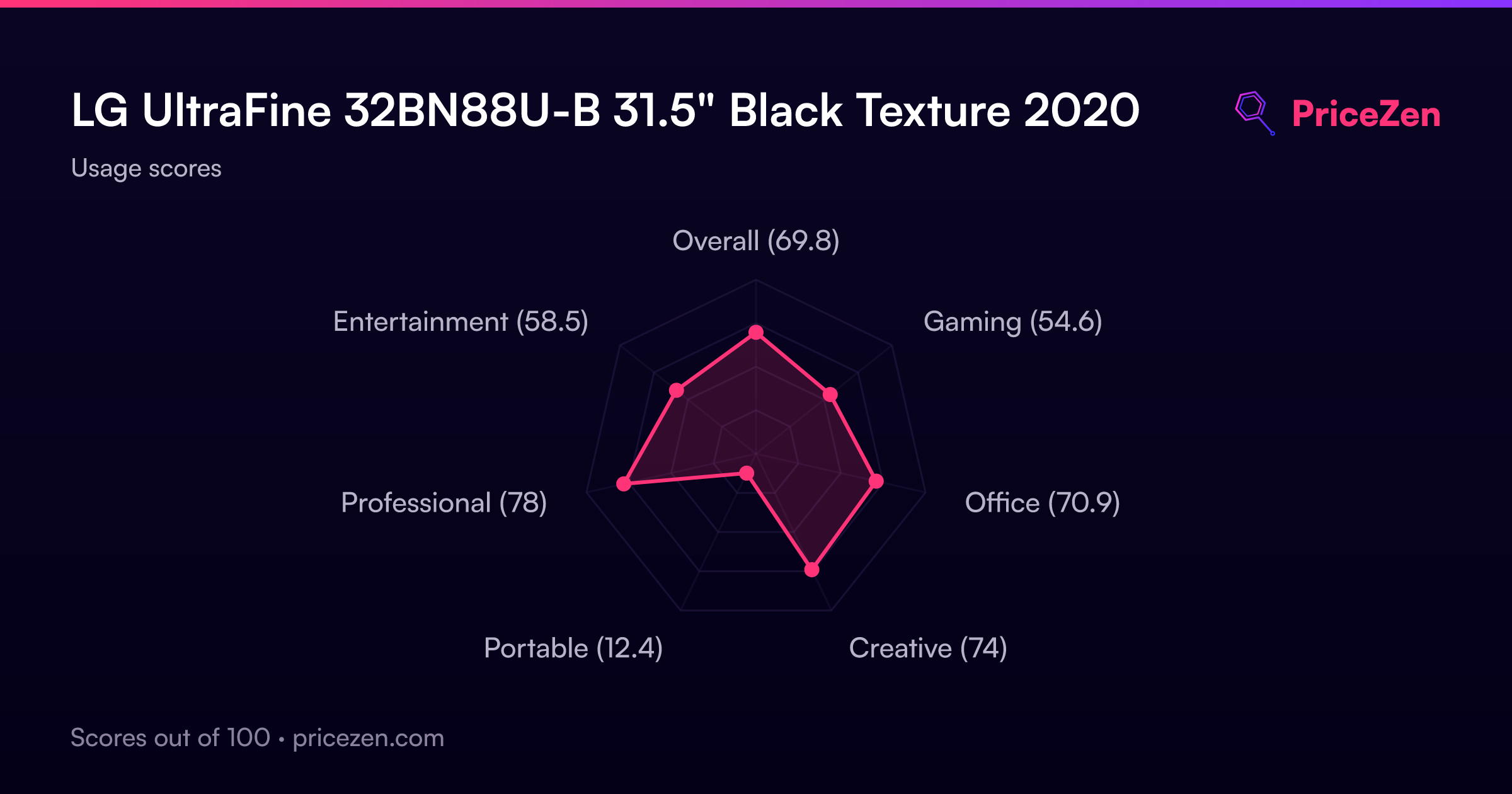
This monitor lands squarely in professional and creative territory. Our scoring model gives it a 78 out of 100 for professional use and 74 for creative work, which makes sense when you look at the spec sheet: 95% DCI-P3 coverage, 10-bit color, HDR10 support, and USB-C with 60W power delivery for single-cable laptop setups. Office use scores a respectable 70.9 as well. But if you're looking for something portable or gaming-focused, the numbers tell a different story. The portable score is a rough 12.4, and overall performance is about average, meaning this isn't the monitor you buy for fast-paced competitive play.
What makes the 32BN88U-B interesting is how it prioritizes comfort and color accuracy over raw speed. At USD 799 from Newegg, it's not cheap, but you're paying for a very specific combination: a large, color-accurate 4K workspace mounted on one of the most adjustable stands available. We compared it against several strong competitors in the category, and while it doesn't win every matchup, it carves out a clear niche for desk-bound professionals who care about posture and pixel quality more than refresh rates.
Common Questions
Q: Can the USB-C port charge my laptop while displaying video?
Yes. The USB-C connection supports 60W Power Delivery, which means it can charge most ultrabooks and many mainstream laptops while simultaneously carrying a 4K video signal and data. That's enough wattage for a MacBook Air or similar thin-and-light, though power-hungry workstation laptops may need more than 60W under heavy load. It's a genuine single-cable solution for the right laptop.
Q: Is this monitor good for gaming?
Not really. The 5ms response time and FreeSync support provide basic functionality, but our performance ranking places this monitor at the 36th percentile in the category. That means it falls behind most competitors for motion handling. If gaming is a priority, you'd be better served by the ASUS ROG Strix XG27UCDMG or the MSI MAG 271QPX QD-OLED E2, both of which are designed with gaming performance in mind.
Q: How does the Ergo C-clamp stand work, and do I need a special desk?
The stand uses a single C-clamp that attaches to the edge of your desk, freeing up surface space compared to a traditional base. It offers extend, retract, swivel, pivot, height, and tilt adjustments, ranking at the 91st percentile for ergonomics in our data. You'll need a desk with an edge that can accommodate a clamp, so glass desks or desks with unusual edge profiles might not work. The VESA 100x100 mount is also there if you prefer a third-party arm.
Q: Is 350 nits bright enough for HDR content?
It supports HDR10, but 350 nits is on the modest side for a meaningful HDR experience. You'll get some benefit from the wider color gamut and 10-bit depth when viewing HDR content, but without higher peak brightness or local dimming, the contrast and highlight pop won't match what dedicated HDR displays deliver. For SDR creative work in a normally lit room, 350 nits is perfectly comfortable.
Who Should Skip This
Gamers should walk away from this one without hesitation. The performance ranking at the 36th percentile and 5ms response time mean you're leaving a lot of responsiveness on the table compared to what's available. The ASUS ROG Strix XG27UCDMG, MSI MAG 271QPX QD-OLED E2, and Samsung Odyssey G60SD are all listed as competitors and are far better starting points if frame rates and motion clarity matter to you. FreeSync alone doesn't make a gaming monitor.
Anyone who needs to move their monitor between locations should also skip this. At 16765g with a C-clamp mounting system, the 32BN88U-B is designed to be installed once and left alone. The portable score of 12.4 out of 100 says it all. And if you just need a basic 4K screen for email and documents without caring about wide-gamut color or an articulating stand, USD 799 is more than you need to spend. A simpler 4K IPS monitor will handle that workload just fine for less money.
Verdict
If you're a creative professional or a knowledge worker who lives at a desk and needs accurate color on a sharp 4K canvas, the LG UltraFine 32BN88U-B is a strong pick. The Ergo stand is genuinely one of the best we've seen in our rankings, and the 95% DCI-P3 coverage with 10-bit color means your work looks the way it's supposed to. The USB-C single-cable setup with 60W charging is the cherry on top for laptop users. At USD 799, it's an investment, but one that pays off daily if posture and color fidelity are part of your job.
If you're a gamer, a casual user who just needs a second screen, or someone who moves their setup around frequently, look elsewhere. The performance score tells you this panel isn't built for speed, the weight tells you it's not moving once installed, and the 3-out-of-5 customer rating suggests the experience isn't universally smooth. For gaming, the ASUS ROG Strix or MSI MAG options in our competitor list are better starting points. For general office work on a budget, you can probably find a simpler 4K monitor that does the basics without the premium ergo tax.
Usage Scores
- Overall69.8
- Gaming54.6
- Office70.9
- Creative74
- Portable12.4
- Professional78
- Entertainment58.5