LG UltraGear 27GS95QE-B 27" Black
The 240Hz OLED panel with a 0.03ms response time delivers near-instant pixel transitions and a 1.5M:1 contrast ratio for exceptional motion clarity. Its 98.5% DCI-P3 coverage and DisplayHDR True Black 400 certification ensure deep blacks and vibrant color, while dual compatibility with G-SYNC and FreeSync Premium Pro eliminates tearing. This monitor is best for competitive gamers who prioritize speed and contrast over peak brightness in a 27-inch desktop format.

No current retailer price
Snapshot
The 30-Second Version
The LG UltraGear 27GS95QE-B pairs a 240Hz QHD OLED panel with a 0.03ms response time and 1.5M:1 contrast, and owners back the specs up with a 4.7/5 across 214 reviews. It's near the top of our performance rankings and basically best-in-class for owner satisfaction. The catch is 275 nits, so HDR leans on perfect blacks instead of bright highlights. Newegg has it at USD 765 versus USD 899 at Best Buy, and at the lower price we think it's an easy yes for 1440p gamers.
Pros & Cons
Pros
- 240Hz with 0.03ms GtG, motion clarity near the top of the category 99th
- OLED contrast at 1.5M:1 with true per-pixel blacks 98th
- 98.5% DCI-P3 and 10-bit color, strong for creative work too 97th
- Full ergonomics: height, tilt, swivel, pivot plus VESA 100x100 91st
- Owners love the included remote and easy menu, 4.7/5 across 214 reviews
Cons
- 275 nits is modest, HDR highlights won't punch like a bright LCD
- Semi-matte coating divides opinion, some want glossy OLED pop
- Burn-in risk is inherent to OLED with static desktop elements
- 1440p rather than 4K, less pixel density for text-heavy work
- USD 134 spread between stores means you can easily overpay
What owners think
The Word on the Street
How owner sentiment changed over time
ExclusiveBased on when customers actually wrote their reviews - so you can see whether early praise held up.
5 written reviews, May 2026: 5 happy
Across all 214 store ratings: 4.7★. Most owners rate without writing a review. The chart counts the 5 written reviews.
Each dot is one written review, in the month it was written. Happy = 4-5★, mixed = 3★, unhappy = 1-2★.
The proof
Performance
Let's unpack the numbers that matter. 240Hz means the panel redraws 240 times a second, so if your GPU can feed it frames in the 200s at 1440p, motion looks continuous rather than stepped. The 0.03ms GtG figure is the OLED party trick: pixels change state almost instantly, so there's effectively no smearing behind fast-moving objects. Owners upgrading from 144Hz and 180Hz IPS panels describe the jump as immediately obvious, not something you need a slow-motion camera to appreciate. Both NVIDIA G-SYNC Compatible and AMD FreeSync Premium Pro are on board, so tearing stays handled whichever GPU team you're on. The trade-off is that 240Hz only pays off if your rig can actually push those frames at 2560 x 1440, otherwise you're paying for headroom you don't use.
The other half of the story is brightness, and this is where you need to be honest with yourself. 275 nits with DisplayHDR True Black 400 certification is a different philosophy from a bright LCD: HDR here is built on perfect blacks and per-pixel light rather than searing highlights. Our color ranking puts it well above average but not at the very top of the category, and the display score sits closer to solid middle-of-the-pack territory, largely because raw brightness and resolution aren't its weapons. Several owners specifically flag that HDR looks dimmer than what they're used to on a high-end phone. In a normal or dim room, that barely matters and the contrast does the heavy lifting. In a sun-drenched room with windows behind you, it matters a lot.
Specifications
Full Specifications
Display
| Size | 27" |
| Resolution | 2560x1440 (QHD) |
| Panel Type | OLED |
| Aspect Ratio | 16:9 |
| Curved | No |
| Screen Finish | matte |
Performance
| Refresh Rate | 240 Hz |
| Response Time | 0.03 |
| Adaptive Sync | FreeSync Premium Pro |
Color & HDR
| Brightness | 275 nits |
| Color Gamut | DCI-P3 98.5% (CIE1976) |
| Color Depth | 10-bit |
| HDR | DisplayHDR True Black 400 |
| HDR Support | HDR10 |
Connectivity
| HDMI Ports | 2 |
| DisplayPort | 1 |
| Thunderbolt | 0 |
| Speakers | No |
| Headphone Jack | Yes |
Ergonomics
| Height Adjustable | Yes |
| Tilt | Yes |
| Swivel | Yes |
| Pivot | Yes |
| VESA Mount | 100x100 |
Features
| Webcam | No |
| Touchscreen | No |
| PIP/PBP | No |
| Power | 37 |
| Weight | 7.3 kg / 16.2 lbs |
vs Competition
The closest fight is with the MSI MAG 271QPX QD-OLED E2 27" and the Samsung Odyssey G60SD 27", since both play in the same 27-inch high-refresh OLED space. Against those, the LG's argument is the combination rather than any single number: 240Hz plus 0.03ms plus a connectivity score that ranks among the better ones we track, with 2x HDMI, a DisplayPort and Thunderbolt in the mix. Its ergonomic ranking is also a genuine standout, and if you pivot to portrait or share a desk, that flexibility is worth more than a spec-sheet tiebreak. Cross-shop the MSI if you're chasing QD-OLED color behavior specifically, and the Samsung if brand loyalty or a bundle price swings you.
The ASUS ROG Strix XG27UCDMG 27" is the one that changes the question rather than the answer, because it's the reason to stop and ask whether you actually want more resolution than 2560 x 1440. If crisp text and dense detail matter more to you than maximum frame rate, go look at it before committing here. And the Alienware AW3425DW 34" and Dell UltraSharp U4025QW 39.7" are different animals entirely: bigger, wider canvases for people who want immersion or spreadsheet acreage. The LG's counterargument is focus. A 26.5-inch 16:9 panel keeps everything in your field of view for competitive play, draws just 37W, and doesn't demand a desk rebuild. If you want width, buy width. If you want speed in a sane footprint, this is the stronger pitch.
| Spec | LG UltraGear 27GS95QE-B 27" | ASUS ROG Strix XG27UCDMG 27" | Dell UltraSharp U4025QW 39.7" | Alienware AW-Series AW3425DW 34" | MSI MAG 271QPX QD-OLED E2 27" | Samsung Odyssey G60SD 27" |
|---|---|---|---|---|---|---|
| Screen Size | 27 | 27 | 39.7 | 34 | 27 | 27 |
| Resolution | 2560 x 1440 | 3840 x 2160 | 5120 x 2160 | 3440 x 1440 | 2560 x 1440 | 2560 x 1440 |
| Panel Type | OLED | QD-OLED | IPS | QD-OLED | QD-OLED | OLED |
| Refresh Rate | 240 | 240 | 120 | 240 | 240 | 360 |
| Response Time Ms | 0.03 | 0.03 | 5 | 0.03 | 0.03 | 0.03 |
| Adaptive Sync | FreeSync Premium Pro | FreeSync Premium Pro | Adaptive-Sync | FreeSync Premium Pro | FreeSync Premium Pro | FreeSync Premium Pro |
| Hdr | DisplayHDR True Black 400 | DisplayHDR True Black 400 | HDR600 | HDR400 | DisplayHDR True Black 400 | HDR10+ |
| Compare | Compare | Compare | Compare | Compare |
| Product | Color | Portability | Display | Feature | User Sentiment | Performance | Connectivity | Social Proof |
|---|---|---|---|---|---|---|---|---|
| LG UltraGear 27GS95QE-B 27" | 79.4 | 49.3 | 73.4 | 70.1 | 99.3 | 97.9 | 87.4 | 96.8 |
| ASUS ROG Strix XG27UCDMG 27" Compare | 96.5 | 57.3 | 97.7 | 85 | 99.3 | 97.9 | 81 | 98.9 |
| Dell UltraSharp U4025QW 39.7" Compare | 97.9 | 76.5 | 98.6 | 96.3 | 85.4 | 56.1 | 99.3 | 96.8 |
| Alienware AW-Series AW3425DW 34" Compare | 98.9 | 73.9 | 84.1 | 96.3 | 95.7 | 97.9 | 95.3 | 96.8 |
| MSI MAG 271QPX QD-OLED E2 27" Compare | 99.2 | 57.3 | 73.4 | 85 | 95.7 | 97.9 | 81 | 98.9 |
| Samsung Odyssey G60SD 27" Compare | 90.7 | 39.3 | 73.4 | 70.1 | 95.7 | 99.5 | 87.4 | 92 |
Price
Value & Pricing
Here's the practical bit. We track this monitor's price across listings, and right now Newegg has it at USD 765 while Best Buy sits at USD 899. That's a USD 134 spread on the identical panel, which is roughly a decent GPU upgrade's worth of difference for doing nothing but clicking a different tab. At USD 765 this is one of the better arguments in the whole 1440p OLED conversation, and owner feedback backs that up: value for money comes up repeatedly as a reason people bought, with several calling it a standout deal at the sale price.
At USD 899 the math gets less flattering, because you're creeping toward the territory where larger ultrawides and higher-resolution panels start making their own case. Nobody can pay us to say nice things, so we'll be plain: check both stores before you buy, and if you're set on Best Buy for the pickup convenience, at least know what you're paying for that convenience.
Read more
Overview
There's a specific moment where OLED stops being a spec sheet line and starts being an experience, and it usually happens the first time you load a dark game scene and realize the black parts of the screen are actually off. That's what LG is selling here with the UltraGear 27GS95QE-B: a 26.5-inch (sold as 27") QHD OLED panel running at 240Hz with a rated 0.03ms grey-to-grey response time and a 1.5M:1 contrast ratio. Our scoring model puts its performance in the top few percent of every gaming monitor we track, which is about where you'd expect a fast OLED to land.
Who's this for? Mostly people who play competitive shooters or fast action games at 1440p and want motion clarity that LCD panels genuinely can't match, but who also care about how a movie looks on a Tuesday night. The 98.5% DCI-P3 coverage and 10-bit color mean it's not a one-trick gaming box. And the ergonomics score sits among the best we track, thanks to height, tilt, swivel and pivot adjustment plus a VESA 100x100 mount, so it'll fit a real desk setup rather than dictating one.
What makes it interesting right now is the gap between how good the specs are and how owners actually feel about it. We collect ratings and owner reviews across stores with our own system, and this thing carries a 4.7/5 from 214 reviews with a sentiment score of 95/100. That lands it basically at the very top of the category for owner happiness, which is rarer than you'd think. Plenty of monitors have great panels and annoying quirks. The recurring theme here is that people got what they hoped for.
Common Questions
Q: Does it have an anti-glare coating, and is it matte or glossy?
It uses a semi-matte anti-glare treatment rather than a glossy finish, which is why owners in brighter rooms tend to like it. Reflections are noticeably reduced compared to glossy panels. The trade-off is that a few buyers miss the extra perceived punch a glossy surface gives, so it's a preference call rather than a flaw.
Q: Is the 0.03ms response time real, and does it matter?
That's the rated grey-to-grey figure, and it's typical of OLED panels where pixels switch state almost instantly. Practically, it means fast-moving objects don't leave a smeared trail behind them, which is the biggest visual difference versus LCD gaming monitors. Combined with 240Hz and G-SYNC Compatible plus FreeSync Premium Pro support, motion stays clean and tear-free.
Q: Should I worry about OLED burn-in?
It's a legitimate consideration with any OLED, and owners do raise it. This panel includes a pixel cleaning routine that owners report runs quickly, which helps manage image retention over time. If your day is mostly static spreadsheets and taskbars, factor that in; if it's varied gaming and video content, the risk is much lower in practice.
Q: Is HDR worth using on this monitor?
Yes, but calibrate your expectations. It's DisplayHDR True Black 400 certified with 275 nits and a 1.5M:1 contrast ratio, so HDR here delivers perfect blacks and precise per-pixel lighting rather than blinding highlights. Owners who game in dim or normally lit rooms describe it as impressive; those expecting phone-level peak brightness come away less wowed.
Who Should Skip This
Skip this if your desk lives in a bright, window-heavy room and you want HDR that punches. At 275 nits, this panel wins on contrast, not luminance, and no amount of settings changes that physics. Also skip it if your workday is eight hours of static documents and dashboards, since burn-in exposure is highest with unchanging elements and 1440p at 26.5 inches isn't the sharpest text rendering you can buy. The Dell UltraSharp U4025QW 39.7" is the more sensible direction for that kind of work-first life.
And if you've already decided you want more pixels or more width, don't talk yourself into this to save money. The ASUS ROG Strix XG27UCDMG 27" is the cross-shop for resolution hunters, and the Alienware AW3425DW 34" is where ultrawide immersion shoppers should be looking. Buying a focused 16:9 speed panel when you wanted a canvas is how regret happens.
Verdict
For competitive and fast-paced gaming at 1440p, we think this is close to a default recommendation at USD 765. The performance ranking is near the top of everything we track, the owner sentiment is even higher, and the specific things buyers rave about, deep blacks, smooth 240Hz motion, the semi-matte coating killing glare, line up exactly with what the specs promise. That alignment between paper and reality is the whole reason we bother collecting owner reviews. Add the remote and the simple menu that multiple owners call out, and it's a monitor that doesn't fight you.
For mixed use, gaming plus work plus movies, it's still a strong pick with one caveat: keep your room lighting reasonable and accept that HDR is about contrast, not fireworks. Office use scores solidly in our model rather than spectacularly, mostly because 1440p at this size isn't a text-density champion and OLED needs a little mindfulness with static taskbars. If you're a nine-hours-of-spreadsheets person who games occasionally, weigh that honestly. If you're a gamer who occasionally opens a spreadsheet, buy it and don't overthink it.
Usage Scores
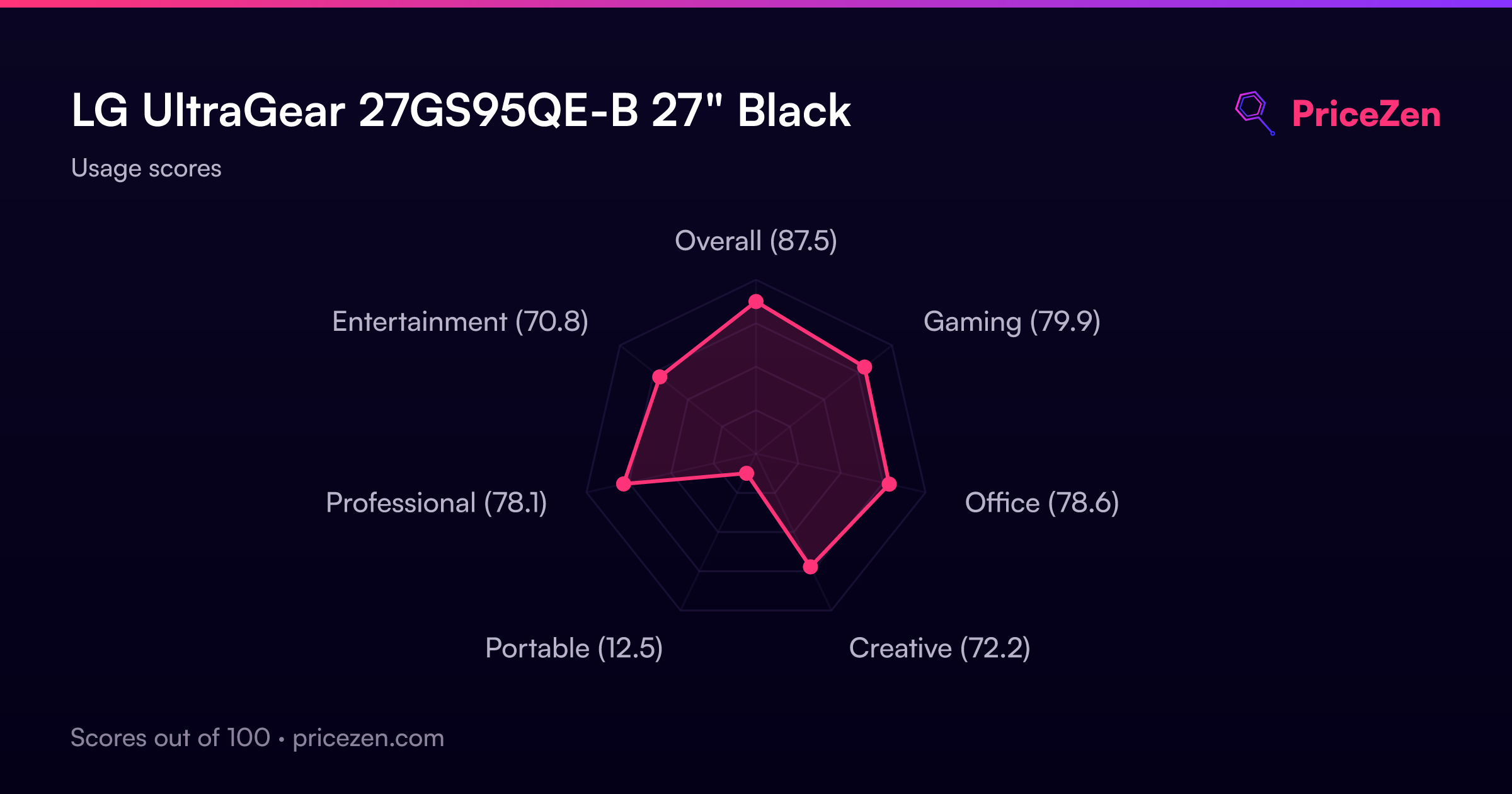
- Overall87.5
- Gaming79.9
- Office78.6
- Creative72.2
- Portable12.5
- Professional78.1
- Entertainment70.8