Planar Helium PCT2235 22" Black 2019
The 22-inch 1920x1080 IPS panel with 10-point projected capacitive multi-touch and a 14ms response time enables direct, lag-free interaction for kiosks and point-of-sale systems. Its 75Hz refresh rate and 250-nit brightness deliver clear visuals, while the tilt range of +15 to +70 degrees and VESA 100x100 mount simplify ergonomic setup. This monitor is best for retail or hospitality buyers who need a durable, responsive touch display for interactive signage or self-service terminals.

No current retailer price


Snapshot
The 30-Second Version
The Planar Helium PCT2235 is a 22-inch 1080p touchscreen monitor that nails touch responsiveness and reliability but falls short on display quality and performance. Owners love it for specialized uses like DMX lighting and flight simming, and it's a solid value in the US at around $296. Just don't buy it expecting a great general-purpose display.
Pros & Cons
Pros
- Responsive 10-point capacitive touchscreen 98th
- Owners report excellent long-term reliability 89th
- Compact and VESA mountable 78th
- Works with Windows 7 through 10 out of the box
- Built-in speakers for basic audio needs
Cons
- 14ms response time is slow by modern standards
- 250-nit brightness is dim for bright rooms
- Color performance is near the bottom of our charts
- No USB-C connectivity
- Pricing varies wildly by region
What owners think
The Word on the Street
How owner sentiment changed over time
ExclusiveBased on when customers actually wrote their reviews - so you can see whether early praise held up.
8 written reviews, Aug 2016 – May 2020: 8 happy
Across all 12 store ratings: 4.2★. The chart counts the 8 written reviews.
Each dot is one written review, in the month it was written. Happy = 4-5★, mixed = 3★, unhappy = 1-2★.
The proof
Performance
Let's be blunt: the performance numbers here are rough. A 14ms response time and 75Hz refresh rate put this monitor in the 3rd percentile for performance in our database. That's not a typo. If you're planning to play fast-paced shooters or do anything motion-heavy, this panel will show ghosting and blur. The 250-nit brightness is also on the dim side, and the 8-bit color depth is fine for basic work but won't impress anyone doing photo or video editing.
But here's the thing: performance for this monitor isn't about frame rates. It's about touch responsiveness and reliability. And on that front, owners report it's excellent. Multiple reviews mention no double-tap issues, no disconnects, and consistent behavior over months of daily use. For a DMX lighting rig or a point-of-sale terminal, that's what actually matters. The 27W power draw is also modest, which is nice if you're running several of these in a commercial setting.
Specifications
Full Specifications
Display
| Size | 22" |
| Resolution | 1920x1080 (Full HD) |
| Panel Type | IPS |
| Aspect Ratio | 16:9 |
| Curved | No |
| Screen Finish | glossy |
Performance
| Refresh Rate | 75 Hz |
| Response Time | 14 |
Color & HDR
| Brightness | 250 nits |
| Color Gamut | 72% NTSC |
| Color Depth | 8-bit |
| HDR | HDR10 |
Connectivity
| HDMI Ports | 1 |
| DisplayPort | 1 |
| USB-C | 0 |
| Speakers | Yes |
Ergonomics
| Tilt | Yes |
| Pivot | Yes |
| VESA Mount | 100x100 |
Features
| Touchscreen | Yes |
| Power | 27 |
| Weight | 3.6 kg / 7.9 lbs |
vs Competition
The competitors in our database for this product are all gaming monitors, which tells you something about how unusual the PCT2235 is. The ASUS ROG Strix XG27UCDMG, LG UltraGear 27GX790A-B, Samsung Odyssey G60SD, MSI MPG 271QR QD-OLED X50, and Gigabyte AORUS FO32U2 are all 27-inch or larger OLED or QD-OLED panels with 240Hz+ refresh rates and sub-1ms response times. They absolutely destroy the Planar in display quality, color accuracy, and gaming performance. But none of them have a touchscreen. Not one.
So the comparison isn't really apples to apples. If you need touch, the Planar is in a different category entirely. The real competitors are things like the ViewSonic TD2230 or Dell P2418HT, which are also 22-24 inch touch monitors in a similar price range. The Planar holds up well against those, especially on touch responsiveness and build quality. But if you don't need touch, any of those gaming monitors will give you a dramatically better picture for not much more money.
| Spec | Planar Helium PCT2235 22" | LG UltraGear 45GX950A-B 45" | ASUS ROG Strix XG27UCDMG 27" | MSI MAG 271QPX QD-OLED E2 27" | Samsung Odyssey Neo G95NC 57" | Gigabyte AORUS FO32U2 32" |
|---|---|---|---|---|---|---|
| Screen Size | 22 | 45 | 27 | 27 | 57 | 32 |
| Resolution | 1920 x 1080 | 5120 x 2160 | 3840 x 2160 | 2560 x 1440 | 7680 x 2160 | 3840 x 2160 |
| Panel Type | IPS | OLED | OLED | QD-OLED | VA | OLED |
| Refresh Rate | 75 | 330 | 240 | 240 | 240 | 240 |
| Response Time Ms | 14 | 0.029999999329447746 | 0.029999999329447746 | 0.029999999329447746 | 1 | 0.029999999329447746 |
| Adaptive Sync | - | FreeSync Premium Pro | FreeSync Premium Pro | FreeSync Premium Pro | FreeSync Premium Pro | FreeSync Premium Pro |
| Hdr | HDR10 | DisplayHDR True Black 400 | DisplayHDR True Black 400 | DisplayHDR True Black 400 | HDR10+ | DisplayHDR True Black 400 |
| Compare | Compare | Compare | Compare | Compare |
| Product | Color | Portability | Display | Feature | User Sentiment | Ergonomic | Performance | Connectivity | Social Proof |
|---|---|---|---|---|---|---|---|---|---|
| Planar Helium PCT2235 22" | 42.1 | 78.4 | 21.4 | 98.4 | 89.2 | 63.5 | 3 | 43.5 | 17.4 |
| LG UltraGear 45GX950A-B 45" Compare | 99.4 | 76.5 | 99.7 | 95.7 | 76.4 | 90.8 | 99.4 | 97 | 92.1 |
| ASUS ROG Strix XG27UCDMG 27" Compare | 96.1 | 57.5 | 97.9 | 83.8 | 99.2 | 90.8 | 98 | 81.3 | 98.9 |
| MSI MAG 271QPX QD-OLED E2 27" Compare | 99.1 | 57.5 | 77.3 | 83.8 | 95.7 | 90.8 | 98 | 81.3 | 98.9 |
| Samsung Odyssey Neo G95NC 57" Compare | 96.9 | 28 | 99.7 | 95.7 | 29.2 | 73.6 | 87.3 | 93.2 | 92.1 |
| Gigabyte AORUS FO32U2 32" Compare | 79.4 | 62.9 | 99.1 | 83.8 | 61 | 90.8 | 98 | 87.6 | 92.1 |
Price
Value & Pricing
Value is where this monitor gets interesting. At around $296 in the US, it's one of the cheaper 22-inch touchscreen monitors you can buy, and owners consistently mention value for money as a top reason they're happy. The sentiment summary shows four separate mentions of value, which is a lot for a product with only 12 reviews. But the story changes if you're in Europe. At 657 EUR in Spain or 446 GBP in the UK, you're paying a serious premium for what is fundamentally a basic 1080p panel with touch bolted on. At that price, you might want to look at used commercial displays or consider whether a tablet plus a stand would do the job. In North America, though, this is a solid deal for the right use case.
Price history
Read more
Overview
The Planar Helium PCT2235 is a 22-inch 1080p touchscreen monitor aimed at interactive kiosks, point-of-sale setups, and specialized desktop use. It's not a gaming display, and it doesn't pretend to be. What it is, based on our database, is a niche workhorse that owners genuinely like, with user sentiment sitting in the 89th percentile for this category. Pricing is all over the map depending on where you shop, from around $296 in the US to roughly 657 EUR in Spain, so regional availability matters a lot here.
People searching for this monitor usually want to know one thing: does the touch actually work well? The short answer is yes. It uses 10-point projected capacitive touch, which is the same tech you'd find in modern tablets and phones. That means it's responsive and accurate, not the mushy infrared overlay you might expect on a budget touchscreen. Owners use it for everything from DMX lighting control to flight simming to homeschooling young kids, and the touch experience is consistently the thing they praise first.
It's also one of the more compact options in its class, landing in the 79th percentile for portability. At 3,583 grams it's not exactly featherweight, but the VESA mount support and pivot capability mean it can live on a desk, a wall, or a stand without much fuss. Just don't expect it to wow you with picture quality, the display and color scores are near the bottom of our charts.
Common Questions
Q: Is the Planar Helium PCT2235 good for gaming?
No, the 14ms response time and 75Hz refresh rate put it in the 3rd percentile for gaming performance in our database. It's fine for casual or touch-based games, but fast-paced shooters will show noticeable ghosting.
Q: Does the Planar PCT2235 work with Windows 10?
Yes, it's optimized for Windows 10 and works with Windows 7 and 8 as well. Owners also report success with Android x86 after some audio tweaking.
Q: Can I mount the Planar Helium PCT2235 on a wall?
Yes, it has a standard VESA 100x100 mount pattern, so it works with most wall mounts and monitor arms. The pivot feature also lets you rotate it for portrait orientation.
Q: How bright is the Planar PCT2235 screen?
It's rated at 250 nits, which is on the dim side. It's fine for indoor use in controlled lighting, but you'll struggle with it in bright rooms or near windows.
Who Should Skip This
Skip this monitor if you don't actually need a touchscreen. The display quality is in the 22nd percentile and color performance is in the 17th percentile, so you're paying a premium for touch capability that will go to waste if you just want a regular monitor. Photo editors, video editors, and anyone who cares about color accuracy should look elsewhere. Gamers should absolutely avoid it, the 14ms response time is a dealbreaker. And if you're in Europe, the price premium makes it a much harder sell. At 657 EUR, you're better off with a non-touch monitor plus a separate drawing tablet or touchpad.
Verdict
Should you buy the Planar Helium PCT2235? If you need a reliable touchscreen monitor for a specific task like lighting control, flight sim panels, point-of-sale, or kid-friendly interactive setups, yes. Owners love it, it holds up over time, and the touch experience is genuinely good. The 89th percentile user sentiment score isn't an accident, people who buy this for the right reasons tend to be very happy.
But if you're looking for a general-purpose monitor and the touchscreen is just a nice-to-have, skip it. The display quality is mediocre, the response time is slow, and you can get a much better picture from a non-touch monitor at the same price. This is a tool for a job, not an all-rounder. Know which one you need before you buy.
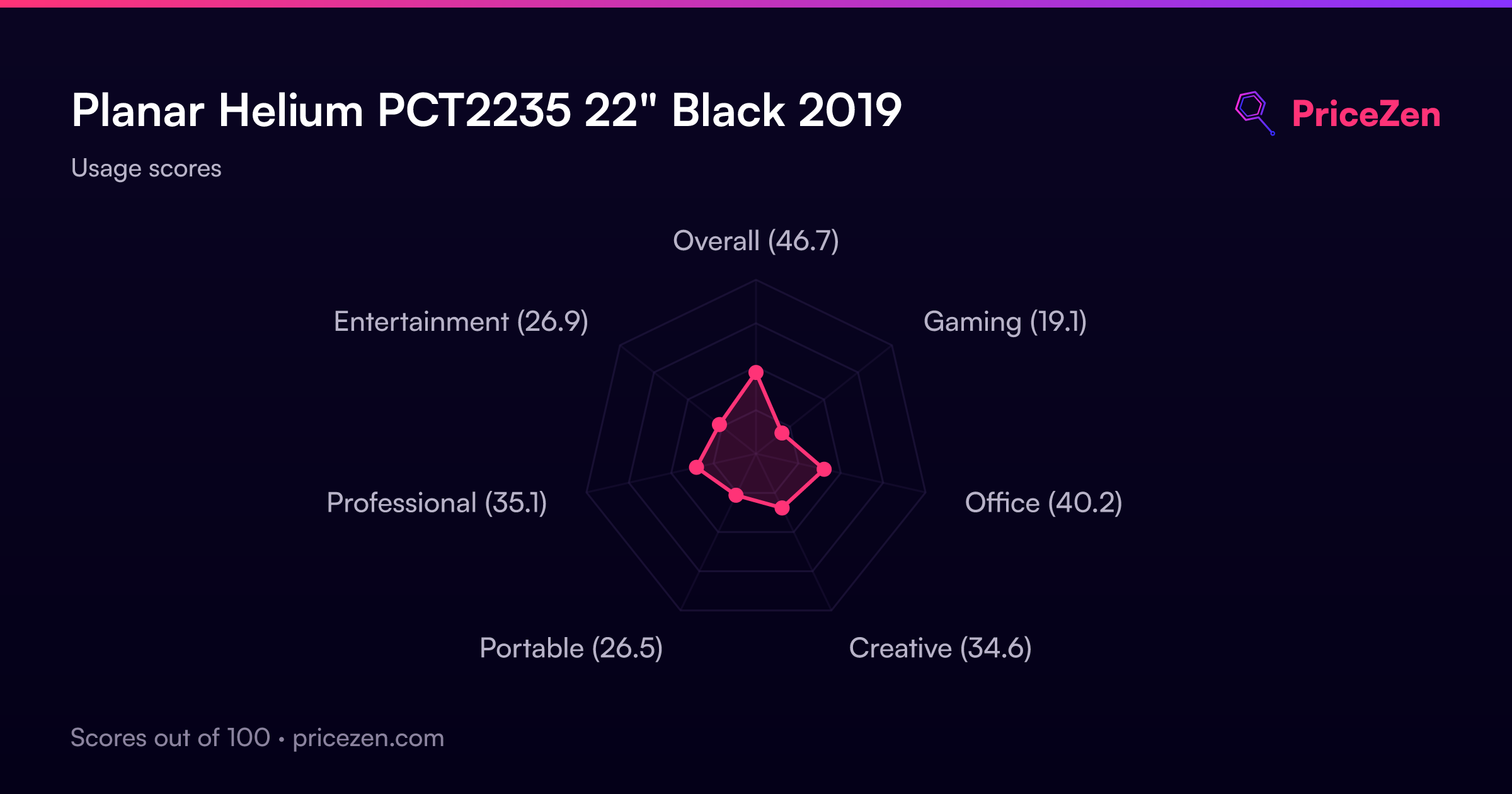
Usage Scores
- Overall46.6
- Gaming19.1
- Office40.2
- Creative34.6
- Portable26.5
- Professional35.1
- Entertainment26.9