Dell Professional Series P2417H 24" Black 2019
The 1920 x 1080 IPS panel with Dell ComfortView reduces harmful blue light and eliminates flicker, making it suitable for extended use. Its comprehensive ergonomic stand offers height, pivot, swivel, and tilt adjustments, while slim bezels create a seamless multi-monitor setup. This monitor is best for office professionals who prioritize eye comfort and ergonomic flexibility for long hours of document-based work.

No current retailer price











Snapshot
The 30-Second Version
The Dell P2417H is a comfortable, well-built office monitor with a great adjustable stand and business-friendly ports. Performance and color are weak, landing near the bottom of our database. At USD 170 to USD 190 in the US, it's a solid buy for office work, but skip it if you need speed or vivid color.
Pros & Cons
Pros
- The stand is fantastic, height, tilt, swivel, and pivot all feel solid. 91st
- VESA mountable and built like it'll survive a decade of office moves. 70th
- HDMI, DisplayPort, and VGA cover basically any business machine. 68th
- ComfortView and flicker-free tech make long workdays easier on the eyes.
Cons
- 60Hz and 6ms response time are rough for anything beyond office work.
- 250 nits brightness is dim by modern standards.
- Color accuracy is weak, so don't plan on photo or video editing.
- No HDMI cable in the box, which annoyed more than one buyer.
What owners think
The Word on the Street
How owner sentiment changed over time
ExclusiveBased on when customers actually wrote their reviews - so you can see whether early praise held up.
8 written reviews, Jan 2017 – Nov 2019: 7 happy, 1 unhappy
Across all 14 store ratings: 4.3★. The chart counts the 8 written reviews.
Each dot is one written review, in the month it was written. Happy = 4-5★, mixed = 3★, unhappy = 1-2★.
The proof
Performance
The P2417H runs at 60Hz with a 6ms response time, which lands it in the bottom 10% of monitors we track. That's fine for Word docs and Slack, but any fast motion looks smeary. Brightness tops out at 250 nits, which is okay for indoor offices but struggles near windows. The IPS panel gives you wide viewing angles, which is nice for sharing your screen with a coworker, but the color performance sits near the bottom of our database. This is a monitor that prioritizes comfort and reliability over raw speed or vividness.
Specifications
Full Specifications
Display
| Size | 24" |
| Resolution | 1920x1080 (Full HD) |
| Panel Type | IPS |
| Aspect Ratio | 16:9 |
| Curved | No |
| Screen Finish | matte |
Performance
| Refresh Rate | 60 Hz |
| Response Time | 6 |
Color & HDR
| Brightness | 250 nits |
| Color Depth | 8-bit |
Connectivity
| HDMI Ports | 1 |
| DisplayPort | 1 |
| USB-C | 0 |
| Thunderbolt | N/A |
| Speakers | No |
| Headphone Jack | No |
Ergonomics
| Height Adjustable | Yes |
| Tilt | Yes |
| Swivel | Yes |
| Pivot | Yes |
| VESA Mount | 100x100 |
Features
| Webcam | No |
| Touchscreen | No |
| PIP/PBP | No |
| Power | 19 |
| Weight | 3.3 kg / 7.3 lbs |
vs Competition
Stacked against something like the MSI MAG 271QPX QD-OLED or the LG UltraGear 27G810A-B, the P2417H looks like a relic. Those competitors offer higher refresh rates, better color, and bigger screens, but they also cost more and target gamers. The Samsung Odyssey G7 and ASUS ROG Strix XG27ACDNG are in a completely different league for speed and vibrancy. Where the Dell wins is ergonomics and business practicality. It's not trying to be flashy, it's trying to be dependable. For an office environment, that matters more than 240Hz.
| Spec | Dell Professional Series P2417H 24" | Acer Nitro UM.CX2AA.S01 34" | BenQ MOBIUZ EX381U 37.5" | Samsung Odyssey Ark 2nd Gen 55" | Gigabyte M Series M32U 31.5" | ASRock Phantom Gaming PGO27QFV 27" |
|---|---|---|---|---|---|---|
| Screen Size | 24 | 34 | 37.5 | 55 | 31.5 | 27 |
| Resolution | 1920 x 1080 | 3440 x 1440 | 3840 x 2160 | 3840 x 2160 | 3840 x 2160 | 2560 x 1440 |
| Panel Type | IPS | VA | IPS | Mini-LED | IPS | OLED |
| Refresh Rate | 60 | 165 | 144 | 165 | 144 | 360 |
| Response Time Ms | 6 | 1 | 1 | 1 | 1 | 0.029999999329447746 |
| Adaptive Sync | - | FreeSync Premium | FreeSync Premium Pro | FreeSync Premium Pro | FreeSync Premium Pro | FreeSync Premium Pro |
| Hdr | - | HDR400 | HDR10 | HDR10+ | HDR400 | DisplayHDR True Black 400 |
| Compare | Compare | Compare | Compare | Compare |
| Product | Color | Portability | Display | Feature | Ergonomic | Performance | Connectivity | Social Proof |
|---|---|---|---|---|---|---|---|---|
| Dell Professional Series P2417H 24" | 15.6 | 68 | 37.7 | 21.3 | 90.8 | 10.4 | 70.3 | 20.9 |
| Acer Nitro UM.CX2AA.S01 34" Compare | 84.7 | 20.7 | 76.2 | 90.8 | 67 | 77.1 | 84 | 84 |
| BenQ MOBIUZ EX381U 37.5" Compare | 93.6 | 68 | 95.1 | 70.2 | 73.5 | 72.6 | 99.8 | 0 |
| Samsung Odyssey Ark 2nd Gen 55" Compare | 98.4 | 20.7 | 91.5 | 96.3 | 30.3 | 77.1 | 81.2 | 74.9 |
| Gigabyte M Series M32U 31.5" Compare | 90 | 63 | 87.1 | 85.1 | 73.5 | 72.6 | 87.6 | 0 |
| ASRock Phantom Gaming PGO27QFV 27" Compare | 80.1 | 57.5 | 73.6 | 70.2 | 73.5 | 99.5 | 81.2 | 7.9 |
Price
Value & Pricing
Pricing is all over the place depending on where you look. In the US, you can grab one for USD 170 to USD 190, with Newegg showing the lower end of that spread. That's reasonable for a reliable office monitor with this kind of stand. But the CAD 406 and EUR 491 listings are a much tougher sell for what you get. At the US price, it's a decent deal for a business fleet. At those other prices, you're paying a premium for old tech.
Price history
Read more
Overview
The Dell P2417H is a 24-inch 1080p IPS monitor aimed squarely at office desks, not gaming rigs. It's built like a tank, has a stand that actually moves the way you want, and won't burn your retinas after eight hours of spreadsheets. But it's also old tech at this point, and the performance numbers show it.
Dell packed this thing with ergonomic flexibility and business-friendly ports. The display itself is fine for documents and email, but it's not winning any color or speed contests. If you need a dependable workhorse for a multi-monitor setup, this is a solid pick. If you want to game or do color-critical work, keep scrolling.
Common Questions
Q: Is this monitor good for gaming?
Not really. The 60Hz refresh rate and 6ms response time put it in the bottom 10% of monitors we track, so fast-paced games will look blurry and feel laggy.
Q: Can I mount this on a monitor arm?
Yes, it has a standard VESA 100x100 mount, and the included stand is also removable if you prefer an arm setup.
Q: Does it come with an HDMI cable?
No, the box includes the monitor and stand but no HDMI cable. You'll need to supply your own HDMI, DisplayPort, or VGA cable depending on your setup.
Who Should Skip This
Skip this if you do any gaming, video editing, or color-sensitive work. The 60Hz panel and weak color accuracy will frustrate you. Also skip it if you need a bright screen for a sunlit room, 250 nits just doesn't cut it. And if you're outside the US, the international pricing makes this a poor value compared to newer options.
Verdict
Buy this if you need a no-nonsense office monitor that you can adjust to exactly the right height and angle, and you don't care about gaming or color work. It's a fleet monitor, the kind IT departments order by the pallet. The stand alone is worth the price of admission for anyone with neck or back strain from a fixed monitor. Just don't expect it to impress anyone with its specs.
Usage Scores
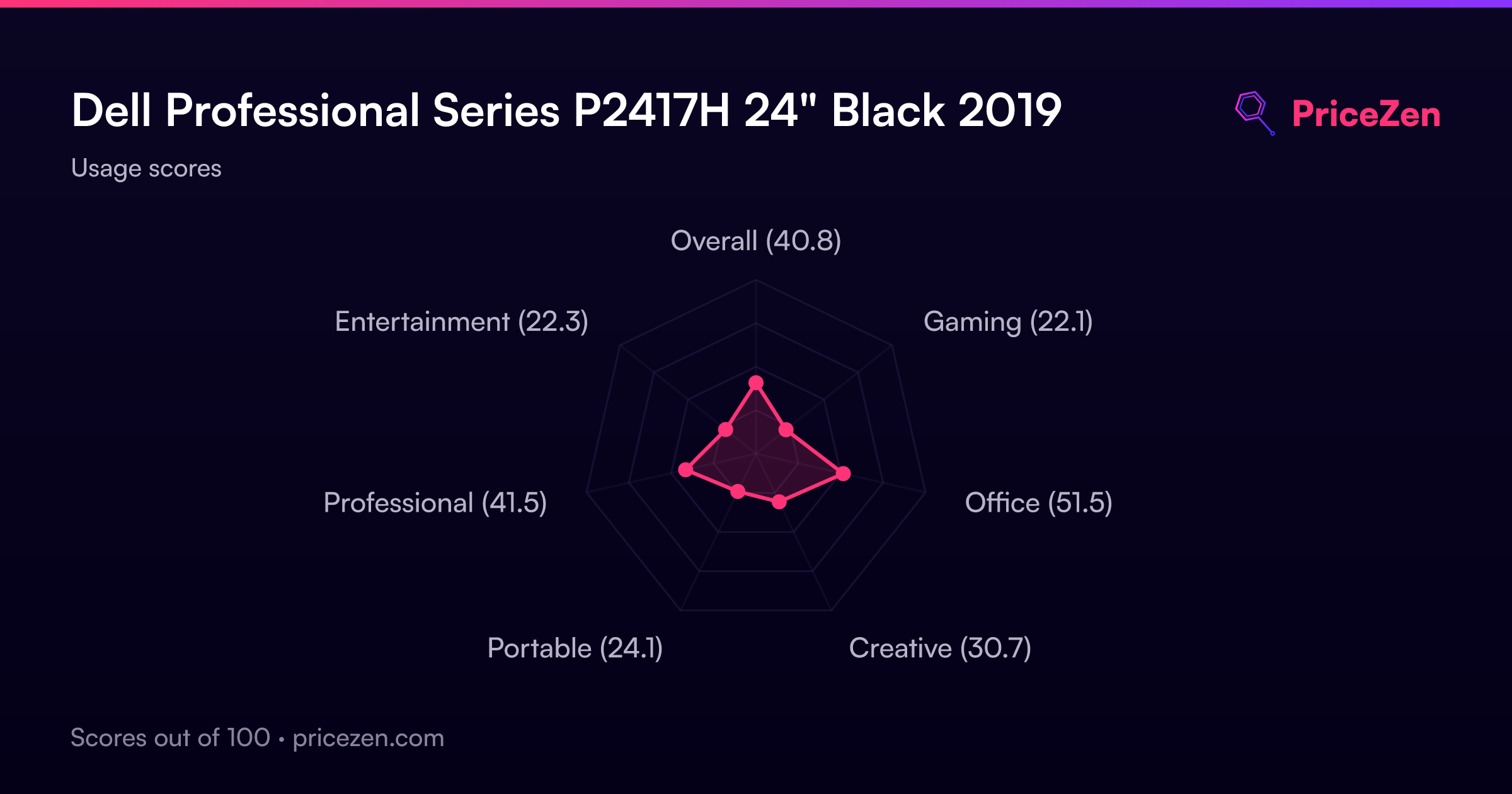
- Overall40.8
- Gaming22.1
- Office51.5
- Creative30.7
- Portable24.1
- Professional41.5
- Entertainment22.3