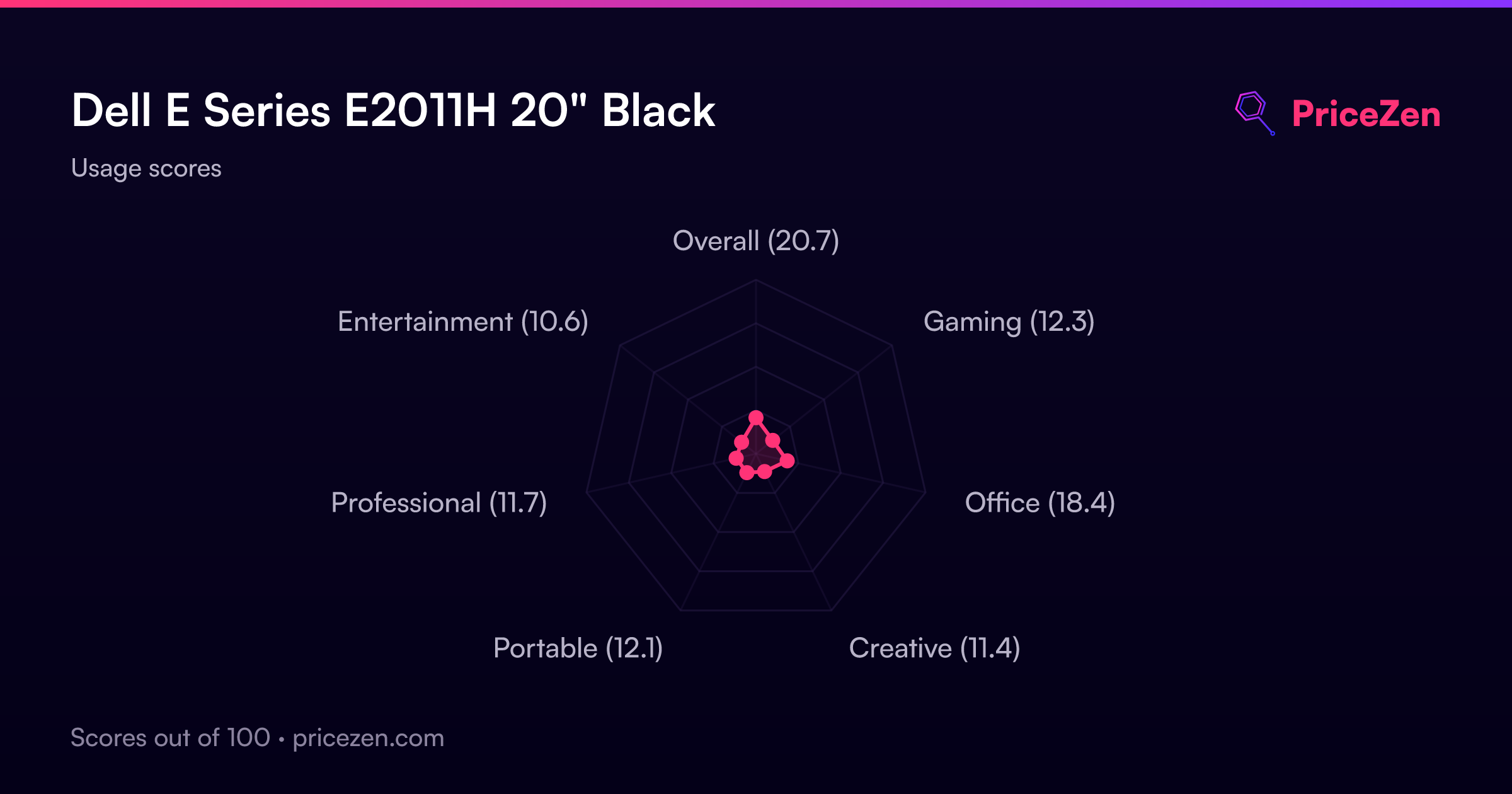
Dell E Series E2011H 20" Black
The 20-inch 1600 x 900 LED display with a 5ms response time delivers clear visuals for daily office tasks. It supports VGA and DVI-D inputs, includes tilt and VESA mount support, and weighs 4.42kg with the stand. This monitor is best for office workers who need a reliable, energy-efficient screen for productivity and document work.

No current retailer price











Snapshot
The 30-Second Version
A 2011 office monitor that time forgot. Fine for reading spreadsheets, terrible for everything else.
Pros & Cons
Pros
- Dirt cheap on the used market 68th
- DVI-D port is a nice throwback for older PCs
- Light enough to move around easily
- Simple, no-nonsense OSD
Cons
- 1600 x 900 on a 20-inch TN panel looks dated
- No HDMI or DisplayPort, so modern laptops need adapters
- Ergonomics are basically a fixed stand
- Color accuracy is one of the worst we've seen
What owners think
The Word on the Street
How owner sentiment changed over time
ExclusiveBased on when customers actually wrote their reviews - so you can see whether early praise held up.
4 written reviews, Mar 2017 – May 2021: 4 happy
Across all 14 store ratings: 4.7★. Most owners rate without writing a review. The chart counts the 4 written reviews.
Each dot is one written review, in the month it was written. Happy = 4-5★, mixed = 3★, unhappy = 1-2★.
The proof
Performance
The specs are rough. A 5ms response time and 1000:1 contrast ratio put this thing in the bottom quarter of our database for performance. The 250 cd/m² brightness is okay for a dim office, but the TN panel means colors shift if you breathe on it wrong. What surprised us? That it still has a 4.7-star rating from 14 buyers. Nostalgia is a powerful drug.
Specifications
Full Specifications
Display
| Size | 20" |
| Resolution | 1600x900 |
| Panel Type | LCD |
| Aspect Ratio | 16:9 |
| Curved | No |
| Screen Finish | glossy |
Performance
| Refresh Rate | 60 Hz |
| Response Time | 5 |
Color & HDR
| Brightness | 250 nits |
| Color Depth | 8-bit |
Connectivity
| HDMI Ports | 0 |
| DisplayPort | 0 |
| USB-C | 0 |
| Speakers | No |
| Headphone Jack | No |
Ergonomics
| Height Adjustable | No |
| Tilt | Yes |
| Swivel | No |
| Pivot | No |
Features
| Webcam | No |
| Touchscreen | No |
| PIP/PBP | No |
| Power | 18 |
| Weight | 5.5 kg / 12.1 lbs |
vs Competition
Stacked against something like the Samsung Odyssey OLED G6 or the ASUS ROG Strix XG27UCDMG, the E2011H looks like a museum piece. Those monitors offer 1440p or 4K, high refresh rates, and color accuracy that makes this Dell look like a calculator screen. Even a budget modern office monitor will beat this on connectivity and ergonomics. The only reason to pick the E2011H is if you specifically need VGA or DVI-D without an adapter.
| Spec | Dell E Series E2011H 20" | BenQ MOBIUZ EX381U 37.5" | Samsung Odyssey Ark 2nd Gen 55" | Gigabyte M Series M32U 31.5" | Acer CB342CU UM.CB2AA.004 34" | MSI MAG 273QP QD-OLED X24 26.5" |
|---|---|---|---|---|---|---|
| Screen Size | 20 | 37.5 | 55 | 31.5 | 34 | 26.5 |
| Resolution | 1600 x 900 | 3840 x 2160 | 3840 x 2160 | 3840 x 2160 | 3440 x 1440 | 2560 x 1440 |
| Panel Type | LCD | IPS | Mini-LED | IPS | IPS | QD-OLED |
| Refresh Rate | 60 | 144 | 165 | 144 | 75 | 240 |
| Response Time Ms | 5 | 1 | 1 | 1 | 1 | 0.029999999329447746 |
| Adaptive Sync | - | FreeSync Premium Pro | FreeSync Premium Pro | FreeSync Premium Pro | FreeSync | Adaptive-Sync |
| Hdr | - | HDR10 | HDR10+ | HDR400 | HDR400 | DisplayHDR True Black 400 |
| Compare | Compare | Compare | Compare | Compare |
| Product | Color | Portability | Display | Feature | Ergonomic | Performance | Connectivity | Social Proof |
|---|---|---|---|---|---|---|---|---|
| Dell E Series E2011H 20" | 15.6 | 68 | 6.4 | 21.3 | 21.8 | 22.3 | 6.7 | 38.4 |
| BenQ MOBIUZ EX381U 37.5" Compare | 93.6 | 68 | 95.1 | 70.2 | 73.5 | 72.6 | 99.8 | 0 |
| Samsung Odyssey Ark 2nd Gen 55" Compare | 98.4 | 20.7 | 91.5 | 96.3 | 30.4 | 77.1 | 81.2 | 74.9 |
| Gigabyte M Series M32U 31.5" Compare | 90.1 | 63 | 87.1 | 85.1 | 73.5 | 72.6 | 87.6 | 0 |
| Acer CB342CU UM.CB2AA.004 34" Compare | 79 | 63 | 78.9 | 70.2 | 78.7 | 65.7 | 70.3 | 74.9 |
| MSI MAG 273QP QD-OLED X24 26.5" Compare | 74.5 | 12.7 | 72.7 | 70.2 | 90.8 | 97.9 | 53.3 | 0 |
Price
Value & Pricing
There's no official price listed, but used listings hover around 68,470 JPY or 13,850 MXN depending on where you look. For that money, you can often find a used 24-inch IPS panel with HDMI. This isn't worth it unless you're getting it for free or need a period-correct monitor for a retro setup.
Price history
Read more
Overview
The Dell E2011H is a relic from a simpler time, and that's not a compliment. It's a 20-inch TN panel with a 1600 x 900 resolution, VGA and DVI-D ports, and a design that screams 'office surplus from 2011'. The one thing to know? This monitor is fine if you need a basic second screen for reading documents, but it's a terrible choice for anything involving color, gaming, or modern connectivity.
Common Questions
Q: Can I connect this to a modern laptop?
Only if your laptop has VGA or DVI-D out, which most don't anymore. You'll need an HDMI-to-DVI adapter, and even then you're stuck at 1600 x 900.
Q: Is this good for gaming?
No. A 5ms response time and 60Hz refresh rate are fine for solitaire, but anything faster will feel muddy. The TN panel also has poor viewing angles, so you'll lose detail in dark scenes.
Q: Does it have built-in speakers?
No speakers, no USB hub, no height adjustment. It's a bare-bones panel with two video inputs and a power button.
Who Should Skip This
If you're looking for a monitor for photo editing, gaming, or even just watching Netflix, this isn't it. Go get a used 24-inch IPS monitor with HDMI instead. You'll spend about the same and get a dramatically better picture.
Verdict
Skip it. The Dell E2011H was a fine budget office monitor in 2011, but in 2025 it's a compromise you don't need to make. Unless you're building a retro battlestation or need a disposable screen for a server rack, put your money toward something with HDMI and an IPS panel.
Usage Scores
- Overall20.7
- Gaming12.3
- Office18.4
- Creative11.4
- Portable12.1
- Professional11.7
- Entertainment10.6