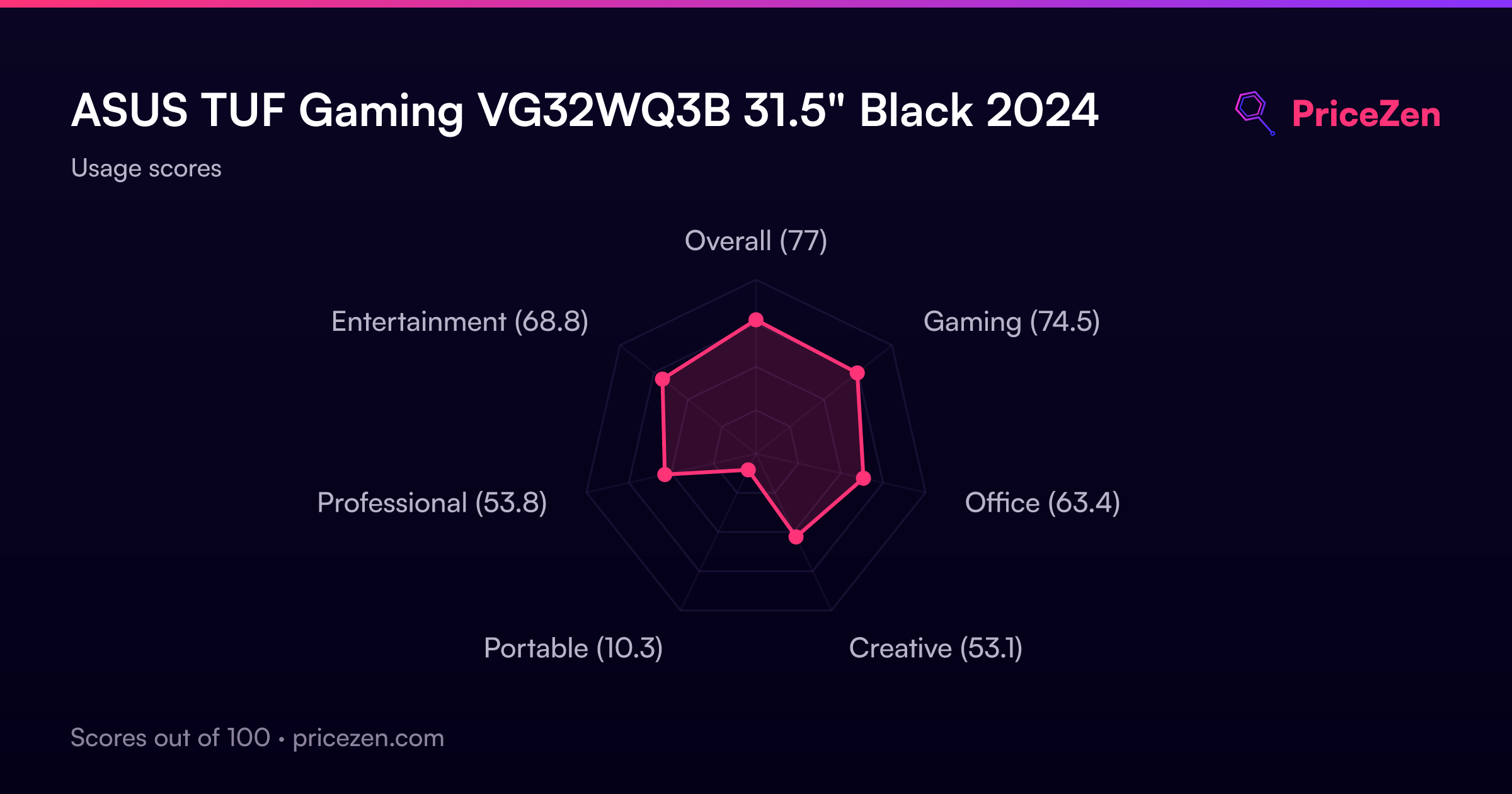
ASUS TUF Gaming VG32WQ3B 31.5" Black 2024

Great 1440p picture for gaming and work verified Nov 19
77/100 overall score 4.5 average from 220 owner ratings
- Screen
- 31.5"
- Resolution
- 2560 x 1440
- Panel
- VA
- Refresh
- 180 Hz
- Response time
- 0.5 ms
- Adaptive sync
- FreeSync
- HDR
- HDR10
Compare prices at 1 store
Cheapest first. New, refurbished and bundled offers are kept apart, so you compare like with like.
| Store | Sold by | Colour and condition | Price | vs lowest | Last checked | Link |
|---|---|---|---|---|---|---|
| New1 offerSingle unit | ||||||
| Not checked in the last 7 days, so these prices may have changed | ||||||
| Amazon | Marketplace seller | Not listed | ¥54,855 | Nov 3 | Go to store | |
 Source: PriceZen, checked Nov 3, 2026
A price counts as current when we checked it in the last 7 days. “Marketplace seller” means a third-party seller on that store, not the store itself.
Price history
Checked that dayNot checked that day, still on offer
Source: PriceZen, checked Nov 3, 2026











Snapshot
The 30-Second Version
The ASUS TUF Gaming VG32WQ3B is a 31.5-inch curved 1440p monitor with a 180Hz refresh rate and 0.5ms response time. Performance sits in the 93rd percentile in our ranking, one of the strongest gaming panels in its category. Ergonomics are weak and brightness is just okay. Prices have risen to USD 232 to USD 275, so it's good value rather than a steal, and owners still rate it highly at 82 out of 100.
Pros & Cons
Pros
- 180Hz refresh rate and 0.5ms response time make gameplay feel incredibly smooth 96th
- 1500R curve on a 31.5-inch panel is immersive without being distracting 92nd
- FreeSync works out of the box with VRR enabled by default 84th
- Shadow Boost genuinely helps in dark game scenes 75th
Cons
- Ergonomics are barebones, tilt only with no height adjustment
- 300 nits brightness is mediocre for bright rooms
- VA panel viewing angles are not great if you sit off-center
- No USB hub or KVM switch for a monitor at this size
What owners think
The Word on the Street
- Owners consistently praise the smooth 180Hz gameplay and lack of ghosting, especially when paired with high-end GPUs
- Several buyers mention the 1500R curve is perfect for sim racing setups, with some running triple monitor rigs
- A few users report the monitor messes with GPU settings after rebooting, requiring manual reconfiguration
How owner sentiment changed over time
ExclusiveBased on when customers actually wrote their reviews - so you can see whether early praise held up.
Happy owners: 100% lately, 80% in 2025
Too few reviews to call that a change.
Across all 220 store ratings: 4.5★. Most owners rate without writing a review. The chart counts the 25 written reviews with stars and their own date.
Show the numbers
| Period | Reviews | Happy | Mixed | Unhappy | Happy share |
|---|---|---|---|---|---|
| 2025 | 10 | 8 | 0 | 2 | 80% |
| Jan – Sep 2026 | 15 | 15 | 0 | 0 | 100% |
Each column joins calendar quarters until it holds at least 10 reviews with stars and their own date. Happy = 4-5★, mixed = 3★, unhappy = 1-2★.
The proof
Performance
The 180Hz refresh rate and 0.5ms response time are the headline acts here, and they deliver. Paired with FreeSync, you get smooth, tear-free gameplay that holds up even in fast-paced shooters. ASUS Extreme Low Motion Blur helps cut down on ghosting, and Shadow Boost brightens dark scenes without washing out the highlights. The VA panel gives you deep blacks and solid contrast, though the 300 nits brightness is fine for a dim room but won't wow you in a bright one. Color coverage at 90% DCI-P3 is respectable for gaming, sitting in the 79th percentile. It's not OLED-level color, but it's more than enough for most people who just want their games to pop.
Specifications
Full Specifications
Display
| Size | 31.5" |
| Resolution | 2560x1440 (QHD) |
| Panel Type | VA |
| Aspect Ratio | 16:9 |
| Curved | Yes |
| Curvature | 1500 |
| Screen Finish | matte |
Performance
| Refresh Rate | 180 Hz |
| Response Time | 0.5 |
| Adaptive Sync | FreeSync |
Color & HDR
| Brightness | 300 nits |
| Color Gamut | DCI-P3 90% |
| Color Depth | 8-bit |
| HDR | HDR10 |
| HDR Support | HDR10 |
Connectivity
| HDMI Ports | 2 |
| DisplayPort | 1 |
| Speakers | Yes |
| Headphone Jack | Yes |
Ergonomics
| Height Adjustable | No |
| Tilt | Yes |
| Swivel | No |
| Pivot | No |
| VESA Mount | 100x100 |
Features
| Webcam | No |
| PIP/PBP | Yes |
| Power | 32 |
| Weight | 7.1 kg / 15.7 lbs |
vs Competition
The current top five is a mixed bag, and the VG32WQ3B's pitch is size plus speed for less. The Samsung Odyssey G60SD 27" and LG UltraGear 32GX850A-B 32" sit at the premium end of our ranking, and you pay for that position. The BenQ MA Series MA270U 27" is aimed more at desk work than gaming, so it's not really chasing the same buyer. The Dell Alienware AW2523HF 24.5" goes the other way, smaller and built for competitive play rather than immersion. Our scoring model puts this ASUS in the 93rd percentile for performance, which is why it stays in the conversation with all of them. If you want a big curved 1440p screen without stretching to the top of the list, it's the value pick here.
| Spec | ASUS TUF Gaming VG32WQ3B 31.5" | LG UltraGear 39" | BenQ PD3220U 32" | Samsung Odyssey Ark 2nd Gen 55" | Gigabyte M Series M32U 31.5" | Dell UltraSharp U4320Q 27" |
|---|---|---|---|---|---|---|
| Screen Size | 31.5 | 39 | 32 | 55 | 31.5 | 27 |
| Resolution | 2560 x 1440 | 3440 x 1440 | 3840 x 2160 | 3840 x 2160 | 3840 x 2160 | 3840 x 2160 |
| Panel Type | VA | OLED | IPS | Mini-LED | IPS | IPS |
| Refresh Rate | 180 | 240 | 60 | 165 | 144 | 60 |
| Response Time Ms | 0.5 | 0.03 | 5 | 1 | 1 | 5 |
| Adaptive Sync | FreeSync | FreeSync Premium Pro | - | FreeSync Premium Pro | FreeSync Premium Pro | - |
| Hdr | HDR10 | DisplayHDR True Black 400 | HDR10 | HDR10+ | HDR400 | HDR400 |
| Compare | Compare | Compare | Compare | Compare |
| Product | Color | Portability | Display | Feature | User Sentiment | Ergonomic | Performance | Connectivity | Social Proof |
|---|---|---|---|---|---|---|---|---|---|
| ASUS TUF Gaming VG32WQ3B 31.5" | 74.8 | 35.1 | 61.9 | 96.3 | 61.5 | 47.1 | 91.8 | 62.1 | 83.9 |
| LG UltraGear 39" Compare | 63.3 | 49.3 | 84 | 96.3 | 0 | 66.9 | 97.9 | 81 | 0 |
| BenQ PD3220U 32" Compare | 88.6 | 81.3 | 95.1 | 85 | 0 | 90.8 | 22.3 | 96.9 | 0 |
| Samsung Odyssey Ark 2nd Gen 55" Compare | 98.4 | 20.7 | 91.5 | 96.3 | 10.4 | 30 | 77 | 81 | 74.8 |
| Gigabyte M Series M32U 31.5" Compare | 90 | 62.8 | 87 | 85 | 0 | 73.4 | 72.6 | 87.4 | 0 |
| Dell UltraSharp U4320Q 27" Compare | 91 | 82.7 | 87 | 85 | 0 | 90.8 | 22.3 | 96.9 | 0 |
Price
Value & Pricing
Prices have climbed since we last looked. US listings now run from USD 232 to USD 275, up from where they sat before. At USD 232 it's still a lot of monitor for the money: 31.5 inches, 1440p, 180Hz, curved. At USD 275 the math gets tighter, and it's worth checking what else sits near that number before you commit. In Europe the spread is wide as ever, EUR 336 to EUR 650. Anything close to EUR 650 is a hard pass. We track this price over time, partly through our community browser extension, so watch for a dip instead of grabbing the first listing you see.
Read more
Overview
The ASUS TUF Gaming VG32WQ3B is a 31.5-inch curved VA panel that nails the gaming essentials. You get 1440p resolution, a 180Hz refresh rate, and a 0.5ms response time, all wrapped in a 1500R curve that pulls you into the action. It's not trying to be a color-critical workstation display. It's built to make games feel fast and look good while doing it.
Our database puts its performance in the 93rd percentile, which is a fancy way of saying this thing is one of the best on the market for pure gaming chops. The feature set is nearly as strong at the 92nd percentile. But the ergonomics are a letdown, sitting at the 54th percentile. You get tilt and that's about it. No height adjustment, no swivel. For a monitor this size, that's a real compromise.
Common Questions
Q: Does this monitor work with NVIDIA GPUs?
Yes. While it's marketed with FreeSync, the VRR works with NVIDIA cards over DisplayPort as G-Sync Compatible. You'll get smooth gameplay either way.
Q: Is the VA panel good for fast-paced shooters?
For most people, yes. The 0.5ms response time and 180Hz refresh rate keep motion blur low. Hardcore competitive players might prefer a TN or OLED panel, but this is more than capable.
Q: Can I mount this on a monitor arm?
Yes, it has a standard VESA 100x100 mount. Given the weak built-in stand, an arm is actually a smart upgrade if you want height adjustment.
Who Should Skip This
Skip this if you need accurate color for photo or video work. The 90% DCI-P3 coverage and 8-bit panel are fine for games but won't satisfy professionals. Also skip it if you have a bright, window-filled room, the 300 nits brightness will struggle against glare. And if you need height adjustment or swivel without buying a separate arm, look elsewhere because the included stand only tilts.
Verdict
This monitor is for gamers who want a big, fast, curved display without spending flagship money. The 31.5-inch size and 1500R curve make racing games, flight sims, and open-world titles feel more engaging. The 180Hz refresh rate keeps competitive shooters smooth. Owners back that up, with sentiment at 82 out of 100 in our data. It's not the right choice for photo editors or anyone who needs accurate color, and the tilt-only stand will annoy anyone with a non-standard desk setup. Prices have crept up, so aim for the USD 232 end rather than USD 275. At the low end it's still an easy recommendation.
Usage Scores
- Overall77
- Gaming74.5
- Office63.3
- Creative53.1
- Portable10.3
- Professional53.8
- Entertainment68.8