Lenovo ThinkCentre TIO24 Gen5 23.8" Black 2026
Its modular design integrates a ThinkCentre Tiny PC into the rear slot for a cable-free desk, complemented by a 1080p webcam, noise-cancelling mic, and dedicated VoIP controls. The 23.8-inch IPS panel covers 99% sRGB with a fully adjustable stand, though its 250-nit brightness limits HDR use. This monitor is best for corporate offices deploying standardized, space-saving desk setups with Lenovo Tiny PCs.

No current retailer price
Where we saw it before. Check the store for today's price.








Snapshot
The 30-Second Version
A fantastic docking station disguised as a monitor. Buy it for the clean desk, not the picture quality.
Pros & Cons
Pros
- Integrated webcam and speakers make it a true all-in-one hub 98th
- Best-in-class ergonomics with full height, tilt, swivel, and pivot 94th
- Excellent connectivity with USB-C, HDMI, and DisplayPort 91st
- Perfect cable-management solution for a Lenovo Tiny PC 87th
- Owners consistently praise how clean the finished desk looks
Cons
- Screen is dim at 250 nits and looks dated
- 1080p resolution feels cramped on a 24" panel right now
- Mediocre color performance for anything beyond office work
- Completely useless as a portable display
- Owners report the setup software can be a headache on the wrong machine
What owners think
The Word on the Street
How owner sentiment changed over time
ExclusiveBased on when customers actually wrote their reviews - so you can see whether early praise held up.
37 written reviews, Dec 2023 – Nov 2026: 25 happy, 1 mixed, 11 without stars
Across all 55 store ratings: 4.8★. The chart counts the 37 written reviews.
- Jan – Mar 20264 without stars
Reviewers praise color accuracy and build quality but note confusing assembly instructions and tricky shading hood setup.
- Excellent color accuracy and vibrant display out of the box.
- Assembly instructions are nearly incomprehensible, missing steps.
- Shading hood is tricky to assemble but works well once in place.
- Helpful customer service resolved calibration software issues.
- Oct – Dec 20252 of 2 happy · 6 without stars
Buyers praised the ThinkCentre Tiny-In-One 24 Gen 5 for office work, highlighting its sleek design, modularity, sharp display, and ergonomic features. However, some reviews were promotional or duplicated, with one negative rating, tempering overall sentiment.
- Sleek design and modularity allow clean integration of ThinkCentre Tiny PC, creating a tidy all-in-one workstation.
- Full HD display is sharp and comfortable, enhancing the office work experience.
- Adjustable stand and retractable webcam add ergonomic and privacy value.
- Some reviews were promotional or duplicated, with one negative rating, raising authenticity concerns.
- Jul – Sep 20254 of 4 happy
Buyers report the monitor works as expected, with easy setup, no bloatware, and good ergonomics. One reviewer noted compatibility with an older Tiny PC while awaiting a new one.
- Works as expected, no issues, easy 5-minute setup, no bloatware.
- Monitor offers full adjustability for height and tilt, good ergonomics.
- Colors and resolution are excellent for office work, meets advertised specs.
- Compatibility with older Tiny PCs noted; one reviewer used it with m920q while waiting for new PC.
- Jul – Sep 20243 of 3 happy
Buyers praised the space-saving design and integrated camera/speakers for meetings, but one duplicate review was rated 0 stars, possibly due to promotion collection, skewing sentiment.
- Space-saving design: tiny PC enclosed within monitor, neat desktop.
- Integrated camera and speakers are perfect for online meetings.
- All-in-one elegance with easy system access without full teardown.
- One review rated 0 stars despite positive text, possibly due to promotion.
Each dot is one written review, in the month it was written. Happy = 4-5★, mixed = 3★, unhappy = 1-2★. Period summaries are in English.
The proof
Performance
The display itself is the biggest surprise, and not in a great way. With 250 nits of brightness and a basic 1080p resolution, it's firmly in the bottom quartile of all monitors we track. It's fine for text and office apps, but it looks dim next to a modern laptop screen. The 99% sRGB coverage is a small saving grace, keeping colors from looking totally washed out, but the low brightness means you won't want it near a sunny window. The 60Hz refresh rate is standard, and the 4ms response time is a non-issue for its intended use. It gets the job done, but 'vibrant' isn't in its vocabulary.
Specifications
Full Specifications
Display
| Size | 23.8" |
| Resolution | 1920x1080 (Full HD) |
| Panel Type | IPS |
| Aspect Ratio | 16:9 |
| Curved | No |
| Screen Finish | matte |
Performance
| Refresh Rate | 60 Hz |
| Response Time | 4 |
| Adaptive Sync | Adaptive-Sync |
Color & HDR
| Brightness | 250 nits |
| Color Gamut | 99% sRGB |
| Color Depth | 8-bit |
| HDR | HDR10 |
Connectivity
| HDMI Ports | 1 |
| DisplayPort | 1 |
| USB-C | 2 |
| Thunderbolt | N/A |
| Speakers | Yes |
| Headphone Jack | Yes |
Ergonomics
| Height Adjustable | Yes |
| Tilt | Yes |
| Swivel | Yes |
| Pivot | Yes |
| VESA Mount | 100x100 |
Features
| Webcam | Yes |
| Touchscreen | No |
| PIP/PBP | No |
| Power | 14 |
| Weight | 6.0 kg / 13.2 lbs |
vs Competition
The monitors sitting near the top of our ranking are a different species entirely: the ASUS ROG Strix XG27AQDPG, the LG UltraGear 27G810A-B and the Dell S2725QC. All three are 27" screens built for people who care about the picture first. The ThinkCentre isn't playing that game. It's a 24" 1080p panel at 60Hz, and our scoring model puts it in the bottom quartile of every monitor we track. What none of those three can do is swallow a Lenovo Tiny PC and turn it into a tidy all-in-one with a webcam and speakers already wired in. That's the whole argument for this screen. If you don't have a Tiny to slot in, buy one of the others and enjoy the better panel.
| Spec | Lenovo ThinkCentre TIO24 Gen5 23.8" | LG UltraGear 39" | BenQ PD3220U 32" | Samsung Odyssey Ark 2nd Gen 55" | Gigabyte M Series M32U 31.5" | Dell UltraSharp U4320Q 27" |
|---|---|---|---|---|---|---|
| Screen Size | 23.8 | 39 | 32 | 55 | 31.5 | 27 |
| Resolution | 1920 x 1080 | 3440 x 1440 | 3840 x 2160 | 3840 x 2160 | 3840 x 2160 | 3840 x 2160 |
| Panel Type | IPS | OLED | IPS | Mini-LED | IPS | IPS |
| Refresh Rate | 60 | 240 | 60 | 165 | 144 | 60 |
| Response Time Ms | 4 | 0.03 | 5 | 1 | 1 | 5 |
| Adaptive Sync | Adaptive-Sync | FreeSync Premium Pro | - | FreeSync Premium Pro | FreeSync Premium Pro | - |
| Hdr | HDR10 | DisplayHDR True Black 400 | HDR10 | HDR10+ | HDR400 | HDR400 |
| Compare | Compare | Compare | Compare | Compare |
| Product | Color | Portability | Display | Feature | User Sentiment | Ergonomic | Performance | Connectivity | Social Proof |
|---|---|---|---|---|---|---|---|---|---|
| Lenovo ThinkCentre TIO24 Gen5 23.8" | 53.5 | 86.7 | 21.4 | 94.4 | 29 | 90.7 | 44.2 | 98.2 | 54.6 |
| LG UltraGear 39" Compare | 63.4 | 49.3 | 84.1 | 96.3 | 0 | 66.8 | 97.9 | 81 | 0 |
| BenQ PD3220U 32" Compare | 88.6 | 81.3 | 95.1 | 85 | 0 | 90.7 | 22.4 | 96.9 | 0 |
| Samsung Odyssey Ark 2nd Gen 55" Compare | 98.4 | 20.7 | 91.5 | 96.3 | 10.4 | 30 | 77.1 | 81 | 74.8 |
| Gigabyte M Series M32U 31.5" Compare | 90 | 62.8 | 87 | 85 | 0 | 73.4 | 72.6 | 87.4 | 0 |
| Dell UltraSharp U4320Q 27" Compare | 91 | 82.7 | 87 | 85 | 0 | 90.7 | 22.4 | 96.9 | 0 |
Price
Value & Pricing
Pricing is all over the map, with a wild spread from $227 to over $61,000 from different vendors, which is clearly some bad data in the mix. The real street price you should be looking for is around that low $200 mark. At that price, it's a solid deal for a business that's already bought into the Lenovo Tiny ecosystem. You're getting a monitor, webcam, speakers, and a USB hub in one package. If you see it for anything over $300, walk away and buy a standard 24" monitor and a separate webcam instead.
Price history
Read more
Overview
The Lenovo ThinkCentre TIO-24 Gen5 is a monitor with a very specific job, and it nails it. This isn't a gaming display or a creative's dream canvas. It's a purpose-built hub for a Lenovo Tiny PC, turning a little compute module into a clean, capable all-in-one. The built-in webcam, speakers, and USB-C connectivity make it a fantastic one-cable docking solution for a clutter-free desk. If you're deploying these in an office, the integrated design and top-tier ergonomics are a genuine win. Just don't buy it expecting a stunning picture for anything beyond spreadsheets and video calls.
Common Questions
Q: Can I use this as a standalone monitor without a Lenovo Tiny PC?
Absolutely. It works as a standard monitor over HDMI or DisplayPort. But you're paying extra for the built-in Tiny PC slot and docking features. If you don't have the PC to slot in, you're better off with a cheaper, brighter standard monitor.
Q: Is the webcam any good?
It's perfectly fine for Teams and Zoom calls. It's not going to make you look like a streamer, but it's convenient, always there, and beats a grainy laptop camera. The integrated privacy shutter is a nice touch.
Q: Is this monitor good for photo editing?
No. While it covers 99% of sRGB, the 250-nit brightness is too low for accurate work, and the 1080p resolution isn't sharp enough. You'd want something like a BenQ PhotoVue for that kind of task.
Who Should Skip This
If you're looking for a vibrant screen for gaming, movies, or creative work, this isn't it. Go get a high-refresh IPS or OLED panel instead. And if you don't own a Lenovo Tiny PC, skip this entirely. You're paying a premium for a docking slot you'll never use. A standard 27" office monitor like the Dell S2725QC will give you a better screen for your money.
Verdict
Buy this if, and only if, you have a Lenovo Tiny PC that needs a home. It's a brilliant docking monitor that creates a super-clean, functional all-in-one for a front desk or a hot-desking setup. The integrated webcam and top-notch ergonomics are genuinely useful. For anyone else, it's a mediocre 1080p monitor with a party trick you can't use. You're paying for the integration, not the panel, so make sure you actually need that before clicking buy.
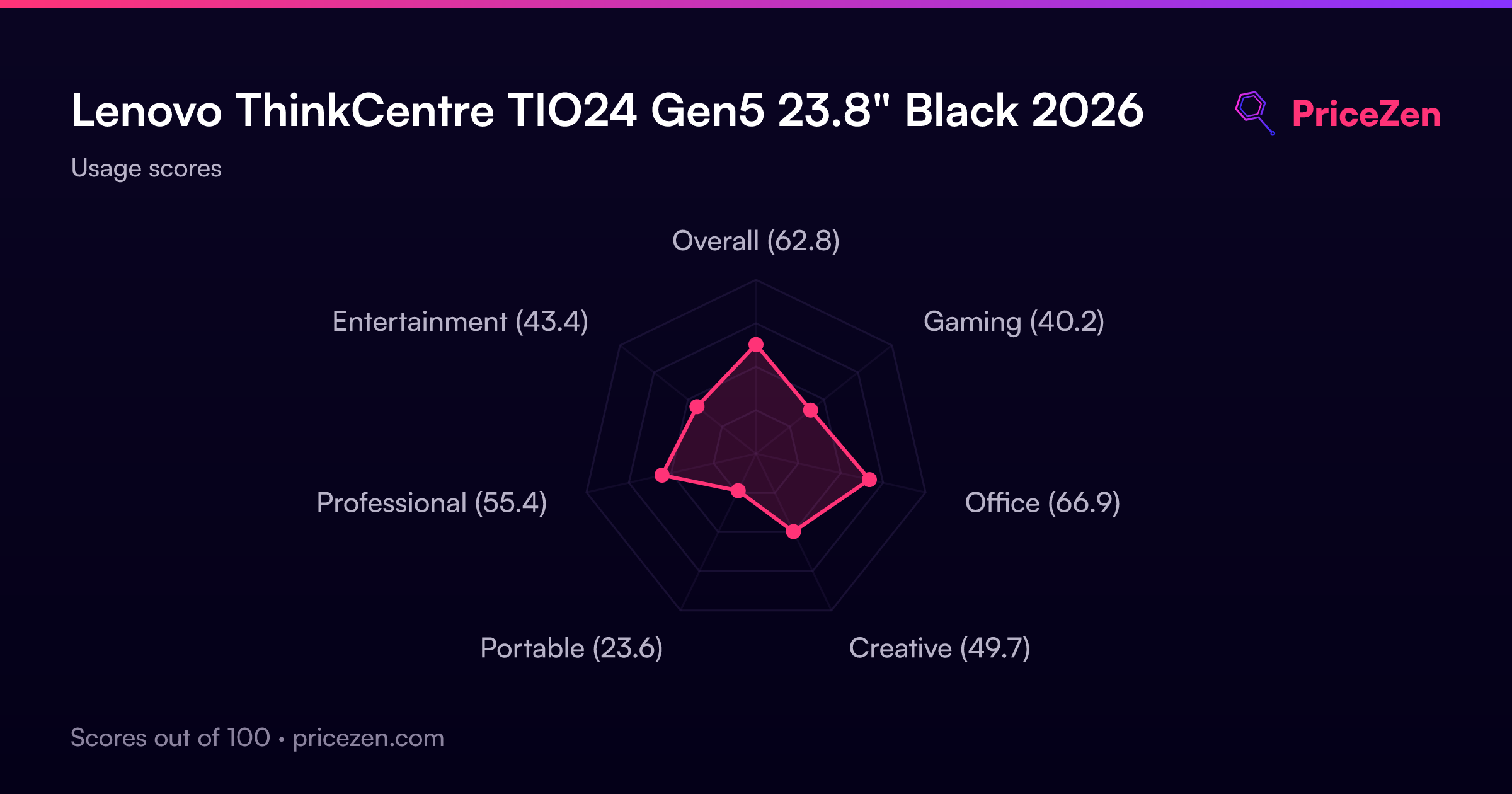
Usage Scores
- Overall62.8
- Gaming40.2
- Office66.4
- Creative49.7
- Portable23.6
- Professional55.5
- Entertainment43.4