HP ZBook 16" BX7V8UT#ABA 2025, Core Ultra 7 265H, 32GB, 2TB SSD, RTX 500 Ada, Silver

3 USB-C ports for modern gear verified Nov 28
63/100 overall score 3.0 average from 1 owner ratings
Prices checked on 1 days so far, too few to say what is usual.
- CPU
- Intel Core Ultra 7 265H
- RAM
- 32 GB
- Storage
- 2 TB
- Screen
- 16" 2560x1600
- GPU
- NVIDIA RTX 500 Ada
- OS
- Windows 11 Pro
- Weight
- 1.7 kg
- Battery
- 77 Wh
Compare prices at 1 store
Cheapest first. New, refurbished and bundled offers are kept apart, so you compare like with like.
| Store | Sold by | Colour and condition | Price | vs lowest | Last checked | Link |
|---|---|---|---|---|---|---|
| New1 offerSingle unit | ||||||
| Amazon | Marketplace seller | Not listed | ¥702,201 | Lowest price | 2 days ago | Go to store |
 Source: PriceZen, checked Nov 26, 2026
A price counts as current when we checked it in the last 7 days. “Marketplace seller” means a third-party seller on that store, not the store itself.











Snapshot
The 30-Second Version
A brilliant, color-perfect screen and a monster CPU in a light body, but the weak GPU and questionable reliability make it a risky buy. Only get it if the display is your absolute priority.
Pros & Cons
Pros
- The 120Hz display is a color-accurate masterpiece. 94th
- Blazing fast CPU and RAM combo for pro workflows. 92nd
- Incredibly light for a 16-inch workstation. 89th
- Port selection is best-in-class, including Ethernet and Wi-Fi 7. 87th
Cons
- The RTX 500 Ada's 4GB VRAM is a serious limitation.
- Reliability score is worryingly low in our database.
- Battery life will vanish under any real GPU load.
- The price spread is wild, ranging from $3k to over $4.5k.
What owners think
How owner sentiment changed over time
ExclusiveBased on when customers actually wrote their reviews - so you can see whether early praise held up.
1 written review, Apr 2026: 1 mixed
Across all 1 store ratings: 3.0★. The chart counts the 1 written review.
Each dot is one written review, in the month it was written. Happy = 4-5★, mixed = 3★, unhappy = 1-2★.
The proof
Performance
What surprised us most is the sheer speed of the CPU. That Core Ultra 7 265H lands in the 88th percentile, making it one of the best on the market for raw processing. It chews through code compiles and 3D renders without breaking a sweat. The 32GB of DDR5 RAM is also a standout, sitting in the 87th percentile. But the RTX 500 Ada GPU is the bottleneck. Its 4GB of VRAM puts it at a mediocre 59th percentile, which is fine for accelerating pro app viewports but a real letdown for local AI workloads, where it scored a dismal 38.5 out of 100. This machine is a processing beast that stumbles hard on GPU-heavy tasks.
Specifications
Full Specifications
Processor
| CPU | Intel Core Ultra 7 265H |
| Cores | 16 |
| Frequency | 2.2 GHz |
| L3 Cache | 24 MB |
Graphics
| GPU | NVIDIA RTX 500 Ada |
| Type | Discrete |
| VRAM | 4 GB |
| VRAM Type | GDDR6 |
Memory & Storage
| RAM | 32 GB |
| RAM Generation | DDR5 |
| Storage | 2 TB |
| Storage Type | NVMe SSD |
Display
| Size | 16" |
| Resolution | 2560x1600 (QHD) |
| Panel | IPS |
| Refresh Rate | 120 Hz |
| Brightness | 400 nits |
| Color Gamut | 100% Adobe RGB100% DCI-P3 |
Connectivity
| USB-C Ports | 3 |
| USB Ports | 1 |
| Thunderbolt | Thunderbolt 4 x 2 |
| HDMI | HDMI 2.1 |
| Wi-Fi | Wi-Fi 7 |
| Bluetooth | Bluetooth 5.4 |
| Ethernet | Gigabit Ethernet |
Physical
| Weight | 1.7 kg / 3.8 lbs |
| Battery | 77 Wh |
| OS | Windows 11 Pro |
vs Competition
The ZBook 8 G1i goes head-to-head with the Apple MacBook Pro M4 Max. The MacBook destroys it in GPU performance and AI tasks, but the ZBook fights back with a superior port selection and a more color-accurate screen for DCI-P3 work. If you need Windows and that specific display, the ZBook is your pick. For sheer GPU muscle, the ASUS ROG Zephyrus G14 is a gaming-focused alternative that will run circles around the RTX 500 Ada, though you'll sacrifice the 16-inch screen real estate and some professional ISV certifications.
| Spec | HP ZBook 16" BX7V8UT#ABA | ASUS ROG Strix SCAR 18" | Samsung Galaxy Book6 Pro 16" NP964XJG-KG2US | MSI Raider A18 HX A9WJG-037CA | Thunderobot Storm 17 18" | Acer TravelMate P4 16" TMP416-53-59NC |
|---|---|---|---|---|---|---|
| CPU | Intel Core Ultra 7 265H | Intel Core Ultra 9 275HX | Intel Core Ultra 7 356H | AMD Ryzen 9 9955HX3D | Intel Core Ultra 9 275HX | Intel Core Ultra 5 125U |
| RAM (GB) | 32 | 64 | 32 | 64 | 64 | 16 |
| Storage (GB) | 2048 | 8192 | 1024 | 2048 | 2048 | 512 |
| Screen | 16" 2560x1600 | 18" 2560x1600 | 16" 2880x1800 | 18" 3840x2400 | 18" 2560x1440 | 16" 1920x1200 |
| GPU | NVIDIA RTX 500 Ada | NVIDIA GeForce RTX 5090 | Intel Graphics | NVIDIA GeForce RTX 5090 | NVIDIA GeForce RTX 5080 | Intel UHD Graphics |
| OS | Windows 11 Pro | Windows 11 Pro | Windows 11 Pro | Windows 11 Pro | Windows 11 Home | Windows 11 Pro |
| Weight (kg) | 1.7 | 3.3 | 1.6 | 5 | - | 1.6 |
| Battery (Wh) | 77 | 90 | 78 | 100 | 53 | 53 |
| Compare | Compare | Compare | Compare | Compare |
| Product | CPU | GPU | RAM | Ports | Screen | Portability | Storage | Reliability | Social Proof | Affordability |
|---|---|---|---|---|---|---|---|---|---|---|
| HP ZBook 16" BX7V8UT#ABA | 89.4 | 78.7 | 86.3 | 92.2 | 87 | 31.5 | 93.9 | 33.7 | 5.1 | 5.6 |
| ASUS ROG Strix SCAR 18" Compare | 97.2 | 99.5 | 95.6 | 97.3 | 91.7 | 1.2 | 99.8 | 60.6 | 43.8 | 0.3 |
| Samsung Galaxy Book6 Pro 16" NP964XJG-KG2US Compare | 90.8 | 57 | 79.5 | 58.3 | 97.2 | 35.8 | 65.4 | 82 | 0 | 7.4 |
| MSI Raider A18 HX A9WJG-037CA Compare | 99.9 | 99.5 | 98.5 | 99.7 | 99.6 | 0.2 | 93.9 | 60.6 | 10.3 | 0.2 |
| Thunderobot Storm 17 18" Compare | 97.2 | 98.3 | 95.6 | 77.7 | 83.1 | 2.7 | 93.9 | 4.1 | 32.4 | 3.1 |
| Acer TravelMate P4 16" TMP416-53-59NC Compare | 54.7 | 28.3 | 49.9 | 64.4 | 71.7 | 35.6 | 35.8 | 11 | 0 | 47.9 |
Price
Value & Pricing
Worth it? Only if you snag it at the low end. The price spread across vendors is a massive $1,484, so shopping around is mandatory. At $3,043, you're getting a phenomenal CPU and a world-class screen for a fair price in the workstation world. At $4,527, you're getting fleeced. Do not pay full price for this.
We started tracking prices for this product on Nov 26, 2026. The chart appears once we have more data.
Read more
Overview
The HP ZBook 8 G1i is a creator's dream wrapped in a mobile workstation chassis. The one thing you need to know is that the display is absolutely stunning, covering 100% of both Adobe RGB and DCI-P3, which makes it a serious tool for color-critical work right out of the box. It's packing a new Intel Core Ultra 7 265H, plenty of fast RAM, and a professional RTX 500 Ada GPU, all in a surprisingly portable 1.72kg package. But that professional GPU is a double-edged sword, and the reliability score in our database gives us pause.
Common Questions
Q: Can this laptop handle AAA gaming?
Not really. The RTX 500 Ada is a professional GPU, and its 4GB of VRAM is a major bottleneck for modern games. You'll be stuck at low-to-medium settings at best. Get an ASUS ROG Zephyrus if gaming is a priority.
Q: Is the RAM user-upgradeable?
On most ZBook models, yes, but you'll want to double-check the specific service manual for this G1i. HP typically uses SODIMM slots in their workstations, so you can likely swap out the 32GB sticks for 64GB down the line.
Q: How is the battery life for real-world work?
It's a 77Wh battery powering a high-res 120Hz screen and a hungry CPU. For basic office tasks, you might squeeze out 6-7 hours. Push the GPU, and you'll be hunting for a charger in under two hours.
Who Should Skip This
If you're looking for a machine to run local LLMs or do heavy 3D rendering, this isn't it. The 4GB VRAM on the RTX 500 Ada is a dealbreaker. Go get a system with an RTX 4080 or 4090, or just get the MacBook Pro M4 Max which will handle those tasks without breaking a sweat.
Verdict
The HP ZBook 8 G1i is a highly specialized tool. It's a top-tier choice for photographers, video editors, and developers who live in the CPU and need a perfect display but don't need to train AI models or play AAA games. The low reliability score is a red flag we can't ignore, so factor in a good warranty. If your workflow is GPU-bound, this is not your machine. If it's color and CPU-bound, you'll love it.
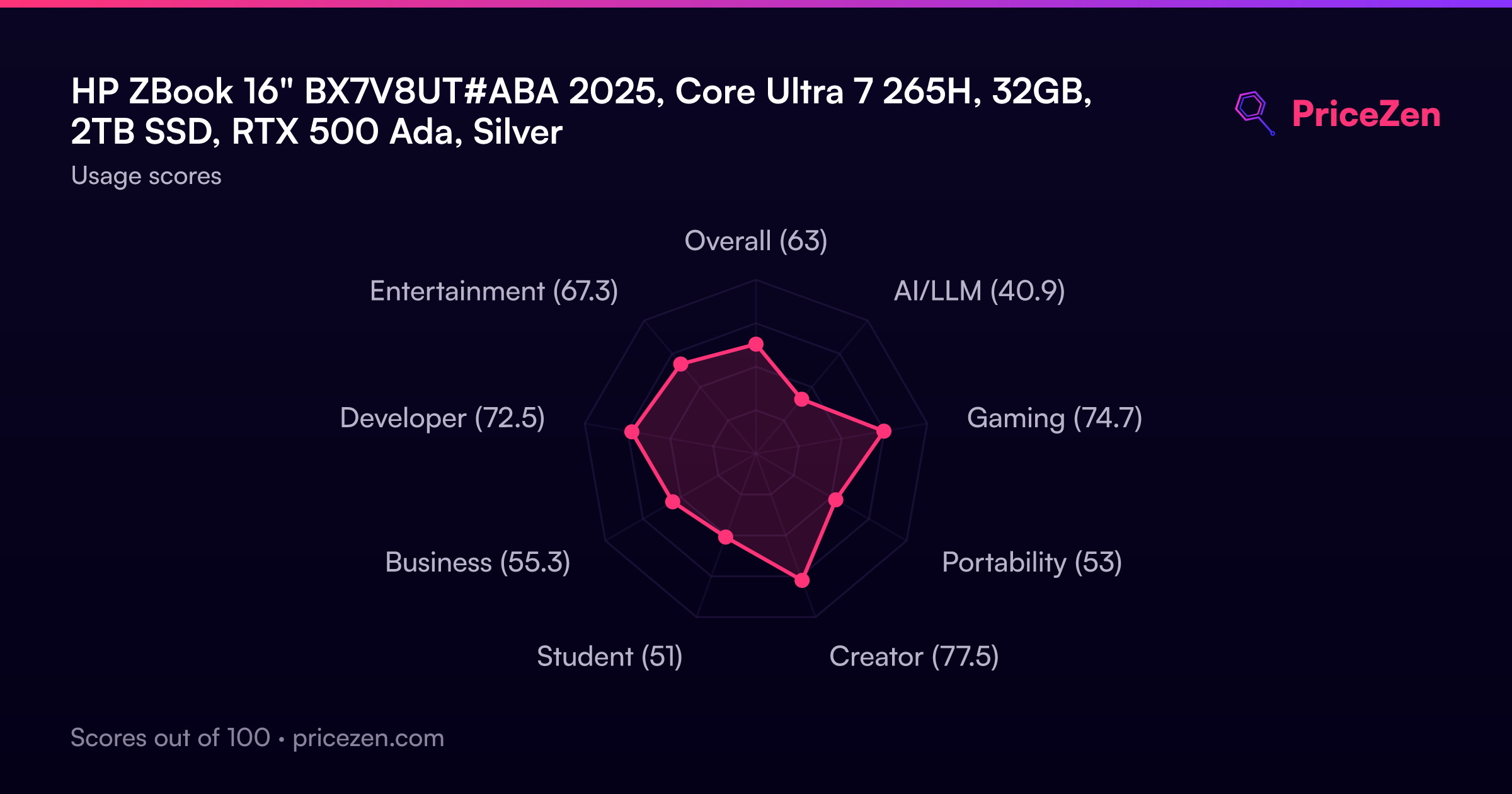
Usage Scores
- Overall63
- AI/LLM40.9
- Gaming74.7
- Portability53
- Creator77.5
- Student52.7
- Business55.3
- Developer72.6
- Entertainment67.3