PNY Quadro K420 2GB GDDR5 workstation
The NVIDIA Pascal architecture in the Quadro P400 delivers up to 2x the visualization performance of the Maxwell-based K420, with three DisplayPort outputs and more memory bandwidth for larger datasets. Its low-profile form factor and HDR video encode/decode via H.264 and HEVC make it a compact, capable option for professional workflows. Best for budget-conscious workstation users who need reliable OpenGL, DirectX, Vulkan, and CUDA support without ray tracing demands.












Snapshot
The 30-Second Version
The PNY VCQP400-PB is a 2GB Pascal Quadro built for multi-display pro work, not for rendering or gaming. Three DisplayPort outputs, a low-profile board, certified drivers and H.264/HEVC HDR engines are the reasons to buy it. At USD 75 from Amazon it's cheap, and our affordability rank is one of the best, but overall scoring is 9.4/100 with 2GB VRAM and raster performance at the bottom of the category. Buy it for a compact three-monitor workstation, skip it for anything 3D.
Pros & Cons
Pros
- Three DisplayPort outputs, more screen connectivity than the previous generation 94th
- Low-profile form factor fits slim workstation and SFF chassis 78th
- Certified pro drivers with current OpenGL, DirectX, Vulkan and CUDA support 69th
- Dedicated H.264 and HEVC engines for HDR video encode and decode
- USD 75 at Amazon, with affordability ranking among the best
Cons
- 2GB GDDR5 is the smallest VRAM pool in our comparison set
- Raster score of 2/100 makes 3D and gaming workloads a non-starter
- Ray tracing at 3.4/100 and AI capability ranked at the very bottom
- Efficiency and thermal scores both sit in the bottom few percent
- Feature and connectivity scores of 11 and 5 mean a very bare spec sheet
What owners think
How owner sentiment changed over time
ExclusiveBased on when customers actually wrote their reviews - so you can see whether early praise held up.
13 written reviews, Aug 2018 – Jan 2026: 11 happy, 1 mixed, 1 unhappy
Across all 180 store ratings: 4.4★. Most owners rate without writing a review. The chart counts the 13 written reviews.
Each dot is one written review, in the month it was written. Happy = 4-5★, mixed = 3★, unhappy = 1-2★.
The proof
Performance
Let's be blunt about the graphics numbers. Raster performance scores 2 out of 100 in our model, ray tracing lands at 3.4, and both sit in the bottom few percent of everything we compare. AI capability ranks lower still. Practically, that means viewport work in light CAD scenes and 2D drafting is the ceiling, not the floor. Anything involving real-time rendering, GPU denoising, machine learning or modern game engines is going to feel like pushing a shopping cart with a flat tire. The 2GB of GDDR5 is a hard wall too, since VRAM ranks dead last among the cards we track, and large assemblies or high-res texture sets simply won't fit.
The other side of the coin is what the card actually accelerates well. Dedicated H.264 and HEVC encode and decode engines handle HDR video creation and playback, which is a genuinely useful trick for a signage box or an edit bay's preview machine, and it offloads that work from your CPU. Three DisplayPort outputs give you more screen connectivity than the previous generation managed, and the certified driver stack is the reason ISV applications behave themselves. But efficiency ranks in the bottom couple of percent and thermal scoring is nearly as low, so don't read "small card" as "modern, frugal card." Pascal here is old silicon doing a narrow job, and the numbers say exactly that.
Specifications
Full Specifications
Chipset
| GPU Chipset | Quadro K420 |
| Brand | NVIDIA |
| Architecture | Pascal |
| Class | workstation |
Memory
| VRAM | 2 GB |
| Memory Type | GDDR5 |
| Memory Bus | 64 |
Compute
| CUDA Cores | 256 |
| Base Clock | 1070 |
Performance
| PassMark G3D | 724 |
| GPU Compute | 344 |
Power & Cooling
| TDP | 41 |
| Cooler | Single Fan |
Connectivity
| Interface | PCI Express 3.0 x16 |
| DisplayPort | 3 |
| HDMI | 0 |
| Max Displays | 3 |
| Max Resolution | 5120 x 2880 |
Physical
| Slot Width | 1 |
| Form Factor | Low Profile |
| Weight | 0.1 kg / 0.3 lbs |
Features
| Ray Tracing | No |
vs Competition
Cross-shop this against the MSI GeForce RTX 3050 Gaming X, the Gigabyte GeForce RTX 3050 WINDFORCE OC and the ZOTAC GeForce RTX 3050 Twin Edge OC and the gap is obvious from this card's own numbers. A raster score of 2 out of 100, ray tracing at 3.4 and AI capability ranked last tell you the P400 isn't playing the same sport as those cards. What it gives you that a consumer GeForce card doesn't is the Quadro driver certification path and a low-profile board with three DisplayPort outputs. If you're picking between them for anything visual or compute-heavy, pick the RTX 3050 options and don't look back.
The EVGA GeForce GTX 1070 is the older name on the list, and even against that generation the P400's graphics rankings sit at the floor, so it isn't a performance escape hatch either. The HP RTX A4000 is the one worth thinking hardest about, because it's the other professional-class option here. If your work is genuine 3D, simulation or GPU rendering, the P400's 2GB buffer and bottom-ranked VRAM and raster scores disqualify it immediately, and a proper pro card is the direction to head. The P400 only wins when the requirement list is short: small chassis, multiple displays, certified drivers, low spend. On that specific list it's a sensible buy. On any longer list, it's outclassed.
| Spec | PNY Quadro K420 | ASUS GeForce RTX 5090 TUF Gaming | Gigabyte GeForce RTX 5090 WINDFORCE OC | MSI GeForce RTX 5090 Gaming Trio | ZOTAC GeForce RTX 5090 SOLID OC White Edition | Sapphire Radeon RX 7900 XTX PULSE |
|---|---|---|---|---|---|---|
| Chipset | Quadro K420 | GeForce RTX 5090 | GeForce RTX 5090 | GeForce RTX 5090 | GeForce RTX 5090 | Radeon RX 7900 XTX |
| Vram | 2GB GDDR5 | 32GB GDDR7 | 32GB GDDR7 | 32GB GDDR7 | 32GB GDDR7 | 24GB GDDR6 |
| Boost Clock Mhz | - | 2407 | 2467 | 2480 | 2422 | 2525 |
| Tdp W | 41 | 575 | 575 | 575 | 575 | 370 |
| Memory Bus Bits | 64 | 512 | 512 | 512 | 512 | 384 |
| Ray Tracing | No | Yes | Yes | Yes | Yes | Yes |
| GPU Class | workstation | consumer | consumer | consumer | consumer | consumer |
| Compare | Compare | Compare | Compare | Compare |
| Product | AI | Rt | Vram | Raster | Compute | Feature | Thermal | User Sentiment | Efficiency | Connectivity | Social Proof | Affordability |
|---|---|---|---|---|---|---|---|---|---|---|---|---|
| PNY Quadro K420 | 7.2 | 8.5 | 7.2 | 8.6 | 4.2 | 10.7 | 16.2 | 77.9 | 11.1 | 32 | 69.1 | 93.7 |
| ASUS GeForce RTX 5090 TUF Gaming Compare | 97.2 | 90.5 | 97.8 | 98.8 | 97.7 | 95.8 | 72.1 | 85.1 | 23.5 | 99.3 | 98.7 | 2.1 |
| Gigabyte GeForce RTX 5090 WINDFORCE OC Compare | 98.5 | 84.1 | 97.8 | 98.8 | 98.2 | 95.8 | 91.8 | 71.2 | 23.5 | 94.2 | 69.1 | 2.9 |
| MSI GeForce RTX 5090 Gaming Trio Compare | 97.6 | 90.8 | 97.8 | 98.8 | 98.3 | 95.8 | 91.8 | 0 | 23.5 | 94.2 | 93.3 | 2.3 |
| ZOTAC GeForce RTX 5090 SOLID OC White Edition Compare | 97.3 | 90.8 | 97.8 | 98.8 | 97.9 | 95.8 | 91.8 | 85.1 | 23.5 | 94.2 | 39.6 | 1.9 |
| Sapphire Radeon RX 7900 XTX PULSE Compare | 95.2 | 96.4 | 92 | 83.4 | 95.7 | 95.8 | 72.1 | 71.2 | 39.9 | 86 | 69.1 | 19.9 |
Price
Value & Pricing
At USD 75 from Amazon, this is one of the cheapest ways into a certified professional driver stack, and our affordability ranking backs that up as one of the best. We track its price over time and the US listing has been sitting at that USD 75 mark. Other regions list it at CAD 122 in Canada, EUR 117 in Spain and BRL 920 in Brazil, though those are separate markets and not conversions of each other, so shop your own region rather than doing mental currency math.
The value case only holds if your needs are narrow. Paying USD 75 for three displays, HDR video decode and ISV-certified drivers in a low-profile card is a fair trade. Paying USD 75 for a card that scores 9.4 overall and can't hold a meaningful 3D scene is not. Price-to-performance here is really price-to-purpose: it's excellent at a short list of jobs and poor value at everything else.
Amazon 1 offer From ¥17,542
We started tracking prices for this product on Nov 25, 2026. The chart appears once we have more data.
Read more
Overview
The PNY VCQP400-PB is the retail box for NVIDIA's Quadro P400, a 2GB GDDR5 card built on Pascal that was designed to do one job quietly and cheaply: drive professional displays in a small machine. It's low profile, it has three DisplayPort outputs, and it ships with the tuned, certified drivers that pro apps expect, covering current OpenGL, DirectX, Vulkan and CUDA versions. That's the whole pitch. There's no gaming ambition here and no AI story either.
So who's it for? Think CAD workstations in a slim chassis, a trading desk that needs three monitors, an office box that has to output HDR video, or someone replacing an older Quadro K420 without redesigning the whole system. PNY claims up to twice the display performance of that Maxwell-based K420, plus more memory bandwidth so you can push bigger datasets across the screens. If your workload is "draw the interface, decode the video, don't make noise," this card was literally built for you.
And here's the honest framing before we go further: our scoring model puts it at 9.4 out of 100 overall and 8.9 for workstation use, which is near the bottom of the category we track. Its affordability rank is one of the best, so it's cheap and it knows it. The interesting question isn't whether this beats modern cards, because it doesn't. It's whether the specific things it does well are the only things you need.
Common Questions
Q: Can I game on a Quadro P400?
Not meaningfully. Its raster score is 2 out of 100 in our model and ray tracing sits at 3.4, both in the bottom few percent of the cards we track, and 2GB of GDDR5 is the smallest memory pool in our comparison set. Older or very light titles might launch, but if gaming is on your list at all, the RTX 3050 options in this category are the sensible direction.
Q: Will 2GB of VRAM be enough for CAD work?
For 2D drafting and light part-level models it can be, and the certified OpenGL, DirectX, Vulkan and CUDA drivers are the real reason people choose Quadro here. But VRAM ranks last among the products we compare, so large assemblies, dense point clouds or textured scenes will hit that 2GB wall fast. If your files are big, plan on a card with more memory rather than hoping compression saves you.
Q: Does it fit a small form factor PC, and how many monitors can it run?
Yes on both counts, within limits. It's a low-profile card, so slim workstation and SFF chassis are its natural home, and the three DisplayPort outputs give you more screen connectivity than the previous generation. Just note our connectivity score is 5 out of 100, so this is about display count, not a rich port selection.
Q: Is it worth USD 75 compared to a newer budget card?
Only if your requirements are exactly what it does: low profile, three displays, HDR video decode and pro-certified drivers. Affordability ranks among the best so the price is genuinely low, but overall scoring is 9.4/100 and feature scoring is 11, meaning you're buying a narrow tool. If you want general-purpose graphics muscle for similar money, cross-shop the RTX 3050 cards instead.
Who Should Skip This
Skip this if you do anything that looks like modern GPU work. Real-time 3D, GPU rendering, simulation, AI experimentation and gaming all run straight into a raster score of 2 out of 100, ray tracing at 3.4, bottom-ranked AI capability and just 2GB of GDDR5. Video editors cutting heavy timelines will also find the memory ceiling frustrating even though the H.264 and HEVC engines are decent. Those buyers should be looking at the MSI GeForce RTX 3050 Gaming X, the Gigabyte GeForce RTX 3050 WINDFORCE OC or the ZOTAC GeForce RTX 3050 Twin Edge OC, and professionals with serious 3D loads should aim at the HP RTX A4000.
Also skip it if you're upgrading an older gaming rig and hoping a Quadro badge means hidden power. It doesn't. Efficiency and thermal scores sit in the bottom few percent, so you're not even getting a modern, frugal chip in exchange for the performance sacrifice. The P400 makes sense as a display-and-driver solution in a small box, and almost nothing else.
Verdict
If you're building or refreshing a compact office or CAD-lite workstation and you need three monitors, HDR video playback and drivers your professional software trusts, the PNY VCQP400-PB at USD 75 does that job without drama. Same story for a digital signage player or a secondary preview machine where the H.264 and HEVC engines earn their keep. For those buyers, the low overall score is irrelevant because none of the weak areas get exercised.
For anyone else, we'd steer you elsewhere. Our model gives it 9.4 overall and 8.9 for workstation duty, with ray tracing at 3.4 and VRAM, AI and raster all at the bottom of the category. Gamers, 3D artists, video editors working with heavy timelines and anyone experimenting with local AI should be looking at the RTX 3050 cards or stepping up to the HP RTX A4000 instead. This is a specialist tool priced like one, not a budget shortcut to modern GPU performance.
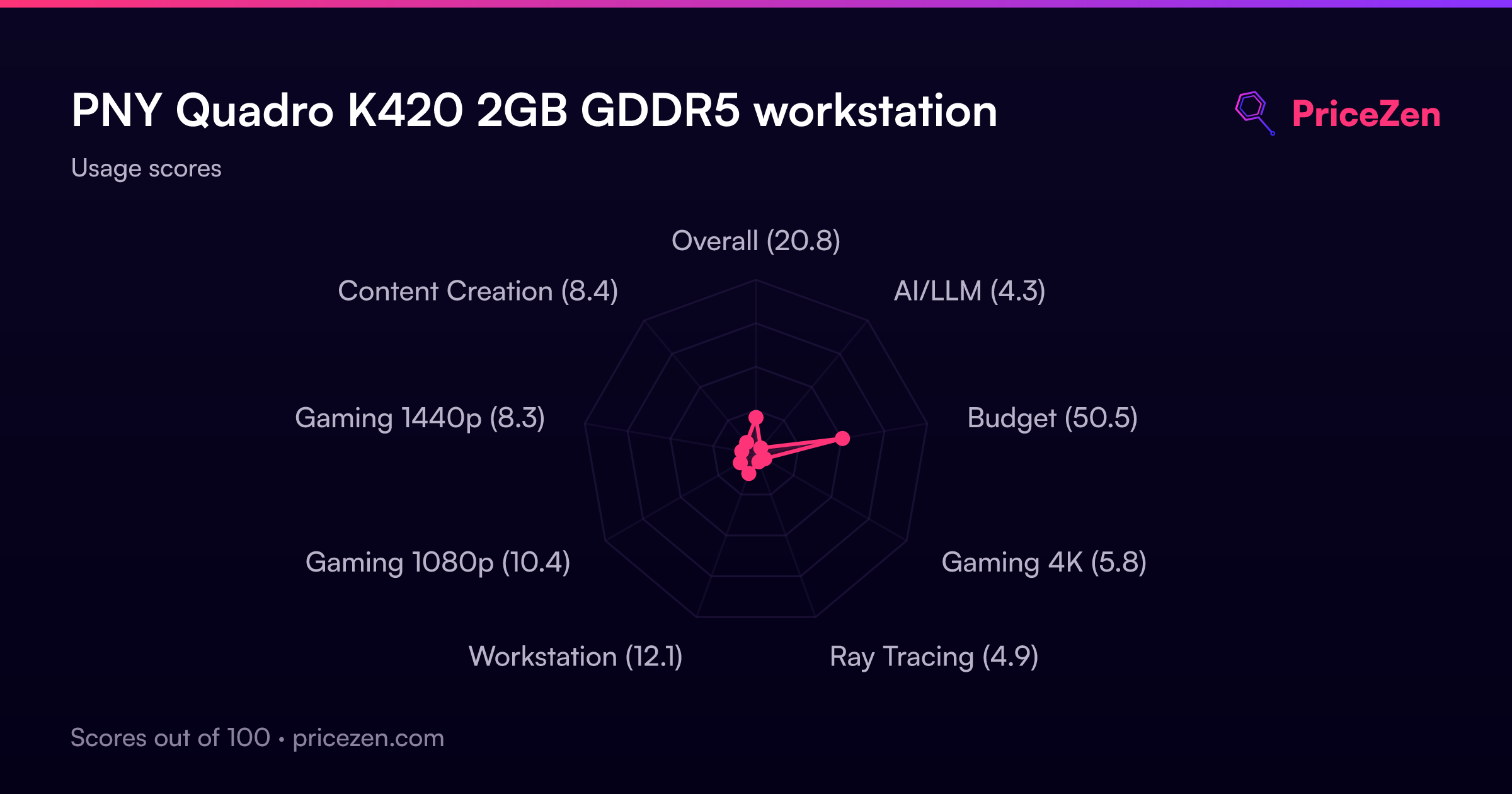
Usage Scores
- Overall20.8
- AI/LLM4.3
- Budget50.5
- Gaming 4K5.8
- Ray Tracing4.9
- Workstation12.1
- Gaming 1080p10.4
- Gaming 1440p8.3
- Content Creation8.4