MSI Cubi 5 Cubi51MA494BUS 2026, Core 5 120U, Black
The 5 GHz Intel Core 5 120U 10-core processor delivers power-efficient performance in a 0.60 kg chassis, with dual-channel DDR4 SO-DIMM slots and an M.2 2280 SSD slot for customization. Thunderbolt 4, Wi-Fi 6E, and 2.5G Ethernet provide fast connectivity, while the barebone design lets you choose your own RAM and storage. Best for home or office users who want a compact, upgradeable desktop for everyday productivity tasks.







Snapshot
The 30-Second Version
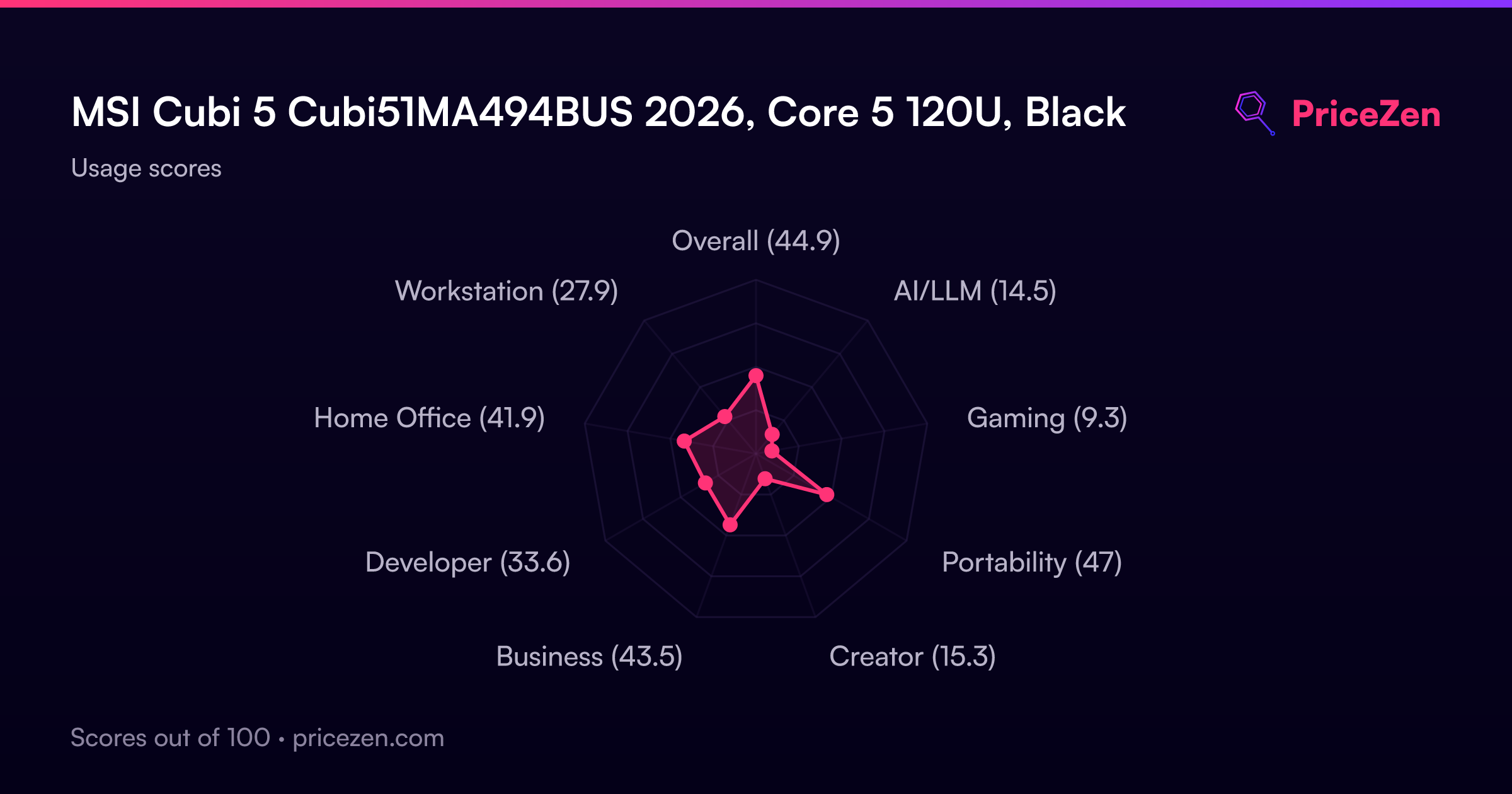
The Cubi 5 scores 44 out of 100 overall, with storage at the 2nd percentile and RAM at the 9th, because it's a barebone with no memory or drive included. The Core 5 120U is a solid middle-of-the-pack CPU for office work, and Thunderbolt 4 plus Wi-Fi 6E are nice touches. But gaming lands at 9.2 out of 100, so this is strictly a productivity shell for buyers who already own parts.
Pros & Cons
Pros
- 0.60kg chassis makes it easy to mount or move 66th
- 5 GHz boost clock on the Core 5 120U handles office work well
- Thunderbolt 4 and Wi-Fi 6E give you modern connectivity
- Dual-channel DDR4 SO-DIMM slots plus M.2 and 2.5" drive bay for flexible upgrades
- Compact score of 46.7 is the strongest category in our database
Cons
- Storage ranking at 2nd percentile is one of the worst we've seen
- RAM at 9th percentile means you're buying memory separately
- Gaming score of 9.2 out of 100 is a real letdown
- Reliability at 37th percentile falls behind most competitors
- No OS included, so factor in a Windows license on top of RAM and storage
The proof
Performance
The Core 5 120U is a 10-core processor with a 5 GHz boost clock, and in our database it ranks at the 43rd percentile for CPUs in this category. That's solidly middle of the pack, which for a barebone mini PC means it'll handle spreadsheets, browser tabs, and video calls without breaking a sweat. The integrated Intel Graphics land at the 49th percentile, so you're getting about average graphics performance for this form factor. Don't expect to push multiple 4K displays with heavy graphical workloads, but basic productivity on one or two monitors is fine.
The real story here is what's missing. RAM comes in at the 9th percentile and storage at the 2nd percentile, which are some of the lowest numbers we've seen in this category. That's because this is a barebone unit, you get the CPU and the chassis, and you supply the DDR4 SO-DIMMs and the M.2 2280 SSD yourself. The board supports dual-channel DDR4 and has both an M.2 slot and a 2.5" drive bay, so the upgrade path is there. But out of the box, this thing is a paperweight until you crack it open and add parts.
Specifications
Full Specifications
Processor
| CPU | Intel Core 5 120U |
| Cores | 10 |
| Frequency | 1.4 GHz |
| L3 Cache | 12 MB |
Graphics
| GPU | Intel Graphics |
| Type | Integrated |
Memory & Storage
| RAM Generation | DDR4 |
| Storage Type | NVMe SSD |
Build
| Form Factor | mini |
| PSU | 65 |
| Weight | 0.6 kg / 1.3 lbs |
Connectivity
| USB-C Ports | 1 |
| USB Ports | 4 |
| Thunderbolt | Thunderbolt 4 |
| HDMI | 1x HDMI 2.0b |
| DisplayPort | 1x DisplayPort 1.4 |
| Wi-Fi | Wi-Fi 6E |
| Bluetooth | Bluetooth 5.3 |
| Ethernet | 2.5GbE and Gigabit Ethernet |
System
| OS | No OS |
vs Competition
Stacked against the competition, the Cubi 5 has a tough time standing out. The Minisforum DeskMini UM880 Plus and GMKtec Nucbox K8 Plus both come with AMD silicon that tends to punch harder in integrated graphics, and they typically ship with RAM and storage included, which makes the Cubi's 2nd percentile storage ranking look even worse. The HP OmniDesk M02-0234 and Dell ECT1250 are more traditional desktop options that offer better reliability scores, with the Cubi sitting at the 37th percentile for reliability, which is below average. The Lenovo IdeaCentre 91CX0002US is another prebuilt that saves you the hassle of sourcing parts. Where the Cubi does hold its own is connectivity, the port selection ranks at the 65th percentile, and Thunderbolt 4 is genuinely useful if you want to dock this thing or add external storage. But that's a narrow win in a category where most buyers just want a working computer out of the box.
| Spec | MSI Cubi 5 Cubi51MA494BUS | Acer Nitro 60 | NextComputing Edge XTA EXTA-R99950X-05 | Corsair ONE i600 | HP OmniDesk TPC-F134-MT | Dell OptiPlex QCS1250 |
|---|---|---|---|---|---|---|
| CPU | Intel Core 5 120U | AMD Ryzen 7 7700 | AMD Ryzen 9 9950X | Intel Core Ultra 9 285K | AMD Ryzen 7 8700G | Intel Core i9 14900K |
| RAM (GB) | - | 32 | 128 | 64 | 32 | 64 |
| Storage (GB) | - | 2048 | 5120 | 4096 | 2048 | 1024 |
| GPU | Intel Graphics | NVIDIA GeForce RTX 5070 | NVIDIA GeForce RTX 5090 | NVIDIA GeForce RTX 5080 | AMD Radeon Graphics | Intel UHD Graphics 770 |
| Form Factor | mini | mid-tower | workstation | sff | mid-tower | sff |
| Psu W | 65 | 850 | 1200 | 1000 | - | - |
| OS | No OS | Windows 11 Pro | Windows 11 Pro | Windows 11 Home | Windows 11 Pro | Windows 11 Pro |
| Compare | Compare | Compare | Compare | Compare |
| Product | CPU | GPU | RAM | Ports | Storage | Reliability |
|---|---|---|---|---|---|---|
| MSI Cubi 5 Cubi51MA494BUS | 42.3 | 50 | 9.1 | 65.5 | 1.8 | 37.8 |
| Acer Nitro 60 Compare | 74.5 | 90.7 | 72.2 | 90.4 | 82.5 | 32.6 |
| NextComputing Edge XTA EXTA-R99950X-05 Compare | 97.3 | 99.3 | 99.3 | 97.6 | 99 | 11.7 |
| Corsair ONE i600 Compare | 98 | 97.3 | 98 | 97.2 | 98.1 | 32.6 |
| HP OmniDesk TPC-F134-MT Compare | 71.7 | 64.5 | 72.2 | 92.1 | 82.5 | 70.3 |
| Dell OptiPlex QCS1250 Compare | 95.3 | 36.5 | 96.5 | 55.1 | 68.6 | 70.3 |
Price
Value & Pricing
Pricing on this unit is a bit of a rollercoaster depending on where you shop. In the US, you're looking at USD 349 across two listings, which feels reasonable for a barebone with a Core 5 120U and Thunderbolt 4. But in Canada, the spread is CAD 498 to CAD 620 across two listings, and that CAD 122 gap is worth paying attention to. The lower end of that range is a fair deal for what you get, but at CAD 620 you're creeping into territory where you could start looking at competitors with RAM and storage already installed. Remember, this is a barebone, so the sticker price is just the entry fee. Add a 16GB DDR4 kit and a 512GB NVMe drive, plus a Windows license, and the real cost climbs fast.
Amazon 1 offer From ¥76,322
We started tracking prices for this product on Nov 25, 2026. The chart appears once we have more data.
Read more
Overview
The MSI Cubi 5 1MA-494BUS is a barebone mini PC that lands at 44 out of 100 in our database, which tells you most of the story before you even open the box. The compact score of 46.7 is the best thing it has going for it, and that makes sense when you look at the 0.60kg chassis. But the storage ranking is 2nd percentile and RAM sits at 9th percentile, and those numbers are rough even for a barebone system. You're buying a shell with a decent CPU and a lot of homework left to do.
The Intel Core 5 120U is a 10-core chip with a 5 GHz boost clock, which sounds impressive until you see it lands at the 43rd percentile for CPUs in this category. It's a power-efficient part designed for office work and light multitasking, not a workstation chip. The integrated Intel Graphics sit at the 49th percentile, which is about average for mini PCs but still means gaming is off the table. The gaming score of 9.2 out of 100 is the weakest area by a wide margin, so if you're hoping to sneak in some Fortnite after work, this isn't the box for you.
Common Questions
Q: Does the MSI Cubi 5 1MA-494BUS come with RAM and storage?
No. This is a barebone unit, which is why RAM ranks at the 9th percentile and storage at the 2nd percentile in our database. You'll need to add your own DDR4 SO-DIMMs and an M.2 2280 SSD, or a 2.5" drive, before you can install an OS and use it.
Q: Can the Cubi 5 handle gaming?
Not really. The gaming score in our database is 9.2 out of 100, which is the weakest area for this machine. The integrated Intel Graphics sit at the 49th percentile, so you might get away with very light or older titles at low settings, but this is built for office productivity, not gaming.
Q: What kind of displays can I connect to the Cubi 5?
You get HDMI 2.0b, DisplayPort 1.4, and Thunderbolt 4, which gives you solid multi-monitor flexibility for a mini PC. The port selection ranks at the 65th percentile in our database, so connectivity is one of the stronger points here. Just keep in mind the integrated graphics are average, so pushing multiple high-resolution displays with demanding content will be a stretch.
Who Should Skip This
Skip this if you want a computer that works out of the box. The storage ranking at the 2nd percentile and RAM at the 9th percentile mean you're buying a project, not a product. If you don't already have DDR4 SO-DIMMs and an M.2 drive on hand, the added cost and effort push you toward competitors like the Minisforum DeskMini UM880 Plus or GMKtec Nucbox K8 Plus, which typically ship ready to go. Gamers should absolutely look elsewhere, the 9.2 gaming score is one of the worst we've seen. And if reliability is a priority, the 37th percentile ranking here is below average, so a prebuilt from HP or Dell might give you more peace of mind.
Verdict
The MSI Cubi 5 1MA-494BUS is a niche product for a specific kind of buyer. If you already have DDR4 SO-DIMMs and an M.2 drive sitting in a drawer, and you want a tiny, quiet office machine with Thunderbolt 4 and Wi-Fi 6E, this is a reasonable foundation. The Core 5 120U is capable enough for productivity, and the 0.60kg chassis is genuinely easy to live with. But the 2nd percentile storage ranking and 9th percentile RAM ranking mean you're paying for a shell, not a computer. The 9.2 gaming score is a non-starter for anything beyond solitaire. At USD 349 it's a fair project box. At the higher end of the CAD range, it's a harder sell.
Usage Scores
- Overall44.9
- AI/LLM14.5
- Gaming9.3
- Portability47
- Creator15.3
- Business43.5
- Developer33.6
- Home Office41.9
- Workstation27.9