Mimo Adapt-LTS MCT-215LTS-POE-5MC
The 21.5-inch Full HD LCD panel with 10-point PCAP touch and 300 nits brightness delivers clear, responsive interaction for commercial signage. Power over Ethernet simplifies installation by eliminating separate power cables, while the built-in 5MP camera and Android OS support interactive applications. Best for retail or hospitality businesses needing a fixed, touch-enabled display for point-of-sale or information kiosks.

No current retailer price


Snapshot
The 30-Second Version
The Mimo Adapt-LTS MCT-215LTS-POE-5MC is a 21.5" commercial Android signage tablet with PoE and a 24/7 duty cycle. It's built for fixed business use like kiosks and control panels, not general-purpose computing. The screen and internals are weak for the $970 price, but the commercial features might justify it for the right buyer.
Pros & Cons
Pros
- PoE support means one cable for power and data
- 24/7 duty cycle rated for constant operation
- 10-point PCAP touchscreen is responsive
- Built-in 5MP camera for video or scanning
- Android OS lets you run custom apps without a PC
Cons
- Screen quality is near the bottom of our database
- CPU and GPU are weak even for basic tasks
- 300 nits brightness struggles in bright rooms
- Expensive for the specs you get
- Limited RAM and storage for a modern Android device
The proof
Performance
Let's be honest about the internals. The CPU sits at the 35th percentile and the GPU at the 33rd percentile in our database, which means this thing is not going to win any speed contests. The RAM and storage rankings are even lower, at the 31st and 30th percentiles respectively. For running a single point-of-sale app or a digital signage loop, that's probably fine. Android is lightweight enough, and a fixed-use device doesn't need to multitask like a laptop. But if you try to push it with heavy apps or lots of browser tabs, you'll feel the lag.
The screen is the bigger concern. At the 15th percentile for screen quality, this 1080p LCD with 300 nits brightness is mediocre at best. In a dim restaurant or office, it'll look okay. Near a window or in bright retail lighting, you'll be squinting. The 800:1 static contrast ratio is standard for budget panels, but it's not going to make your menu photos pop. The 5MP front and rear cameras are serviceable for video calls or basic scanning, but don't expect crisp detail. For a fixed signage tablet, the performance is adequate. For anything else, it's underwhelming.
Specifications
Full Specifications
Memory & Storage
| Expandable | Yes |
Display
| Resolution | 1920x1080 (Full HD) |
| Panel | LCD |
| Refresh Rate | 60 Hz |
| Brightness | 300 nits |
Connectivity
| Bluetooth | ✓ |
Features
| Stylus Support | Yes |
| Fingerprint Reader | No |
Physical
| OS | Android |
vs Competition
Stacked against the Apple iPad Pro M5, this thing looks ancient. The iPad has a vastly better screen, a processor that's orders of magnitude faster, and a more polished app ecosystem. But the iPad isn't designed to be mounted on a wall and powered over Ethernet for years at a time. The Microsoft Surface Pro 11th Edition is a closer competitor in terms of business use, with better performance and a sharper display, but it runs Windows and costs more. The Lenovo Yoga Tab Plus and Xiaomi Pad 7 Pro are both cheaper and more powerful as general-purpose tablets, but neither has PoE or a 24/7 duty cycle rating.
The real comparison isn't against tablets at all. It's against dedicated commercial displays from brands like Elo or Advantech. Those often cost more but come with better panels and more robust management software. The Mimo Adapt-LTS undercuts some of those options on price, but you're giving up screen quality and processing power to get there. If your use case is a simple menu board or room scheduler, this might be enough. If you need something that looks premium in a customer-facing role, keep shopping.
| Spec | Mimo Adapt-LTS MCT-215LTS-POE-5MC | Apple iPad Pro 13" M5 | Microsoft Surface Pro 11 13" | Samsung Galaxy Tab 12.4" S10+ | Lenovo Yoga Tab Plus 12.7" ZAEG0096US | Xiaomi Pad 11.2" 62751 |
|---|---|---|---|---|---|---|
| CPU | - | Apple M5 | Qualcomm Snapdragon X Elite X1E-84-100 | MediaTek Dimensity 9300+ | QTI SM8650 | Snapdragon 8s Gen 3 |
| RAM (GB) | - | 16 | 16 | 12 | 16 | 12 |
| Storage (GB) | - | 1024 | 1024 | 512 | 256 | 512 |
| Screen | ?" 1920x1080 | 13" 2752x2064 | 13" 2880x1920 | 12.4" 2800x1752 | 12.7" 2944x1840 | 11.2" 3200x2136 |
| OS | Android | iPadOS | Windows 11 Home | Android 14 | Android 14 | Android 14 |
| Stylus | true | true | true | true | true | true |
| Cellular | false | true | false | false | false | false |
| Battery (Wh) | - | 39 | 53 | - | - | - |
| Compare | Compare | Compare | Compare | Compare |
| Product | CPU | GPU | RAM | Screen | Battery | Feature | Storage | Connectivity | Affordability | Water Resistance |
|---|---|---|---|---|---|---|---|---|---|---|
| Mimo Adapt-LTS MCT-215LTS-POE-5MC | 38.1 | 36.6 | 31.2 | 29.9 | 32.1 | 49.9 | 30.2 | 29.3 | 11.6 | 46.4 |
| Apple iPad Pro 13" M5 Compare | 99.2 | 99.4 | 92.5 | 99.7 | 97.7 | 96.4 | 97.9 | 99.2 | 1.6 | 46.4 |
| Microsoft Surface Pro 11 13" Compare | 98.5 | 96.7 | 92.5 | 99.1 | 99.8 | 74.1 | 97.9 | 92.8 | 8.6 | 97.3 |
| Samsung Galaxy Tab 12.4" S10+ Compare | 82.4 | 79.2 | 81.1 | 95.2 | 88.1 | 96.4 | 93.1 | 77 | 5.8 | 97.3 |
| Lenovo Yoga Tab Plus 12.7" ZAEG0096US Compare | 84.2 | 82.3 | 92.5 | 96.4 | 88.9 | 96.4 | 83.9 | 92.8 | 21.7 | 46.4 |
| Xiaomi Pad 11.2" 62751 Compare | 86.8 | 85.7 | 81.1 | 98 | 85.3 | 65.1 | 89.6 | 77 | 13.6 | 46.4 |
Price
Value & Pricing
At $970 USD, the Mimo Adapt-LTS is a tough sell if you're comparing it to consumer tablets. The Apple iPad Pro M5 and Samsung Galaxy Tab S11 both cost more, but they're in a completely different performance class. The Xiaomi Pad 7 Pro offers way more power for less money, though it lacks the commercial features like PoE and the 24/7 duty cycle. What you're paying for here is the form factor and the commercial-grade build, not raw specs. If your business needs a fixed Android display with Ethernet power and you don't want to rig up a consumer tablet with adapters, the price might be justified. But if you just need a big touchscreen for occasional use, there are cheaper ways to get there.
Read more
Overview
The Mimo Adapt-LTS MCT-215LTS-POE-5MC is a 21.5" commercial digital signage tablet that sits in a weird middle ground between a giant Android tablet and a fixed point-of-sale display. At $970 USD, it's not cheap, but it's also not trying to be an iPad. This thing is built for businesses that need a wall-mounted or counter-mounted touchscreen running Android, with Power over Ethernet so you don't need a separate power brick. The 1920x1080 LCD panel runs at 60Hz with 300 nits of brightness, which is fine for indoor signage but nothing to write home about.
People searching for a 21.5 inch commercial display with PoE will find this fits a specific niche. It's got a 10-point PCAP touchscreen, a built-in 5MP camera, and a 24/7 duty cycle, which means it's rated to run constantly without burning out. That's the kind of spec that matters for kiosks and control systems, not for watching Netflix in bed. The integrated Android OS means you can run custom apps without a separate PC, which is handy for information displays or restaurant ordering stations.
But here's the thing: the specs are pretty modest for the price. The CPU, RAM, and storage all rank in the bottom third of our database compared to other tablets and displays. If you're expecting iPad-level smoothness, you'll be disappointed. This is a purpose-built tool, not a general-purpose tablet, and it shows in both the good and bad ways.
Common Questions
Q: Is the Mimo Adapt-LTS good for point-of-sale systems?
Yes, the Mimo Adapt-LTS is designed for point-of-sale use, with a 10-point touchscreen, 24/7 duty cycle, and PoE for single-cable installation. The modest specs are fine for running a single POS app, though the dim screen may be an issue in bright retail environments.
Q: Does the Mimo Adapt-LTS need a separate power supply?
No, the Mimo Adapt-LTS supports Power over Ethernet, so a single Ethernet cable can handle both data and power. It also has a DC adapter input if you don't have a PoE switch or injector.
Q: Can the Mimo Adapt-LTS run regular Android apps?
Yes, it runs an integrated Android operating system, so you can install apps from the Google Play Store or sideload custom APKs. Just keep in mind the CPU and RAM are on the weaker side, so heavy apps will feel sluggish.
Q: How bright is the Mimo Adapt-LTS display?
The Mimo Adapt-LTS has a 300-nit LCD panel, which is adequate for indoor use in dim or moderate lighting. In direct sunlight or very bright rooms, the screen will be hard to read.
Who Should Skip This
Skip the Mimo Adapt-LTS if you're looking for a general-purpose tablet. The weak CPU, limited RAM, and dim 1080p screen make it a poor choice for media consumption, gaming, or productivity work. If you need a big touchscreen for home use, the Xiaomi Pad 7 Pro or Lenovo Yoga Tab Plus will serve you far better for less money. Businesses that need a premium customer-facing display should also look elsewhere, since the screen quality is a real weak spot. This is a tool for utilitarian installations, not a device you'll enjoy using.
Verdict
Should you buy the Mimo Adapt-LTS MCT-215LTS-POE-5MC? If you're a business looking for a fixed Android touchscreen with PoE and you've already priced out the alternatives, maybe. The 24/7 duty cycle and single-cable power setup are genuinely useful for kiosks, information displays, and control panels. The 10-point touch works well, and the built-in camera is a nice bonus for video intercom or basic scanning tasks.
But for most people, this is a pass. The screen is dim and washed out by modern standards, the internals are weak, and $970 is a lot of money for a 1080p panel with bottom-tier performance. If you don't need PoE or the commercial duty cycle, buy a consumer tablet and a wall mount. You'll get a better screen, faster performance, and save money in the process. This is a niche product for a niche need, and it doesn't pretend otherwise.
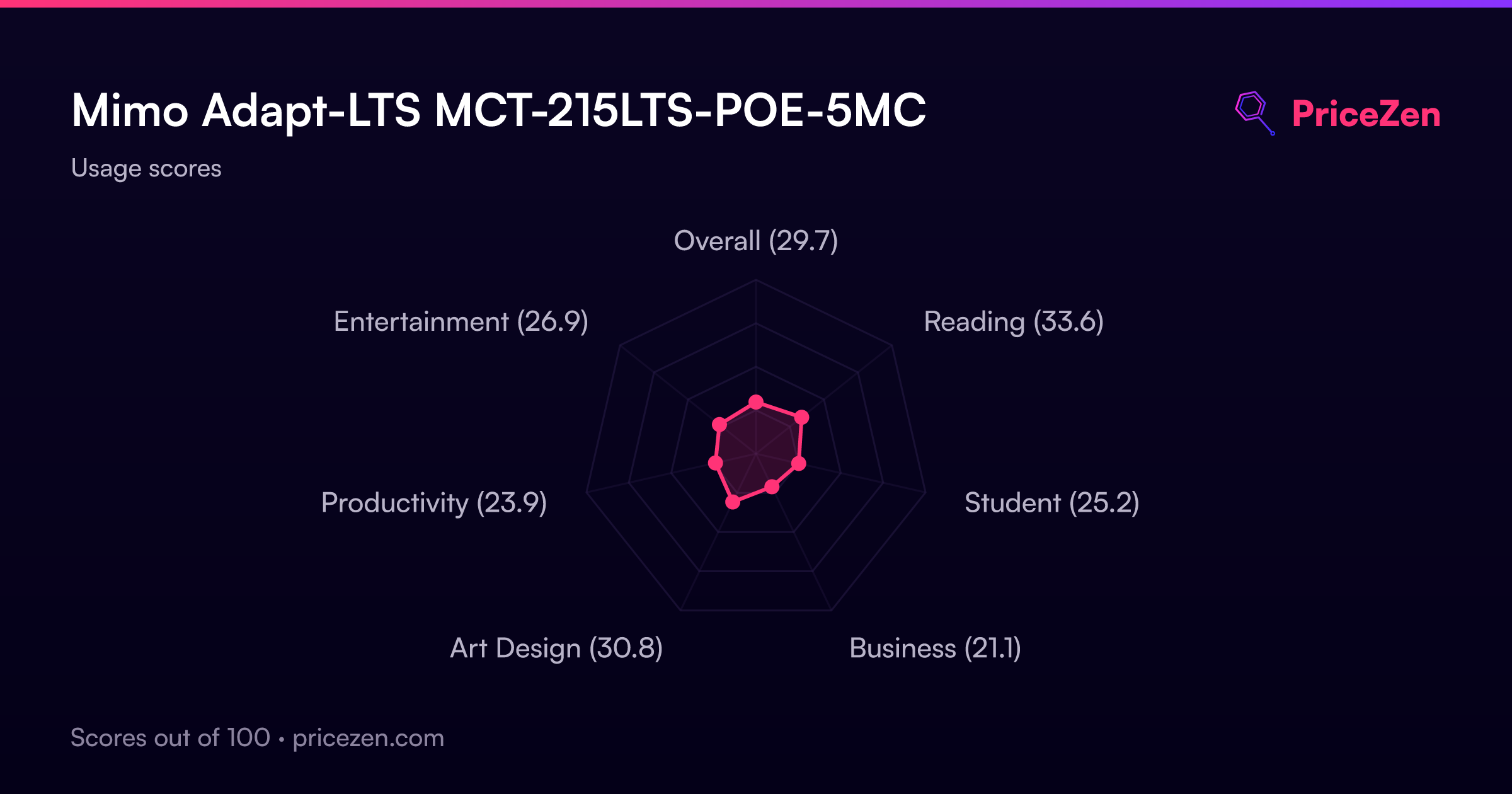
Usage Scores
- Overall29.8
- Reading33.6
- Student25.7
- Business21.1
- Art Design30.8
- Productivity24
- Entertainment27