Western Digital Green SN3000 1TB PCIe 4.0 x4 NVMe M.2 2280

1TB of PCIe 4.0 speed for your laptop verified Nov 24
55/100 overall score 4.6 average from 77 owner ratings
Prices checked on 1 days so far, too few to say what is usual.
- Capacity
- 1TB
- Form factor
- M.2 2280
- Interface
- PCIe 4.0 x4
- Read speed
- 5,000 MB/s
- NAND
- QLC
- Endurance
- 150 TBW
Compare prices at 1 store
Cheapest first. New, refurbished and bundled offers are kept apart, so you compare like with like.
| Store | Sold by | Colour and condition | Price | vs lowest | Last checked | Link |
|---|---|---|---|---|---|---|
| New1 offerSingle unit | ||||||
| Amazon | Not known | Not listed | €205.86 | Lowest price | Yesterday | Go to store |
 Source: PriceZen, checked Nov 27, 2026
A price counts as current when we checked it in the last 7 days. “Marketplace seller” means a third-party seller on that store, not the store itself.








Snapshot
The 30-Second Version
The WD Green SN3000 1TB delivers 5,000 MB/s PCIe 4.0 speeds in a slim single-sided M.2 stick, and owners say the everyday speed bump is real. Its strength is budget upgrades (75.1/100 in our scoring), but endurance and features both rank near the bottom of the category. We track it at USD 192 at Amazon and CAD 232 in Canada. Great for reviving a general-purpose PC, wrong choice for write-heavy creative work.
Pros & Cons
Pros
- 5,000 MB/s sequential reads and writes put speed well above average for internal NVMe drives 74th
- Single-sided M.2 2280 layout fits thin laptops and small-form-factor PCs
- Budget is its best-scoring use case at 75.1/100 in our model
- Free Acronis True Image for Western Digital makes cloning an old drive far less painful
- 4.6/5 from 74 owners, with repeated reports of faster boots and app launches
Cons
- Endurance ranks near the bottom, a weak spot for write-heavy workloads
- Feature depth also sits near the bottom, so this is a bare-bones drive
- Random performance is only middling under heavy multitasking
- Portable use scores just 13.8/100, its worst category by a wide margin
- Only one US listing in our data at USD 192, so there's no retailer competition to shop
What owners think
The Word on the Street
- A recurring theme is that the speed improvement is immediately obvious in daily use, with multiple owners describing faster boots, quicker app launches and a generally more responsive laptop after the swap.
- Buyers frequently frame this as a lot of drive for the money, calling out the combination of capacity and speed at what they consider a bargain price, and several mention brand trust in Western Digital as part of why they picked it.
- The installation and cloning process comes up as a hurdle rather than a dealbreaker. At least one owner describes getting the drive installed, formatted and cloned as a bit of a circus, but credits the bundled Acronis software with getting them through it.
How owner sentiment changed over time
ExclusiveBased on when customers actually wrote their reviews - so you can see whether early praise held up.
12 written reviews, Jun 2025 – Apr 2026: 12 happy
Across all 77 store ratings: 4.6★. Most owners rate without writing a review. The chart counts the 12 written reviews.
Each dot is one written review, in the month it was written. Happy = 4-5★, mixed = 3★, unhappy = 1-2★.
The proof
Performance
Let's talk about what 5,000 MB/s actually buys you. In our rankings, sequential speed is one of the best for internal NVMe drives, comfortably above the middle of the pack. Practically, that means boot times shrink, big apps open without the awkward pause, and copying a folder of video files finishes before you've refilled your coffee. Random performance, the stuff that governs how snappy a system feels when twenty things are happening at once, is about average. Solid, not spectacular. Owners back this up: several report a noticeable jump in everyday responsiveness after swapping this in, particularly on laptops that were previously crawling.
Here's the trade-off nobody puts on the box. Endurance ranks near the bottom against everything else we track in this category, and feature depth matches it. Translation: this drive is built for read-heavy, ordinary desktop life, not for being hammered with constant large writes day after day. If you're editing 4K footage, running a scratch disk, or writing tens of gigabytes daily, the endurance rating is a real concern rather than a footnote. And those 5,000 MB/s figures are peak numbers from WD's own internal testing, with the usual caveats about host device and capacity. Sustained writes on a cache-dependent drive rarely hold their advertised ceiling. For browsing, office work, gaming libraries and general file storage, none of that will bother you. For heavy production work, it absolutely might.
Specifications
Full Specifications
Drive
| Capacity | 1000 |
| Form Factor | M.2 2280 |
| Interface | PCIe 4.0 x4 |
| Protocol | NVMe |
| PCIe Generation | 4 |
| External | No |
Performance
| Sequential Read (MB/s) | 5000 |
| Sequential Write (MB/s) | 4200 |
Hardware
| NAND | QLC |
| DRAM Cache | No |
Reliability
| Endurance (TBW) | 150 |
| MTBF (hours) | 1000000 |
| Warranty (years) | 3 |
vs Competition
The competitor set here is genuinely tough, and it's worth being honest about that. The Samsung 9100 PRO, Crucial T700, Lexar Professional NM1090 PRO and Team Group MP44 are all names you'll see recommended in enthusiast builds, and the Kingston 2TB SSD is the obvious cross-shop if capacity is your bottleneck rather than speed. Against that crowd, the SN3000's argument isn't dominance, it's sufficiency. Its 5,000 MB/s sequential rating is strong in absolute terms and sits above the category midpoint in our rankings, which is more than enough for booting, launching and general file work. But its random performance is about average and its bottom-tier endurance and feature scores mean it isn't competing on the same axis as those drives. If you're deciding between this and a Crucial T700 or Samsung 9100 PRO for a primary workstation drive, you already know which direction your needs point.
The more useful comparison is against the Kingston 2TB SSD and the Team Group MP44. If your problem is that you keep uninstalling games to make room, capacity beats speed every time, and this SKU is only 1TB with a capacity ranking that is essentially average. The SN3000 range does go up to 2TB, so check whether the bigger sibling makes more sense before committing. Where the WD wins is the combination of single-sided slimness, included Acronis migration software and a budget-first design brief. If you're upgrading a thin laptop and want the swap to be as painless as possible, that package is genuinely appealing in a way a bare enthusiast drive isn't.
| Spec | Western Digital Green SN3000 | Samsung 9100 PRO | Kingston KC3000 | Crucial T500 | Team Group MP44 | MSI SPATIUM M480 PRO |
|---|---|---|---|---|---|---|
| Capacity | 1TB | 2TB | 2TB | 2TB | 4TB | 1TB |
| Form Factor | M.2 2280 | M.2 2280 | M.2 2280 | M.2 2280 | M.2 2280 | M.2 2280 |
| Interface | PCIe 4.0 x4 | PCIe 5.0 x4 | PCIe 4.0 x4 | PCIe 4.0 x4 | PCIe 4.0 x4 | PCIe 4.0 x4 |
| Seq Read | 5,000 MB/s | 14,700 MB/s | 7,000 MB/s | 7,400 MB/s | 7,400 MB/s | 7,400 MB/s |
| Nand Type | QLC | TLC | TLC | TLC | TLC | TLC |
| Dram Cache | No | Yes | Yes | Yes | No | Yes |
| Endurance | 150 TBW | 1200 TBW | 1600 TBW | 1200 TBW | 2000 TBW | 3000 TBW |
| Compare | Compare | Compare | Compare | Compare |
| Product | Speed | Random | Feature | Capacity | User Sentiment | Endurance | Social Proof | Affordability |
|---|---|---|---|---|---|---|---|---|
| Western Digital Green SN3000 | 74.2 | 62.3 | 15.6 | 56.5 | 20 | 63.2 | 48.6 | 60.7 |
| Samsung 9100 PRO Compare | 98.9 | 99.8 | 99.8 | 78.2 | 57.9 | 85.9 | 95 | 24.2 |
| Kingston KC3000 Compare | 89.1 | 94.7 | 94.3 | 78.2 | 95.3 | 93 | 85.8 | 27.7 |
| Crucial T500 Compare | 94.2 | 97.1 | 99 | 78.2 | 80.1 | 82.9 | 95 | 16.7 |
| Team Group MP44 Compare | 93.8 | 89.3 | 54.3 | 91.5 | 80.1 | 77.1 | 85.8 | 17.4 |
| MSI SPATIUM M480 PRO Compare | 94.2 | 81.7 | 94.3 | 56.5 | 80.1 | 98.5 | 95 | 40.5 |
Price
Value & Pricing
We track this at USD 192 at Amazon in the US and CAD 232 in Canada, each from a single listing. Those are separate currencies and separate markets, so don't try to line them up against each other. What we can say is that with one US retailer in our price data, there's no cross-store arbitrage to chase here. You're paying the listed price or waiting. Our affordability ranking is decent but not the screaming bargain the Green branding might suggest. The budget score of 75.1 is more about what this drive is suited to than about it being the cheapest thing on the shelf.
Where the value argument holds up is cost per unit of everyday speed. You're getting above-average sequential throughput and a form factor that fits basically any modern M.2 slot, plus migration software included so you don't have to buy a cloning tool. Where it gets shakier is longevity. A drive with endurance in the bottom sixth of its category is a fine three-to-five-year upgrade for a general-purpose machine, but it's a poor foundation for a workstation you plan to abuse. Buy it for the speed bump, not as a forever drive.
We started tracking prices for this product on Nov 27, 2026. The chart appears once we have more data.
Read more
Overview
The WD Green SN3000 is Western Digital's answer to a very specific question: how do you get someone off a slow SATA drive or a cramped boot SSD without asking them to spend flagship money? This particular SKU, the WDS100T4G0E, is the 1TB version. It's an M.2 2280 stick running PCIe 4.0 NVMe, rated for up to 5,000 MB/s reads and 5,000 MB/s writes, with WD's nCache 4.0 tech doing the caching work behind the scenes. Single-sided design, which matters more than it sounds like it should if you've ever tried to wedge a double-sided drive into a thin laptop.
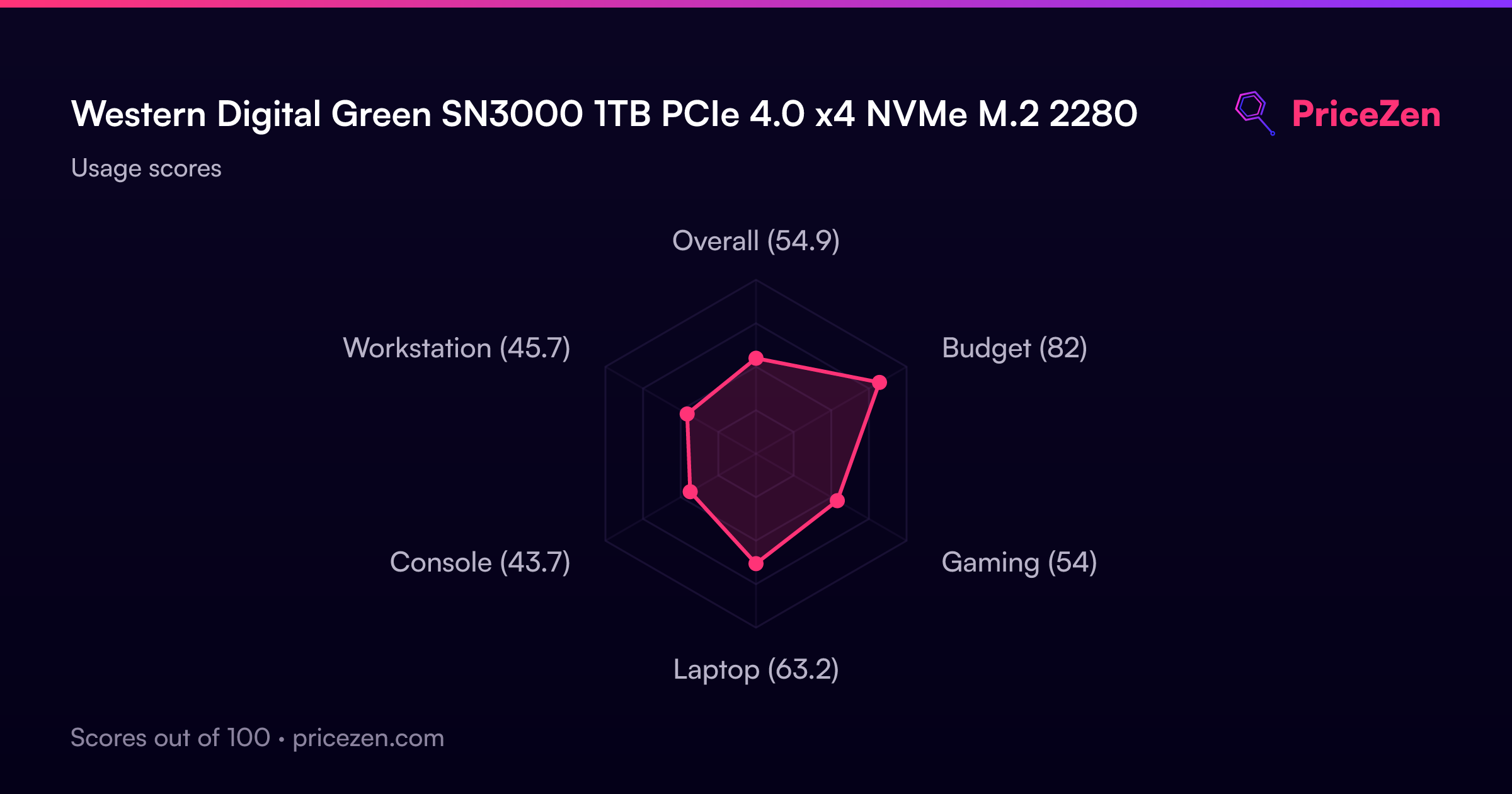
Our scoring model puts this thing exactly where you'd expect: budget is its strongest category at 75.1 out of 100, while laptop (53.4) and gaming (51.3) land squarely in the middle. That's not an insult. It's a description. This is a drive for people upgrading an aging desktop or giving a laptop a second life, not for someone building a rig to shave milliseconds off load screens. The 4.6/5 average across 74 owner reviews tells us the people buying it for that job are mostly happy with the result.
What makes it interesting to us is the gap between the headline speed and the rest of the spec sheet. Sequential throughput sits well above average for its class, but endurance and feature depth both rank near the bottom of the products we track. So you're getting a genuinely quick drive with a fairly bare-bones everything-else. Whether that trade works for you depends entirely on what you plan to do with it, and we'll get into that.
Common Questions
Q: Will this fit in my thin laptop?
Very likely, yes. It's a single-sided M.2 2280 module, which is the standard length and the thinner of the two common layouts, and WD specifically designed it for slim laptops and small PCs. You'll still need an M.2 slot that supports PCIe NVMe rather than SATA-only, so check your machine's manual before ordering.
Q: Is 5,000 MB/s something I'll actually notice?
For boot times, launching applications and moving large files, yes, and that's reflected in owner feedback about noticeably snappier systems. Our speed ranking places it well above the category average, though random performance sits closer to the middle, so heavy multitasking gains will be more modest than the headline number suggests.
Q: Can I use this as my main drive for video editing?
We'd steer you away from that. Endurance ranks near the bottom against the other internal drives we track, which means sustained heavy writes are exactly the workload this drive is least suited to. It's a good read-heavy system and storage drive, but a dedicated scratch disk for video work wants something with a much higher write tolerance.
Q: How do I move my existing Windows install onto it?
Western Digital includes a free download of Acronis True Image for Western Digital, which handles cloning your old drive across. Owners who've done it report the process can be fiddly, especially around formatting and getting the clone to boot, but the bundled software is what got them there without buying anything extra.
Who Should Skip This
Skip this if your work involves writing large amounts of data every day. Video editors, 3D renderers, anyone running a database or a scratch disk, and people who regularly move huge project folders around will run straight into the endurance limitation, which sits in the bottom sixth of the category in our rankings. The feature score matching it reinforces the point: this is a straightforward drive without the extras that demanding workflows tend to need. Look at the Samsung 9100 PRO, Crucial T700 or Lexar Professional NM1090 PRO instead.
Also skip it if capacity is your actual problem. At 1TB with a capacity ranking around the category midpoint, it won't solve a overflowing game library, and the Kingston 2TB SSD or the 2TB version of this same SN3000 line is the more logical target. And anyone hoping to use this in a portable setup should know it scores just 13.8 out of 100 for that use case in our model. It's an internal upgrade part, and it's happiest staying inside a case.
Verdict
If you're pulling a mechanical drive or a tired SATA SSD out of a desktop or laptop and want the machine to feel new again, this is a sensible buy. The speed uplift is real, owners consistently report it, and the single-sided M.2 2280 design plus free Acronis cloning software removes most of the friction from the upgrade itself. Our budget score of 75.1 reflects exactly this scenario. For general productivity, web work, a game library you mostly read from, and photo storage, the SN3000 does the job without drama.
If you're building something you intend to push hard, look elsewhere. The endurance and feature rankings both sit near the bottom of the category, and that's not a spec-sheet quirk you can ignore when you're writing large files daily. Content creators, anyone running a scratch or cache disk, and builders chasing top-tier random performance should be shopping the Samsung 9100 PRO, Crucial T700 or Lexar NM1090 PRO instead. And if you need portability, this scores 13.8 out of 100 in that use case, which is about as clear a signal as we can give. Right tool, right job, and this one has a fairly narrow job description.
Usage Scores
- Overall54.9
- Budget82
- Gaming54
- Laptop63.2
- Console43.7
- Workstation45.7