Kingston FURY Beast 16GB DDR5-5200 CL40 SODIMM White

DDR5 SODIMM for laptops and mini PCs verified Nov 29
54/100 overall score
Prices checked on 1 days so far, too few to say what is usual.
- Capacity
- 16GB
- Kit
- 1 x 16GB
- Memory
- DDR5
- Speed
- 5200 MT/s
- CAS latency
- CL40
- Form factor
- SODIMM
Compare prices at 1 store
Cheapest first. New, refurbished and bundled offers are kept apart, so you compare like with like.
| Store | Sold by | Colour and condition | Price | vs lowest | Last checked | Link |
|---|---|---|---|---|---|---|
| New1 offerSingle unit | ||||||
| Amazon | Marketplace seller | Not listed | €400.90 | Lowest price | 3 days ago | Go to store |
 Source: PriceZen, checked Nov 26, 2026
A price counts as current when we checked it in the last 7 days. “Marketplace seller” means a third-party seller on that store, not the store itself.











Snapshot
The 30-Second Version
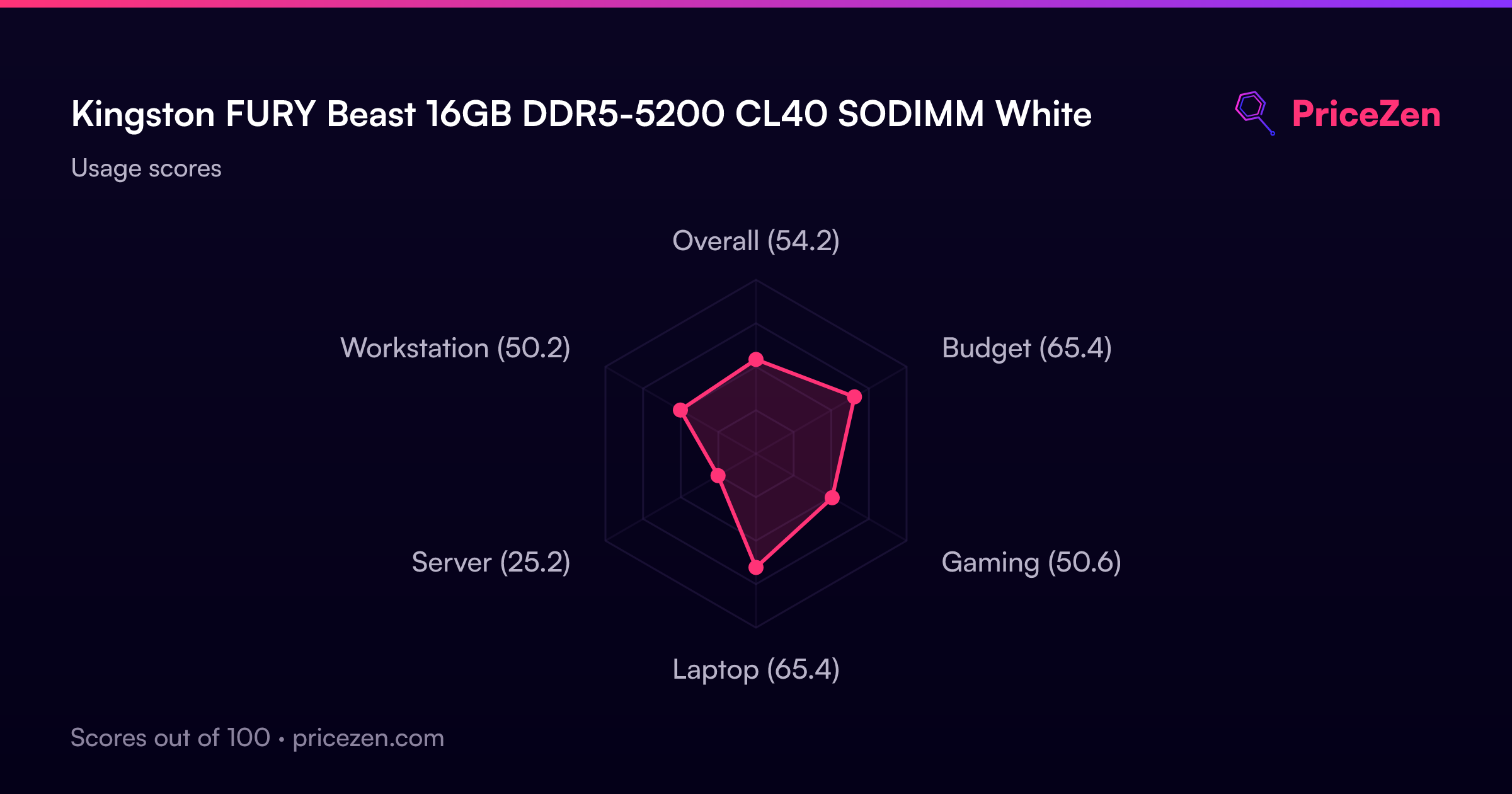
The FURY Beast KF552C40BW-16 is a 16GB DDR5 SODIMM at 5200 MT/s CL40, and the speed is the good news: it ranks at the 72nd percentile for its class. The bad news is CL40 latency down at the 28th percentile and affordability at the 36th, with European prices spanning EUR 345 to EUR 401 (Amazon is cheapest at EUR 345). Our model scores it 65.4/100 for laptop and budget use but only 54.2/100 overall. Fine as a single-stick laptop upgrade, easy to skip if you want low latency or dual-channel value.
Pros & Cons
Pros
- 5200 MT/s is well above average for laptop DDR5, ranking at the 72nd percentile 72nd
- Intel XMP 3.0 certified with Plug N Play fallback for locked-down laptop BIOSes
- On-die ECC and an on-module PMIC help stability at higher speeds
- 262-pin SODIMM format fits laptops and small-form-factor builds directly
- Heat spreader included, and owners rate it 4.3/5 across 16 reviews
Cons
- CL40 latency falls behind most of the category, sitting at the 28th percentile
- Single 16GB module means single-channel operation unless you buy a second stick
- Affordability ranks at only the 36th percentile, so it's not the value pick
- EUR listings spread from EUR 345 to EUR 401, a EUR 56 gap for the same part
- Server suitability scores just 25.2/100, and 16GB capacity is only about average
The proof
Performance
Let's unpack the numbers, because 5200 MT/s CL40 sounds impressive until you look at what each half does. The transfer rate is the bandwidth side, and at the 72nd percentile it's strong for this class. DDR5 also doubles the bank count from 16 to 32 and the burst length from 8 to 16 versus DDR4, plus it splits into dual 32-bit subchannels, which is why DDR5 handles lots of small simultaneous requests better than the old stuff. For real work like 3D rendering, big spreadsheet models or streaming while gaming, that bandwidth is where you feel the difference. Owners give it 4.3/5 across 16 reviews, which suggests it mostly does what it says on the box.
The catch is CL40 at 1.35V. Latency ranks at the 28th percentile, so on tasks that hammer memory with tight, dependent reads (some game engines, certain simulation workloads) you're not getting the snappiness the headline speed implies. And there's a bigger structural issue: this is one 16GB stick. A single module runs single-channel, and no amount of MT/s fixes that. Capacity itself sits at the 45th percentile, basically middle of the pack, so 16GB is adequate rather than generous. If your laptop has two slots, buying a matched pair is the smarter play than one of these. Also worth knowing: XMP 3.0 profiles need BIOS support, and plenty of laptops lock memory tuning entirely, in which case the Plug N Play behaviour is what you'll actually get.
Specifications
Full Specifications
Memory
| Type | DDR5 |
| Form Factor | SODIMM |
| Total Capacity | 16384 |
| Modules | 1 |
| Per Module | 16384 |
| Pins | 262 |
Performance
| Speed | 5200 |
| CAS Latency | 40 |
| Voltage | 1.35 |
Class
| ECC | No |
| Registered | No |
| OC Profile | Intel XMP 3.0 |
Features
| RGB | No |
| Heat Spreader | Yes |
vs Competition
The competitor set here is tough company: G.Skill Trident Z5 Royal Neo RGB, Corsair Vengeance, Team Group T-CREATE EXPERT, Crucial Pro Overclocking and XPG Lancer Blade RGB. Against that group, the FURY Beast's argument is its 5200 MT/s rating at the 72nd percentile combined with the 262-pin SODIMM format and XMP 3.0 certification. If your machine is a laptop, form factor decides the shortlist before any benchmark does, and that's where this Kingston earns its spot. Cross-shop Crucial Pro Overclocking if you want to compare overclocking-oriented options, since that's the closest philosophical match to what Kingston is doing with XMP profiles here.
Where it gives ground is latency and price. At the 28th percentile for latency and the 36th for affordability, this module isn't winning a spec-sheet argument against premium kits, and names like G.Skill Trident Z5 Royal Neo RGB and XPG Lancer Blade RGB exist precisely to chase buyers who care about timings and looks. Team Group T-CREATE EXPERT is the one we'd point content creators toward for comparison, and Corsair Vengeance is the mainstream default worth checking. Our total score of 54.2/100 reflects exactly this: solid speed, middling capacity, weak latency, soft value. It's a situational win, not a category leader.
| Spec | Kingston FURY Beast | Corsair Vengeance | G.Skill Trident Z5 Royal Neo RGB | Team Group T-CREATE EXPERT | Crucial Pro Overclocking | XPG Lancer Blade RGB |
|---|---|---|---|---|---|---|
| Capacity | 16GB | 64GB | 32GB | 32GB | 32GB | 32GB |
| Kit | 1 x 16GB | 2 x 32GB | 2 x 16GB | 2 x 16GB | 2 x 16GB | 2 x 16GB |
| Memory Type | DDR5 | DDR5 | DDR5 | DDR5 | DDR5 | DDR5 |
| Speed Mts | 5200 | 6000 | 6000 | 6400 | 6400 | 6000 |
| Cas Latency | CL40 | CL30 | CL28 | CL32 | CL32 | CL30 |
| Form Factor | SODIMM | UDIMM | UDIMM | UDIMM | UDIMM | UDIMM |
| Ecc | No | No | No | No | No | No |
| Compare | Compare | Compare | Compare | Compare |
| Product | Speed | Feature | Latency | Capacity | Affordability |
|---|---|---|---|---|---|
| Kingston FURY Beast | 71.5 | 61.5 | 27.6 | 44.8 | 36.1 |
| Corsair Vengeance Compare | 87.6 | 74.8 | 87.6 | 89.4 | 7.6 |
| G.Skill Trident Z5 Royal Neo RGB Compare | 87.6 | 89.6 | 97.1 | 70.4 | 12.4 |
| Team Group T-CREATE EXPERT Compare | 94.8 | 74.8 | 87.6 | 70.4 | 23.9 |
| Crucial Pro Overclocking Compare | 94.8 | 74.8 | 87.6 | 70.4 | 27 |
| XPG Lancer Blade RGB Compare | 87.6 | 89.6 | 87.6 | 70.4 | 16.5 |
Price
Value & Pricing
Here's where we'd pump the brakes. Affordability sits at the 36th percentile in our data, which is underwhelming for a single 16GB module, and the pricing we track is messy. Across four European listings in DE, ES, FR and IT, the same part shows up between EUR 345 and EUR 401. That's a EUR 56 spread for identical hardware. Amazon is the cheapest European option right now at EUR 345, so if you're buying in the EU, start there and don't pay the top of that range out of impatience.
Other regions look wildly different on paper: CAD 77 in Canada, JPY 106,561 in Japan, MXN 6,950 in Mexico. Those are separate currencies and separate markets, so don't try to line them up against the euro figures. What we can say is that the budget score of 65.4/100 is the strongest thing this module has going for it, tied with its laptop score, and even that isn't a bargain verdict. It's a fair-ish upgrade part if you specifically need 5200 MT/s in SODIMM form. It's not the cheap way to add RAM.
We started tracking prices for this product on Nov 26, 2026. The chart appears once we have more data.
Read more
Overview
The Kingston FURY Beast KF552C40BW-16 is a single 16GB DDR5 SODIMM running at 5200 MT/s with CL40 timings and 1.35V, built for laptops and small-form-factor machines that take the 262-pin format. It's unbuffered memory with Intel XMP 3.0 certification, an on-module PMIC, on-die ECC and a heat spreader in white. If you've got a DDR5 laptop sitting on 8GB and you keep hitting the wall with browser tabs plus a game plus Discord, this is the kind of stick you drop in and forget about.
What makes it interesting is the mix. The speed rating lands well above average in our data, sitting at the 72nd percentile against everything else in this category, so 5200 MT/s is genuinely quick for a laptop module rather than just marketing. But the latency side tells a different story: CL40 puts it down at the 28th percentile, which means it falls behind most of the field on how fast it responds to a request. Fast pipe, slightly slow tap. That trade-off is the whole personality of this module.
Our scoring model gives it 65.4/100 for budget-focused buyers and the same 65.4 for laptop use, with a total score of 54.2/100 across all product types. That gap matters. This is a decent laptop upgrade part, not a standout component overall, and its weakest showing by far is server work at 25.2/100, which makes sense given it's unbuffered consumer memory. We collect specs, prices and ratings from a pile of stores with our own system and rank everything against its category peers, so those numbers are relative, not vibes.
Common Questions
Q: Will 5200 MT/s actually run at full speed in my laptop?
Only if your laptop's memory controller and BIOS support it. This module is Intel XMP 3.0 certified with Plug N Play behaviour, so on machines that block memory tuning it should fall back to a standard supported speed rather than fail outright. Check your laptop's maximum supported DDR5 speed before paying for 5200 MT/s, because the 72nd percentile speed ranking only helps if the platform lets it stretch.
Q: Is one 16GB stick enough, or should I buy two?
One stick works, but it runs single-channel, and that limits real-world throughput no matter how high the transfer rate goes. Capacity here sits at the 45th percentile in our data, so 16GB is adequate for gaming and general multitasking rather than roomy. If your laptop has two SODIMM slots, a matched pair is the better use of your money.
Q: Does CL40 latency matter for gaming?
It can. CL40 puts this module at the 28th percentile for latency, meaning most of the category responds faster, and games that make lots of tight, dependent memory reads are where that shows up. The strong 5200 MT/s bandwidth helps in bulk-data work like rendering and streaming, but it doesn't cancel out loose timings.
Q: Why is the price so different between stores?
We track four European listings across DE, ES, FR and IT and they range from EUR 345 to EUR 401, a EUR 56 gap for the identical part. Amazon currently sits at the bottom of that range at EUR 345. With affordability ranked at only the 36th percentile, shopping around here is worth the extra few minutes.
Who Should Skip This
Skip this if you're chasing low-latency gaming performance in a desktop. CL40 at the 28th percentile is a genuine weak spot, and a single module compounds it by running single-channel. Look at Corsair Vengeance, G.Skill Trident Z5 Royal Neo RGB or XPG Lancer Blade RGB instead and prioritise a matched kit with tighter timings.
Also skip it if you need capacity headroom or server-grade reliability. 16GB sits mid-pack at the 45th percentile, and the server score of 25.2/100 is our model's clearest warning label anywhere in this review. Content creators doing heavy 3D or animation work should compare Team Group T-CREATE EXPERT and Crucial Pro Overclocking, and anyone on a tight budget should note the 36th percentile affordability before committing to EUR 345 or more.
Verdict
If you're upgrading a DDR5 laptop that supports 5200 MT/s and you're currently stuck on a small single module, this is a reasonable buy at EUR 345 from Amazon. You get above-average bandwidth, XMP 3.0 with a Plug N Play safety net, on-die ECC for stability and a heat spreader. The 4.3/5 owner rating across 16 reviews backs up the idea that it behaves. Just go in knowing CL40 is a weak spot rather than a hidden strength.
If you're building or tuning a desktop for latency-sensitive gaming, or you need serious capacity for rendering and VM work, look elsewhere in the competitor list. One 16GB stick at the 45th percentile for capacity and the 28th for latency isn't the foundation for that kind of machine. And nobody should be considering this for a server: 25.2/100 there is our model telling you, politely, to stop. Buy it as a targeted laptop fix, not as a general-purpose performance upgrade.
Usage Scores
- Overall54.2
- Budget65.4
- Gaming50.6
- Laptop65.4
- Server25.2
- Workstation50.2