Samsung G31H 24" Black 2026

Smooth 144Hz gaming on an IPS panel verified Nov 25
43/100 overall score 4.5 average from 26 owner ratings
- Screen
- 24"
- Resolution
- 1920 x 1080
- Panel
- IPS
- Refresh
- 144 Hz
- Response time
- 1 ms
- Adaptive sync
- FreeSync


Snapshot
The 30-Second Version
The Samsung G3 G31H is a budget 144Hz IPS monitor that nails speed but skimps on color and brightness. Performance is solid at the 73rd percentile, but color lands in the 17th percentile, so it's strictly for gamers who don't care about picture quality. At USD 71 to USD 80, it's a fair deal if refresh rate is all you need.
Pros & Cons
Pros
- 144Hz refresh rate keeps fast games feeling smooth 73rd
- Height-adjustable stand is rare at this price 67th
- FreeSync support helps prevent screen tearing
- Low 25W power draw is easy on your electric bill
Cons
- 250 nits brightness is dim for bright rooms
- Color accuracy is one of the weakest we've seen
- Only one HDMI and one DisplayPort, no USB hub
- 24 inches feels cramped for anything beyond gaming
The proof
Performance
The 144Hz refresh rate and 1ms MPRT response time are the whole story here. Our database puts this panel's performance at the 73rd percentile, which is solid for a budget display. Fast motion stays reasonably clear, and FreeSync keeps things from tearing when your frame rate dips. But the display itself is a weak spot, landing in the 39th percentile. At 250 nits, it's not bright enough for a sunny room, and the 95 percent color coverage claim is vague at best. Our color score puts it in the 17th percentile, so don't expect rich, accurate tones. This is a speed-first monitor, and it shows.
Specifications
Full Specifications
Display
| Size | 24" |
| Resolution | 1920x1080 (Full HD) |
| Panel Type | IPS |
| Aspect Ratio | 16:9 |
| Curved | No |
Performance
| Refresh Rate | 144 Hz |
| Response Time | 1 |
| Adaptive Sync | FreeSync |
Color & HDR
| Brightness | 250 nits |
| Color Gamut | 95 percent |
Connectivity
| HDMI Ports | 1 |
| DisplayPort | 1 |
| Speakers | No |
| Headphone Jack | Yes |
Ergonomics
| Height Adjustable | Yes |
| Tilt | Yes |
| VESA Mount | 100x100 |
Features
| Webcam | No |
| Touchscreen | No |
| Power | 25 |
| Weight | 2.7 kg / 5.9 lbs |
vs Competition
Against the ASUS TUF Gaming VG27AQL5A and LG UltraGear 27GS75Q-B, the Samsung G3 looks like a budget compromise. Those competitors offer 27-inch screens and better color, but they also cost significantly more. The Acer Nitro XV272U W2bmiiprx is another step up in size and image quality. The SANSUI 27 inch and Amzfast AMZG24F6Q are closer in spirit, but the Samsung's height-adjustable stand gives it a practical edge for desk setups. If you want the cheapest 144Hz IPS monitor that doesn't feel flimsy, the G3 holds its own. If you want a monitor that's also good for watching movies or editing photos, every competitor here beats it.
| Spec | Samsung G31H 24" | LG UltraGear 45GX950A-B 45" | ASUS ROG Strix XG27UCDMG 27" | Dell UltraSharp U4025QW 39.7" | Alienware AW-Series AW3425DW 34" | MSI MAG 271QPX QD-OLED E2 27" |
|---|---|---|---|---|---|---|
| Screen Size | 24 | 45 | 27 | 39.7 | 34 | 27 |
| Resolution | 1920 x 1080 | 5120 x 2160 | 3840 x 2160 | 5120 x 2160 | 3440 x 1440 | 2560 x 1440 |
| Panel Type | IPS | OLED | QD-OLED | IPS | QD-OLED | QD-OLED |
| Refresh Rate | 144 | 330 | 240 | 120 | 240 | 240 |
| Response Time Ms | 1 | 0.03 | 0.03 | 5 | 0.03 | 0.03 |
| Adaptive Sync | FreeSync | FreeSync Premium Pro | FreeSync Premium Pro | Adaptive-Sync | FreeSync Premium Pro | FreeSync Premium Pro |
| Hdr | - | DisplayHDR True Black 400 | DisplayHDR True Black 400 | HDR600 | HDR400 | DisplayHDR True Black 400 |
| Compare | Compare | Compare | Compare | Compare |
| Product | Color | Portability | Display | Feature | Ergonomic | Performance | Connectivity | Social Proof |
|---|---|---|---|---|---|---|---|---|
| Samsung G31H 24" | 15.4 | 57.3 | 37.4 | 21.1 | 66.9 | 72.6 | 33.8 | 42.3 |
| LG UltraGear 45GX950A-B 45" Compare | 99.4 | 76.5 | 99.7 | 96.3 | 90.8 | 99.4 | 96.9 | 91.9 |
| ASUS ROG Strix XG27UCDMG 27" Compare | 96.5 | 57.3 | 97.7 | 85 | 90.8 | 97.9 | 81 | 98.9 |
| Dell UltraSharp U4025QW 39.7" Compare | 97.9 | 76.5 | 98.6 | 96.3 | 90.8 | 56.1 | 99.3 | 96.8 |
| Alienware AW-Series AW3425DW 34" Compare | 98.9 | 73.9 | 84 | 96.3 | 90.8 | 97.9 | 95.4 | 96.8 |
| MSI MAG 271QPX QD-OLED E2 27" Compare | 99.2 | 57.3 | 73.4 | 85 | 90.8 | 97.9 | 81 | 98.9 |
Price
Value & Pricing
There's no listed price in our data, but US listings range from USD 71 to USD 80 across four vendors. That's a pretty tight spread, so you're not saving much by shopping around. For under USD 80, a 144Hz IPS panel with a height-adjustable stand is a genuinely good deal. Just know you're trading color quality and brightness for that refresh rate. If you can stretch your budget a bit, the extra money goes a long way toward a better panel.
Read more
Overview
The Samsung G3 G31H is a 24-inch 1080p IPS panel aimed at budget gamers who want 144Hz without spending real money. It's got FreeSync, a 1ms MPRT response time, and a height-adjustable stand, which is more than you usually get at this price. The catch? Color and brightness are pretty weak, even for a budget monitor.
Samsung calls this the Essential Monitor G3, and that's fair. It nails the basics for fast-paced gaming, but don't expect it to wow you with picture quality. If you're on a tight budget and mostly play competitive shooters, this thing makes sense. If you care about colors or want a bigger screen, keep scrolling.
Common Questions
Q: Is this monitor good for competitive gaming?
Yes, the 144Hz refresh rate and 1ms MPRT response time are the main selling points, and our performance score puts it in the 73rd percentile. FreeSync also helps keep gameplay smooth when your frame rate fluctuates.
Q: Can I mount this monitor on a monitor arm?
Yes, it has a standard VESA 100x100 mount, so it works with most monitor arms and wall mounts. The included stand also has height adjustment, which is a nice bonus at this price.
Q: How are the colors and brightness for everyday use?
They're mediocre. The panel maxes out at 250 nits, which is dim for bright rooms, and our color score puts it in the 17th percentile. It's fine for gaming and basic office work, but not great for photo editing or watching movies.
Who Should Skip This
Skip this if you do any kind of color-sensitive work or want a monitor for watching movies. The 17th percentile color score and 250-nit brightness make it a poor fit for photo editing, video work, or even a bright living room. If you want a bigger screen or better image quality, save up for the LG UltraGear 27GS75Q-B or ASUS TUF Gaming VG27AQL5A instead.
Verdict
Buy this if you're a budget-conscious gamer who plays fast-paced titles like Valorant, CS2, or Apex and doesn't care about color accuracy. The 144Hz refresh rate and FreeSync support are the real deal, and the height-adjustable stand is a nice bonus. It's also fine for office work, though the dim panel might strain your eyes in a bright room. This is a purpose-built budget gaming monitor, and it's honest about what it is.
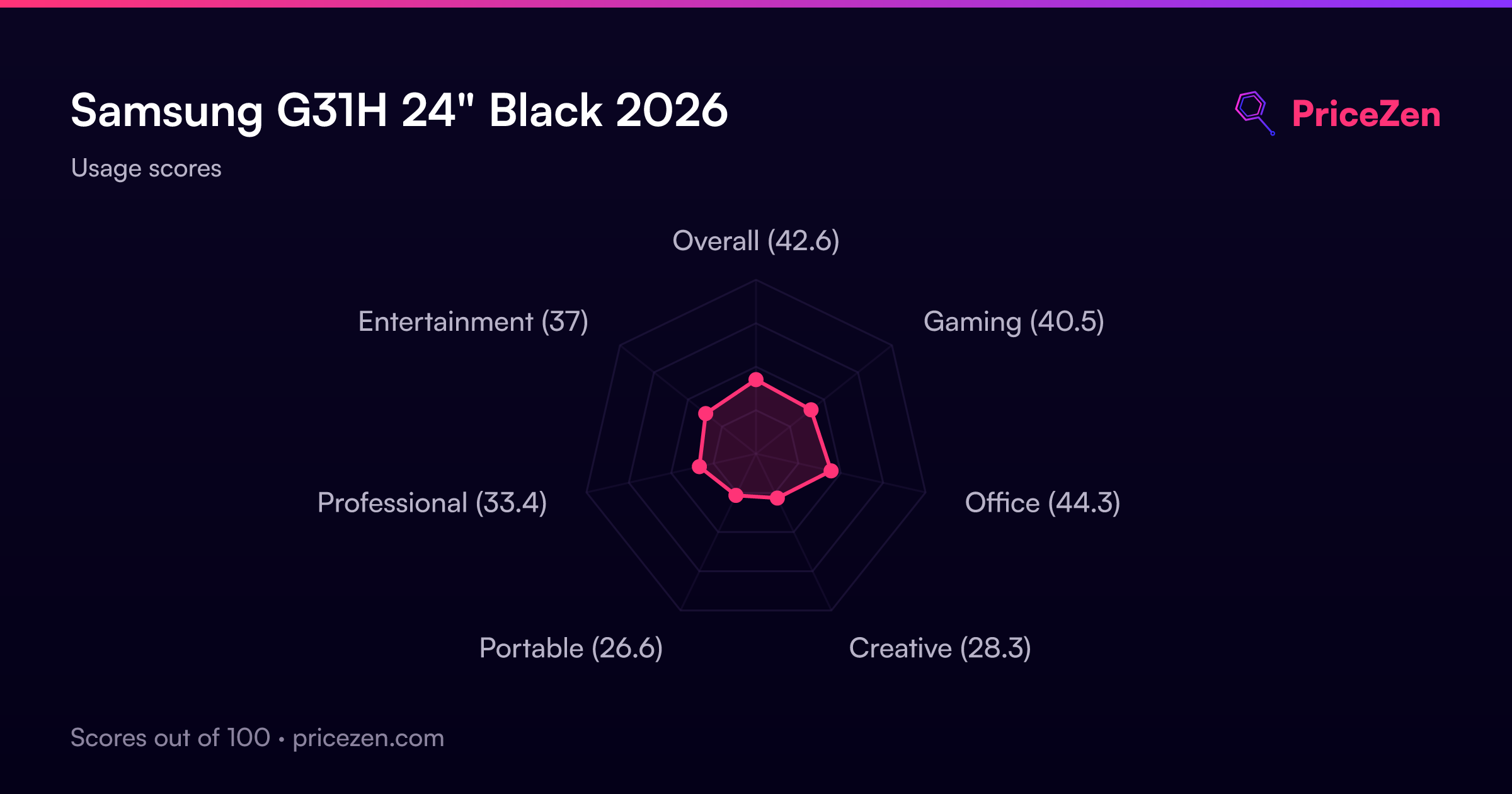
Usage Scores
- Overall42.6
- Gaming40.5
- Office44.3
- Creative28.3
- Portable26.6
- Professional33.4
- Entertainment37