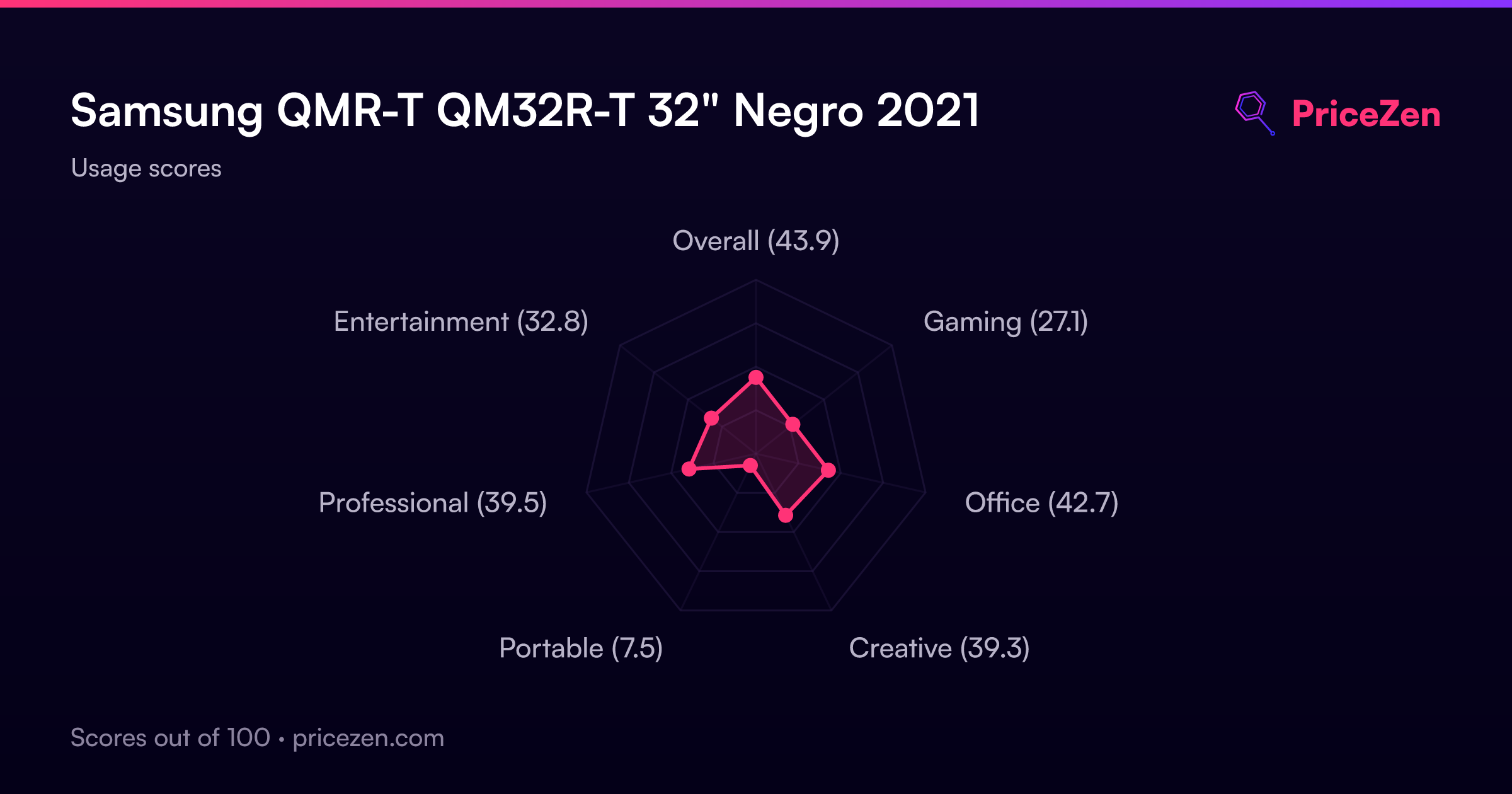
Samsung QMR-T QM32R-T 32" Negro 2021
The 32-inch VA panel delivers 1920 x 1080 resolution at 300 nits with an 8ms response time, while the capacitive touchscreen and built-in Wi-Fi enable interactive content without external hardware. Running Tizen 4.0 with a built-in media player and dual speakers, it handles digital signage playback directly, and the IP5X rating adds dust resistance for commercial settings. This display suits office or retail buyers who need a touch-enabled signage screen for presentations, wayfinding, or interactive kiosks, though its 8.3kg weight limits portability.

No current retailer price











Snapshot
The 30-Second Version
The Samsung QMR-T QM32R-T is a 32-inch commercial touchscreen display built for digital signage and interactive kiosks. It packs a capacitive touchscreen, built-in Wi-Fi, Tizen 4.0, and dual speakers into a dust-resistant chassis. Image quality and performance are average at best, but the feature set is best-in-class for commercial use.
Pros & Cons
Pros
- Capacitive touchscreen works well for kiosks and interactive signage
- Built-in media player and Tizen 4.0 mean no external PC needed
- Dual HDMI 2.0, DisplayPort 1.2, and HDMI output for flexible setups
- IP5X dust resistance suits retail and industrial environments
- Dual built-in speakers handle audio without extra hardware
Cons
- 300-nit brightness struggles in bright rooms or near windows
- 8ms response time and 60Hz limit fast-moving content
- Heavy at 8.3kg, wall mounting requires solid support
- No HDR support and limited color accuracy for creative work
- Price is high for a 1080p panel in 2025
The proof
Performance
The QM32R-T runs at 60Hz with an 8ms response time, which lands it in the 6th percentile for performance in our database. That's near the bottom of the charts, but it's also not the point of this display. You're not buying this for fast-paced gaming or high-refresh scrolling. For signage, menu boards, and interactive kiosks, 60Hz is perfectly fine. The 8ms response time means fast-moving content will show some ghosting, but static content and touch interactions feel responsive enough.
The 300-nit brightness is adequate for indoor use, though it sits in the middle of the pack for color at the 43rd percentile. The 8-bit VA panel gives you decent contrast and viewing angles for a commercial display, but don't expect wide gamut coverage or HDR punch. The feature set is where this thing shines, hitting the 99th percentile. Built-in Wi-Fi, Tizen 4.0, capacitive touch, dual HDMI 2.0, DisplayPort 1.2, and an HDMI output for daisy-chaining make this a flexible signage hub.
Specifications
Full Specifications
Display
| Size | 32" |
| Resolution | 1920x1080 (Full HD) |
| Panel Type | VA |
| Aspect Ratio | 16:9 |
| Curved | No |
Performance
| Refresh Rate | 60 Hz |
| Response Time | 8 |
Color & HDR
| Brightness | 300 nits |
| Color Depth | 8-bit |
Connectivity
| HDMI Ports | 2 |
| DisplayPort | 1 |
| Speakers | Yes |
| Headphone Jack | Yes |
Ergonomics
| Height Adjustable | No |
| Tilt | No |
| Swivel | No |
| Pivot | No |
| VESA Mount | 200x200 |
Features
| Webcam | No |
| Touchscreen | Yes |
| PIP/PBP | No |
| Power | 45 |
| Weight | 8.3 kg / 18.3 lbs |
vs Competition
The Samsung QM32R-T doesn't really compete with the gaming monitors in our database, but the price overlap makes comparisons inevitable. The ASUS ROG Strix XG27UCDMG is a 27-inch 4K OLED gaming monitor that absolutely destroys the Samsung in color, contrast, and response time. But it has no touchscreen, no built-in OS, and no signage features. The LG UltraGear 45GX950A-B is a massive 45-inch ultrawide OLED, again built for gaming and content consumption, not interactive kiosks. The MSI MPG 271QR QD-OLED X50 and Gigabyte M Series OLED MO27U2 SA are similarly gaming-first panels with far better image quality but zero commercial features.
The Dell UltraSharp U4025QW is the closest philosophical competitor, a 40-inch ultrawide aimed at productivity and office use. It has better color and resolution, but no touchscreen and no built-in media player. If your use case is a meeting room display or retail kiosk, the Samsung's touch and Tizen OS make it the only real choice among these. If you just want a great-looking screen for a desk, every other competitor here beats it on image quality.
| Spec | Samsung QMR-T QM32R-T 32" | LG UltraGear 45GX950A-B 45" | ASUS ROG Strix XG27UCDMG 27" | Dell UltraSharp U4025QW 39.7" | Alienware AW-Series AW3425DW 34" | MSI MAG 271QPX QD-OLED E2 27" |
|---|---|---|---|---|---|---|
| Screen Size | 32 | 45 | 27 | 39.7 | 34 | 27 |
| Resolution | 1920 x 1080 | 5120 x 2160 | 3840 x 2160 | 5120 x 2160 | 3440 x 1440 | 2560 x 1440 |
| Panel Type | VA | OLED | QD-OLED | IPS | QD-OLED | QD-OLED |
| Refresh Rate | 60 | 330 | 240 | 120 | 240 | 240 |
| Response Time Ms | 8 | 0.03 | 0.03 | 5 | 0.03 | 0.03 |
| Adaptive Sync | - | FreeSync Premium Pro | FreeSync Premium Pro | Adaptive-Sync | FreeSync Premium Pro | FreeSync Premium Pro |
| Hdr | - | DisplayHDR True Black 400 | DisplayHDR True Black 400 | HDR600 | HDR400 | DisplayHDR True Black 400 |
| Compare | Compare | Compare | Compare | Compare |
| Product | Color | Portability | Display | Feature | Ergonomic | Performance | Connectivity |
|---|---|---|---|---|---|---|---|
| Samsung QMR-T QM32R-T 32" | 41.8 | 38.1 | 55.1 | 55.4 | 30 | 6.3 | 62.1 |
| LG UltraGear 45GX950A-B 45" Compare | 99.4 | 76.5 | 99.7 | 96.3 | 90.7 | 99.4 | 96.9 |
| ASUS ROG Strix XG27UCDMG 27" Compare | 96.5 | 57.3 | 97.7 | 85 | 90.7 | 97.9 | 81 |
| Dell UltraSharp U4025QW 39.7" Compare | 97.9 | 76.5 | 98.6 | 96.3 | 90.7 | 56.1 | 99.3 |
| Alienware AW-Series AW3425DW 34" Compare | 98.9 | 73.9 | 84.1 | 96.3 | 90.7 | 97.9 | 95.4 |
| MSI MAG 271QPX QD-OLED E2 27" Compare | 99.2 | 57.3 | 73.4 | 85 | 90.7 | 97.9 | 81 |
Price
Value & Pricing
Value is tricky here. The QM32R-T lists between USD 1,375 and USD 1,578 in the US, which is a wide spread for the same panel. If you're shopping, the lower end of that range is the better deal, and it's worth checking which store has the USD 1,375 listing before you commit. For that money you're getting a commercial-grade touchscreen with a built-in OS and media player, which is a different value proposition than a consumer monitor. But compared to something like the ASUS ROG Strix XG27UCDMG or LG UltraGear 45GX950A-B, both of which are gaming-focused OLEDs, you're paying for touch and signage features rather than raw display quality. If you don't need touch or Tizen, there are far cheaper 1080p panels out there.
Read more
Overview
The Samsung QMR-T QM32R-T is a 32-inch commercial touchscreen display aimed at businesses that need interactive signage, kiosks, or meeting room screens. It's a Full HD 1920 x 1080 VA panel with a capacitive touchscreen, built-in Wi-Fi, and Tizen 4.0 running the show. Pricing is a bit scattered depending on where you look, with US listings ranging from USD 1,375 to USD 1,578, and international prices in CAD, JPY, and MXN. This isn't a gaming monitor or a creative color grading tool. It's a workhorse display for digital signage, retail, and office collaboration.
If you're searching for a commercial touchscreen display that can handle all-day operation without a connected PC, the QM32R-T has a built-in media player and dual speakers, so it can run content straight from USB. The IP5X rating means it's dust-resistant, which matters in retail or industrial settings. But the 300-nit brightness and 8ms response time tell you this panel isn't built for speed or vivid HDR. It's built for utility.
Samsung positions this as a smart signage display, and that's exactly what it is. The Tizen OS gives you app support and remote management, which is handy for IT teams. But if you're a home user looking for a touchscreen monitor for casual use, this thing weighs 8.3kg and draws 45W. It's a commercial product through and through.
Common Questions
Q: Is the Samsung QM32R-T good for gaming?
No, the QM32R-T is not built for gaming. Its 60Hz refresh rate and 8ms response time put it near the bottom of our performance rankings, and the 1080p VA panel lacks the speed and color accuracy gamers expect.
Q: Does the Samsung QM32R-T need a computer to work?
No, the QM32R-T has a built-in media player and Tizen 4.0 operating system, so it can play content directly from USB drives or stream over Wi-Fi without a connected PC.
Q: Can the Samsung QM32R-T be wall mounted?
Yes, the QM32R-T supports VESA 200x200 mounting. At 8.3kg it's on the heavier side for a 32-inch display, so make sure your mount is rated for the weight.
Q: Is the Samsung QM32R-T bright enough for outdoor use?
No, the 300-nit brightness is designed for indoor environments. Direct sunlight or very bright rooms will wash out the display, so it's best used in controlled lighting conditions.
Who Should Skip This
Skip the QM32R-T if you're a gamer, creative professional, or home user looking for a desktop monitor. The 1080p resolution, 60Hz refresh rate, and 8ms response time are well behind what similarly priced gaming and productivity monitors offer. If you want a great-looking screen for your desk, the ASUS ROG Strix XG27UCDMG or Dell UltraSharp U4025QW deliver far better image quality for the same money. Also skip it if you need a portable display, the 8.3kg weight and 45W power draw make it strictly a fixed installation. And if you don't need touch or built-in signage software, a standard commercial display will save you a lot of cash.
Verdict
Should you buy the Samsung QMR-T QM32R-T? If you need a commercial touchscreen display for digital signage, retail kiosks, or interactive meeting rooms, yes. The built-in Tizen 4.0 OS, capacitive touch, and IP5X rating make it a purpose-built tool that consumer monitors can't match. The 99th percentile feature score isn't marketing fluff, this thing has more connectivity and software capability than almost anything else in our database.
But if you're a home user, gamer, or creative professional, this is the wrong tool. The 1080p resolution, 300-nit brightness, and 6th percentile performance score mean you're paying a premium for commercial features you'll never use. For the same money you could get a 4K OLED with dramatically better image quality. The QM32R-T is excellent at what it's built for, and mediocre at everything else.
Usage Scores
- Overall43.9
- Gaming27.1
- Office42.7
- Creative39.3
- Portable7.5
- Professional39.5
- Entertainment32.8