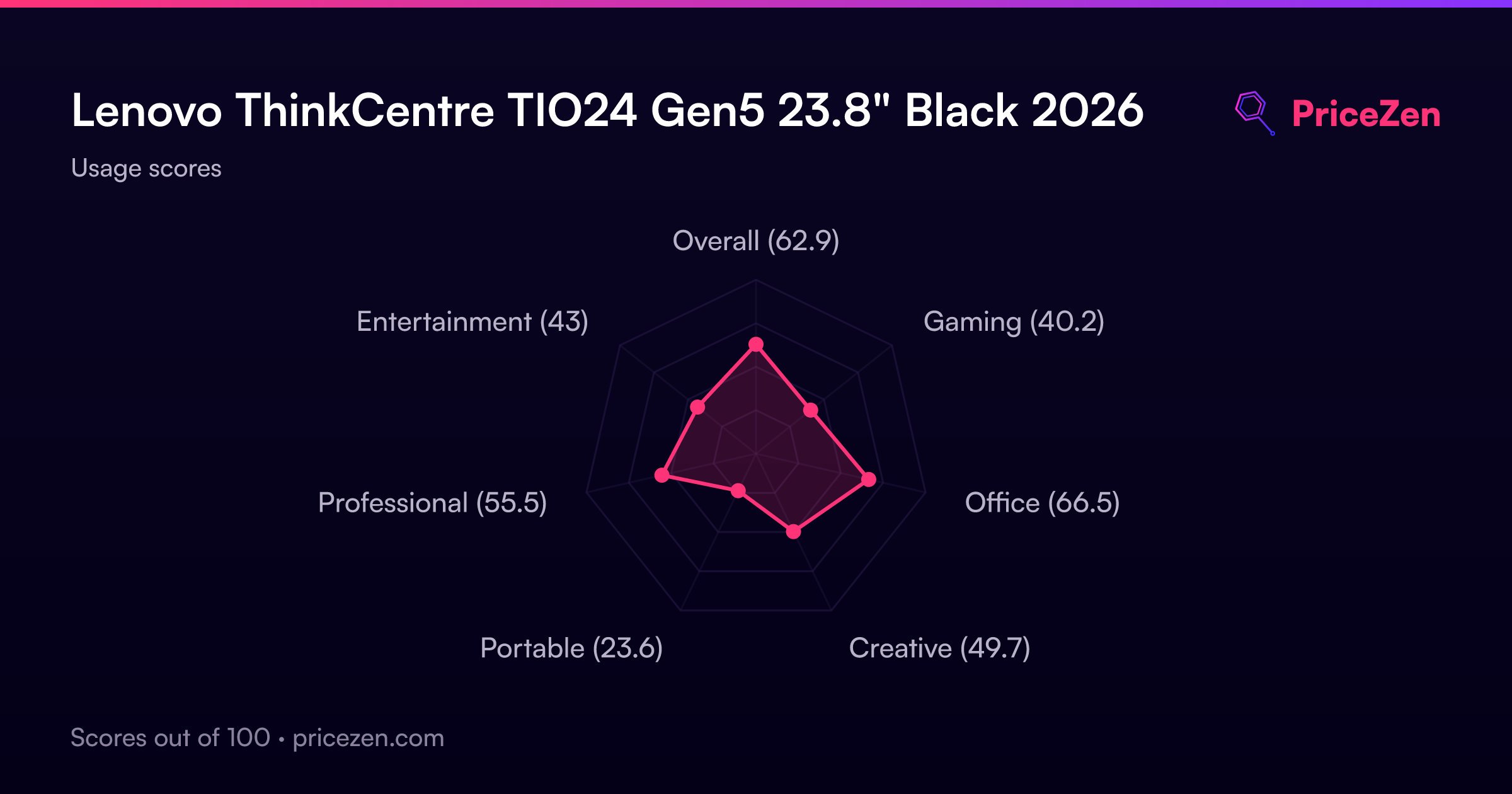
Lenovo ThinkCentre TIO24 Gen5 23.8" Black 2026
Its modular design integrates a ThinkCentre Tiny PC into the rear slot for a cable-free desk, complemented by a 1080p webcam, noise-cancelling mic, and dedicated VoIP controls. The 23.8-inch IPS panel covers 99% sRGB with a fully adjustable stand, though its 250-nit brightness limits HDR use. This monitor is best for corporate offices deploying standardized, space-saving desk setups with Lenovo Tiny PCs.

No current retailer price








Snapshot
The 30-Second Version
A fantastic docking station disguised as a monitor. Buy it for the clean desk, not the picture quality.
Pros & Cons
Pros
- Integrated webcam and speakers make it a true all-in-one hub 98th
- Best-in-class ergonomics with full height, tilt, swivel, and pivot 94th
- Excellent connectivity with USB-C, HDMI, and DisplayPort 91st
- Perfect cable-management solution for a Lenovo Tiny PC 87th
Cons
- Screen is dim at 250 nits and looks dated
- 1080p resolution feels cramped on a 24" panel in 2024
- Mediocre color performance for anything beyond office work
- Completely useless as a portable display
What owners think
The Word on the Street
How owner sentiment changed over time
ExclusiveBased on when customers actually wrote their reviews - so you can see whether early praise held up.
37 written reviews, Dec 2023 – Nov 2026: 25 happy, 1 mixed, 11 without stars
Across all 55 store ratings: 4.8★. The chart counts the 37 written reviews.
- Jan – Mar 20264 without stars
Reviewers praise color accuracy and build quality but note confusing assembly instructions and tricky shading hood setup.
- Excellent color accuracy and vibrant display out of the box.
- Assembly instructions are nearly incomprehensible, missing steps.
- Shading hood is tricky to assemble but works well once in place.
- Helpful customer service resolved calibration software issues.
- Oct – Dec 20252 of 2 happy · 6 without stars
Buyers praised the ThinkCentre Tiny-In-One 24 Gen 5 for office work, highlighting its sleek design, modularity, sharp display, and ergonomic features. However, some reviews were promotional or duplicated, with one negative rating, tempering overall sentiment.
- Sleek design and modularity allow clean integration of ThinkCentre Tiny PC, creating a tidy all-in-one workstation.
- Full HD display is sharp and comfortable, enhancing the office work experience.
- Adjustable stand and retractable webcam add ergonomic and privacy value.
- Some reviews were promotional or duplicated, with one negative rating, raising authenticity concerns.
- Jul – Sep 20254 of 4 happy
Buyers report the monitor works as expected, with easy setup, no bloatware, and good ergonomics. One reviewer noted compatibility with an older Tiny PC while awaiting a new one.
- Works as expected, no issues, easy 5-minute setup, no bloatware.
- Monitor offers full adjustability for height and tilt, good ergonomics.
- Colors and resolution are excellent for office work, meets advertised specs.
- Compatibility with older Tiny PCs noted; one reviewer used it with m920q while waiting for new PC.
- Jul – Sep 20243 of 3 happy
Buyers praised the space-saving design and integrated camera/speakers for meetings, but one duplicate review was rated 0 stars, possibly due to promotion collection, skewing sentiment.
- Space-saving design: tiny PC enclosed within monitor, neat desktop.
- Integrated camera and speakers are perfect for online meetings.
- All-in-one elegance with easy system access without full teardown.
- One review rated 0 stars despite positive text, possibly due to promotion.
Each dot is one written review, in the month it was written. Happy = 4-5★, mixed = 3★, unhappy = 1-2★. Period summaries are in English.
The proof
Performance
The display itself is the biggest surprise, and not in a great way. With 250 nits of brightness and a basic 1080p resolution, it's firmly in the bottom quartile of all monitors we track. It's fine for text and office apps, but it looks dim next to a modern laptop screen. The 99% sRGB coverage is a small saving grace, keeping colors from looking totally washed out, but the low brightness means you won't want it near a sunny window. The 60Hz refresh rate is standard, and the 4ms response time is a non-issue for its intended use. It gets the job done, but 'vibrant' isn't in its vocabulary.
Specifications
Full Specifications
Display
| Size | 23.8" |
| Resolution | 1920x1080 (Full HD) |
| Panel Type | IPS |
| Aspect Ratio | 16:9 |
| Curved | No |
| Screen Finish | matte |
Performance
| Refresh Rate | 60 Hz |
| Response Time | 4 |
| Adaptive Sync | Adaptive-Sync |
Color & HDR
| Brightness | 250 nits |
| Color Gamut | 99% sRGB |
| Color Depth | 8-bit |
| HDR | HDR10 |
Connectivity
| HDMI Ports | 1 |
| DisplayPort | 1 |
| USB-C | 2 |
| Thunderbolt | N/A |
| Speakers | Yes |
| Headphone Jack | Yes |
Ergonomics
| Height Adjustable | Yes |
| Tilt | Yes |
| Swivel | Yes |
| Pivot | Yes |
| VESA Mount | 100x100 |
Features
| Webcam | Yes |
| Touchscreen | No |
| PIP/PBP | No |
| Power | 14 |
| Weight | 6.0 kg / 13.2 lbs |
vs Competition
Stacking this against the ASUS ROG Strix XG27AQDMG or the MSI MAG 271QPX is a category error. Those are high-refresh OLED gaming monsters. The ThinkCentre isn't playing that game. Its real competition is other office-focused 24" monitors like the Dell P2422H or HP E24 G5. The Lenovo's killer feature is the Tiny PC integration, which neither Dell nor HP can match. If you don't have a Tiny PC to slot in, those competitors offer similar or better panels for the same money, and you lose the main reason to buy this specific screen.
| Spec | Lenovo ThinkCentre TIO24 Gen5 23.8" | LG UltraGear 45GX950A-B 45" | ASUS ROG Strix XG27UCDMG 27" | Dell UltraSharp U4025QW 39.7" | Alienware AW-Series AW3425DW 34" | MSI MAG 271QPX QD-OLED E2 27" |
|---|---|---|---|---|---|---|
| Screen Size | 23.799999237060547 | 45 | 27 | 39.70000076293945 | 34 | 27 |
| Resolution | 1920 x 1080 | 5120 x 2160 | 3840 x 2160 | 5120 x 2160 | 3440 x 1440 | 2560 x 1440 |
| Panel Type | IPS | OLED | OLED | IPS | QD-OLED | QD-OLED |
| Refresh Rate | 60 | 330 | 240 | 120 | 240 | 240 |
| Response Time Ms | 4 | 0.029999999329447746 | 0.029999999329447746 | 5 | 0.029999999329447746 | 0.029999999329447746 |
| Adaptive Sync | Adaptive-Sync | FreeSync Premium Pro | FreeSync Premium Pro | Adaptive-Sync | FreeSync Premium Pro | FreeSync Premium Pro |
| Hdr | HDR10 | DisplayHDR True Black 400 | DisplayHDR True Black 400 | HDR600 | HDR400 | DisplayHDR True Black 400 |
| Compare | Compare | Compare | Compare | Compare |
| Product | Color | Portability | Display | Feature | User Sentiment | Performance | Connectivity | Social Proof |
|---|---|---|---|---|---|---|---|---|
| Lenovo ThinkCentre TIO24 Gen5 23.8" | 53.7 | 86.7 | 21.3 | 94.4 | 76.4 | 44.2 | 98.2 | 54.7 |
| LG UltraGear 45GX950A-B 45" Compare | 99.4 | 76.6 | 99.7 | 96.3 | 76.4 | 99.4 | 96.9 | 92 |
| ASUS ROG Strix XG27UCDMG 27" Compare | 96.5 | 57.5 | 97.7 | 85.1 | 99.3 | 97.9 | 81.2 | 98.9 |
| Dell UltraSharp U4025QW 39.7" Compare | 97.9 | 76.6 | 98.6 | 96.3 | 85.6 | 56.1 | 99.3 | 96.8 |
| Alienware AW-Series AW3425DW 34" Compare | 98.9 | 74 | 84.1 | 96.3 | 95.7 | 97.9 | 95.4 | 96.8 |
| MSI MAG 271QPX QD-OLED E2 27" Compare | 99.2 | 57.5 | 73.5 | 85.1 | 95.7 | 97.9 | 81.2 | 98.9 |
Price
Value & Pricing
Pricing is all over the map, with a wild spread from $227 to over $61,000 from different vendors, which is clearly some bad data in the mix. The real street price you should be looking for is around that low $200 mark. At that price, it's a solid deal for a business that's already bought into the Lenovo Tiny ecosystem. You're getting a monitor, webcam, speakers, and a USB hub in one package. If you see it for anything over $300, walk away and buy a standard 24" monitor and a separate webcam instead.
Read more
Overview
The Lenovo ThinkCentre TIO-24 Gen5 is a monitor with a very specific job, and it nails it. This isn't a gaming display or a creative's dream canvas. It's a purpose-built hub for a Lenovo Tiny PC, turning a little compute module into a clean, capable all-in-one. The built-in webcam, speakers, and USB-C connectivity make it a fantastic one-cable docking solution for a clutter-free desk. If you're deploying these in an office, the integrated design and top-tier ergonomics are a genuine win. Just don't buy it expecting a stunning picture for anything beyond spreadsheets and video calls.
Common Questions
Q: Can I use this as a standalone monitor without a Lenovo Tiny PC?
Absolutely. It works as a standard monitor over HDMI or DisplayPort. But you're paying extra for the built-in Tiny PC slot and docking features. If you don't have the PC to slot in, you're better off with a cheaper, brighter standard monitor.
Q: Is the webcam any good?
It's perfectly fine for Teams and Zoom calls. It's not going to make you look like a streamer, but it's convenient, always there, and beats a grainy laptop camera. The integrated privacy shutter is a nice touch.
Q: Is this monitor good for photo editing?
No. While it covers 99% of sRGB, the 250-nit brightness is too low for accurate work, and the 1080p resolution isn't sharp enough. You'd want something like a BenQ PhotoVue for that kind of task.
Who Should Skip This
If you're looking for a vibrant screen for gaming, movies, or creative work, this isn't it. Go get a high-refresh IPS or OLED panel instead. And if you don't own a Lenovo Tiny PC, skip this entirely. You're paying a premium for a docking slot you'll never use. A standard Dell or HP office monitor will give you a better screen for the same money.
Verdict
Buy this if, and only if, you have a Lenovo Tiny PC that needs a home. It's a brilliant docking monitor that creates a super-clean, functional all-in-one for a front desk or a hot-desking setup. The integrated webcam and top-notch ergonomics are genuinely useful. For anyone else, it's a mediocre 1080p monitor with a party trick you can't use. You're paying for the integration, not the panel, so make sure you actually need that before clicking buy.
Usage Scores
- Overall68.8
- Gaming40.2
- Office66.5
- Creative49.7
- Portable23.6
- Professional55.5
- Entertainment43