ASUS Vivobook Go 14" L1404GA-DS01-CA, Intel N100, 4GB, 128GB SSD, Mixed Black
The Intel N100 processor with integrated UHD Graphics handles everyday multitasking, while the 14-inch FHD display with 83% screen-to-body ratio and TÜV Rheinland low-blue light certification supports extended use. Its MIL-STD 810H durability and 180-degree hinge add practical toughness, and the 42Wh battery keeps it portable at 1.38 kg. Best for students needing a budget-friendly, durable laptop for note-taking, browsing, and light office work, not for gaming.

No current retailer price
Snapshot
The 30-Second Version
The ASUS Vivobook Go 14 is a cheap, lightweight laptop that handles basic tasks okay but chokes on anything more. The 4GB RAM and slow 128GB storage are real limitations. At CAD 280 from Walmart Canada it's a fair deal for light use, but spend much more and you should look elsewhere.
Pros & Cons
Pros
- Lightweight and compact at 1.38 kg, easy to toss in a bag 99th
- 1080p display on a budget laptop is a welcome surprise
- MIL-STD 810H durability rating means it can take a bump or two
- Physical webcam shutter is a nice privacy touch
Cons
- 4GB of RAM is barely enough for Windows 11 alone
- 128GB UFS storage is slow and fills up fast
- Wi-Fi 5 instead of Wi-Fi 6 feels dated
- Screen quality ranks near the bottom of our database
What owners think
The Word on the Street
How owner sentiment changed over time
ExclusiveBased on when customers actually wrote their reviews - so you can see whether early praise held up.
1 written review, Sep 2026: 1 happy
Across all 2 store ratings: 3.5★. Most owners rate without writing a review. The chart counts the 1 written review.
Each dot is one written review, in the month it was written. Happy = 4-5★, mixed = 3★, unhappy = 1-2★.
The proof
Performance
The Intel N100 is a 4-core chip designed for efficiency, not speed. In our database, it lands near the bottom for CPU performance, and the integrated UHD Graphics aren't much better. The 4GB of DDR4 RAM is the real bottleneck here. Windows 11 will eat most of that just sitting idle. Multitasking beyond a few lightweight apps will trigger slowdowns and disk swapping. The 128GB UFS 2.1 storage is also a weak spot, ranking among the worst we've seen. It's not a proper SSD, so boot times and app launches feel sluggish. For a single browser window with a few tabs and a document open, it's tolerable. Push it harder and you'll be waiting.
Specifications
Full Specifications
Processor
| CPU | Intel Processor N100 |
| Cores | 4 |
| Frequency | 700 MHz |
| L3 Cache | 6 MB |
Graphics
| GPU | Intel UHD Graphics |
| Type | Integrated |
| VRAM Type | Shared |
Memory & Storage
| RAM | 4 GB |
| RAM Generation | DDR4 |
| Storage | 128 GB |
| Storage Type | SSD |
Display
| Size | 14" |
| Resolution | 1920x1080 (Full HD) |
| Refresh Rate | 60 Hz |
Connectivity
| USB-C Ports | 1 |
| USB Ports | 2 |
| HDMI | HDMI 1.4 |
| Wi-Fi | Wi-Fi 5 |
| Bluetooth | Bluetooth 5.1 |
Physical
| Weight | 2.2 kg / 4.9 lbs |
| Battery | 42 Wh |
| OS | Windows 11 Home |
vs Competition
Stacked against the competition, this thing is in a different league entirely. The Apple MacBook Pro MWP72LL/A, Lenovo Yoga 7i, and HP OmniBook X Flip all cost several times more and deliver dramatically better performance, screens, and build quality. That's not a fair fight. The more relevant comparison is against other budget Windows laptops, and even there the Vivobook Go 14 struggles. The 4GB RAM and UFS storage put it behind most Chromebooks in real-world responsiveness. If you're cross-shopping this with a used ThinkPad or a refurbished Dell with 8GB of RAM and an SSD, the used machine will feel faster in daily use. The Vivobook's only real edge is that it's new, with a warranty and a fresh battery.
| Spec | ASUS Vivobook Go 14" L1404GA-DS01-CA | Apple MacBook Pro 14.2" M4 Max | Lenovo Legion Pro 7i Gen 10 16" | HP OMEN Transcend | Samsung Galaxy Book5 Pro 14" NP944XHA-KG3US | Dell Premium 14.5" LDA14250-7667SLV-PUS |
|---|---|---|---|---|---|---|
| CPU | Intel Processor N100 | Apple M4 Max | Intel Core Ultra 9 275HX | Intel Core Ultra 9 285H | Intel Core Ultra 7 258V | Intel Core Ultra 7 255H |
| RAM (GB) | 4 | 64 | 32 | 32 | 32 | 32 |
| Storage (GB) | 128 | 4096 | 1024 | 1024 | 1024 | 1024 |
| Screen | 14" 1920x1080 | 14.2" 3024x1964 | 16" 2560x1600 | 14" 2880x1800 | 14" 2880x1800 | 14.5" 3200x2000 |
| GPU | Intel UHD Graphics | Apple (40-Core) | NVIDIA GeForce RTX 5070 Ti | NVIDIA GeForce RTX 5070 | Intel Arc Graphics 140V | Intel Arc Graphics |
| OS | Windows 11 Home | macOS | Windows 11 Home | Windows 11 Home | Windows 11 Pro | Windows 11 Home |
| Weight (kg) | 2.2 | 1.6 | 2.7 | 1.6 | 1.2 | 1.7 |
| Battery (Wh) | 42 | 72 | 99 | 71 | 63 | 62 |
| Compare | Compare | Compare | Compare | Compare |
| Product | CPU | GPU | RAM | Ports | Screen | Portability | Storage | Reliability | Social Proof | Affordability |
|---|---|---|---|---|---|---|---|---|---|---|
| ASUS Vivobook Go 14" L1404GA-DS01-CA | 16.5 | 28.2 | 2.4 | 28.4 | 20.4 | 63 | 7.4 | 60.5 | 8.3 | 98.5 |
| Apple MacBook Pro 14.2" M4 Max Compare | 93.7 | 91.5 | 95.6 | 73.9 | 99.1 | 68.8 | 98.4 | 98.1 | 72.6 | 1.8 |
| Lenovo Legion Pro 7i Gen 10 16" Compare | 97.2 | 96.7 | 89 | 97.3 | 95 | 9.5 | 79.3 | 81.9 | 99.7 | 5.8 |
| HP OMEN Transcend Compare | 90.1 | 93.5 | 89.6 | 89.4 | 96 | 72.2 | 65.3 | 33.7 | 93 | 8.9 |
| Samsung Galaxy Book5 Pro 14" NP944XHA-KG3US Compare | 65.8 | 69.6 | 79.5 | 83.5 | 90.4 | 89.4 | 79.3 | 81.9 | 95.5 | 21 |
| Dell Premium 14.5" LDA14250-7667SLV-PUS Compare | 87 | 69.6 | 89 | 66.8 | 96.8 | 61.2 | 65.3 | 33.7 | 95.5 | 14.6 |
Price
Value & Pricing
At CAD 280 to CAD 361 depending on the listing, this is firmly in impulse-buy territory. Walmart Canada has the best price at CAD 280, and at that number it's hard to complain too much. You're getting a brand-name laptop with a 1080p screen and Windows 11 for less than a decent phone. But the spread matters. At CAD 361, you're creeping into territory where better options with 8GB of RAM and proper SSDs start showing up. If you can snag it at the low end, it's a fair deal for a secondary machine or a kid's first laptop. At the high end, skip it.
Read more
Overview
The ASUS Vivobook Go 14 is a budget laptop that knows exactly what it is: cheap, light enough to carry, and fine for basic tasks. The Intel N100 chip and 4GB of RAM won't impress anyone, but for web browsing, email, and document work, it gets the job done without drama. The 14-inch 1080p screen is a nice touch at this price, even if it's not the brightest panel out there.
But here's the thing. 4GB of RAM in 2025 is rough. Windows 11 alone wants more than that just to breathe. Open a few browser tabs and you'll feel it. The 128GB storage is also tight, and it's UFS 2.1, not a proper SSD, so don't expect snappy load times. This is a machine for people who need the absolute basics and nothing more.
Common Questions
Q: Can this laptop handle multiple browser tabs and basic multitasking?
Barely. The 4GB of RAM is the main constraint, and Windows 11 uses most of it just running the OS. A few lightweight tabs and one document is fine, but expect slowdowns if you push beyond that.
Q: Is the 128GB storage enough?
For most people, no. Windows 11 alone takes up a significant chunk, and the UFS 2.1 storage is slower than a standard SSD. You'll likely need cloud storage or an external drive for anything beyond basic files.
Q: Is this good for students?
It works for light schoolwork like writing papers and browsing the web, but the weak performance and limited storage make it a poor choice for anything involving heavier software, large files, or lots of multitasking.
Who Should Skip This
If you need to run anything beyond a web browser and basic office apps, look elsewhere. The 4GB of RAM will frustrate anyone who keeps more than a few tabs open, and the slow UFS storage makes even simple tasks feel sluggish. Gamers, photo editors, programmers, and anyone who multitasks heavily should spend a bit more on something with at least 8GB of RAM and a proper SSD. Also skip it if you need fast Wi-Fi, since Wi-Fi 5 is a generation behind.
Verdict
This laptop is for a very specific person: someone who needs a cheap Windows machine for light tasks and nothing else. Students on a tight budget, grandparents who just want email and Facebook, or anyone who needs a backup machine for travel. If that's you, and you can get it at the CAD 280 end, it's a reasonable buy. Just know what you're signing up for. This is not a machine for multitasking, photo editing, gaming, or anything beyond the basics. Set expectations low and you'll be fine.
Usage Scores
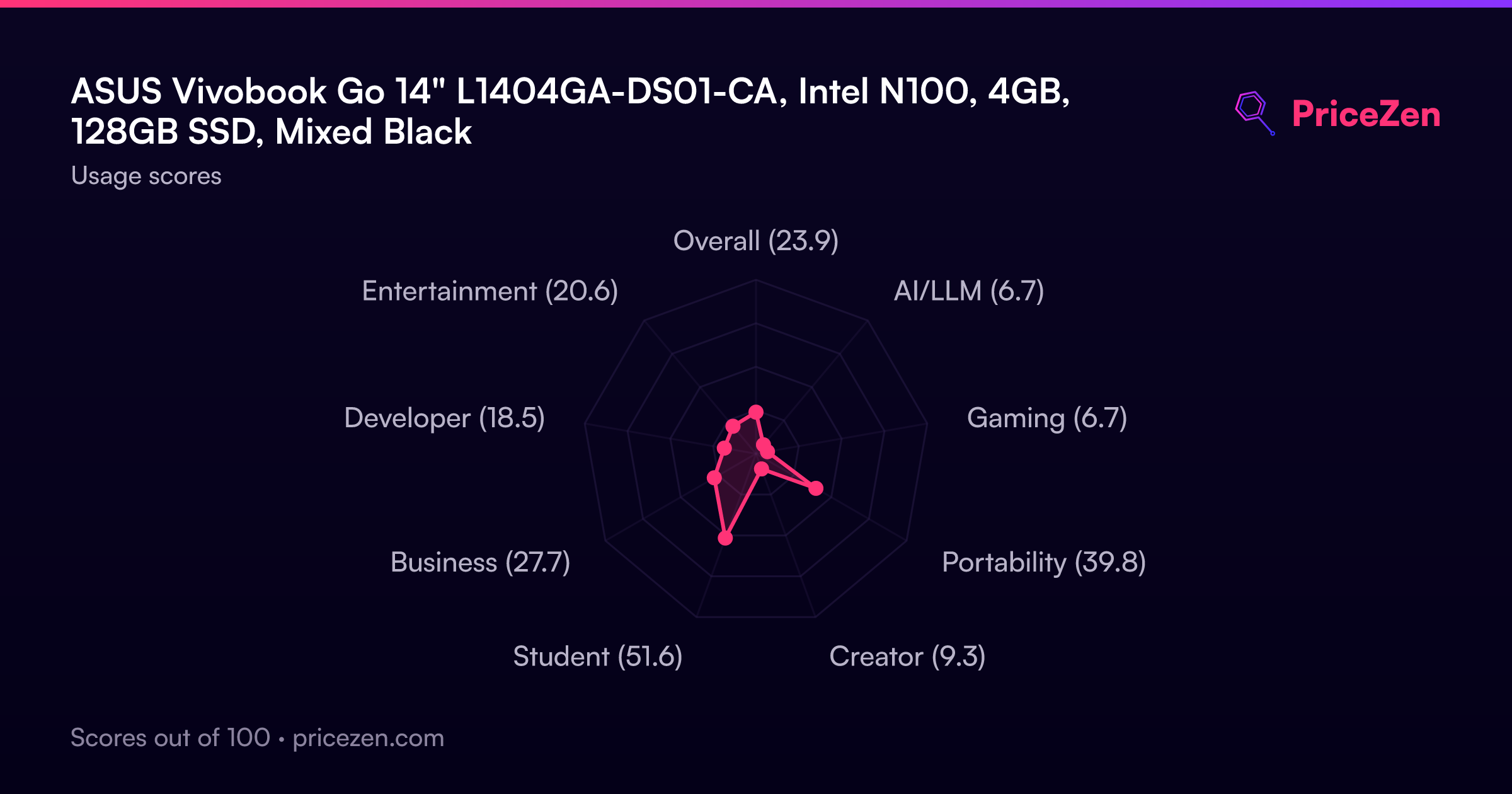
- Overall23.9
- AI/LLM6.7
- Gaming6.7
- Portability39.8
- Creator9.3
- Student51.6
- Business27.7
- Developer18.5
- Entertainment20.6