Exsurf 15.6" T156A-3250C-16+512GB-Silver, Ryzen 3 3250C, 16GB, 512GB SSD
The AMD Ryzen 3 3250C and discrete Radeon RX Vega 3 with 8GB VRAM handle daily multitasking and light gaming at 60Hz on the 15.6-inch IPS display. Its 16GB DDR4 RAM, 512GB NVMe SSD, and Wi-Fi 6 support smooth work and streaming, while the backlit keyboard and fingerprint reader add convenience. Best for a budget-conscious business user or student who needs a secure Windows 11 Pro laptop for office tasks, web browsing, and occasional entertainment.

No current retailer price
Snapshot
The 30-Second Version
The Exsurf T156A is a $383 budget laptop with surprisingly good specs for the price: 16GB RAM, 512GB SSD, and Windows 11 Pro. But the weak Ryzen 3 3250C processor and poor reliability scores make it a risky buy. It's fine for basic tasks if you're on a tight budget, but most people should spend a bit more on a more dependable machine.
Pros & Cons
Pros
- 16GB RAM and 512GB SSD at this price is rare 83rd
- Backlit keyboard and fingerprint reader included 81st
- Excellent port selection with dual USB-C 77th
- Windows 11 Pro pre-installed
- Wi-Fi 6 and Bluetooth 5.3 connectivity
Cons
- Ryzen 3 3250C is slow by modern standards
- Fan noise is loud under load
- 46Wh battery life is underwhelming
- Reliability scores near the bottom of our database
- Display is only 60Hz with average color accuracy
What owners think
The Word on the Street
How owner sentiment changed over time
ExclusiveBased on when customers actually wrote their reviews - so you can see whether early praise held up.
8 written reviews, Jun – Sep 2026: 7 happy, 1 unhappy
Across all 11 store ratings: 4.5★. The chart counts the 8 written reviews.
Each dot is one written review, in the month it was written. Happy = 4-5★, mixed = 3★, unhappy = 1-2★.
The proof
Performance
Let's talk numbers. The Ryzen 3 3250C sits in the 32nd percentile for CPUs in our database, which means it's below average compared to other laptops we've tested. That's not a surprise, this is a dual-core chip designed for cheap Chromebooks and entry-level Windows machines. In practice, it handles web browsing, email, and Office apps fine, but open too many tabs and you'll feel it slow down. The 16GB of RAM helps, but it can't fully compensate for the weak processor.
The AMD Radeon RX Vega 3 integrated graphics land in the 77th percentile for GPUs, which sounds impressive until you remember this is integrated graphics we're talking about. It's fine for streaming video and light photo editing, but don't expect to play modern games at anything beyond low settings. The 512GB NVMe SSD is solidly average at the 52nd percentile, and it makes boot times and app launches feel snappy. The 46Wh battery is small, and combined with the power-hungry display, you'll likely need to charge this thing daily.
Specifications
Full Specifications
Processor
| CPU | AMD Ryzen 3 3250C |
Graphics
| GPU | AMD Radeon RX Vega 3 |
| Type | Integrated |
| VRAM | 8 GB |
Memory & Storage
| RAM | 16 GB |
| RAM Generation | DDR4 |
| Storage | 512 GB |
| Storage Type | NVMe SSD |
Display
| Size | 15.6" |
| Panel | IPS |
| Refresh Rate | 60 Hz |
Connectivity
| USB-C Ports | 2 |
| USB Ports | 3 |
| HDMI | No |
| Wi-Fi | Wi-Fi 6 |
| Bluetooth | Bluetooth 5.3 |
Physical
| Weight | 1.7 kg / 3.7 lbs |
| Battery | 46 Wh |
| OS | Windows 11 Pro |
vs Competition
Compared to the Apple MacBook Air M5, this Exsurf is in a completely different league, and not in a good way. The MacBook Air costs several times more and delivers dramatically better performance, battery life, and build quality. But that's not a fair fight. A more realistic comparison is the Lenovo ThinkPad E14 Gen 7, which typically sells for around $600-$700. The ThinkPad has a better keyboard, better reliability, and a more modern processor, but you'll pay more for it. The HP OmniBook X Flip and ASUS Zenbook UX3405CA are also significantly more expensive and significantly better machines.
Where the Exsurf wins is pure price-to-spec ratio. You won't find another laptop with 16GB RAM, 512GB NVMe storage, and Windows 11 Pro for under $400 from a major brand. The trade-off is that you're buying from a lesser-known manufacturer with a 4th percentile reliability score in our database. That's a real risk. If you need a laptop that will last three or four years without issues, spend more on a ThinkPad or a Zenbook. If you need something cheap right now and you're willing to gamble on reliability, the Exsurf is an option.
| Spec | Exsurf 15.6" T156A-3250C-16+512GB-Silver | Apple MacBook Pro 14.2" M4 Max | ASUS ROG Zephyrus 14" GA403WW-G14.R95080 | Lenovo Legion Pro 7i Gen 10 16" | HP OMEN Transcend | Samsung Galaxy Book5 Pro 14" NP944XHA-KG3US |
|---|---|---|---|---|---|---|
| CPU | AMD Ryzen 3 3250C | Apple M4 Max | AMD Ryzen AI 9 HX 370 | Intel Core Ultra 9 275HX | Intel Core Ultra 9 285H | Intel Core Ultra 7 258V |
| RAM (GB) | 16 | 64 | 32 | 32 | 32 | 32 |
| Storage (GB) | 512 | 4096 | 2048 | 1024 | 1024 | 1024 |
| Screen | 15.6" | 14.2" 3024x1964 | 14" 2880x1800 | 16" 2560x1600 | 14" 2880x1800 | 14" 2880x1800 |
| GPU | AMD Radeon RX Vega 3 | Apple (40-Core) | NVIDIA GeForce RTX 5080 | NVIDIA GeForce RTX 5070 Ti | NVIDIA GeForce RTX 5070 | Intel Arc Graphics 140V |
| OS | Windows 11 Pro | macOS | Windows 11 Home | Windows 11 Home | Windows 11 Home | Windows 11 Pro |
| Weight (kg) | 1.7 | 1.6 | 1.6 | 2.7 | 1.6 | 1.2 |
| Battery (Wh) | 46 | 72 | - | 99 | 71 | 63 |
| Compare | Compare | Compare | Compare | Compare |
| Product | CPU | GPU | RAM | Ports | Screen | Portability | Storage | Reliability | Social Proof | Affordability |
|---|---|---|---|---|---|---|---|---|---|---|
| Exsurf 15.6" T156A-3250C-16+512GB-Silver | 9 | 81 | 36.2 | 77.2 | 38.9 | 49.2 | 50.9 | 4 | 34.9 | 83.4 |
| Apple MacBook Pro 14.2" M4 Max Compare | 93.7 | 91.6 | 95.7 | 73.2 | 99.3 | 68.9 | 98.5 | 98.3 | 73.4 | 1.7 |
| ASUS ROG Zephyrus 14" GA403WW-G14.R95080 Compare | 91.2 | 98.3 | 90.9 | 89.2 | 96.5 | 73.6 | 89.7 | 60.6 | 96.5 | 5.7 |
| Lenovo Legion Pro 7i Gen 10 16" Compare | 97.2 | 96.6 | 89 | 97.2 | 95.6 | 9.5 | 79.2 | 82 | 99.7 | 5.5 |
| HP OMEN Transcend Compare | 90.1 | 93.6 | 89.7 | 89.2 | 96.5 | 72.2 | 65.2 | 33.6 | 94.1 | 8.3 |
| Samsung Galaxy Book5 Pro 14" NP944XHA-KG3US Compare | 65.8 | 69.7 | 79.5 | 83.1 | 91.5 | 89.5 | 79.2 | 82 | 96.5 | 20 |
Price
Value & Pricing
At $383 USD, the Exsurf T156A is cheap, but cheap doesn't always mean good value. You're getting 16GB of RAM and a 512GB SSD, which is genuinely unusual at this price point. Most laptops under $400 come with 8GB of RAM and a slow eMMC drive. The Windows 11 Pro license alone is worth something if you need domain join or BitLocker. But the weak CPU and questionable reliability drag the overall value down. If you can stretch your budget to $500-$600, you'll find laptops with much better processors and build quality. If $383 is your hard ceiling, this is one of the better-spec'd options you'll find, just know what you're signing up for.
Read more
Overview
The Exsurf T156A-3250C-16+512GB-Silver is a budget business laptop that tries to punch above its weight class. At around $383 USD, it's aimed at students, office workers, and anyone who needs a Windows 11 Pro machine without spending MacBook money. The spec sheet looks decent on paper: an AMD Ryzen 3 3250C, 16GB of DDR4 RAM, a 512GB NVMe SSD, and a 15.6 inch 1080p IPS display. But specs don't tell the whole story, and this laptop has some quirks you should know about before clicking buy.
People searching for a cheap Windows 11 Pro laptop will find this one quickly. It's sold through Newegg with fast shipping and a 1-year warranty, plus a 1-month return window. The backlit keyboard and fingerprint reader are nice touches at this price, and the port selection is genuinely useful: two USB-C ports, three USB-A ports, a headphone jack, and a microSD slot. That's more connectivity than you get on some laptops twice the price.
But here's the thing. The Ryzen 3 3250C is a low-power chip from 2020, and it shows. This isn't a laptop for heavy multitasking or anything beyond basic productivity. If you're just browsing, streaming, and typing documents, it'll get the job done. If you expect more, you'll be disappointed fast.
Common Questions
Q: Is the Exsurf T156A good for gaming?
It can handle light gaming and cloud gaming services like Xbox Game Pass, but the Ryzen 3 3250C and Vega 3 graphics aren't built for modern AAA titles. Stick to older or less demanding games at low settings.
Q: Does the Exsurf T156A come with Windows 11 Pro?
Yes, it ships with Windows 11 Pro pre-installed, which includes features like BitLocker encryption and domain join support that you don't get with Windows 11 Home.
Q: How is the battery life on the Exsurf T156A?
The 46Wh battery is on the smaller side, so expect around 5-6 hours of light use. Heavy multitasking or video streaming will drain it faster.
Q: Is the Exsurf T156A good for college students?
It works for basic note-taking, research, and writing papers, but the loud fan and slow processor may be annoying in quiet classrooms. If you need to run demanding software, look for something with a better CPU.
Who Should Skip This
Skip this laptop if you need to run demanding software like video editors, IDEs, or virtual machines. The Ryzen 3 3250C will choke on anything beyond basic productivity. Also skip it if you need a quiet machine for classrooms or offices, multiple owners report the fan is distractingly loud. If reliability matters to you, this isn't the pick, our database shows it near the bottom for long-term dependability. Instead, look at a Lenovo ThinkPad E14 Gen 7 or a used business laptop from Dell or HP. You'll pay more, but you'll get a machine that lasts and doesn't sound like a jet engine during a Zoom call.
Verdict
Should you buy the Exsurf T156A-3250C-16+512GB-Silver? That depends entirely on your budget and your expectations. If you have $383 and you need a Windows laptop with decent RAM and storage, this is one of the few options that delivers those specs. The backlit keyboard, fingerprint reader, and port selection are all genuine pluses. For basic tasks like web browsing, document editing, and video streaming, it works.
But if you can afford to spend even $150 more, do it. The Ryzen 3 3250C is a weak processor that will frustrate you if you try to do anything beyond the basics. The fan noise is a common complaint, and the reliability score in our database is concerning. This is a laptop for people who need something functional right now and understand they're making compromises. For everyone else, save up a bit longer and buy something better.
Usage Scores
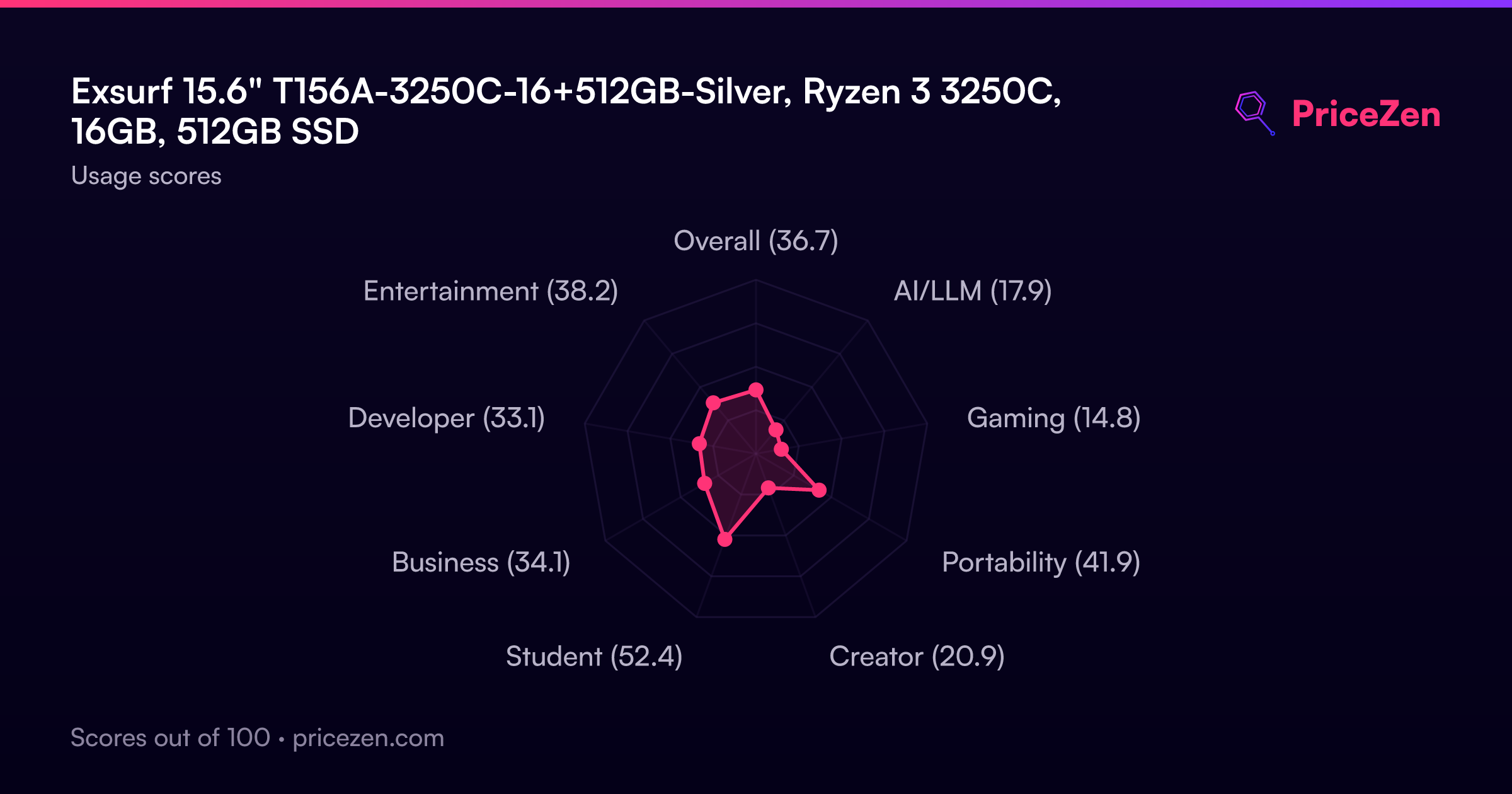
- Overall36.7
- AI/LLM17.9
- Gaming14.8
- Portability41.9
- Creator20.9
- Student52.4
- Business34.1
- Developer33.1
- Entertainment38.2