Lenovo ThinkCentre neo 12SB003GUS 2025, Core i5 i5-13420H, 16GB, 512GB SSD, Luna Gray

Everything in the screen, nothing under the desk verified Nov 29
57/100 overall score 5.0 average from 2 owner ratings
- CPU
- Intel Core i5 13420H
- RAM
- 16 GB
- Storage
- 512 GB
- GPU
- Intel UHD Graphics
- Form factor
- aio
- Psu
- 90 W
- OS
- Windows 11 Pro
Compare prices at 1 store
Cheapest first. New, refurbished and bundled offers are kept apart, so you compare like with like.
| Store | Sold by | Colour and condition | Price | vs lowest | Last checked | Link |
|---|---|---|---|---|---|---|
| New1 offerSingle unit | ||||||
| Out of stock when last checked | ||||||
| Amazon | Not known | Not listed | No price | Out of stock | Nov 2 | Go to store |
 Source: PriceZen, checked Nov 2, 2026
A price counts as current when we checked it in the last 7 days. “Marketplace seller” means a third-party seller on that store, not the store itself.
Price history
No offers of this kind in this period.
Checked that dayNot checked that day, still on offer
Source: PriceZen, checked Jul 19, 2026











Snapshot
The 30-Second Version
The Lenovo ThinkCentre neo 50a Gen 5 is a 27-inch all-in-one built for office work, not play. With an i5-13420H, 16GB DDR5, and a 512GB SSD, it handles productivity tasks well, but the integrated graphics mean gaming is basically off the table. Prices range from USD 870 to USD 918 in the US, but Canadian buyers should watch for the CAD 320 spread between retailers. If you need a clean, quiet office machine, this is a solid pick. If you want to game or do creative work, keep looking.
Pros & Cons
Pros
- Compact all-in-one design saves serious desk space 70th
- Windows 11 Pro out of the box, no upgrade needed
- 16GB DDR5 handles heavy multitasking well
- Quiet, low-power operation with a 90W PSU
- Wi-Fi 6 and Ethernet give flexible connectivity
Cons
- Integrated graphics kill any gaming or GPU-heavy work
- 512GB SSD is small for long-term storage
- No USB-C ports, which feels dated in 2025
- Port selection is below average overall
- Price varies by CAD 320 between retailers
What owners think
How owner sentiment changed over time
ExclusiveBased on when customers actually wrote their reviews - so you can see whether early praise held up.
1 written review, Nov 2025: 1 happy
Across all 2 store ratings: 5.0★. Most owners rate without writing a review. The chart counts the 1 written review.
Each dot is one written review, in the month it was written. Happy = 4-5★, mixed = 3★, unhappy = 1-2★.
The proof
Performance
The i5-13420H is an 8-core chip with a 2.1GHz base clock, and it lands right around the middle of the pack in our CPU rankings at the 46th percentile. For everyday office work, that's plenty. You'll fly through Outlook, Teams, Chrome with a dozen tabs, and the occasional light photo edit without breaking a sweat. The 16GB of DDR5 helps here too, sitting at the 51st percentile for RAM, which means multitasking won't turn into a slideshow when you've got a few apps running side by side.
The integrated Intel UHD Graphics is where expectations need to be managed. At the 49th percentile for GPU performance, it's fine for driving a 1080p display and handling video playback, but anything beyond that is asking too much. The 512GB SSD lands at the 29th percentile for storage, which is on the smaller side for 2025. It's enough for documents, spreadsheets, and a reasonable app library, but if you're storing years of photos or large media files locally, you'll be leaning on external drives or cloud storage sooner than you'd like. The port selection is also a bit thin at the 32nd percentile, with four USB-A ports, one HDMI, Ethernet, and Wi-Fi 6. No USB-C is a notable omission for a modern office machine, especially if you're using newer peripherals.
Specifications
Full Specifications
Processor
| CPU | Intel Core i5 13420H |
| Cores | 8 |
| Frequency | 2.1 GHz |
| L3 Cache | 12 MB |
Graphics
| GPU | Intel UHD Graphics |
| Type | Integrated |
| VRAM Type | Shared |
Memory & Storage
| RAM | 16 GB |
| RAM Generation | DDR5 |
| Storage | 512 GB |
| Storage Type | SSD |
Build
| Form Factor | aio |
| PSU | 90 |
| Weight | 11.2 kg / 24.6 lbs |
Connectivity
| USB Ports | 4 |
| HDMI | 1x HDMI |
| Wi-Fi | Wi-Fi 6 |
| Bluetooth | ✓ |
| Ethernet | 1x Ethernet |
System
| OS | Windows 11 Pro |
vs Competition
The competitors in this space are an interesting mix. The Apple Mac Studio M3 Ultra is in a completely different league on performance and price, so if you're cross-shopping those two, you probably already know which one you need. The Mac Studio is for creative pros and developers who need serious GPU and CPU muscle. The ThinkCentre is for office workers who need a clean desk and a reliable machine for productivity apps. They're not really competing.
Closer comparisons would be the Dell Desktop ECT1250 and the HP OMEN GT16-0364. The Dell is a more traditional desktop that likely offers better expandability and possibly more ports, but you're giving up the all-in-one form factor. The HP OMEN is a gaming machine, which means it'll crush the ThinkCentre on graphics performance but at the cost of size, noise, and power draw. The MSI Aegis and ASUS ROG machines are similarly gaming-focused, with discrete GPUs that make the ThinkCentre's integrated graphics look like a toy. If you need any kind of graphical horsepower, those are the machines to look at. If you need a quiet, compact office PC that just works, the ThinkCentre holds its own.
| Spec | Lenovo ThinkCentre neo 12SB003GUS | Apple Mac Studio M5 Max | HP OMEN GT16-0364 | Dell Desktop ECT1250 | ASUS ROG GM700 | MSI Aegis ZS2 A9NVP-1407US |
|---|---|---|---|---|---|---|
| CPU | Intel Core i5 13420H | Apple M5 Max | AMD Ryzen 7 8700F | Intel Core Ultra 7 265 | AMD Ryzen 7 9800X3D | AMD Ryzen 9 9900X |
| RAM (GB) | 16 | 48 | 32 | 32 | 32 | 32 |
| Storage (GB) | 512 | 1024 | 1024 | 2048 | 2048 | 2048 |
| GPU | Intel UHD Graphics | Apple (40-Core) | NVIDIA GeForce RTX 5070 | Intel UHD Graphics | NVIDIA GeForce RTX 5070 Ti | NVIDIA GeForce RTX 5070 |
| Form Factor | aio | mini | mid-tower | sff | mid-tower | mid-tower |
| Psu W | 90 | 480 | 850 | 180 | 850 | 750 |
| OS | Windows 11 Pro | macOS | Windows 11 Home | Windows 11 Home | Windows 11 Home | Windows 11 Home |
| Compare | Compare | Compare | Compare | Compare |
| Product | CPU | GPU | RAM | Ports | Storage | Reliability | Social Proof |
|---|---|---|---|---|---|---|---|
| Lenovo ThinkCentre neo 12SB003GUS | 45.7 | 50 | 51.1 | 31.8 | 29.1 | 70.2 | 57.8 |
| Apple Mac Studio M5 Max Compare | 95.7 | 85 | 95 | 89.1 | 68.5 | 99.3 | 71.4 |
| HP OMEN GT16-0364 Compare | 69.3 | 90.7 | 87 | 97.9 | 53.2 | 70.2 | 98.3 |
| Dell Desktop ECT1250 Compare | 88 | 60.1 | 81.6 | 75 | 82.5 | 70.2 | 98.3 |
| ASUS ROG GM700 Compare | 80.3 | 94.6 | 81.6 | 96.1 | 90 | 37.7 | 99.3 |
| MSI Aegis ZS2 A9NVP-1407US Compare | 92.3 | 90.7 | 87 | 90.4 | 82.5 | 37.7 | 99.3 |
Price
Value & Pricing
Value is where this machine gets tricky. The hardware itself is solid for what it is, but the pricing depends heavily on where you buy it. In the US, you're looking at USD 870 to USD 918 across two listings, which feels reasonable for a 27-inch all-in-one with these specs. But in Canada, the spread is CAD 1,753 to CAD 2,073, and that CAD 320 difference is hard to ignore. If you're in Canada, the lower end of that range is the only price that makes sense. At the higher end, you're paying a premium for the same machine you could get elsewhere for less.
Compared to the competition, this ThinkCentre sits in an awkward middle ground. It's not as cheap as a basic tower and monitor combo, but it's also not delivering the performance of a dedicated desktop with a discrete GPU. What you're paying for is the form factor and the simplicity. One box, one power cable, done. For a small business that needs to deploy a dozen of these across an office, that simplicity has real value. For a home user who just wants a clean desk, it's a reasonable trade-off too. Just don't pay the high end of that CAD range.
Read more
Overview
The Lenovo ThinkCentre neo 50a Gen 5 is one of those machines that knows exactly what it is, and doesn't pretend otherwise. It's a 27-inch all-in-one built for small businesses and home offices where desk space is tight and the workload is mostly spreadsheets, video calls, email, and browser tabs. Lots of browser tabs. The i5-13420H inside is a laptop-class chip, which tells you Lenovo prioritized a slim chassis and quiet operation over raw desktop horsepower. That's not a knock, it's a design choice, and for the right buyer it's the correct one.
What you're getting here is a complete package: 16GB of DDR5, a 512GB SSD, Windows 11 Pro, Wi-Fi 6, and a 27-inch Full HD display all wrapped in a Luna Gray shell that won't offend anyone in a shared office. The 90W power supply is another hint that this thing sips power rather than gulps it. At 11.16kg, it's not something you'll be moving between rooms daily, but it's light enough to set up once and forget about.
The integrated Intel UHD Graphics is the biggest tell about who this is for. If you're hoping to sneak in some gaming after hours, our database puts this machine's gaming score at 11.8 out of 100. That's not a typo. This is a work machine, full stop. And for the right office setup, that's perfectly fine.
But here's the thing: the price spread on this unit is wild. In Canada, we're seeing it listed anywhere from CAD 1,753 to CAD 2,073 depending on the retailer. That's a CAD 320 gap for the exact same hardware. If you're buying this, you need to shop around before you click checkout.
Common Questions
Q: What operating system does this come with?
The ThinkCentre neo 50a Gen 5 ships with Windows 11 Pro, which is a nice upgrade over the Home edition you often see on consumer machines. That means you get BitLocker encryption, remote desktop, and domain join support out of the box. For a small business, that's a real advantage since you won't need to pay for a Pro upgrade later.
Q: How much storage does it have, and can I upgrade it?
It comes with a 512GB SSD, which lands at the 29th percentile in our storage rankings. That's enough for documents, spreadsheets, and a reasonable app library, but it's on the smaller side for 2025. If you're storing lots of photos, videos, or large files locally, you'll want to plan for external storage or cloud backups sooner rather than later.
Q: Can this handle gaming or video editing?
No, and that's not what it's built for. The integrated Intel UHD Graphics puts this machine at the 49th percentile for GPU performance, and our gaming score for this unit is 11.8 out of 100. Light photo editing is fine, but anything involving 3D rendering, video editing, or modern games is going to be a frustrating experience. If you need graphical horsepower, look at machines with discrete GPUs like the HP OMEN or MSI Aegis lines.
Q: Does it have USB-C ports?
No, and that's one of the more frustrating omissions here. You get four USB-A ports, one HDMI, Ethernet, and Wi-Fi 6, but no USB-C at all. The port selection overall sits at the 32nd percentile, which is below average. If you're using newer peripherals that require USB-C, you'll need adapters or a dock.
Who Should Skip This
If you're a gamer, a video editor, a 3D artist, or anyone who needs real GPU performance, this machine is not for you. The integrated Intel UHD Graphics are a hard limit, and our gaming score of 11.8 out of 100 should make that clear. You'd be much better served by something like the HP OMEN GT16-0364 or the MSI Aegis ZS2, both of which bring discrete GPUs to the table. Even a mid-range gaming laptop would run circles around this for anything graphical.
Also skip this if you need lots of local storage or modern connectivity. The 512GB SSD is small by today's standards, and the lack of USB-C ports means you'll be juggling adapters if you have newer peripherals. If you're a power user who needs multiple fast drives and a full port selection, a traditional desktop like the Dell Desktop ECT1250 with room for expansion is a better fit. The ThinkCentre is for people who want simplicity and a clean desk, not for people who want to tinker or push their hardware.
Verdict
For a small business or home office that needs a clean, quiet, all-in-one machine for everyday productivity, the ThinkCentre neo 50a Gen 5 is a solid choice. The i5-13420H and 16GB of DDR5 will handle email, documents, video calls, and web browsing without complaint. Windows 11 Pro is a nice touch for business users who need domain join and BitLocker. The 27-inch Full HD display is fine for office work, though it's not going to wow anyone with color accuracy or sharpness.
If you're a home user who occasionally wants to game or do any kind of creative work that involves video editing or 3D rendering, look elsewhere. The integrated graphics are a hard ceiling, and the 512GB SSD will fill up faster than you think. The gaming score of 11.8 out of 100 in our database should be all the warning you need. This is a work machine, and it's good at being that. Just make sure you're paying the right price for it, especially if you're shopping in Canada.
Usage Scores
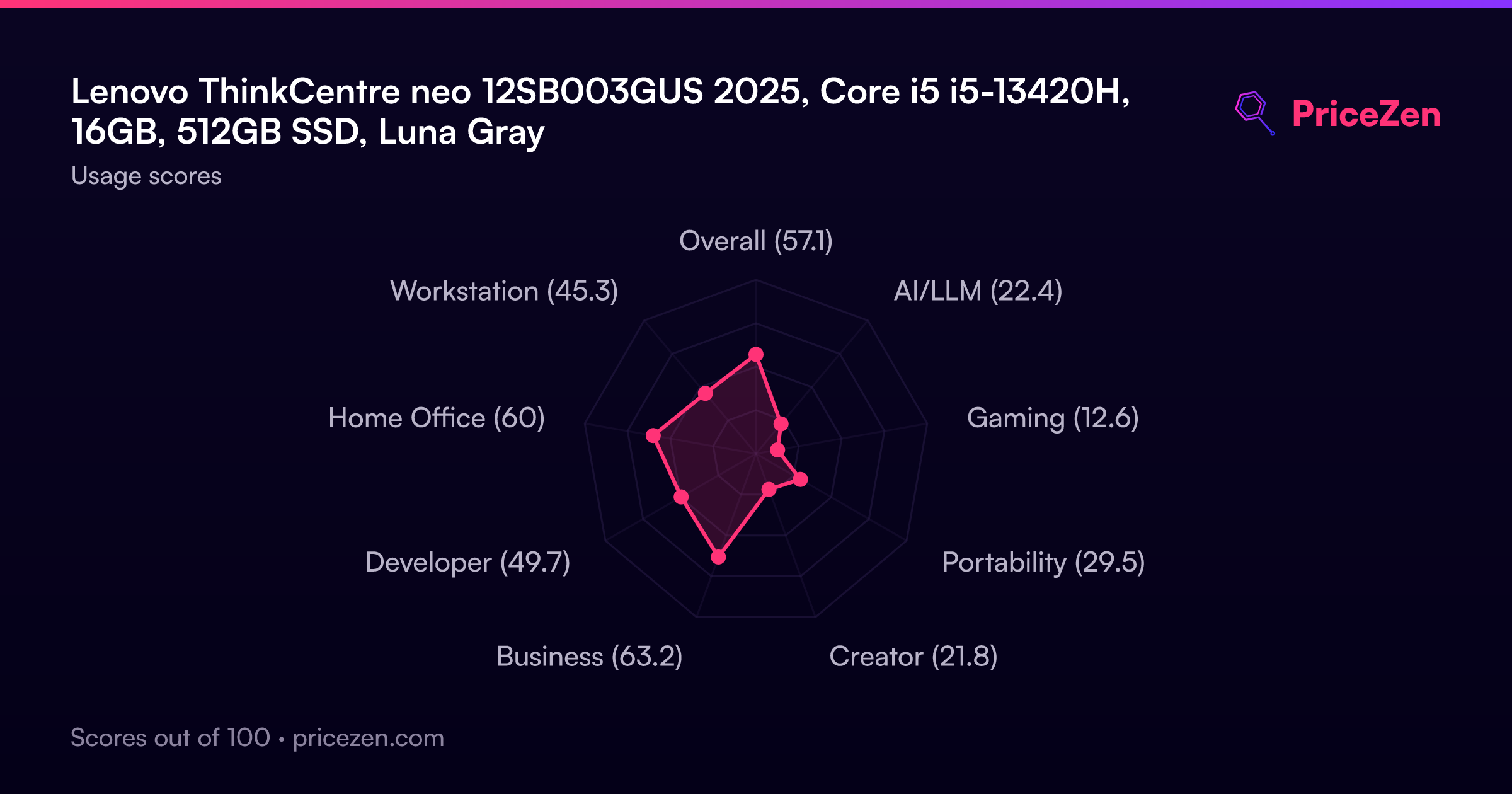
- Overall57.1
- AI/LLM22.4
- Gaming12.6
- Portability29.5
- Creator21.8
- Business63.2
- Developer49.7
- Home Office60
- Workstation45.3