Lenovo P Series 30J5002VUS 2026, Core Ultra 5 235, 32GB, 512GB SSD
The Intel Core Ultra 5 2nd Gen 235 processor with vPro Technology and 32GB DDR5 RAM handles demanding business workloads in a small form factor that weighs just 5.74kg. The NVIDIA 4GB discrete GPU and WiFi 7 connectivity support graphics tasks and fast network transfers, while the 230W PSU keeps the system compact. This workstation suits home office and business users who need reliable performance for everyday productivity and light graphics work.

No current retailer price
Where we saw it before. Check the store for today's price.











Snapshot
The 30-Second Version
The Lenovo ThinkStation P3 Ultra Gen 2 packs a 64-core Core Ultra 5 and 32GB of DDR5 into a compact workstation chassis. CPU and RAM performance are strong, but the 4GB GPU and 512GB SSD hold it back. At $2,663 to $2,891 USD, it's a good deal for CPU-bound professionals who need a small footprint. Skip it if you need serious graphics power or lots of storage.
Pros & Cons
Pros
- 32GB of DDR5 RAM puts it in the 91st percentile, excellent for memory-heavy workloads 90th
- 64-core Core Ultra 5 235 handles multi-threaded tasks well at the 78th percentile 76th
- Small form factor saves desk space without sacrificing CPU performance 70th
- vPro Technology and Windows 11 Pro make it easy for IT departments to manage 65th
- WiFi 7 support means fast wireless connectivity out of the box
Cons
- 512GB SSD is small for a workstation, sitting at the 31st percentile
- 4GB VRAM GPU is weak for graphics-intensive work, only 61st percentile
- Port selection is limited, ranking at the 24th percentile
- 230W PSU limits future GPU upgrade options
- Price is steep for the specs, especially with the storage and GPU compromises
The proof
Performance
The Core Ultra 5 235 sits at the 78th percentile for CPUs in our database. That's strong, not spectacular. For single-threaded tasks like most office work and light CAD, it'll feel snappy. The 3.4GHz base clock with boost up to 4.4GHz means short bursts of heavy lifting are handled well. Where this chip shines is multi-threaded workloads. Those 64 cores, even split between P-cores and E-cores, give it serious parallel processing chops for rendering, compiling, and simulation tasks.
The 32GB of DDR5 is the real standout here, landing at the 91st percentile for RAM. That's near the top of what we see in this category. For memory-hungry applications like large spreadsheets, virtual machines, or 3D modeling, you'll have plenty of headroom. But the GPU is a different story. At the 61st percentile with just 4GB of VRAM, it's adequate for basic display output and light graphics work, but it'll choke on anything GPU-intensive. Don't expect to do serious rendering or machine learning on this box. The storage situation is also underwhelming at the 31st percentile. 512GB fills up fast when you're working with large project files.
Specifications
Full Specifications
Processor
| CPU | Intel Core Ultra 5 |
| Cores | 14 |
| Frequency | 3.4 GHz |
| L3 Cache | 24 MB |
Graphics
| GPU | NVIDIA 4 GB Graphics |
| Type | Discrete |
| VRAM | 4 GB |
Memory & Storage
| RAM | 32 GB |
| RAM Generation | DDR5 |
| Storage | 512 GB |
| Storage Type | SSD |
Build
| Form Factor | sff |
| PSU | 230 |
| Weight | 3.6 kg / 7.9 lbs |
Connectivity
| DisplayPort | 3 x DisplayPort 1.4 |
| Wi-Fi | Wi-Fi 7 |
| Bluetooth | Bluetooth 5.4 |
| Ethernet | Gigabit Ethernet |
System
| OS | Windows 11 Pro |
vs Competition
Against the Apple Mac Studio M5 Max, the ThinkStation takes a different approach entirely. The Mac Studio will absolutely demolish this Lenovo in GPU performance and likely in single-threaded CPU tasks too. But the Lenovo has x86 compatibility, which matters for a lot of professional software that still doesn't run natively on Apple Silicon. And the ThinkStation's RAM is user-upgradeable, while the Mac Studio's unified memory is soldered. Different tools for different jobs.
The HP OMEN GT22-3080 and Dell Aurora are gaming-focused machines. They'll have much better GPUs for the price, but they lack the workstation pedigree, vPro management, and the compact form factor. The ASUS ROG GM700 is in a similar boat. If you're doing CAD or engineering work, the ThinkStation's stability and ISV certifications matter more than raw gaming performance. The Horizon Pcs Autherium Dragon is a wildcard, but it's likely a boutique build with different priorities entirely. For pure workstation reliability in a small package, the Lenovo holds its own, but you're paying for the form factor.
| Spec | Lenovo P Series 30J5002VUS | Apple Mac Studio M5 Max | HP OMEN GT16-0364 | Dell Desktop ECT1250 | ASUS ROG GM700 | MSI Aegis ZS2 A9NVP-1407US |
|---|---|---|---|---|---|---|
| CPU | Intel Core Ultra 5 | Apple M5 Max | AMD Ryzen 7 8700F | Intel Core Ultra 7 265 | AMD Ryzen 7 9800X3D | AMD Ryzen 9 9900X |
| RAM (GB) | 32 | 48 | 32 | 32 | 32 | 32 |
| Storage (GB) | 512 | 1024 | 1024 | 2048 | 2048 | 2048 |
| GPU | NVIDIA 4 GB Graphics | Apple (40-Core) | NVIDIA GeForce RTX 5070 | Intel UHD Graphics | NVIDIA GeForce RTX 5070 Ti | NVIDIA GeForce RTX 5070 |
| Form Factor | sff | mini | mid-tower | sff | mid-tower | mid-tower |
| Psu W | 230 | 480 | 850 | 180 | 850 | 750 |
| OS | Windows 11 Pro | macOS | Windows 11 Home | Windows 11 Home | Windows 11 Home | Windows 11 Home |
| Compare | Compare | Compare | Compare | Compare |
| Product | CPU | GPU | RAM | Ports | Storage | Reliability |
|---|---|---|---|---|---|---|
| Lenovo P Series 30J5002VUS | 76.4 | 65.4 | 90.4 | 23.7 | 29.2 | 70.3 |
| Apple Mac Studio M5 Max Compare | 95.7 | 84.9 | 95 | 89.1 | 68.6 | 99.3 |
| HP OMEN GT16-0364 Compare | 69.3 | 90.6 | 87 | 97.9 | 53.3 | 70.3 |
| Dell Desktop ECT1250 Compare | 88.1 | 60 | 81.6 | 75 | 82.5 | 70.3 |
| ASUS ROG GM700 Compare | 80.3 | 94.6 | 81.6 | 96.1 | 90 | 37.8 |
| MSI Aegis ZS2 A9NVP-1407US Compare | 92.3 | 90.6 | 87 | 90.4 | 82.5 | 37.8 |
Price
Value & Pricing
Here's where things get tricky. This machine lists between $2,663 and $2,891 USD. For that money, you're getting a strong CPU and excellent RAM, but a mediocre GPU and small SSD. The value proposition depends entirely on what you're doing with it. If your workload is CPU and memory bound, like data analysis or software compilation, this is a reasonable deal. The small form factor adds a premium too, since you're paying for the engineering that crams all this into a compact chassis.
But if you need GPU acceleration or lots of local storage, you'll be spending more money immediately. A 4GB GPU in a $2,700 workstation feels like a mismatch. You could buy a mid-tower with a better GPU and more storage for less money, though you'd lose the compact footprint. The CAD pricing at $4,305 to $4,341 and GBP 3,000 in the UK reflects the same premium positioning. It's not a bad value, but it's a specific one.
Read more
Overview
The Lenovo ThinkStation P3 Ultra Gen 2 is one of those machines that makes you do a double take. It's a full workstation squeezed into a small form factor chassis that weighs about 5.74kg. You're getting an Intel Core Ultra 5 235, 32GB of DDR5, and a discrete NVIDIA GPU with 4GB of VRAM. For a box this size, that's a serious amount of compute. Lenovo is clearly targeting professionals who need real horsepower but don't have room for a tower under the desk.
Who's this for? Think engineers, architects, data analysts, and anyone running CAD or simulation software in a space-constrained office. The vPro Technology support means IT departments can manage these remotely, which is a big deal for fleet deployments. And with Windows 11 Pro out of the box, it slots right into enterprise environments without extra licensing headaches.
The interesting bit here is the balance Lenovo struck. The CPU is a 2nd Gen Core Ultra 5 with 64 cores, which sounds wild until you realize Intel's hybrid architecture splits those between performance and efficiency cores. Paired with 32GB of DDR5, this thing should chew through multi-threaded workloads. But the 512GB SSD and 4GB GPU are where you feel the cost-cutting. More on that below.
Common Questions
Q: Can I upgrade the RAM and storage later?
Yes, the ThinkStation P3 Ultra Gen 2 uses standard DDR5 DIMMs, so you can swap out the 32GB for more if needed. The 512GB SSD is also replaceable, though the small form factor chassis may limit you to M.2 drives only. Check Lenovo's service manual for exact slot configurations before buying upgrades.
Q: Is the 4GB GPU enough for CAD work?
For basic 2D CAD and light 3D modeling, the 4GB NVIDIA GPU will get by. But for complex assemblies, real-time rendering, or GPU-accelerated simulation, it'll struggle. The GPU sits at the 61st percentile in our database, which is middle of the pack. If your workflow is GPU-heavy, consider a machine with at least 8GB of VRAM.
Q: How does the Core Ultra 5 235 compare to a standard desktop CPU?
The Core Ultra 5 235 is a 2nd Gen Intel chip with a hybrid architecture that combines performance and efficiency cores, totaling 64 cores. It ranks at the 78th percentile for CPUs in our database, which is strong but not top-tier. For multi-threaded workloads like rendering or compiling, it performs well. Single-threaded performance is good but not class-leading.
Q: Is this machine good for gaming?
No, this is not a gaming machine. The 4GB GPU is designed for professional display output and light graphics work, not gaming. At the 61st percentile for GPUs, it'll run older or less demanding games at low settings, but anything modern will struggle. If gaming is a priority, look at the HP OMEN GT22-3080 or ASUS ROG GM700 instead.
Who Should Skip This
If your work revolves around GPU acceleration, machine learning, or heavy 3D rendering, this machine will frustrate you. The 4GB VRAM is a hard ceiling that no amount of CPU power can overcome. You'd be better served by a machine with a proper workstation GPU like an RTX A-series card or at least a consumer RTX 4070 with 12GB. The Apple Mac Studio M5 Max is also worth a look if your software runs on Apple Silicon.
Similarly, if you need lots of local storage for video editing or large datasets, the 512GB SSD is going to feel cramped immediately. You'll end up spending more on external drives or a NAS, which eats into the value proposition. In that case, a mid-tower workstation with multiple drive bays makes more sense, even if it takes up more space. The small form factor is a feature, but it comes with real compromises.
Verdict
If you're an engineer, architect, or data professional who needs a compact workstation with strong CPU and RAM performance, the ThinkStation P3 Ultra Gen 2 is a solid choice. The 64-core processor and 32GB of DDR5 will handle most professional workloads without breaking a sweat. The small form factor is genuinely useful if desk space is at a premium, and the vPro support makes it a no-brainer for corporate IT departments.
But if your work involves GPU rendering, machine learning, or heavy graphics, look elsewhere. The 4GB GPU is simply not up to the task, and the 512GB SSD will have you shopping for external drives within a month. Gamers should also steer clear. This is a workstation, not a gaming rig, and the price reflects that. For the right professional, it's a great tool. For everyone else, it's an expensive mismatch.
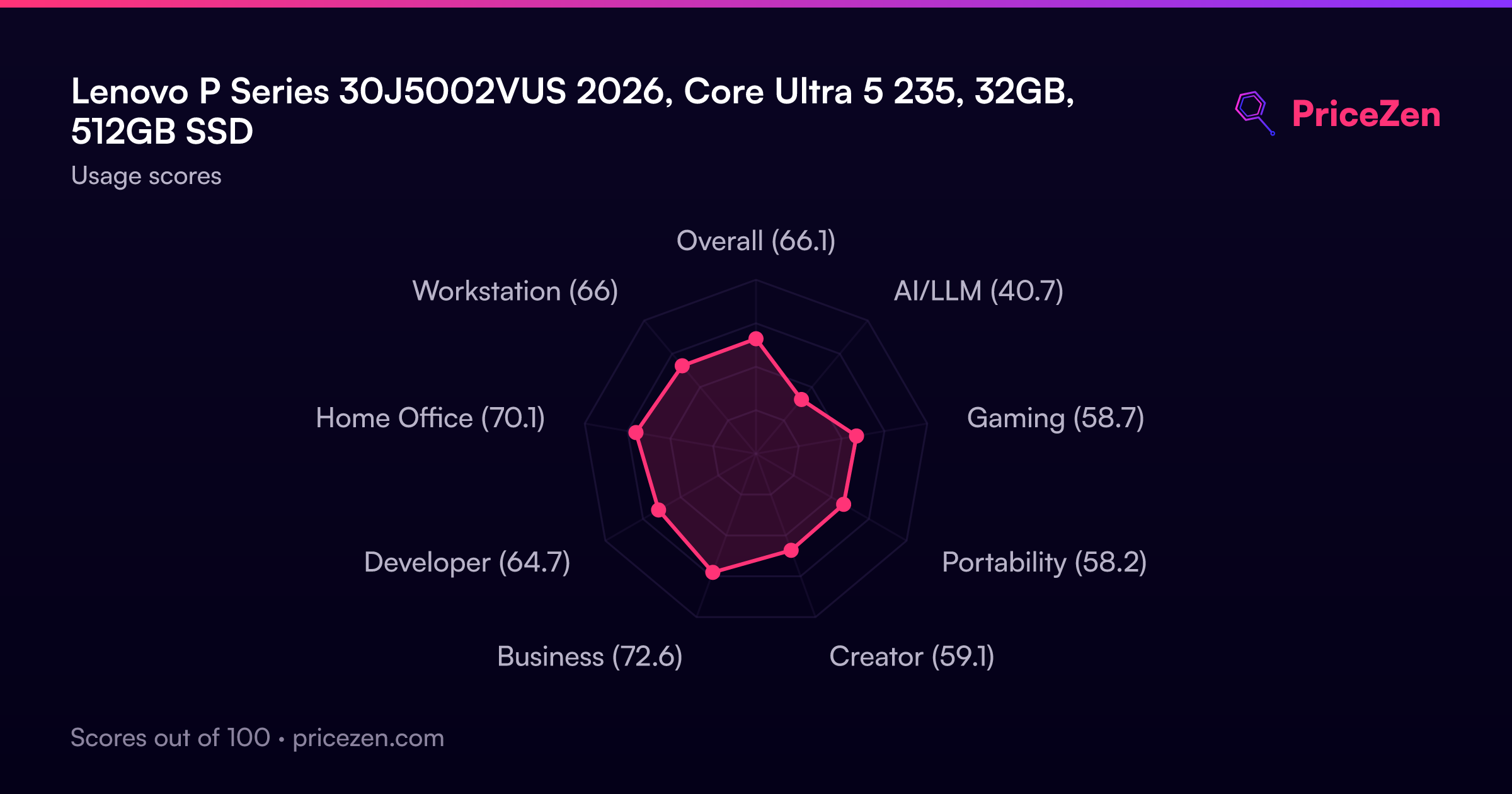
Usage Scores
- Overall66.1
- AI/LLM40.7
- Gaming58.7
- Portability58.2
- Creator59.1
- Business72.6
- Developer64.7
- Home Office70.1
- Workstation66