HP Z2 G9 2024, Core i7-14700, 32GB, 512GB SSD, RTX A2000, Black
Packing a 20-core Intel Core i7-14700 processor and an NVIDIA RTX A2000 with 12GB VRAM, this small form factor workstation delivers tower-class power with tool-less interior access. Advanced thermal management and three BIOS performance modes allow sustained 24/7 operation under load, while ISV certifications guarantee stability in professional applications. This system is ideal for CAD designers and engineers running simulations and real-time ray tracing who need a compact, quiet, and reliable machine.

No current retailer price
Snapshot
The 30-Second Version
The HP Z2 G9 SFF packs a 20-core i7-14700 and RTX A2000 into a compact, tool-less case built for pro workflows. It's a strong pick for CAD and engineering, but the 512GB SSD and 450W PSU are real limitations. Prices range from USD 1,999 to USD 2,424, so shop carefully. If you don't need ISV certification, there are better consumer options for the money.
Pros & Cons
Pros
- 20-core i7-14700 is a genuine multi-threaded workhorse 84th
- Compact SFF case with tool-less access for easy upgrades 82nd
- RTX A2000 with 12GB VRAM is ISV-certified for pro apps 76th
- 32GB DDR5 memory is well above average for this class 72nd
- HP Wolf Pro Security built in for business users
Cons
- 512GB SSD is small for a workstation, 44th percentile
- 450W PSU limits future GPU upgrades
- No wireless adapter included, per customer feedback
- Only one customer review, so social proof is thin
- Price spread of USD 425 across just two listings
What owners think
The Word on the Street
How owner sentiment changed over time
ExclusiveBased on when customers actually wrote their reviews - so you can see whether early praise held up.
1 written review, Jan 2025: 1 happy
Across all 1 store ratings: 4.0★. The chart counts the 1 written review.
Each dot is one written review, in the month it was written. Happy = 4-5★, mixed = 3★, unhappy = 1-2★.
The proof
Performance
The i7-14700 is the star here. Twenty cores at 2.1GHz base clock, and it lands in the 82nd percentile for CPUs in our database. That's strong, not top-of-the-charts, but more than enough for multi-threaded workloads like simulation, compiling, or heavy spreadsheet crunching. The 32GB of DDR5 helps too, sitting at the 78th percentile. You won't be memory-starved in most professional apps.
The RTX A2000 is a bit more middle-of-the-pack at the 66th percentile for GPUs. That's not a knock, it's just reality. This is a pro visualization card, not a gaming monster. It'll handle CAD viewports, moderate rendering, and real-time ray tracing in certified apps without breaking a sweat. But if you're doing heavy GPU rendering all day, you'll feel the ceiling. The 512GB SSD is the weakest spec here, landing at the 44th percentile. It's fast, but you'll be managing storage sooner than you'd like.
Specifications
Full Specifications
Processor
| CPU | Intel Core i7 14700 |
| Cores | 20 |
| Frequency | 2.1 GHz |
| L3 Cache | 33 MB |
Graphics
| GPU | NVIDIA RTX A2000 |
| Type | Discrete |
| VRAM | 12 GB |
| VRAM Type | GDDR6 |
Memory & Storage
| RAM | 32 GB |
| RAM Generation | DDR5 |
| Storage | 512 GB |
| Storage Type | NVMe SSD |
Build
| Form Factor | sff |
| PSU | 450 |
| Weight | 5.0 kg / 11.1 lbs |
Connectivity
| USB-C Ports | 1 |
| USB Ports | 10 |
| DisplayPort | 2x DisplayPort 1.4 |
| Ethernet | Gigabit Ethernet |
System
| OS | Windows 11 Pro |
vs Competition
The Lenovo Legion 90Y6003JUS is the obvious consumer alternative. It'll likely have a beefier gaming GPU and more storage for similar money, but it won't have the ISV certifications or the SFF footprint. If you're doing CAD work professionally, the HP's pro drivers and validation matter. If you're gaming or doing general productivity, the Legion is probably more fun.
The Apple Mac Studio M4 Max is a different beast entirely. It's smaller, quieter, and the M4 Max will crush the i7-14700 in many creative workloads, especially video editing and 3D rendering. But you're locked into macOS, and if your software stack is Windows-only, that's a non-starter. The Dell Tower ECT1250 is a more direct competitor, a traditional tower workstation with similar pro-grade ambitions. You'd get more expansion room but lose the compact footprint. The MSI Aegis and CLX machines are gaming-focused, so they're really only competitors if you don't need pro drivers.
| Spec | HP Z2 G9 | Apple Mac Studio M5 Max | Lenovo T Series Towers Legion Tower 5a Gen 10 | Dell Desktop ECT1250 | ASUS ROG GM700 | MSI Aegis ZS2 A9NVP-1407US |
|---|---|---|---|---|---|---|
| CPU | Intel Core i7 14700 | Apple M5 Max | AMD Ryzen 7 7800X3D | Intel Core Ultra 7 265 | AMD Ryzen 7 9800X3D | AMD Ryzen 9 9900X |
| RAM (GB) | 32 | 36 | 32 | 32 | 32 | 32 |
| Storage (GB) | 512 | 1024 | 4096 | 2048 | 2048 | 2048 |
| GPU | NVIDIA RTX A2000 | Apple (32-Core) | NVIDIA GeForce RTX 5070 Ti | Intel UHD Graphics | NVIDIA GeForce RTX 5070 Ti | NVIDIA GeForce RTX 5070 |
| Form Factor | sff | mini | mid-tower | sff | mid-tower | mid-tower |
| Psu W | 450 | 480 | 850 | 180 | 850 | 750 |
| OS | Windows 11 Pro | macOS | Windows 11 Home | Windows 11 Home | Windows 11 Home | Windows 11 Home |
| Compare | Compare | Compare | Compare | Compare |
| Product | CPU | GPU | RAM | Ports | Storage | Reliability | Social Proof |
|---|---|---|---|---|---|---|---|
| HP Z2 G9 | 82.4 | 71.6 | 76.3 | 84.4 | 40.6 | 70.1 | 13.7 |
| Apple Mac Studio M5 Max Compare | 95.7 | 85 | 92.5 | 89.1 | 68.7 | 99.3 | 66.8 |
| Lenovo T Series Towers Legion Tower 5a Gen 10 Compare | 73.3 | 94.6 | 78 | 88.6 | 98.1 | 70.1 | 99.9 |
| Dell Desktop ECT1250 Compare | 88.1 | 60.2 | 81.6 | 75 | 82.6 | 70.1 | 98.2 |
| ASUS ROG GM700 Compare | 80.4 | 94.6 | 81.6 | 96.1 | 90 | 37.5 | 99.2 |
| MSI Aegis ZS2 A9NVP-1407US Compare | 92.4 | 90.7 | 87.1 | 90.4 | 82.6 | 37.5 | 99.2 |
Price
Value & Pricing
Pricing on this config is all over the place. We're seeing USD 1,999 to USD 2,424 across two US listings. That's a USD 425 spread for what appears to be the same machine. If you're buying, the lower end of that range is the only sensible option. At USD 1,999, you're getting a solid workstation CPU, pro GPU, and 32GB of DDR5 in a compact case. At USD 2,424, you're paying a premium for impatience.
Compared to the broader market, this is reasonable value for an ISV-certified SFF workstation. You're not getting a bargain, but you're not getting fleeced either. The real question is whether the small form factor and pro-grade reliability are worth the premium over a consumer desktop with similar raw specs. For businesses that need certified hardware and a warranty, yes. For hobbyists, probably not.
Read more
Overview
The HP Z2 G9 Small Form Factor is one of those machines that makes you wonder why more workstations aren't this size. You get a 20-core Intel Core i7-14700, 32GB of DDR5, and an NVIDIA RTX A2000 with 12GB of VRAM packed into a case that won't eat your entire desk. HP is clearly aiming this at engineers, designers, and anyone doing CAD or simulation work who doesn't want a full tower humming under their desk.
This config sits in a weird but interesting spot. The CPU is a genuine standout, ranking well above average in our database. The RTX A2000 is a pro-grade card built for ISV-certified software like SolidWorks, AutoCAD, and Revit, not gaming. If you're rendering or doing real-time ray tracing in a professional app, that 12GB of VRAM matters more than raw gaming frame rates.
But there are trade-offs. The 512GB NVMe SSD is on the small side for a workstation, and the 450W power supply means you won't be dropping in a power-hungry GPU later. Still, for a compact, quiet, tool-less machine that HP says can run at max load 24/7, this thing has a clear audience.
Common Questions
Q: How much memory does the HP Z2 G9 have?
This config ships with 32GB of DDR5 RAM, which puts it at the 78th percentile in our database. That's plenty for most CAD, simulation, and multitasking workloads. The tool-less case makes it easy to add more later if you need it.
Q: What CPU is in this workstation?
It uses the Intel Core i7-14700, a 14th-gen chip with 20 cores and a 2.1GHz base clock. In our database it ranks at the 82nd percentile for CPUs, so it's a strong performer for multi-threaded professional applications.
Q: Does it come with Wi-Fi?
Based on customer feedback, this config does not include a wireless adapter card. You'll need to use Ethernet or add a Wi-Fi card yourself. The machine does have 10 USB-A ports and a USB-C port, so a USB Wi-Fi dongle is also an option.
Q: Can I upgrade the graphics card later?
The 450W power supply is the main constraint. The RTX A2000 is a low-power pro card, and while you could swap in another low-power GPU, you won't be dropping in a high-end gaming card without also upgrading the PSU. The SFF case also limits physical space for larger cards.
Who Should Skip This
If you're a gamer, skip this. The RTX A2000 is built for pro visualization, not frame rates, and the 450W PSU means you can't easily upgrade to a gaming GPU. You'd be better off with a consumer desktop like the Lenovo Legion or MSI Aegis, which will give you more gaming performance per dollar.
If you do heavy video editing or 3D rendering in macOS-friendly apps, the Apple Mac Studio M4 Max is a better fit. It's smaller, quieter, and the M4 Max will outpace the i7-14700 in many creative workloads. And if you just need a general office PC, this is overkill. Save your money and get something with more storage and a cheaper CPU.
Verdict
For CAD designers, engineers, and simulation folks who need a compact, quiet, ISV-certified machine, the Z2 G9 SFF is a strong pick. The i7-14700 and RTX A2000 combo will chew through professional workloads, and the tool-less case makes RAM and storage upgrades painless. Just budget for a bigger SSD sooner rather than later.
For everyone else, think twice. If you're a gamer, a video editor, or someone who just wants a fast general-purpose PC, there are better ways to spend USD 2,000. The pro GPU and certifications are wasted on you, and the 512GB SSD will feel cramped fast. Look at a consumer desktop with a gaming GPU and more storage, or a Mac Studio if you're in the Apple ecosystem.
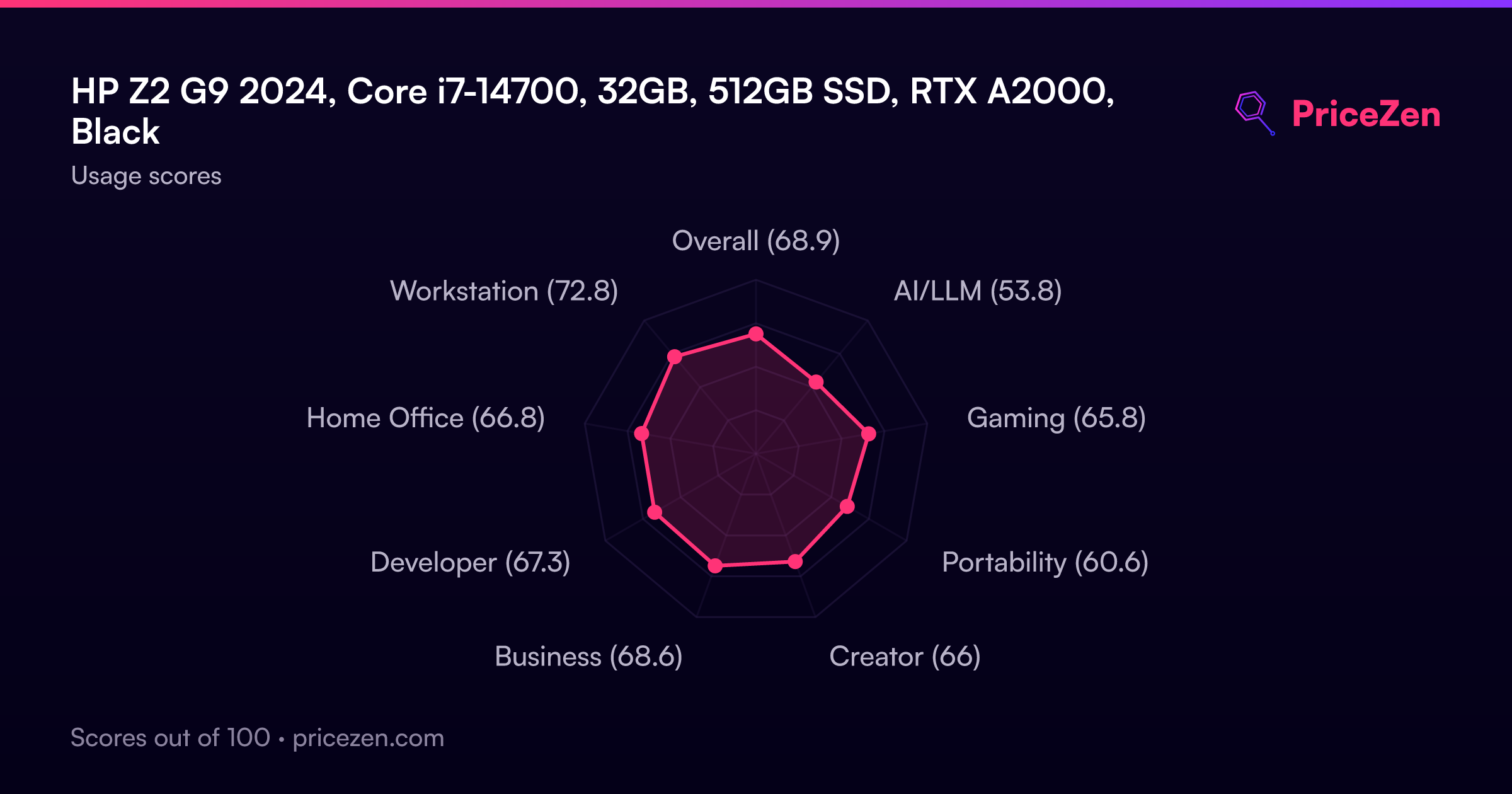
Usage Scores
- Overall68.9
- AI/LLM53.8
- Gaming65.8
- Portability60.6
- Creator66
- Business68.6
- Developer67.3
- Home Office66.8
- Workstation72.8