Lenovo ThinkStation 30JQ002TUS 2025, Core Ultra 5 235, 16GB, 512GB SSD
The 14-core Intel Core Ultra 5 235 and 16GB of DDR5 RAM provide dependable multitasking for data-heavy workloads in an ISV-certified, EPEAT Gold-rated chassis. Its tool-less design offers easy upgradability for memory and storage, backed by Wi-Fi 7 connectivity and a generous port selection including 8x USB-A. This entry-level tower is best for engineers, data analysts, and students who need a reliable, expandable workstation for certified professional applications rather than gaming.

No current retailer price


Snapshot
The 30-Second Version
The ThinkStation P2 Gen 2 is a capable entry-level workstation with a strong 14-core CPU and great port selection. Gaming is basically off the table with integrated graphics, and 16GB of RAM will feel tight for heavy CAD work. At the low end of the price range, it's a fair deal for professional use.
Pros & Cons
Pros
- 14-core Core Ultra 5 235 delivers strong CPU performance for the price 84th
- DDR5 RAM and NVMe SSD keep everyday tasks feeling fast 77th
- Port selection is excellent, including USB-C, HDMI 2.1, and Wi-Fi 7 70th
- Easy to upgrade with a 500W PSU and accessible mid-tower design
Cons
- Integrated graphics make gaming and 3D rendering a non-starter
- 16GB of RAM gets tight for heavy CAD or large datasets
- 512GB storage fills up fast if you work with big files
- User sentiment sits at 44th percentile, so owners have mixed feelings
What owners think
The Word on the Street
How owner sentiment changed over time
ExclusiveBased on when customers actually wrote their reviews - so you can see whether early praise held up.
The proof
Performance
The Core Ultra 5 235 is the star here. Fourteen cores at 3.4GHz gives you plenty of headroom for multitasking, data crunching, and everyday professional software. The 16GB of DDR5 running at 5600MHz is snappy, and the 512GB NVMe SSD keeps boot times and file loads quick. But that integrated Intel Graphics is the bottleneck. It's fine for driving monitors and basic visuals, yet it falls flat for anything GPU-heavy. The 500W PSU means you could drop in a discrete card later, which is a nice escape hatch. Just know that out of the box, this is a CPU-first machine with graphics as an afterthought.
Specifications
Full Specifications
Processor
| CPU | Intel Core Ultra 5 235 |
| Cores | 14 |
| Frequency | 3.4 GHz |
| L3 Cache | 24 MB |
Graphics
| GPU | Intel Graphics |
| Type | Integrated |
Memory & Storage
| RAM | 16 GB |
| RAM Generation | DDR5 |
| Storage | 512 GB |
| Storage Type | NVMe SSD |
Build
| Form Factor | mid-tower |
| PSU | 500 |
| Weight | 9.7 kg / 21.3 lbs |
Connectivity
| USB-C Ports | 1 |
| USB Ports | 8 |
| HDMI | 1x HDMI 2.1 |
| DisplayPort | 3x DisplayPort 1.4 |
| Wi-Fi | Wi-Fi 7 |
| Bluetooth | Yes |
| Ethernet | Gigabit Ethernet |
System
| OS | Windows 11 Pro |
vs Competition
Against the HP OMEN GT22-3080 or MSI Aegis ZS2, this ThinkStation looks slow for anything graphical. Those machines pack discrete GPUs and are built for gaming or creative work. But they're also louder, hotter, and less focused on reliability. The Apple Mac Studio M4 Max absolutely crushes this Lenovo in GPU and efficiency, though it costs way more and locks you into macOS. The Dell Tower ECT1250 is the closest rival in spirit, a business-focused tower with similar upgrade potential. The ThinkStation's edge is its port selection and vPro management features, which IT departments actually care about.
| Spec | Lenovo ThinkStation 30JQ002TUS | Apple Mac Studio M5 Max | Dell Desktop ECT1250 | HP OMEN GT16-0364 | ASUS ROG GM700 | MSI Aegis ZS2 A9NVP-1407US |
|---|---|---|---|---|---|---|
| CPU | Intel Core Ultra 5 235 | Apple M5 Max | Intel Core Ultra 7 265 | AMD Ryzen 7 8700F | AMD Ryzen 7 9800X3D | AMD Ryzen 9 9900X |
| RAM (GB) | 16 | 36 | 32 | 32 | 32 | 32 |
| Storage (GB) | 512 | 1024 | 2048 | 1024 | 2048 | 2048 |
| GPU | Intel Graphics | Apple (32-Core) | Intel UHD Graphics | NVIDIA GeForce RTX 5070 | NVIDIA GeForce RTX 5070 Ti | NVIDIA GeForce RTX 5070 |
| Form Factor | mid-tower | mini | sff | mid-tower | mid-tower | mid-tower |
| Psu W | 500 | 480 | 180 | 850 | 850 | 750 |
| OS | Windows 11 Pro | macOS | Windows 11 Home | Windows 11 Home | Windows 11 Home | Windows 11 Home |
| Compare | Compare | Compare | Compare | Compare |
| Product | CPU | GPU | RAM | Ports | Storage | User Sentiment | Reliability |
|---|---|---|---|---|---|---|---|
| Lenovo ThinkStation 30JQ002TUS | 76.5 | 60.2 | 53.8 | 84.1 | 40.6 | 44.5 | 70.1 |
| Apple Mac Studio M5 Max Compare | 95.7 | 85.1 | 92.4 | 88.9 | 68.7 | 95 | 99.3 |
| Dell Desktop ECT1250 Compare | 88.2 | 60.2 | 81.6 | 74.6 | 82.6 | 98.5 | 70.1 |
| HP OMEN GT16-0364 Compare | 69.5 | 90.7 | 87.1 | 97.9 | 53.4 | 98.5 | 70.1 |
| ASUS ROG GM700 Compare | 80.4 | 94.6 | 81.6 | 96 | 90 | 98.5 | 37.4 |
| MSI Aegis ZS2 A9NVP-1407US Compare | 92.4 | 90.7 | 87.1 | 90.3 | 82.6 | 88.7 | 37.4 |
Price
Value & Pricing
Pricing is all over the place. In the US, we're seeing USD 1,259 to USD 1,959 across three listings, and that spread matters. At the low end, this is a reasonable deal for a vPro-equipped workstation with modern DDR5 and a solid CPU. At the high end, you're paying too much for integrated graphics and entry-level specs. The CAD market shows a similar story, ranging from CAD 2,443 to CAD 2,709. Shop around and don't pay a premium for the same box. The best US deal in our data comes from Newegg, so start there if you're buying stateside.
Read more
Overview
The Lenovo ThinkStation P2 Gen 2 is an entry-level workstation that gets the basics right. You get a 14-core Intel Core Ultra 5 235, 16GB of DDR5, a 512GB NVMe SSD, and Windows 11 Pro in a mid-tower that's easy to open up and upgrade later. It's built for spreadsheets, code, light design work, and general office grind, not for gaming or heavy 3D rendering.
Our database puts the CPU at a strong 78th percentile and the port selection at 87th, which is genuinely good for this class. But the integrated Intel graphics land at 51st percentile, and gaming performance is basically a rounding error at 15.3 out of 100. If you need a quiet, reliable workhorse for professional apps, this thing is solid. If you want to game or push big CAD models, keep scrolling.
Common Questions
Q: Can I upgrade the RAM and storage later?
Yes. The mid-tower case and 500W PSU make upgrades straightforward. You can add more DDR5 RAM and swap in a larger NVMe SSD down the line.
Q: Will this run modern games?
Not really. The integrated Intel Graphics score 51st percentile overall, and gaming performance lands at 15.3 out of 100. You'd need to add a discrete GPU to play anything beyond basic titles.
Q: Is this good for CAD or 3D rendering?
For light CAD work, the 14-core CPU can handle it. But 16GB of RAM and integrated graphics will struggle with complex models or rendering tasks. Plan to upgrade both if that's your main use case.
Who Should Skip This
Skip this if you need any real GPU horsepower. Gamers, video editors, and 3D artists should look at something with a discrete graphics card, like the HP OMEN or MSI Aegis lines. Also skip it if you work with massive datasets or heavy CAD files, because 16GB of RAM and a 512GB SSD will frustrate you within a month. And if you're buying at the top of the price range, you're overpaying for what you get.
Verdict
Buy this if you need a dependable Windows workstation for office work, light data analysis, coding, or general professional use. The CPU is genuinely good, the ports are plentiful, and the upgrade path is clear. Just don't expect to game on it or run heavy rendering workloads without adding a discrete GPU and more RAM. It's a sensible fleet machine for a business or a solid first workstation for a student or analyst who lives in spreadsheets and dashboards.
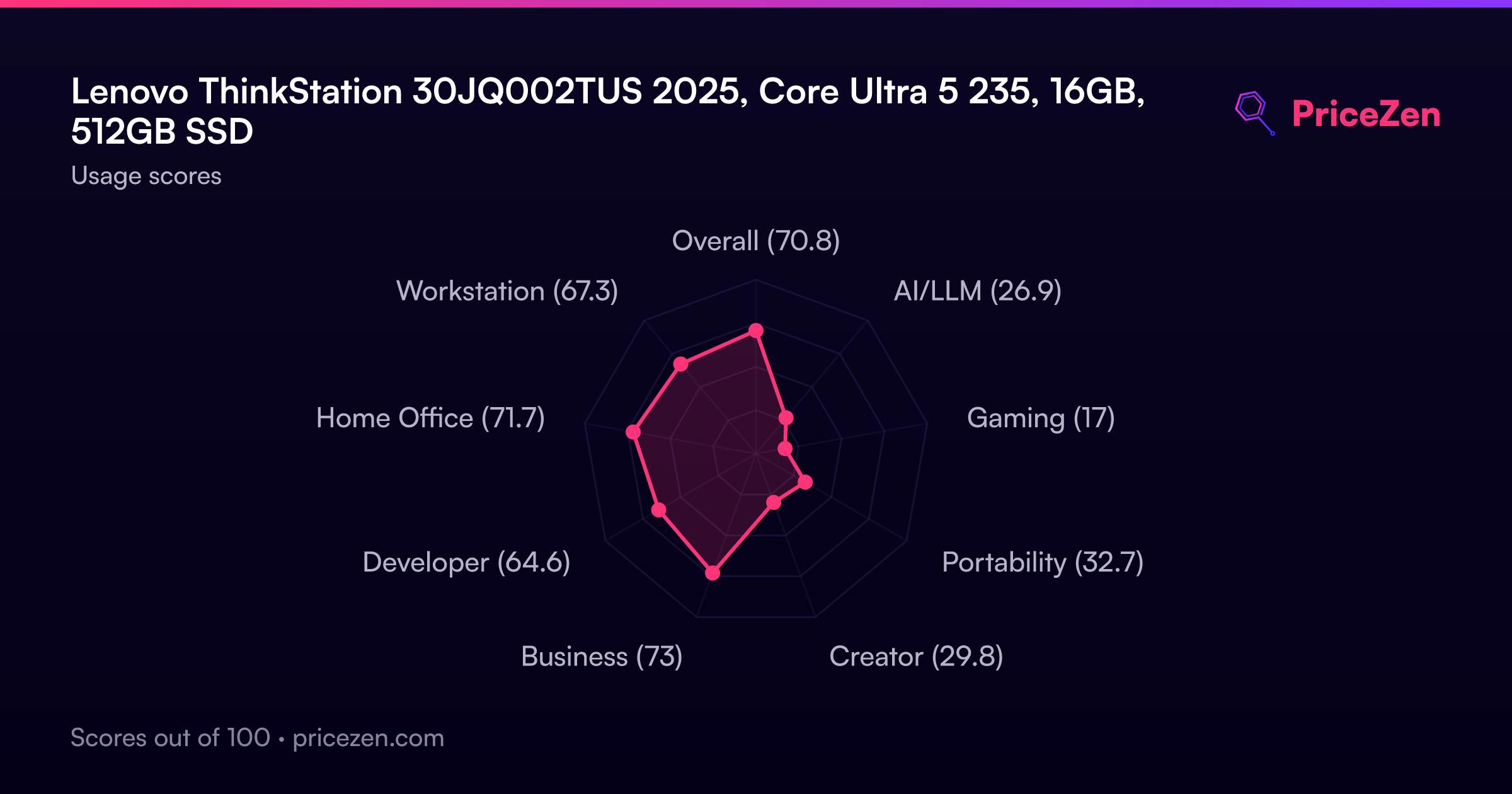
Usage Scores
- Overall70.8
- AI/LLM26.9
- Gaming17
- Portability32.7
- Creator29.8
- Business73
- Developer64.6
- Home Office71.7
- Workstation67.3