Silicon Power
The 8GB DDR4 SODIMM runs at 3200 MT/s with a low 1.2V voltage, delivering twice the bandwidth of DDR3 while cutting power draw. Its CL22 latency and 260-pin design fit most modern laptops, backed by a lifetime warranty for long-term reliability. Best for budget-conscious laptop owners needing a simple, energy-efficient RAM upgrade for everyday multitasking and faster app loading.

अभी किसी विक्रेता की मौजूदा कीमत नहीं है











एक नज़र में
The 30-Second Version
The SP Silicon Power 8GB DDR4 SODIMM is a budget laptop memory upgrade that gets the job done for everyday tasks. It's cheap, runs cool at 1.2V, and comes with a lifetime warranty. Don't expect blazing performance or gaming chops, but for reviving a sluggish notebook, it's a sensible buy.
Pros & Cons
खूबियाँ
- Very affordable, 77th percentile for price 77th
- Lifetime warranty is a nice safety net
- Low 1.2V power draw helps battery life
- Easy drop-in upgrade for most laptops
- 3200 MT/s is plenty for everyday tasks
कमियाँ
- Only 8GB capacity, 23rd percentile
- CL22 latency is slow, 12th percentile
- No heat spreader or any extra features
- Not great for gaming or heavy multitasking
- Single stick means no dual-channel benefit on its own
प्रमाण
Performance
At 3200 MT/s, this module is right in the middle of the pack for DDR4 SODIMMs, landing at 54th percentile for speed in our database. That's fine. For most everyday laptop tasks, web browsing, office work, streaming, you won't notice a difference between this and a faster kit. The CL22 latency is where things get less exciting. It's at 12th percentile, which means it's on the slower side when it comes to responsiveness. In practice, that translates to slightly longer delays when the memory is being hammered, but for a budget upgrade, it's not a dealbreaker.
Where this stick actually shines is in what it does to a system that's currently running 4GB or a single-channel 8GB setup. Going from 4GB to 8GB, or from single-channel to dual-channel with two of these, is a genuinely noticeable improvement. Apps load faster, Chrome stops choking on twenty tabs, and the whole machine feels less like it's wading through mud. The 1.2V power draw is also a small win for laptop battery life compared to older DDR3 modules. It's not a night-and-day difference, but every little bit helps when you're away from a wall outlet.
Specifications
Full Specifications
Memory
| Type | DDR4 |
| Form Factor | SODIMM |
| Total Capacity | 8192 |
Performance
| Speed | 3200 |
vs Competition
Stacked against something like the Corsair Vengeance RGB Pro SL, this SP module looks pretty bare. The Corsair kit runs at the same 3200 MT/s but with tighter CL16 timings, and it comes with heat spreaders and RGB if you're into that sort of thing. You'll pay more for it, though. The Team Group T-FORCE VULCAN Z is another step up, offering 3600 MT/s speeds, which is a real advantage if your laptop's BIOS actually supports it. Most budget laptops don't, so that speed bump can be wasted.
The G.Skill TridentZ RGB is in a completely different league, aimed at people who want performance and looks. The Timetec Pinnacle Konduit and Patriot Viper Steel are closer competitors in spirit, budget-focused sticks that trade blows on price. The SP module's main edge is that lifetime warranty and its low power draw. If you're comparing "cheap 8GB DDR4 SODIMM" options, this one is competitive. If you're comparing performance, it's near the back of the pack.
| Spec | Silicon Power | G.Skill Flare X5 | Corsair Dominator Titanium | Kingston Fury Renegade | Team Group T-Create Master | Micron 128GB DDR5 RDIMM |
|---|---|---|---|---|---|---|
| Capacity | 8GB | 256GB | 48GB | 128GB | 192GB | 128GB |
| Kit | - | 4 x 64GB | 2 x 24GB | 4 x 32GB | 8 x 24GB | 1 x 128GB |
| Memory Type | DDR4 | DDR5 | DDR5 | DDR5 | DDR5 | DDR5 |
| Speed Mts | 3200 | 6000 | 7200 | 5600 | 6000 | 6400 |
| Cas Latency | - | CL36 | CL36 | CL28 | CL32 | CL52 |
| Form Factor | SODIMM | UDIMM | UDIMM | RDIMM | RDIMM | RDIMM |
| Ecc | - | false | false | true | true | true |
| Compare | Compare | Compare | Compare | Compare |
| उत्पाद | Speed | Feature | Latency | Capacity | Affordability |
|---|---|---|---|---|---|
| Silicon Power | 53.4 | 18.1 | 11.8 | 22.5 | 76.9 |
| G.Skill Flare X5 Compare | 87.6 | 74.8 | 75.1 | 98.4 | 1.2 |
| Corsair Dominator Titanium Compare | 98.3 | 89.6 | 87.6 | 84.1 | 6.5 |
| Kingston Fury Renegade Compare | 77.6 | 100 | 87.6 | 96.7 | 1.7 |
| Team Group T-Create Master Compare | 87.6 | 99.3 | 79.9 | 97.9 | 1.4 |
| Micron 128GB DDR5 RDIMM Compare | 94.8 | 89.6 | 25.6 | 96.7 | 1.3 |
कीमत
Value & Pricing
At around 53 USD in the US, this is a cheap way to make an old laptop usable again. That's the whole story. You can find 16GB kits for not much more, and if your laptop has two slots, a 2x8GB setup from a competitor might be the smarter long-term play. But if you're on a tight budget and just need to stop your laptop from freezing when you open a second browser tab, this does the job. The lifetime warranty also means you're not gambling much. For the price, it's hard to complain too loudly, even if the specs are nothing special.
कीमत इतिहास
और पढ़ें
Overview
The SP Silicon Power DDR4 SODIMM is a budget laptop memory stick, plain and simple. It's an 8GB module running at 3200 MT/s with CL22 timings, and it's aimed squarely at people who want to breathe a little life into an aging notebook without spending real money. In our database, it lands at 77th percentile for affordability, which tells you exactly what this thing is about. You're not buying bragging rights here, you're buying a fix for a sluggish laptop.
If you're searching for something like "best cheap laptop RAM upgrade" or "is 8GB DDR4 enough for my laptop," this stick is a reasonable answer. It runs at the standard 1.2V for DDR4, which means less power draw than the old 1.5V DDR3 modules it's likely replacing. That's a nice bonus for battery life, even if it's a small one. The lifetime warranty is also a solid comfort blanket for a part this cheap.
But let's be honest about what this is. The capacity sits at 23rd percentile, the latency at 12th, and the feature set at 18th. This is a no-frills module. No heat spreaders, no RGB, no overclocking headroom. It's the memory equivalent of a reliable sedan. It gets you there, and that's the whole pitch.
Common Questions
Q: Is the SP Silicon Power 8GB DDR4 SODIMM good for gaming?
Not really. 8GB is the bare minimum for modern games, and the CL22 latency at 12th percentile means it's slower to respond than most gaming memory. You'd be better off with a 16GB kit with tighter timings if gaming is a priority.
Q: Will this RAM work in my laptop?
It should work in most laptops that take DDR4 SODIMM modules and support 3200 MT/s. Check your laptop's specs to confirm it uses DDR4 and not DDR3 or DDR5, and that it has an available SODIMM slot.
Q: Is 8GB of RAM enough for Windows 11?
For basic tasks like web browsing, email, and office work, 8GB is workable but tight on Windows 11. You'll notice slowdowns with lots of browser tabs or multiple apps open. 16GB is the more comfortable target if you can stretch your budget.
Q: Does this memory run at 1.2V or 1.35V?
This module runs at 1.2V, which is the standard voltage for DDR4. That's lower than the 1.5V used by older DDR3 modules, so it draws less power and generates less heat, which is a small win for laptop battery life.
Who Should Skip This
Skip this if you're a gamer, a content creator, or anyone who runs memory-hungry applications. 8GB at CL22 is going to feel cramped and sluggish for video editing, 3D work, or running virtual machines. You'd be better served by a 16GB or 32GB kit from Corsair, G.Skill, or Team Group with tighter timings. Also skip it if your laptop already has 8GB and you're hoping for a big speed boost. Going from 8GB to 8GB, even in dual-channel, won't transform your experience the way jumping from 4GB to 8GB will. And if your laptop uses DDR5 or still runs DDR3, this stick won't fit at all.
Verdict
Should you buy this? If you have an older laptop with 4GB of RAM and you're tired of waiting for it to do literally anything, yes. This is a cheap, low-risk fix that will make a real difference in daily use. The lifetime warranty means you're covered if it dies, and the low voltage is kind to your battery. It's not exciting, but it works.
If you're building a new system, or you want to game, or you run virtual machines, or you edit photos and video, skip this. You'll want 16GB or more, and you'll want faster timings. This stick is a band-aid for an aging laptop, not a foundation for a performance machine. For that specific job, it's a solid pick.
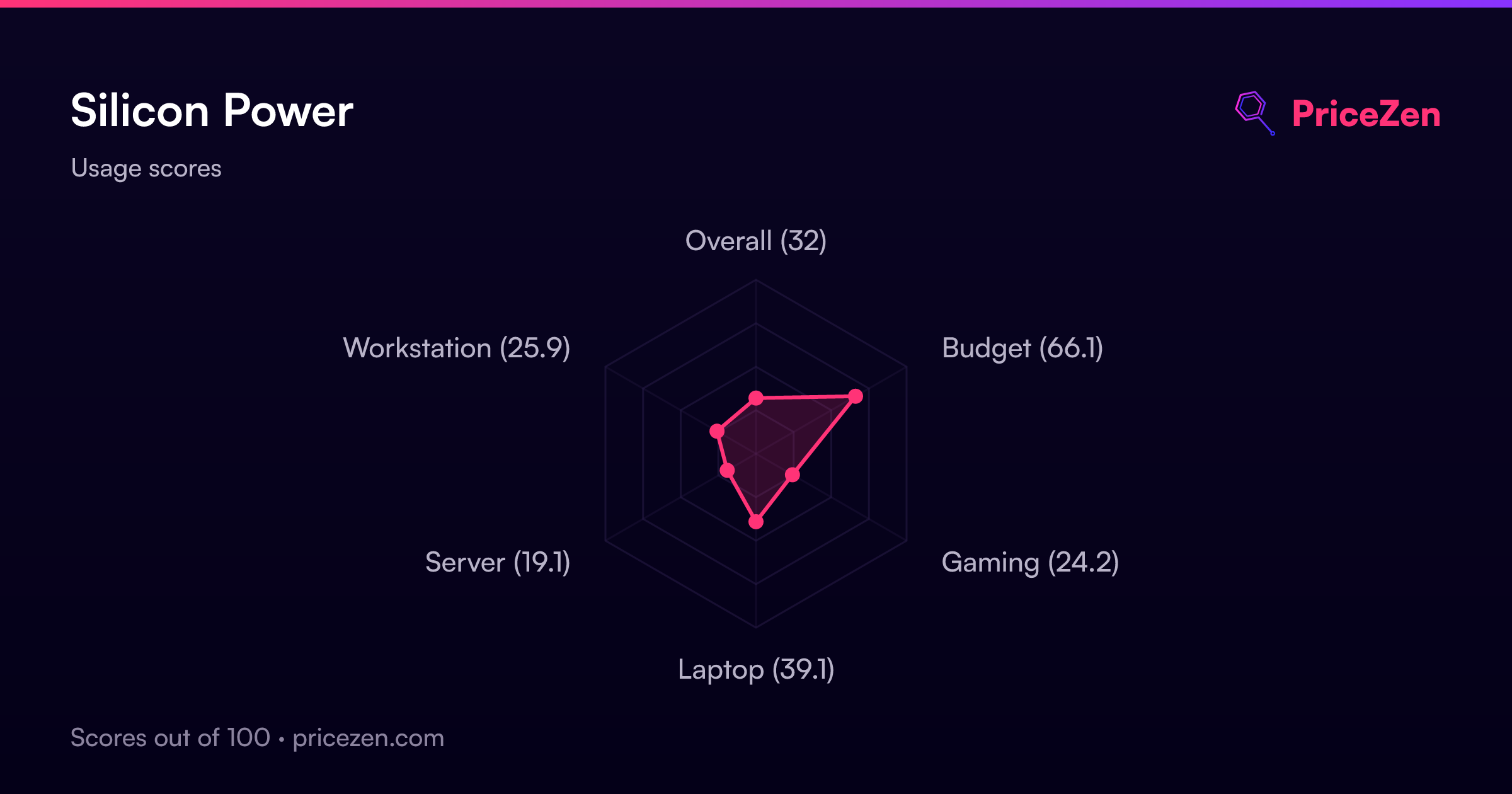
Usage Scores
- कुल32
- Budget66.1
- गेमिंग24.2
- Laptop39.1
- Server19.1
- Workstation25.9