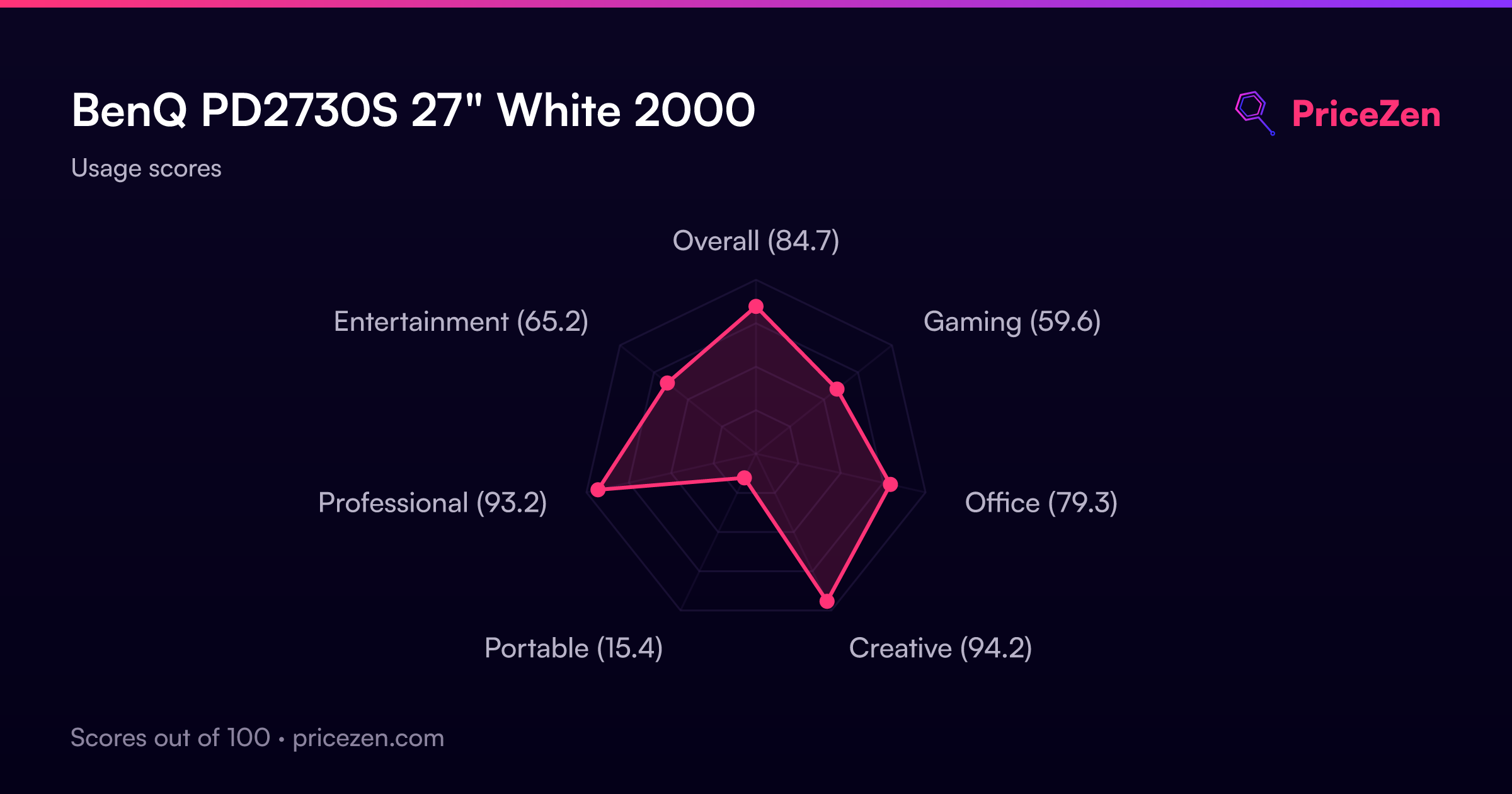
BenQ PD2730S 27" White 2000
5120 x 2880 रिज़ॉल्यूशन वाली यह 5K IPS स्क्रीन 218 PPI की बेहद सघन पिक्सेल व्यवस्था और 98% P3 कलर कवरेज के साथ बेजोड़ स्पष्टता देती है। Thunderbolt 4 के ज़रिए 90W पावर डिलीवरी, डेज़ी चेन सपोर्ट और नैनो मैट पैनल इसे Mac उपयोगकर्ताओं के लिए एक सहज, चकाचौंध-मुक्त विकल्प बनाते हैं। यह मॉनिटर विशेष रूप से 3D आर्टिस्ट और VFX एनिमेटरों के लिए उपयुक्त है जिन्हें सटीक रंग और उच्च विवरण वाले वर्कफ़्लो की आवश्यकता होती है।

अभी किसी विक्रेता की मौजूदा कीमत नहीं है


एक नज़र में
The 30-Second Version
The BenQ PD2730S delivers 5K resolution at the 100th percentile for display quality, with 98% DCI-P3 color coverage and Thunderbolt 4 connectivity that puts it in the top tier of our database. It's not a gaming monitor at 60Hz, but for creative work, it's a standout. Owners rate it 4.6 out of 5 stars and consistently compare it favorably to Apple's Studio Display, especially on price and adjustability.
Pros & Cons
खूबियाँ
- 100th percentile display quality with 5K resolution and 218 PPI density 100th
- 98% DCI-P3 color coverage with 100% sRGB and Rec.709 98th
- Thunderbolt 4 with 90W power delivery plus HDMI, DisplayPort, and dual USB-C 93rd
- 91st percentile ergonomics with height, tilt, swivel, and pivot 91st
- Built-in KVM switch and hotkey puck for multi-device workflows
कमियाँ
- 36th percentile performance with 60Hz refresh rate and 5ms response time
- 8-bit+FRC panel, not true 10-bit despite the marketing
- Matte coating softens text slightly compared to glossy panels
- Only one HDMI and one DisplayPort input
- 8,219 grams makes it a permanent desk fixture
मालिकों की राय
The Word on the Street
मालिकों की राय समय के साथ कैसे बदली
विशेषग्राहकों ने वास्तव में अपनी समीक्षाएँ कब लिखीं, इसके आधार पर - ताकि आप देख सकें कि शुरुआती तारीफ़ टिकी या नहीं।
12 लिखित समीक्षाएँ, जुल॰ 2025 – जुल॰ 2026: 2 संतुष्ट, 10 बिना स्टार
स्टोर की सभी 14 रेटिंग में: 5.0★। चार्ट 12 लिखित समीक्षाएँ गिनता है।
- जन॰–मार्च 20265 बिना स्टार
Buyers praise the 5K display quality, color accuracy, and value versus Apple Studio Display. One reported a USB-C port failure, but replacement was smooth. Minor notes on matte text softness and brightness differences in modes.
- Display quality and color accuracy match or exceed Apple's 5K Retina and Cinema displays.
- Better value than Apple Studio Display with more ports and extras like the hotkey puck.
- One unit had a USB-C port die within weeks, but replacement was handled by retailer.
- Matte screen softens text slightly but is easier on eyes; single input mode less bright than PBP.
- अक्टू॰–दिस॰ 20251 में से 1 संतुष्ट · 3 बिना स्टार
Buyers praised the screen quality, design, and adjustable stand, with one noting it's worth the expense for professional use. No negative feedback was mentioned.
- Screen quality praised as beautiful, vibrant, and comparable to Apple's retina display.
- Adjustable stand (height and tilt) valued, especially compared to Apple monitors.
- Design and build quality described as good, sturdy, and well-built.
- Built-in KVM switch useful for multi-device setups with Macs.
हर बिंदु एक लिखित समीक्षा है, उस महीने में जब वह लिखी गई। संतुष्ट = 4-5★, मिश्रित = 3★, असंतुष्ट = 1-2★। अवधि के सारांश अंग्रेज़ी में हैं।
प्रमाण
Performance
Let's talk about what this panel does well first, because the display ranking at the 100th percentile is earned. The 5K resolution means you're getting roughly 218 pixels per inch on a 27-inch screen, which is the same density Apple's Studio Display offers. Text is crisp, photos look like you could reach through the glass, and the 10-bit color depth with HDR10 support gives you 1.07 billion colors to work with. The 400 nits peak brightness isn't going to blow anyone away for HDR content, but for color-critical work in a controlled lighting environment, it's plenty. The 2000:1 static contrast ratio is actually better than a lot of IPS panels manage, and the matte coating does a nice job cutting reflections without destroying color vibrancy.
The 60Hz refresh rate and 5ms response time are where this monitor shows its professional focus. For photo editing, video work, and design, you won't notice the refresh rate at all. For gaming, you absolutely will. G-Sync Compatible certification helps with tearing if you do fire up a game, but this is not the panel for competitive shooters. The 36th percentile performance ranking is honest about that. If you're coming from a high-refresh gaming display, the motion clarity difference will be immediately obvious. For the intended audience, though, the performance is exactly what it needs to be. Nothing more, nothing less.
Specifications
Full Specifications
Display
| Size | 27" |
| Resolution | 5120x2880 |
| Panel Type | IPS |
| Aspect Ratio | 16:9 |
| Curved | No |
| Screen Finish | matte |
Performance
| Refresh Rate | 60 Hz |
| Response Time | 5 |
| Adaptive Sync | G-Sync Compatible |
Color & HDR
| Brightness | 400 nits |
| Color Gamut | 100% sRGB, 100% Rec.709, 98% P3 |
| Color Depth | 10-bit |
| HDR | HDR10 |
| HDR Support | HDR10 |
Connectivity
| HDMI Ports | 1 |
| DisplayPort | 1 |
| USB-C | 2 |
| Thunderbolt | Thunderbolt 4 |
| Speakers | Yes |
| Headphone Jack | Yes |
Ergonomics
| Height Adjustable | Yes |
| Tilt | Yes |
| Swivel | Yes |
| Pivot | Yes |
| VESA Mount | 100x100 |
Features
| Webcam | No |
| Touchscreen | No |
| PIP/PBP | Yes |
| Power | 40 |
| Weight | 8.2 kg / 18.1 lbs |
vs Competition
Stacked against the competition, the PD2730S occupies a specific lane. The LG UltraGear 45GX950A-B and ASUS ROG Strix XG27UCDMG are gaming-focused panels with high refresh rates and OLED panels, but they can't match the BenQ's color accuracy or 5K resolution for professional work. The Dell UltraSharp U4025QW is a 40-inch ultrawide that offers more screen real estate but at a lower pixel density and with a different aspect ratio that some designers won't want. The MSI MAG 271QPX QD-OLED E2 brings OLED contrast and speed, but OLED panels still have burn-in concerns for static UI elements that designers stare at all day. The Alienware AW3425DW is another ultrawide gaming option that trades resolution for immersion. What the BenQ does better than all of them is color accuracy out of the box, the 5K pixel density, and the Thunderbolt 4 connectivity with 90W power delivery. What it does worse is refresh rate and response time. If you're a designer who occasionally games, this is the pick. If you're a gamer who occasionally designs, look elsewhere.
| Spec | BenQ PD2730S 27" | LG UltraGear 45GX950A-B 45" | ASUS ROG Strix XG27UCDMG 27" | Dell UltraSharp U4025QW 39.7" | MSI MAG 271QPX QD-OLED E2 27" | Alienware AW-Series AW3425DW 34" |
|---|---|---|---|---|---|---|
| Screen Size | 27 | 45 | 27 | 39.70000076293945 | 27 | 34 |
| Resolution | 5120 x 2880 | 5120 x 2160 | 3840 x 2160 | 5120 x 2160 | 2560 x 1440 | 3440 x 1440 |
| Panel Type | IPS | OLED | OLED | IPS | QD-OLED | QD-OLED |
| Refresh Rate | 60 | 330 | 240 | 120 | 240 | 240 |
| Response Time Ms | 5 | 0.029999999329447746 | 0.029999999329447746 | 5 | 0.029999999329447746 | 0.029999999329447746 |
| Adaptive Sync | G-Sync Compatible | FreeSync Premium Pro | FreeSync Premium Pro | Adaptive-Sync | FreeSync Premium Pro | FreeSync Premium Pro |
| Hdr | HDR10 | DisplayHDR True Black 400 | DisplayHDR True Black 400 | DisplayHDR 600 | DisplayHDR True Black 400 | DisplayHDR 400 True Black |
| Compare | Compare | Compare | Compare | Compare |
| उत्पाद | Color | पोर्टेबिलिटी | Display | Feature | User Sentiment | Performance | Connectivity | सामाजिक प्रमाण |
|---|---|---|---|---|---|---|---|---|
| BenQ PD2730S 27" | 92.8 | 83.8 | 99.5 | 83.7 | 89.2 | 35.9 | 98.2 | 43 |
| LG UltraGear 45GX950A-B 45" Compare | 99.4 | 76.5 | 99.7 | 95.7 | 76.4 | 99.4 | 97 | 92.1 |
| ASUS ROG Strix XG27UCDMG 27" Compare | 96.1 | 57.5 | 97.9 | 83.7 | 99.2 | 98 | 81.3 | 98.9 |
| Dell UltraSharp U4025QW 39.7" Compare | 98.2 | 76.5 | 98.7 | 95.7 | 85.6 | 56.1 | 99.3 | 96.9 |
| MSI MAG 271QPX QD-OLED E2 27" Compare | 99.1 | 57.5 | 77.3 | 83.7 | 95.7 | 98 | 81.3 | 98.9 |
| Alienware AW-Series AW3425DW 34" Compare | 99 | 73.9 | 85.7 | 89.7 | 95.7 | 98 | 95.5 | 96.9 |
कीमत
Value & Pricing
The pricing on this monitor is all over the place depending on where you shop. In the US, we're seeing listings from $920 to $1,980 across 8 vendors, which is a $1,060 spread. That's not a typo. The same panel can cost you nearly twice as much depending on which store you pick, so shopping around is not optional here. In Canada, the spread is tighter at CAD 1,300 to CAD 1,731 across 6 listings, but that's still a CAD 431 difference. The value proposition gets a lot more interesting at the lower end of those ranges. When you consider that Apple's Studio Display starts well above $1,500 and doesn't include an adjustable stand or the same port selection, the BenQ starts looking like a bargain. At the high end of the price range, you're paying a premium that's harder to justify. The sweet spot is finding this panel at the lower end of the spectrum, where the price-to-performance ratio for color-critical work is genuinely excellent.
और पढ़ें
Overview
The BenQ PD2730S sits at the 100th percentile for display quality in our database, and that's not marketing fluff. It's a 27-inch 5K IPS panel pushing 5120 x 2880 at 60Hz, and the pixel density is the kind of thing that makes you lean in and squint just to see if you can find a jagged edge. You won't. Color coverage hits 100% sRGB, 100% Rec.709, and 98% DCI-P3, which puts it in the top tier for color work. The connectivity story is just as strong at the 98th percentile, with Thunderbolt 4 delivering 90W of power delivery alongside HDMI, DisplayPort, and dual USB-C.
But here's the thing. The performance ranking lands at the 36th percentile, and that's the trade-off you're making. This is not a gaming monitor. 60Hz and 5ms response time are fine for design work, photo editing, and general productivity, but if you're chasing high refresh rates, this panel will feel sluggish. The ergonomics are solid at the 91st percentile with height, tilt, swivel, and pivot all covered, and the 40W power draw is reasonable for a 5K panel. At 8,219 grams, it's not a featherweight, but it's not meant to be portable. The portable score of 15.8 out of 100 tells you everything about who this is for. It's a desk anchor, and a very good one.
Common Questions
Q: What color gamut coverage does the PD2730S actually have?
The panel covers 100% sRGB, 100% Rec.709, and 98% DCI-P3. That's enough for most professional photo and video work, though if you need Adobe RGB specifically, you'll want to verify your workflow requirements against those numbers.
Q: Is this a true 10-bit panel or does it use FRC?
It's an 8-bit+FRC panel, not native 10-bit. In practice, the difference is hard to spot for most work, but if you're doing high-end color grading where true 10-bit matters, this is worth knowing before you buy.
Q: Will this work with my M1 Mac?
Yes. The Thunderbolt 4 port with 90W power delivery means a single cable handles video, data, and charging for M1 Macs. The 5K resolution at 60Hz is fully supported, and the built-in KVM makes it easy to switch between a Mac and another machine.
Who Should Skip This
If you're a gamer, skip this. The 60Hz refresh rate and 5ms response time put it at the 36th percentile for performance, and that's going to feel rough if you're used to 144Hz or higher. The 8-bit+FRC panel might also bother color purists who need true 10-bit output for high-end grading work. And if you're looking for something portable or compact, the 8,219 gram weight and 15.8 out of 100 portable score should tell you everything. This is a desk monitor, full stop. If you need high refresh rates, true 10-bit color, or something you can move around, there are better options in our database. But if you're a designer, photographer, or office user who wants 5K pixel density with excellent color and connectivity, this is hard to beat.
Verdict
The BenQ PD2730S is a specialist's monitor, and it's excellent at what it specializes in. The 100th percentile display ranking and 98th percentile connectivity ranking tell the story. This is a panel built for people who need color accuracy, pixel density, and a clean single-cable setup. The user sentiment score of 88 out of 100 backs that up, with owners consistently praising the picture quality, vibrant colors, and the built-in KVM switch. The comparison to Apple's Studio Display comes up repeatedly, and the BenQ wins on adjustability, ports, and price. The 36th percentile performance ranking is the only real knock, but that's a feature, not a bug. This monitor knows exactly what it is and doesn't pretend to be anything else. For creative professionals and office users who want a 5K panel without the Apple tax, this is one of the best options on the market right now.
Usage Scores
- कुल84.7
- गेमिंग59.6
- Office79.3
- Creative94.2
- Portable15.4
- Professional93.2
- मनोरंजन65.2