ASUS VA249QGS 23.8" Black
The 120Hz refresh rate and 1ms MPRT with Adaptive-Sync deliver tear-free motion on a 23.8-inch IPS panel with 350 nits brightness and 99% sRGB coverage. Full ergonomic adjustments (height, tilt, swivel, pivot) and VESA mountability make it a flexible workspace tool, backed by ASUS DisplayWidget Center for quick settings. Best for office workers who need a smooth, adjustable monitor for spreadsheets and documents without gaming-level cost.

अभी किसी विक्रेता की मौजूदा कीमत नहीं है


एक नज़र में
The 30-Second Version
A 120Hz ergonomic office monitor for under $163 USD. If you're still on a 60Hz panel, this is the upgrade you didn't know you needed.
Pros & Cons
खूबियाँ
- 120Hz refresh rate at this price is a steal 91st
- Ergonomic stand with height, tilt, swivel, and pivot is top-tier 70th
- Adaptive-Sync kills screen tearing without fuss 67th
- VESA mountable if you want to ditch the stand
कमियाँ
- 1080p resolution feels dated in 2025
- Only 2 video inputs, no USB hub
- Color accuracy is just average for an IPS panel
- Built-in speakers are likely an afterthought
प्रमाण
Performance
The 120Hz refresh rate and 1ms MPRT response are the real story here. Our database puts this panel's performance at the 70th percentile, which is solid for a business monitor. The IPS panel gives you 178-degree viewing angles and 350 nits of brightness, so it stays readable in bright offices. But the display quality itself sits at the 21st percentile, which tells you this is a 1080p panel in a world moving toward 1440p and 4K. Fine for spreadsheets and web browsing, but don't expect pixel density to wow you.
Specifications
Full Specifications
Display
| Size | 23.8" |
| Resolution | 1920x1080 (Full HD) |
| Panel Type | IPS |
| Aspect Ratio | 16:9 |
| Curved | No |
| Screen Finish | matte |
Performance
| Refresh Rate | 120 Hz |
| Response Time | 1 |
| Adaptive Sync | Adaptive-Sync |
Color & HDR
| Brightness | 350 nits |
| Color Gamut | sRGB 99% |
| Color Depth | 16.7 Million |
| HDR | No |
Connectivity
| HDMI Ports | 1 |
| DisplayPort | 1 |
| Speakers | Yes |
| Headphone Jack | Yes |
Ergonomics
| Height Adjustable | Yes |
| Tilt | Yes |
| Swivel | Yes |
| Pivot | Yes |
| VESA Mount | 100x100 |
Features
| Webcam | No |
| Touchscreen | No |
| Power | 14 |
| Weight | 4.8 kg / 10.6 lbs |
vs Competition
Against the LG UltraGear 27G810A-B or Dell Alienware AW2523HF, the VA249QGS loses on raw gaming specs and panel size. Those are 240Hz+ gaming monitors with bigger screens. But they cost significantly more. The Acer Nitro XV272U W2bmiiprx offers 1440p resolution, which is a real upgrade if you have the desk space and budget. For pure office productivity with a side of smooth scrolling, the ASUS undercuts them all. The MSI MAG 271QP QD-OLED is in a completely different league, and priced like it.
| Spec | ASUS VA249QGS 23.8" | LG UltraGear 45GX950A-B 45" | Dell UltraSharp U4025QW 39.7" | MSI MAG 271QPX QD-OLED E2 27" | Alienware AW-Series AW3425DW 34" | Samsung Odyssey G60SD 27" |
|---|---|---|---|---|---|---|
| Screen Size | 23.799999237060547 | 45 | 39.70000076293945 | 27 | 34 | 27 |
| Resolution | 1920 x 1080 | 5120 x 2160 | 5120 x 2160 | 2560 x 1440 | 3440 x 1440 | 2560 x 1440 |
| Panel Type | IPS | OLED | IPS | QD-OLED | QD-OLED | OLED |
| Refresh Rate | 120 | 330 | 120 | 240 | 240 | 360 |
| Response Time Ms | 1 | 0.029999999329447746 | 5 | 0.029999999329447746 | 0.029999999329447746 | 0.029999999329447746 |
| Adaptive Sync | Adaptive-Sync | FreeSync Premium Pro | Adaptive-Sync | FreeSync Premium Pro | FreeSync Premium Pro | FreeSync Premium Pro |
| Hdr | ✗ | DisplayHDR True Black 400 | DisplayHDR 600 | DisplayHDR True Black 400 | DisplayHDR 400 True Black | HDR10+ |
| Compare | Compare | Compare | Compare | Compare |
| उत्पाद | Color | पोर्टेबिलिटी | Display | Feature | Performance | Connectivity | सामाजिक प्रमाण |
|---|---|---|---|---|---|---|---|
| ASUS VA249QGS 23.8" | 61.8 | 63 | 21.3 | 67.1 | 69.9 | 43.6 | 34.2 |
| LG UltraGear 45GX950A-B 45" Compare | 99.4 | 76.6 | 99.7 | 95.7 | 99.4 | 97 | 94.7 |
| Dell UltraSharp U4025QW 39.7" Compare | 98.2 | 76.6 | 98.7 | 95.7 | 56.1 | 99.3 | 97.9 |
| MSI MAG 271QPX QD-OLED E2 27" Compare | 99.1 | 57.6 | 77.3 | 83.8 | 98 | 81.2 | 99.3 |
| Alienware AW-Series AW3425DW 34" Compare | 99 | 74 | 85.7 | 89.8 | 98 | 95.4 | 97.9 |
| Samsung Odyssey G60SD 27" Compare | 90.3 | 39.7 | 77.3 | 67.1 | 99.5 | 87.6 | 94.7 |
कीमत
Value & Pricing
At $126 to $163 USD depending on the vendor, this monitor is a no-brainer for office work. Best Buy has the lowest price in our data at $126, while other listings climb to $163. Canadian buyers see a similar spread from CAD 161 to CAD 199. The 3-year warranty sweetens the deal. You're getting a 120Hz ergonomic monitor for less than most 60Hz office displays.
और पढ़ें
Overview
The ASUS VA249QGS is a 24-inch 1080p IPS monitor that punches above its weight where it counts: ergonomics and smoothness. You get a 120Hz refresh rate, Adaptive-Sync, and a fully adjustable stand for a price that hovers around $126 to $163 USD. That's a rare combo in the budget business monitor space. The one thing to know? This is a productivity workhorse with a gaming monitor's heart, not a color-critical display.
Common Questions
Q: Can I adjust the height and angle of this monitor?
Yes, and this is honestly one of the best parts. You get height adjustment, tilt, swivel, and even pivot to portrait mode. Most budget monitors give you tilt and nothing else.
Q: What resolution and size is the screen?
It's a 23.8-inch viewable panel running 1920x1080. That's standard Full HD. Sharp enough for text and video, but if you're doing photo editing or want more screen real estate, look at 1440p options.
Who Should Skip This
If you're a serious gamer chasing high frame rates at 1440p or 4K, this isn't your monitor. Go grab the LG UltraGear 27G810A-B or Dell Alienware AW2523HF instead. And if you do color-critical work, the 99% sRGB coverage sounds nice but the panel quality won't satisfy professionals. Get a factory-calibrated display.
Verdict
Buy the ASUS VA249QGS if you want a comfortable, smooth office monitor without spending real money. The ergonomic stand alone is worth the price of admission, and 120Hz makes everything from scrolling to casual gaming feel better. It's not a color professional's tool and 1080p is showing its age, but for the price, this is one of the easiest recommendations we can make.
Usage Scores
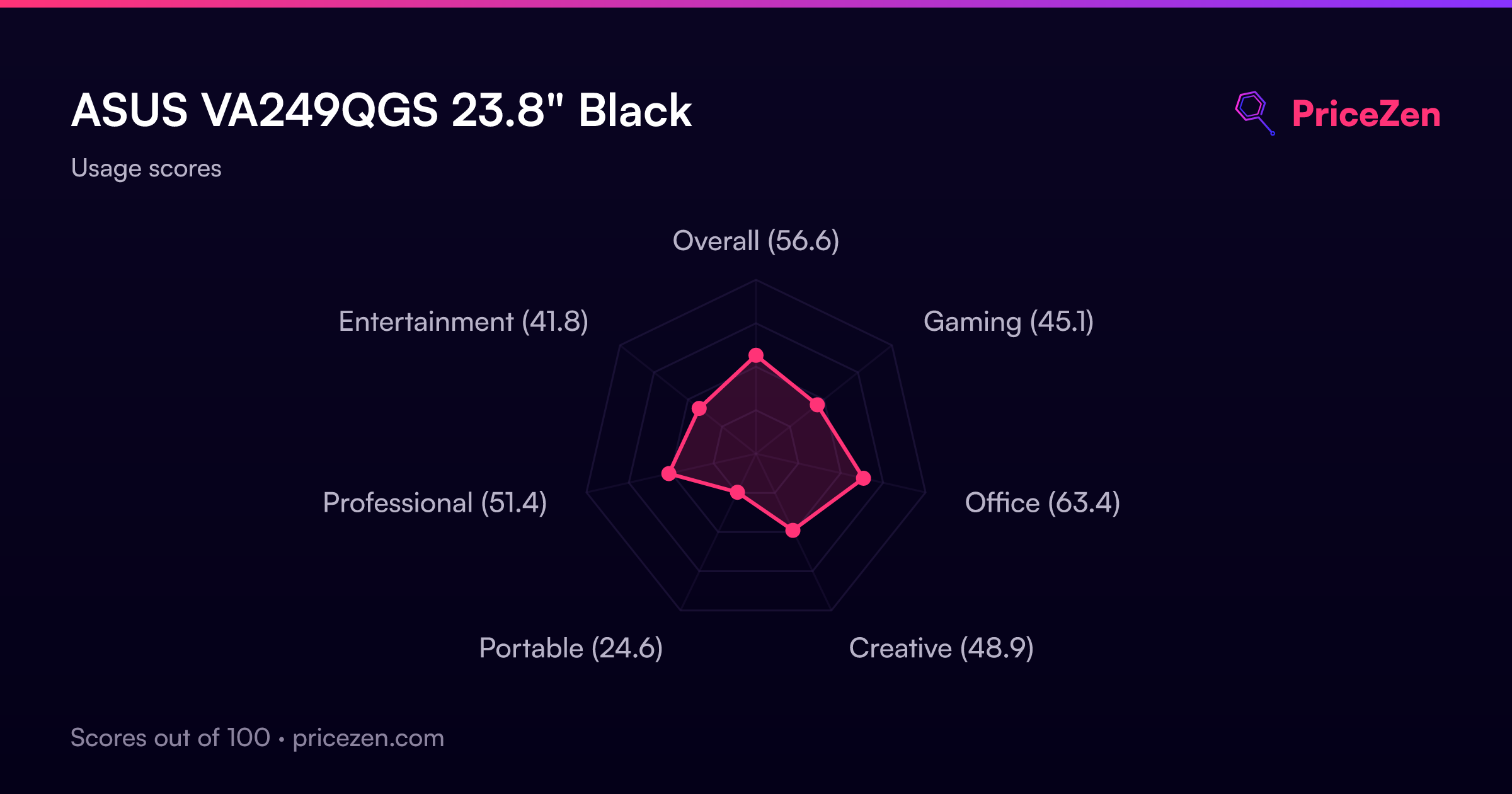
- कुल56.6
- गेमिंग45.1
- Office63.4
- Creative48.9
- Portable24.6
- Professional51.4
- मनोरंजन41.8