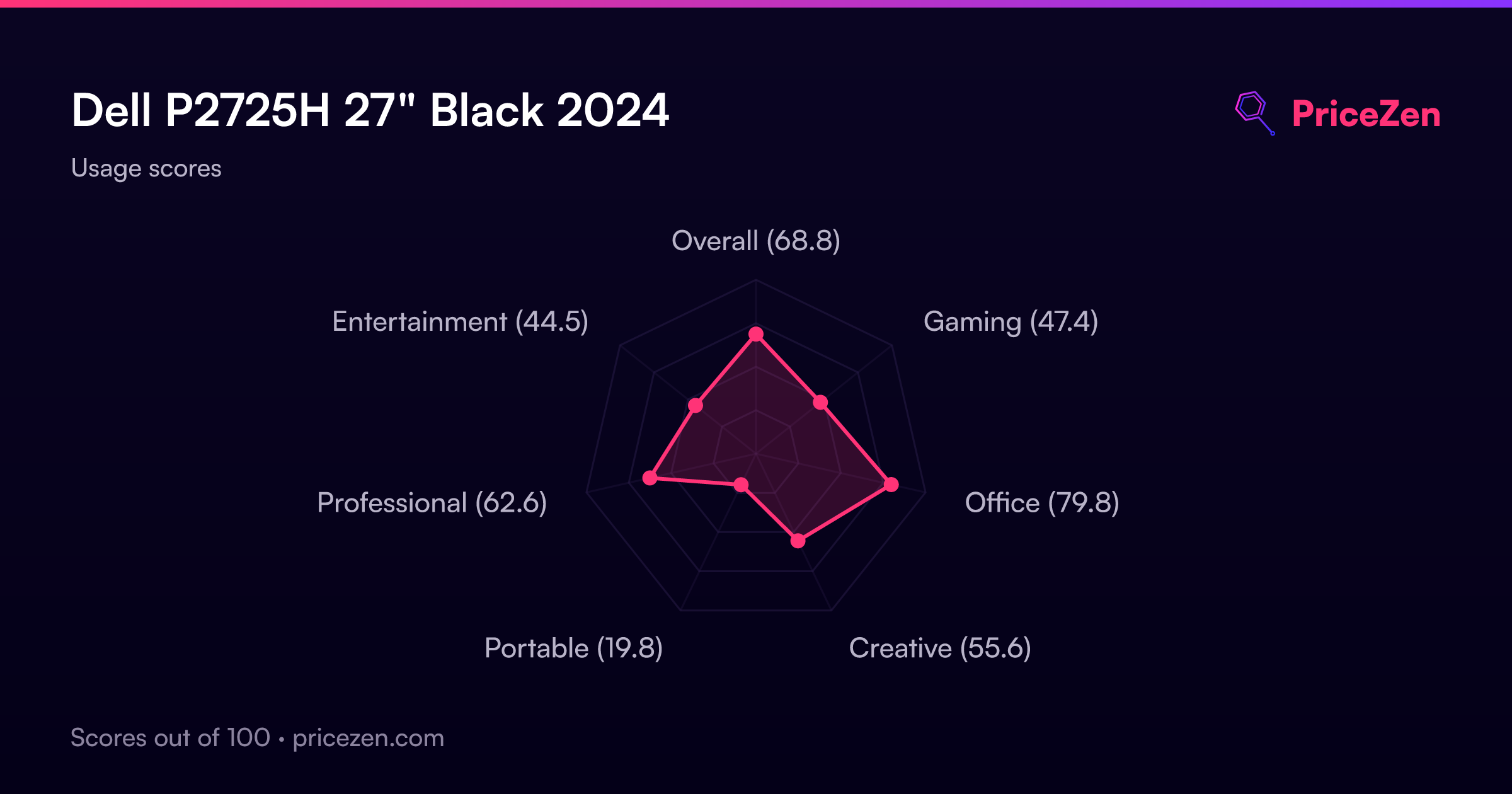
Dell P2725H 27" Black 2024
The 100Hz refresh rate and ComfortView Plus low blue light technology set this 27-inch IPS panel apart for all-day office use, delivering smoother motion than standard 60Hz displays. Its integrated USB-C hub with 3 additional USB-A ports and a fully adjustable stand with pivot function provide a clutter-free, ergonomic workspace. This monitor is best for office workers and data analysts who need a flicker-free, easy-to-read display for extended productivity sessions.

अभी किसी विक्रेता की मौजूदा कीमत नहीं है
हमने इसे पहले यहाँ देखा था। आज की कीमत स्टोर पर देखें।











एक नज़र में
The 30-Second Version
The Dell P2725H is a dependable 27-inch 1080p office monitor with a standout 100Hz refresh rate and an excellent adjustable stand. Connectivity is a strong point, with USB-C, HDMI, DisplayPort, and even VGA. The price floor has dropped to $160 USD, which makes it a proper bargain, though listings still climb to $1,900 USD, so shop around. It's a great office workhorse, but creative pros and gamers should look elsewhere.
Pros & Cons
खूबियाँ
- 100Hz refresh rate makes everyday scrolling feel smoother than typical 60Hz office monitors 92nd
- Excellent stand with height, tilt, swivel, and pivot adjustments 91st
- Strong connectivity including USB-C and even legacy VGA 91st
- IPS panel offers good viewing angles for shared or multi-monitor setups 74th
- High customer satisfaction with a 4.6/5 rating across 339 reviews and an 82/100 owner sentiment score in our data
- The low end of its price range has dropped to $160 USD, which is a genuinely good deal for this feature set
कमियाँ
- 1080p resolution on a 27-inch panel means text isn't as sharp as higher-res options
- 300 nits brightness is just average and may struggle in bright rooms
- Color performance is middle of the pack, not suitable for color-critical work
- Feature set is thin compared to similarly priced competitors
- Price still varies wildly across vendors, from $160 to $1,900 USD
मालिकों की राय
The Word on the Street
मालिकों की राय समय के साथ कैसे बदली
विशेषग्राहकों ने वास्तव में अपनी समीक्षाएँ कब लिखीं, इसके आधार पर - ताकि आप देख सकें कि शुरुआती तारीफ़ टिकी या नहीं।
संतुष्ट मालिक: अब 100%, जुल॰ 2022 – मार्च 2025 में 100%
इसे बदलाव कहने के लिए समीक्षाएँ बहुत कम हैं।
स्टोर की सभी 343 रेटिंग में: 4.6★। ज़्यादातर मालिक समीक्षा लिखे बिना रेटिंग देते हैं। चार्ट स्टार और अपनी तारीख वाली 32 लिखित समीक्षाएँ गिनता है।
बिना स्टार वाली 1 लिखित समीक्षा रुझान में शामिल नहीं है।
आंकड़े दिखाएँ
| अवधि | समीक्षाएँ | संतुष्ट | मिश्रित | असंतुष्ट | संतुष्ट हिस्सा |
|---|---|---|---|---|---|
| जुल॰ 2022 – मार्च 2025 | 10 | 10 | 0 | 0 | 100% |
| अप्रैल–दिस॰ 2025 | 11 | 10 | 0 | 1 | 91% |
| जन॰–मई 2026 | 11 | 11 | 0 | 0 | 100% |
- अप्रैल–जून 20263 में से 3 संतुष्ट
Buyers in this period praised the monitor for its crisp, clear display, easy setup, solid quality, and good value for the price.
- Crisp and clear display quality mentioned in all reviews.
- Easy connection and setup highlighted in one review.
- Good value for the price noted in one review.
- Solid build quality and appropriate size appreciated.
- जन॰–मार्च 20268 में से 8 संतुष्ट
Buyers praised the monitor for office use, color accuracy, and easy setup. Ports were seen as useful, though one wished for DVI instead of VGA.
- Great for office use, looks nice on desk, easy to set up, good picture quality.
- Color quality matches well between units, satisfying picky users.
- Easy to assemble and works well, with useful ports (DisplayPort, HDMI, VGA, USB).
- Port selection is useful but missing DVI; VGA less preferred.
- जन॰–मार्च 20253 में से 3 संतुष्ट
Buyers in this period praised the Dell P2725H for its eye comfort, display quality, and energy efficiency, with one user upgrading from dual 24-inch monitors and buying a second unit. Overall, reviews were highly positive.
- Users appreciate the monitor's eye comfort features, which help reduce strain during extended use.
- The display quality is described as stunning, with excellent performance for both intensive and everyday tasks.
- The monitor is noted for its energy efficiency, contributing to its value.
- Users find the monitor a great fit for dual setups, with one buying a second unit to recreate their dual-monitor configuration.
हर कॉलम तिमाहियों को तब तक जोड़ता है जब तक उसमें स्टार और अपनी तारीख वाली कम से कम 10 समीक्षाएँ न हों। संतुष्ट = 4-5★, मिश्रित = 3★, असंतुष्ट = 1-2★। अवधि के सारांश अंग्रेज़ी में हैं।
प्रमाण
Performance
The 100Hz refresh rate is the headline spec here, and it's a genuine step up from the 60Hz panels most office workers have been staring at for a decade. Scrolling through long documents feels noticeably smoother, and the 5ms GtG response time is fine for productivity work. You won't confuse this with a 240Hz gaming monitor, but for the target audience, it's more than enough.
Brightness comes in at 300 nits, which is about average for this class. In a typical office with fluorescent lighting, that's perfectly usable. If you're sitting next to a big sunny window, you might find yourself wishing for a bit more punch. Color coverage is 99% sRGB on an 8-bit panel, which lands it right in the middle of the pack for color performance. It's fine for documents and web browsing, but anyone doing serious photo or video work will want to look elsewhere.
Specifications
Full Specifications
Display
| Size | 27" |
| Resolution | 1920x1080 (Full HD) |
| Panel Type | IPS |
| Aspect Ratio | 16:9 |
| Curved | No |
| Screen Finish | matte |
Performance
| Refresh Rate | 100 Hz |
| Response Time | 5 |
Color & HDR
| Brightness | 300 nits |
| Color Gamut | 99% sRGB |
| Color Depth | 8-bit |
Connectivity
| HDMI Ports | 1 |
| DisplayPort | 1 |
| USB-C | 1 |
| Thunderbolt | N/A |
| Speakers | No |
| Headphone Jack | No |
Ergonomics
| Height Adjustable | Yes |
| Tilt | Yes |
| Swivel | Yes |
| Pivot | Yes |
| VESA Mount | 100x100 |
Features
| Webcam | No |
| Touchscreen | No |
| PIP/PBP | No |
| Power | 74 |
| Weight | 4.0 kg / 8.9 lbs |
vs Competition
Our ranking puts the P2725H alongside a very different crowd right now: the LG UltraGear 27G810A-B 27", ASUS ROG Strix XG27JCG 27", Gigabyte M Series OLED MO27Q28G 27", and HP OMEN 27qs G2 27". Those are gaming-first displays, and comparing them to the Dell is like comparing a reliable sedan to a sports car. The P2725H isn't trying to win on raw performance, and it shouldn't be judged that way.
What the Dell brings to that table is the stuff gaming panels often skimp on: a stand with height, tilt, swivel and pivot, VESA mounting, and a port selection that includes USB-C and VGA alongside HDMI and DisplayPort. Its 100Hz refresh rate is a real upgrade over the 60Hz screens most offices still run, but it sits well below what those gaming models are built for. If your day is spreadsheets, email and video calls, the Dell is the better buy at $160 USD. If you want frames and motion clarity above all else, one of those four is where your money should go.
| Spec | Dell P2725H 27" | LG UltraGear 45GX950A-B 45" | ASUS ROG Strix XG27UCDMG 27" | Alienware AW-Series AW3425DW 34" | MSI MAG 271QPX QD-OLED E2 27" | Samsung Odyssey G60SD 27" |
|---|---|---|---|---|---|---|
| Screen Size | 27 | 45 | 27 | 34 | 27 | 27 |
| Resolution | 1920 x 1080 | 5120 x 2160 | 3840 x 2160 | 3440 x 1440 | 2560 x 1440 | 2560 x 1440 |
| Panel Type | IPS | OLED | QD-OLED | QD-OLED | QD-OLED | OLED |
| Refresh Rate | 100 | 330 | 240 | 240 | 240 | 360 |
| Response Time Ms | 5 | 0.03 | 0.03 | 0.03 | 0.03 | 0.03 |
| Adaptive Sync | - | FreeSync Premium Pro | FreeSync Premium Pro | FreeSync Premium Pro | FreeSync Premium Pro | FreeSync Premium Pro |
| Hdr | - | DisplayHDR True Black 400 | DisplayHDR True Black 400 | HDR400 | DisplayHDR True Black 400 | HDR10+ |
| Compare | Compare | Compare | Compare | Compare |
| उत्पाद | Color | पोर्टेबिलिटी | Display | Feature | User Sentiment | Performance | Connectivity | सामाजिक प्रमाण |
|---|---|---|---|---|---|---|---|---|
| Dell P2725H 27" | 53.5 | 73.9 | 50.6 | 21.1 | 61.5 | 47.9 | 91 | 92 |
| LG UltraGear 45GX950A-B 45" Compare | 99.4 | 76.5 | 99.7 | 96.3 | 76.6 | 99.4 | 96.9 | 92 |
| ASUS ROG Strix XG27UCDMG 27" Compare | 96.5 | 57.4 | 97.7 | 85 | 99.3 | 97.9 | 81.1 | 98.9 |
| Alienware AW-Series AW3425DW 34" Compare | 98.9 | 73.9 | 84.1 | 96.3 | 95.7 | 97.9 | 95.4 | 96.8 |
| MSI MAG 271QPX QD-OLED E2 27" Compare | 99.2 | 57.4 | 73.4 | 85 | 95.7 | 97.9 | 81.1 | 98.9 |
| Samsung Odyssey G60SD 27" Compare | 90.7 | 39.4 | 73.4 | 70.1 | 95.7 | 99.5 | 87.5 | 92 |
कीमत
Value & Pricing
Here's where things get interesting. The Dell P2725H now shows up as low as $160 USD in our price tracking, down from the $319 floor we saw before. At that price, this stops being a compromise and starts being a bargain: 100Hz, a fully adjustable stand, and USB-C plus HDMI, DisplayPort and VGA for less than most bare-bones office panels cost. If you can find it near that number, buy it.
The top of the range is still nonsense. Listings run all the way to $1,900 USD, and the CAD side spans $246 to $2,664, so the spread between the cheapest and most expensive listing remains absurd for a 1080p office monitor. Nobody should be paying anywhere near the upper end. We track this price over time, partly through our community browser extension, and the pattern is clear: the same monitor sells for wildly different amounts depending on who's listing it. Check more than one store before you click buy.
हम 29 मई 2026 से इस उत्पाद की कीमतों पर नज़र रख रहे हैं। अधिक डेटा होने पर चार्ट दिखाई देगा।
और पढ़ें
Overview
The Dell P2725H is a 27-inch 1080p IPS monitor aimed squarely at offices, cubicles, and anyone who needs a dependable screen for spreadsheets, email, and the occasional YouTube break. It's not trying to be a gaming monitor or a color-critical display, and that's fine. What it does try to do is be a comfortable, well-connected, no-drama daily driver, and for the most part it nails that brief.
Dell has been making office monitors forever, and the P-series has always been their workhorse line. This one adds a 100Hz refresh rate to the standard 1080p formula, which is a nice little upgrade over the 60Hz panels most offices are still stuck with. Even just moving your cursor around feels smoother, and if you sneak in a lunchtime game of something light, it won't feel like a slideshow.
It also comes with a surprisingly good stand for the price. Height adjust, tilt, swivel, pivot, and VESA mounting are all here. That's the kind of ergonomic flexibility that usually gets cut first on budget monitors, so credit to Dell for keeping it. The connectivity story is solid too, with HDMI, DisplayPort, USB-C, and even VGA for that one ancient office PC nobody wants to retire.
Common Questions
Q: Is 1080p sharp enough on a 27-inch monitor?
It depends on what you're used to and how close you sit. At 27 inches, 1080p works out to about 82 pixels per inch, which is fine for general office work but noticeably less sharp than a 1440p or 4K display. If you do a lot of reading or work with small text, you might notice slightly soft edges. For spreadsheets, email, and web browsing at a normal viewing distance, most people find it perfectly acceptable.
Q: Can I use this monitor with a Mac?
Yes, and several reviewers specifically mention using it as a replacement for Apple displays. The USB-C connection makes it easy to plug into modern MacBooks, and the HDMI port works with older Macs or adapters. Just keep in mind that macOS handles 1080p scaling differently than Windows, so text rendering may look a bit different than you're used to on a Retina display.
Q: Does the 100Hz refresh rate make a difference for office work?
It's subtle but noticeable. Moving your cursor, scrolling through documents, and switching between windows all feel smoother than on a standard 60Hz office monitor. It's not a night-and-day difference like going from 60Hz to 144Hz on a gaming monitor, but once you've used 100Hz for a while, going back to 60Hz feels a little sluggish.
Q: Is this monitor good for gaming?
For casual or light gaming, it's fine. The 100Hz refresh rate and 5ms response time are better than a typical office monitor, and the IPS panel gives you good colors and viewing angles. But serious gamers will want something with a higher refresh rate, faster response time, and adaptive sync support. This is an office monitor first, and it shows in the feature set.
Who Should Skip This
If you're a photographer, video editor, or graphic designer, skip this one. The color performance is middle of the pack, and 1080p on a 27-inch panel doesn't give you the pixel density you need for detailed work. Look at a 1440p or 4K IPS panel with better color coverage instead.
Gamers should also look elsewhere. The 100Hz refresh rate is nice for office work, but it's well below what modern gaming monitors offer, and there's no mention of adaptive sync or other gaming features. If you want a smooth gaming experience, the LG UltraGear 27G810A-B 27", ASUS ROG Strix XG27JCG 27", Gigabyte M Series OLED MO27Q28G 27" and HP OMEN 27qs G2 27" sit near the top of our ranking for a reason, and they're built for a completely different job.
Verdict
For a standard office deployment, the Dell P2725H is a solid choice, and at $160 USD it's an easy one. The 100Hz refresh rate is a nice quality-of-life upgrade, the stand is genuinely good, and the connectivity options mean it'll work with just about any PC you throw at it. Owners back that up: a 4.6 out of 5 rating across 339 reviews and an 82/100 sentiment score in our data. If you're outfitting a whole office or just want a dependable second monitor for your home desk, this will do the job without complaint.
But if you're a creative professional, a serious gamer, or someone who stares at text all day and wants maximum sharpness, this isn't your monitor. The 1080p resolution on a 27-inch panel is the biggest limitation. At that size, individual pixels are visible if you look closely, and text isn't as crisp as it would be on a 1440p or 4K display. For those users, stepping up to a higher-resolution panel is worth the extra money.
Usage Scores
- कुल68.8
- गेमिंग47.4
- Office79.8
- Creative55.6
- Portable19.8
- Professional62.6
- मनोरंजन44.5