Samsung Odyssey G90XF 27" Silver 2025

52/100 कुल स्कोर 3.5 28 मालिकों की रेटिंग का औसत
- Screen
- 27"
- Resolution
- 3840 x 2160
- Panel
- OLED
- Refresh
- 165 Hz
- Response time
- 1 ms
- Adaptive sync
- FreeSync Premium
- HDR
- HDR







एक नज़र में
The 30-Second Version
The Odyssey G90XF pairs a 27-inch 4K OLED at 165Hz with genuine glasses-free 3D, and it tops our feature and display rankings at the 99th and 98th percentile. But the 3D only works through Samsung's software on a limited game list, color and connectivity rank poorly, and the overall score is 51.7/100. At USD 1,340 with a 3.5/5 owner rating, this is a niche buy for committed 3D fans, not a value pick for general gaming.
Pros & Cons
खूबियाँ
- Glasses-free 3D via eye tracking, the standout feature in our data at the 99th percentile 99th
- 27-inch 4K OLED panel, display quality ranks in the 98th percentile 98th
- 165Hz with 1ms GtG, plus both FreeSync Premium and G-Sync compatibility 77th
- AI video-to-3D conversion extends the trick beyond supported games
- Height-adjustable stand and built-in dual directional speakers included
कमियाँ
- USD 1,340 for a 51.7/100 overall score is a hard sell
- 3D is locked behind Odyssey 3D Hub and won't enable manually, per owners
- Connectivity ranks near the bottom, a real letdown
- Color scores among the weakest despite HDR and OLED
- Owner rating is 3.5/5 across 28 reviews, social proof near the bottom
मालिकों की राय
The Word on the Street
- Owners who bought specifically for 3D describe the depth effect as genuinely immersive, with real pop-out that adds a dimension flat panels can't match. Several say it's worth the money if 3D is your thing and your budget allows.
- The most common frustration is software lock-in. Multiple buyers report the 3D mode only engages when Samsung's hub detects qualifying content, with no manual override, which makes the headline feature feel out of their control.
- A recurring theme is that the supported game library is thin. Owners like the effect but keep noting how few titles officially work with it, which limits how often the premium feature actually gets used.
- Some buyers point to missing format support, notably 3D Blu-ray playback, as a gap they hope firmware updates address. The eye-tracking camera approach gets described as clever but dependent on head position staying in range.
मालिकों की राय समय के साथ कैसे बदली
विशेषग्राहकों ने वास्तव में अपनी समीक्षाएँ कब लिखीं, इसके आधार पर - ताकि आप देख सकें कि शुरुआती तारीफ़ टिकी या नहीं।
9 लिखित समीक्षाएँ, अप्रैल 2025 – फ़र॰ 2026: 5 संतुष्ट, 1 मिश्रित, 3 असंतुष्ट
स्टोर की सभी 28 रेटिंग में: 3.5★। ज़्यादातर मालिक समीक्षा लिखे बिना रेटिंग देते हैं। चार्ट 9 लिखित समीक्षाएँ गिनता है।
हर बिंदु एक लिखित समीक्षा है, उस महीने में जब वह लिखी गई। संतुष्ट = 4-5★, मिश्रित = 3★, असंतुष्ट = 1-2★।
प्रमाण
Performance
Let's separate the panel from the party trick. As a straight 4K gaming display, the fundamentals are good: 3840 x 2160 on 27 inches is a very sharp image, OLED means per-pixel lighting and real blacks, and 165Hz with 1ms GtG plus FreeSync Premium and G-Sync compatibility covers tearing and stutter on both GPU camps. Our performance ranking lands at the 77th percentile, which is strong but not chart-topping. For fast shooters and racing games, that combination should feel quick and clean. The trade-off is that 4K at 165Hz demands serious GPU horsepower to actually feed, and nothing in this monitor's spec sheet helps you there.
The 3D side is where the numbers stop being useful and owner reports take over. Buyers describe the depth effect as genuinely striking when it engages, with real pop-out rather than a gimmicky blur. But multiple owners point out that it only activates when Samsung's software decides the content qualifies, and you can't force it on manually. Supported game count comes up repeatedly as thin. Color ranks as one of the weakest in our data despite the HDR support, which is underwhelming for an OLED at this price, and connectivity sits near the bottom, a weak spot that basically amounts to built-in speakers being the notable entry. The 3D is the reason to buy this. Everything else is competent, not exceptional.
Specifications
Full Specifications
Display
| Size | 27" |
| Resolution | 3840x2160 (4K UHD) |
| Panel Type | OLED |
| Aspect Ratio | 16:9 |
| Curved | No |
| Screen Finish | matte |
Performance
| Refresh Rate | 165 Hz |
| Response Time | 1 |
| Adaptive Sync | FreeSync Premium |
Color & HDR
| HDR | ✓ |
Connectivity
| Speakers | Yes |
Ergonomics
| Height Adjustable | Yes |
Features
| Touchscreen | Yes |
| Weight | 7.5 kg / 16.5 lbs |
vs Competition
The ASUS ROG Strix XG27UCDMG and the MSI MAG 271QPX QD-OLED E2 are the two you should look at hardest, both 27-inch panels going head to head with this thing on size. Neither offers glasses-free 3D, and that's the whole argument for the Samsung. But given that our color ranking for the G90XF is one of the weakest and connectivity near the bottom, buyers who care about image accuracy and ports rather than depth effects have real reason to cross-shop those two instead. The Alienware AW3425DW at 34 inches and the LG UltraGear 45GX950A-B at 45 inches take a different route entirely, trading pixel density for width. If your idea of immersion is peripheral vision rather than objects floating off the screen, an ultrawide is a cheaper path to the same feeling.
Where the Samsung wins is unambiguous: nothing else in this competitor set does glasses-free 3D, and its feature and display rankings (99th and 98th percentile) are the highest we've recorded in this group. Where it gives ground is everything boring but important. Ergonomics land about average even with height adjustment, compactness about average too, and at 7498g this isn't something you're moving between rooms. The Dell UltraSharp U4025QW at 39.7 inches is aimed at a completely different buyer, productivity over play, and if that's you, the G90XF's 62/100 gaming score isn't the number to optimize for. Pick based on whether you want depth or breadth. Literally.
| Spec | Samsung Odyssey G90XF 27" | ASUS ROG Strix XG27UCDMG 27" | LG UltraGear 45GX950A-B 45" | Dell UltraSharp U4025QW 39.7" | Alienware AW-Series AW3425DW 34" | MSI MAG 271QPX QD-OLED E2 27" |
|---|---|---|---|---|---|---|
| Screen Size | 27 | 27 | 45 | 39.7 | 34 | 27 |
| Resolution | 3840 x 2160 | 3840 x 2160 | 5120 x 2160 | 5120 x 2160 | 3440 x 1440 | 2560 x 1440 |
| Panel Type | OLED | QD-OLED | OLED | IPS | QD-OLED | QD-OLED |
| Refresh Rate | 165 | 240 | 330 | 120 | 240 | 240 |
| Response Time Ms | 1 | 0.03 | 0.03 | 5 | 0.03 | 0.03 |
| Adaptive Sync | FreeSync Premium | FreeSync Premium Pro | FreeSync Premium Pro | Adaptive-Sync | FreeSync Premium Pro | FreeSync Premium Pro |
| Hdr | HDR | DisplayHDR True Black 400 | DisplayHDR True Black 400 | HDR600 | HDR400 | DisplayHDR True Black 400 |
| Compare | Compare | Compare | Compare | Compare |
| उत्पाद | Color | पोर्टेबिलिटी | Display | Feature | Ergonomic | Performance | Connectivity | सामाजिक प्रमाण |
|---|---|---|---|---|---|---|---|---|
| Samsung Odyssey G90XF 27" | 31 | 45.4 | 97.7 | 98.7 | 47.1 | 77 | 15 | 12.3 |
| ASUS ROG Strix XG27UCDMG 27" Compare | 96.5 | 57.3 | 97.7 | 85 | 90.7 | 97.9 | 81 | 98.9 |
| LG UltraGear 45GX950A-B 45" Compare | 99.4 | 76.5 | 99.7 | 96.3 | 90.7 | 99.4 | 96.9 | 92.2 |
| Dell UltraSharp U4025QW 39.7" Compare | 97.9 | 76.5 | 98.6 | 96.3 | 90.7 | 56 | 99.3 | 92.2 |
| Alienware AW-Series AW3425DW 34" Compare | 98.9 | 73.9 | 84 | 96.3 | 90.7 | 97.9 | 95.3 | 96.9 |
| MSI MAG 271QPX QD-OLED E2 27" Compare | 99.2 | 57.3 | 73.3 | 85 | 90.7 | 97.9 | 81 | 98.9 |
कीमत
Value & Pricing
Here's the uncomfortable math. USD 1,340 at Amazon is the only US listing we're tracking right now, so there's no store-to-store shopping to be done, and in Mexico we see MXN 44,199. Against a 51.7/100 total score, that price is buying you a feature, not a package. Our gaming score of 62/100 and entertainment score of 59.5/100 say this is a solid-but-not-special monitor wearing one extraordinary hat. If the hat fits your head, fine. If it doesn't, you're overpaying by a lot.
We track prices over time, partly through our community browser extension, and with a single US listing there's not much competitive pressure pushing this down. The honest framing: treat the 3D capability as the entire purchase justification. If you'd be equally happy with a great 4K OLED without depth effects, this is not the value pick, and our comparison section below has names worth cross-shopping.
और पढ़ें
Overview
Glasses-free 3D on a gaming monitor. That's the pitch, and Samsung actually shipped it. The Odyssey G90XF is a 27-inch 4K OLED panel running at 165Hz with a 1ms GtG response time, and then it layers eye-tracking cameras and view-mapping algorithms on top so you get depth without strapping anything to your face. There's an AI conversion mode that tries to add depth to regular video, an Odyssey 3D Hub app that gates which games work, and LED Edge Lighting along the bottom edge that matches on-screen colors. It's the most feature-dense monitor in our data by a wide margin, ranking 99th for features and 98th for display.
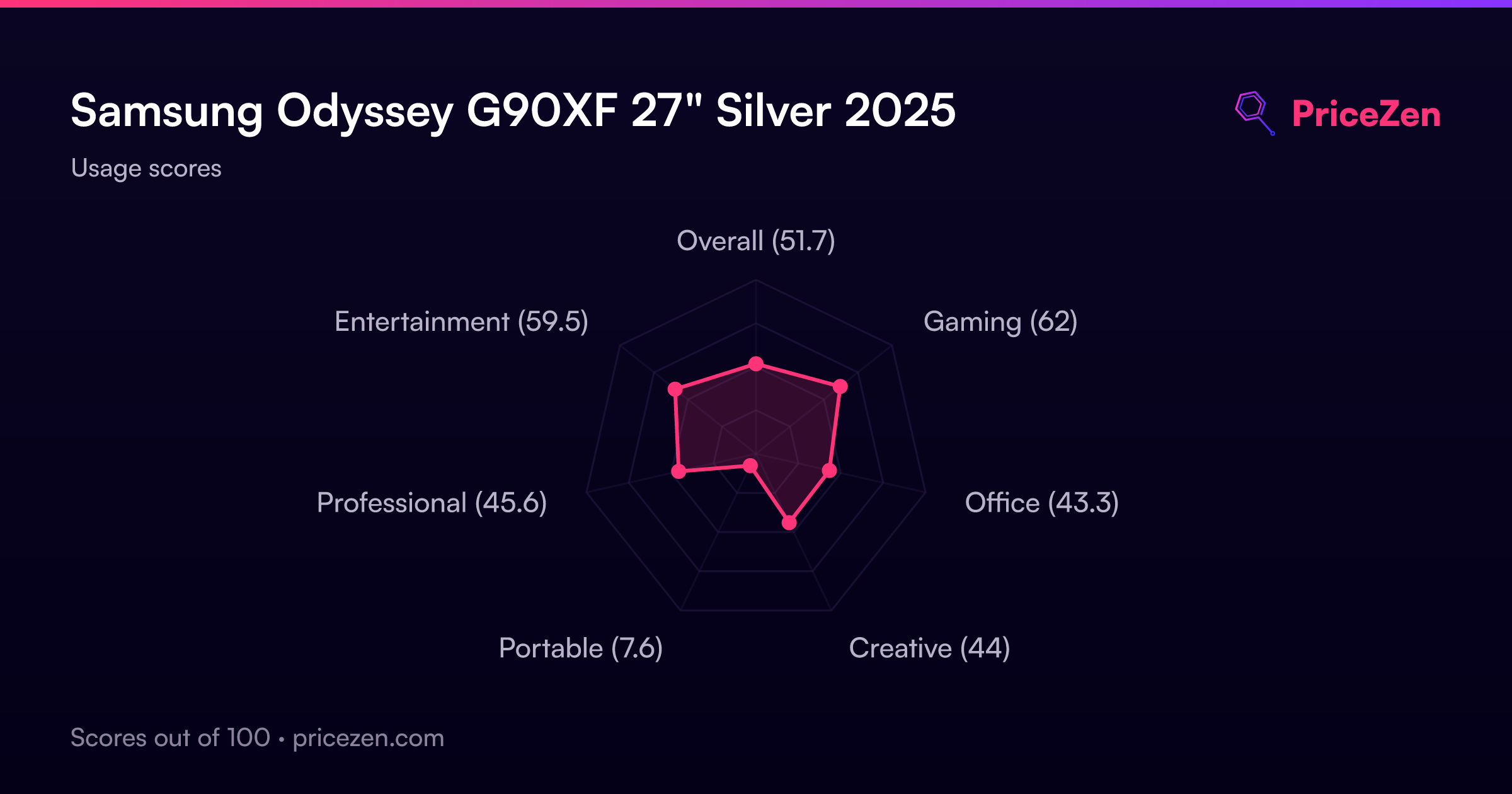
So who's this for? Honestly, a pretty specific person: someone who already loves 3D as a format, has a strong PC, and wants the novelty more than they want the best possible price-to-performance. Our scoring model puts it at 62/100 for gaming and 59.5/100 for entertainment, with a 51.7 overall. Those are middling numbers for a monitor asking USD 1,340, and the gap between the sky-high feature ranking and the average overall score tells you almost everything about this product. The hardware is genuinely impressive. The experience around it is where things get complicated.
And there's a catch worth knowing before you get excited. Samsung's own recommended specs for optimal 3D performance are an Intel i7 or higher (or Ryzen 7 1700X or higher), 32GB of DDR5-5600 across two sticks, and PCIe 5. That's not a casual machine. If your rig doesn't clear that bar, you're paying a premium for a headline feature you may not get to enjoy properly. We collect specs, prices and owner feedback from multiple stores with our own automated system, and nobody can pay us to soften that.
Common Questions
Q: Do I really need special glasses for the 3D?
No, that's the whole point. The G90XF uses eye-tracking cameras and view-mapping algorithms to render depth based on where your head is, so nothing goes on your face. Owners describe the tracking as effective but position-dependent, meaning you'll want to stay reasonably centered in front of the panel.
Q: Will the 3D work with any game or video I throw at it?
Not reliably. Games need to be supported through Samsung's Odyssey 3D Hub, and owners consistently report that list is short. The AI conversion feature handles video only, requires the hub running in the system tray with full-screen playback, and some players don't support it at all.
Q: Is my PC powerful enough for this?
Samsung recommends an Intel i7 or higher (or Ryzen 7 1700X and up), 32GB of DDR5-5600 in two sticks, and PCIe 5 for optimal 3D performance. Separately, driving 3840 x 2160 at 165Hz needs a strong GPU regardless of 3D. If your build falls short of those recommendations, you're paying for a feature you won't fully get.
Q: Is it a good monitor if I ignore the 3D entirely?
It's decent, not class-leading. The 4K OLED panel and 165Hz/1ms combo rank well, but our color score is one of the weakest and connectivity near the bottom, dragging the overall to 51.7/100. At USD 1,340, you'd get a more balanced package elsewhere if depth effects don't matter to you.
Who Should Skip This
Skip this if you're buying a monitor first and a 3D experiment second. The 51.7/100 overall score, weak color ranking and near-bottom connectivity mean you're accepting real compromises in the basics to get one specialty feature. Anyone who wants accurate color for creative work, plenty of ports for a multi-device desk, or simply the best gaming image per dollar should look at the ASUS ROG Strix XG27UCDMG or MSI MAG 271QPX QD-OLED E2 at the same 27-inch size instead.
Also skip it if your PC doesn't meet Samsung's recommended specs, or if you were hoping to watch a stack of 3D Blu-rays. Owners flag that gap specifically, and the software-gated activation means you can't workaround unsupported content by forcing the mode on. And if you move your setup around, 7498g and a 7.6/100 portability score make this a permanent desk resident, not a travel companion.
Verdict
If you're a 3D enthusiast with a PC that meets Samsung's recommended specs and you understand you're buying into a small supported-game library, this is the only product doing what it does, and owners who fit that profile clearly love it. Buy it as a specialist tool, not a general-purpose monitor. Go in knowing the software gates the feature and that you can't override it, and you'll probably be happy.
For everyone else, we'd pass. A 3.5/5 owner rating across 28 reviews and a social proof ranking near the bottom suggest the broader buyer population isn't converting on the promise. If you want a fantastic 4K OLED for gaming without the experimental layer, put your USD 1,340 toward one of the 27-inch competitors instead and get a more predictable result. This monitor is interesting. Interesting and recommended aren't always the same word.
Usage Scores
- कुल51.7
- गेमिंग62
- Office43.3
- Creative44
- Portable7.6
- Professional45.5
- मनोरंजन59.5