Dell Aurora 16, Core 7 240H, 64GB, 2TB SSD, RTX 5050
The Intel Core 7-240H 10-core processor and NVIDIA GeForce RTX 5050 with 8GB GDDR7 deliver smooth 1440p gaming and fast rendering. The 16-inch 2560x1600 120Hz IPS panel covers 100% sRGB, and the 96Wh battery lasts up to 10 hours. Best for gamers and creators who need a powerful, portable workstation with 64GB RAM and 2TB SSD.

अभी किसी विक्रेता की मौजूदा कीमत नहीं है











एक नज़र में
The 30-Second Version
Massive 64GB of RAM and a 2TB SSD bolted onto an RTX 5050, at USD 2,499. The memory is best-in-class, the price is bottom-tier value. Worth it only if you actually need that much RAM.
Pros & Cons
खूबियाँ
- 64GB of DDR5 is about as much memory as you can get in this class. 98th
- 2TB PCIe 4.0 SSD means no juggling your game library. 94th
- 16-inch 2560x1600 120Hz IPS panel with full sRGB coverage. 85th
- HDMI 2.1 wired to the dGPU, plus Ethernet and Wi-Fi 7. 82nd
कमियाँ
- USD 2,499 is steep for an RTX 5050 and a Core 7-240H.
- 8GB of VRAM will limit you at the panel's native resolution.
- 2.49kg and a 180W adapter make this a desk laptop, not a backpack one.
- Reliability ranks below average in our data, and there's only one owner rating so far.
प्रमाण
Performance
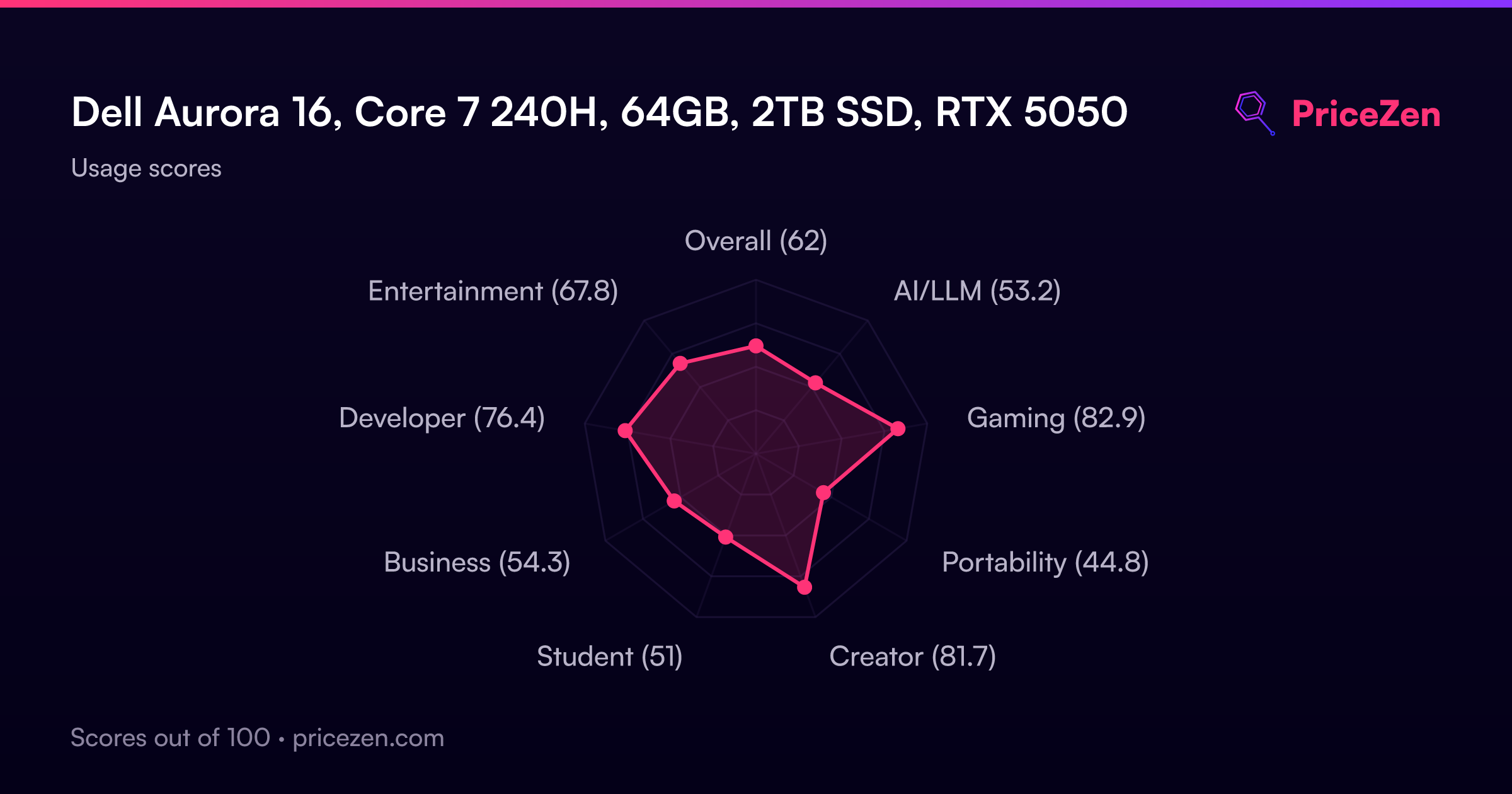
The memory config is the headline. 64GB puts it in the 98th percentile, basically best-in-class, and the 2TB drive is a standout too. The GPU score of 82.9 for gaming and 81.7 for creators is strong, well above average, and the 120Hz QHD+ panel gives you room to actually see those frames. But the CPU ranks only solid at the 77th percentile, and 8GB of VRAM is the ceiling you'll bump into first at 2560x1600 with textures cranked. Port selection is strong (two USB-C with DisplayPort, two USB-A, HDMI 2.1 off the dGPU, Ethernet, Wi-Fi 7), though both USB-C ports run off the integrated graphics. And at 2.49kg with a 180W GaN brick, portability is a weak spot, scoring 44.7 for compactness.
Specifications
Full Specifications
Processor
| CPU | Intel Core 7 240H |
| Cores | 10 |
| Frequency | 2.5 GHz |
| L3 Cache | 24 MB |
Graphics
| GPU | NVIDIA GeForce RTX 5050 |
| Type | Discrete |
| VRAM | 8 GB |
| VRAM Type | GDDR6 |
Memory & Storage
| RAM | 64 GB |
| RAM Generation | DDR5 |
| Storage | 2 TB |
| Storage Type | NVMe SSD |
Display
| Size | 16" |
| Resolution | 2560x1600 (QHD) |
| Panel | IPS |
| Refresh Rate | 120 Hz |
| Brightness | 300 nits |
| Color Gamut | 100% sRGB |
Connectivity
| USB-C Ports | 2 |
| USB Ports | 2 |
| HDMI | HDMI 2.1 |
| Wi-Fi | Wi-Fi 7 |
| Bluetooth | Bluetooth 5.4 |
| Ethernet | RJ-45 Ethernet |
Physical
| Weight | 2.5 kg / 5.5 lbs |
| Battery | 96 Wh |
| OS | Windows 11 Pro |
vs Competition
Cross-shop the Lenovo Legion Pro 7i Gen 10 16" first if raw gaming performance is the goal, since this machine's RTX 5050 and 8GB of VRAM are its limiting factors, not its 64GB of RAM. The ASUS ROG Zephyrus 14" GA403WW-G14.R95080 and HP OMEN Transcend 14-fb1023dx are the ones to look at if hauling 2.49kg around sounds miserable, given how poorly this thing scores on compactness. The Apple MacBook Pro 14.2" M4 Pro and Samsung Galaxy Book5 Pro 14" are worth a look for creator and dev work, but neither is aimed at the 120Hz gaming this panel is built for. Where the Aurora 16 wins outright is memory and storage headroom, and it isn't close.
| Spec | Dell Aurora 16 | Apple MacBook Pro 14.2" M4 Pro | ASUS ROG Zephyrus 14" GA403WW-G14.R95080 | Lenovo Legion Pro 7i Gen 10 16" | HP OMEN Transcend | Samsung Galaxy Book5 Pro 14" NP944XHA-KG3US |
|---|---|---|---|---|---|---|
| CPU | Intel Core 7 240H | Apple M4 Pro | AMD Ryzen AI 9 HX 370 | Intel Core Ultra 9 275HX | Intel Core Ultra 9 285H | Intel Core Ultra 7 258V |
| RAM (GB) | 64 | 48 | 32 | 32 | 32 | 32 |
| Storage (GB) | 2048 | 4096 | 2048 | 1024 | 1024 | 1024 |
| Screen | 16" 2560x1600 | 14.2" 3024x1964 | 14" 2880x1800 | 16" 2560x1600 | 14" 2880x1800 | 14" 2880x1800 |
| GPU | NVIDIA GeForce RTX 5050 | Apple (16-Core) | NVIDIA GeForce RTX 5080 | NVIDIA GeForce RTX 5070 Ti | NVIDIA GeForce RTX 5070 | Intel Arc Graphics 140V |
| OS | Windows 11 Pro | macOS | Windows 11 Home | Windows 11 Home | Windows 11 Home | Windows 11 Pro |
| Weight (kg) | 2.5 | 1.6 | 1.6 | 2.7 | 1.6 | 1.2 |
| Battery (Wh) | 96 | 72 | - | 99 | 71 | 63 |
| Compare | Compare | Compare | Compare | Compare |
| उत्पाद | CPU | GPU | RAM | पोर्ट | स्क्रीन | पोर्टेबिलिटी | स्टोरेज | विश्वसनीयता | सामाजिक प्रमाण | Affordability |
|---|---|---|---|---|---|---|---|---|---|---|
| Dell Aurora 16 | 76.6 | 82 | 97.6 | 77.8 | 85 | 12.7 | 93.9 | 33.7 | 44.2 | 10.2 |
| Apple MacBook Pro 14.2" M4 Pro Compare | 92.4 | 78.9 | 90.6 | 73.9 | 99.1 | 68.8 | 98.4 | 98.2 | 99.7 | 4.4 |
| ASUS ROG Zephyrus 14" GA403WW-G14.R95080 Compare | 91.2 | 98.3 | 90.8 | 89.4 | 96 | 73.6 | 89.7 | 60.6 | 95.6 | 6 |
| Lenovo Legion Pro 7i Gen 10 16" Compare | 97.2 | 96.7 | 89 | 97.3 | 95 | 9.5 | 79.3 | 81.9 | 99.7 | 5.8 |
| HP OMEN Transcend Compare | 90.1 | 93.5 | 89.6 | 89.4 | 96 | 72.2 | 65.3 | 33.7 | 93.1 | 8.9 |
| Samsung Galaxy Book5 Pro 14" NP944XHA-KG3US Compare | 65.8 | 69.6 | 79.5 | 83.5 | 90.4 | 89.4 | 79.3 | 81.9 | 95.6 | 21.1 |
कीमत
Value & Pricing
Honestly? Tough sell at USD 2,499. Our affordability ranking puts it in the bottom 10 percent of the category, and the parts driving that price are the RAM and SSD, not the CPU or GPU. If you genuinely need 64GB for VMs, big datasets or heavy timelines, the config saves you an upgrade hassle. If you're mostly gaming, you're paying a premium for memory most titles won't touch.
और पढ़ें
Overview
The Dell Aurora 16 is Alienware's 16-inch machine loaded up with memory and storage: 64GB of DDR5 at 5600 MT/s and a 2TB PCIe 4.0 NVMe drive, paired with a Core 7-240H (10 cores) and an RTX 5050 carrying 8GB of GDDR7. The screen is a 2560x1600 IPS panel at 120Hz, 300 nits, full sRGB. Windows 11 Pro ships on it.
Here's the catch. That RAM and SSD sit near the top of our rankings, but the price does too: USD 2,499 at Amazon, which lands in the bottom tier for affordability in this category. You're paying flagship money for mid-tier silicon.
Common Questions
Q: Can it handle games at the native 2560x1600 resolution?
The RTX 5050 scores 82.9 for gaming in our ranking, which is strong, but 8GB of VRAM is the constraint at that resolution. Expect to lean on upscaling or drop settings in demanding titles.
Q: Is 64GB of RAM overkill?
For gaming, mostly yes. For running VMs, containers or large creative projects it's the whole reason to buy this config, and it ranks in the 98th percentile for memory.
Q: Is it practical to carry around daily?
Not really. At 2.49kg plus a 180W GaN adapter it scores just 44.7 for compactness, one of its weakest results. The 96Wh battery helps, but this is a desk-first machine.
Who Should Skip This
If you're buying purely to game, skip it. USD 2,499 for an RTX 5050 with 8GB of VRAM is the wrong trade, and the Legion Pro 7i Gen 10 is the smarter cross-shop. Same story if you commute with your laptop, because 2.49kg gets old fast.
Verdict
Buy it if you want one machine for gaming plus memory-hungry work: containers, VMs, big compiles, chunky video projects. The 64GB and 2TB combo is genuinely rare, and the developer score of 76.4 backs that up. Pure gamers should spend the same money on stronger graphics elsewhere.
Usage Scores
- कुल62
- AI/LLM53.2
- गेमिंग82.9
- पोर्टेबिलिटी44.8
- क्रिएटर81.7
- छात्र51
- बिज़नेस54.3
- डेवलपर76.4
- मनोरंजन67.8