HP ZBook Firefly 14" G11 A 2025, Ryzen 7 8840HS, 32GB, 1TB SSD
The AMD Ryzen 7 8840HS processor and 32GB of DDR5 RAM deliver ISV-certified reliability for complex workflows in a 1.41kg chassis. Its spill-resistant keyboard and 5MP camera with AI noise reduction add practical durability and collaboration quality beyond raw specs. This workstation is best for mobile developers and engineers who need pro-level CPU power and portability, but not a color-accurate display or discrete graphics.

अभी किसी विक्रेता की मौजूदा कीमत नहीं है


एक नज़र में
The 30-Second Version
The HP ZBook Firefly G11 A packs 32GB DDR5 and a Ryzen 7 8840HS into a 1.41kg chassis with excellent port coverage, making it a strong pick for developers and mobile professionals. The display (300 nits, 45% NTSC) and integrated GPU are the trade-offs, and at CAD 2,154 it's not a budget option. Great for code and multitasking, wrong for color work or gaming.
Pros & Cons
खूबियाँ
- 32GB DDR5 in dual-channel ranks among the best for laptop memory right now 86th
- 1.41kg in a 14" workstation chassis, well above average for portability 80th
- Ryzen 7 8840HS with 8 cores/16 threads and 5.10 GHz boost handles heavy multitasking easily 79th
- Port selection covers Thunderbolt, 2x USB-C, 2x USB-A, HDMI 2.0b, no dongles needed 79th
- 1TB NVMe SSD gives strong storage capacity and speed without external drives
कमियाँ
- Gaming score of 21.6/100 makes this one of the weaker options for any GPU-heavy leisure use
- Display at 300 nits and 45% NTSC is mediocre for color accuracy or outdoor visibility
- Affordability ranks in the lower third, CAD 2,154 is steep for an integrated-GPU machine
- Reliability percentile sits at 34, falling behind most competitors in our data
- Both RAM slots occupied (2x16GB), so upgrading to 64GB means replacing, not adding
प्रमाण
Performance
The Ryzen 7 8840HS sits in the upper tier of laptop processors in our data, ranking well above average against everything else we track. Eight cores and sixteen threads with a 5.10 GHz turbo ceiling means this thing chews through parallel workloads like compilation, containerized dev environments, and heavy multitasking without breaking a sweat. Pair that with 32GB of DDR5 in dual-channel (2x16GB), which lands it among the best on the market for memory capacity, and you've got a machine that won't choke when you've got forty browser tabs, three IDEs, and a Docker stack running simultaneously. The 1TB NVMe SSD also ranks strong, so storage speed and capacity aren't bottlenecks here.
But let's talk about where the numbers tell a less flattering story. The Radeon 780M is integrated graphics, and while it's respectable for an iGPU (our GPU ranking puts it in solid territory overall), the gaming score of 21.6/100 is a real letdown. Don't buy this expecting to run anything demanding after work. The 56Wh battery paired with that efficient AMD chip should deliver decent runtime for productivity tasks, but the 300-nit, 45% NTSC panel means color-critical work is off the table. If your day involves spreadsheets, code, terminals, and video calls, this hardware sings. If it involves Lightroom catalogs or Unreal Engine, look elsewhere.
Specifications
Full Specifications
Processor
| CPU | AMD Ryzen 7 8840HS |
| Cores | 8 |
| Frequency | 3.3 GHz |
| L3 Cache | 16 MB |
Graphics
| GPU | AMD Radeon 780M |
| Type | Integrated |
| VRAM Type | Shared |
Memory & Storage
| RAM | 32 GB |
| RAM Generation | DDR5 |
| Storage | 1 TB |
| Storage Type | NVMe SSD |
Display
| Size | 14" |
| Resolution | 1920x1200 (Full HD) |
| Panel | IPS |
| Brightness | 300 nits |
| Color Gamut | 45% NTSC |
Connectivity
| USB-C Ports | 2 |
| USB Ports | 2 |
| Thunderbolt | Thunderbolt 4 x 2 |
| HDMI | HDMI 2.0b |
| Wi-Fi | Wi-Fi 6E |
| Bluetooth | Bluetooth 5.3 |
Physical
| Weight | 1.4 kg / 3.1 lbs |
| Battery | 56 Wh |
| OS | Windows 11 Pro |
vs Competition
Let's put this next to the machines it's actually competing against. The Apple MacBook Pro 14.2" M4 Max is in a different weight class entirely for GPU and creative workloads, but if your workflow lives in macOS-native tools, the Firefly can't touch that. Where the HP wins is Windows-native enterprise compatibility, upgradeable SoDIMM RAM (both slots accessible), and a port array that doesn't require adapters for legacy USB-A peripherals. The ASUS ROG Zephyrus 14" GA403WW and Lenovo Legion Pro 7i Gen 10 are gaming-first machines; they'll demolish the Firefly in GPU tasks, but they're heavier, louder, and shorter on battery. If you don't game, their discrete GPUs are wasted watts and grams you're carrying for nothing.
The closer rivals are the Samsung Galaxy Book5 Pro 14" and Dell Premium 14.5", both targeting the same thin-and-light professional crowd. Against those, the Firefly's 32GB RAM and 8-core Ryzen give it a clear edge for memory-hungry workloads, and the port selection (Thunderbolt plus HDMI plus dual USB-A) is more generous than most ultrabooks manage. But the display is where it gives ground: 45% NTSC and 300 nits is underwhelming next to what Samsung and Dell typically offer in this tier. If your work is color-sensitive or you spend time outdoors, the Firefly's panel is the compromise you'll notice every single day.
| Spec | HP ZBook Firefly 14" G11 A | Apple MacBook Pro 14.2" M4 Max | ASUS ROG Zephyrus 14" GA403WW-G14.R95080 | Lenovo Legion Pro 7i Gen 10 16" | Samsung Galaxy Book5 Pro 14" NP944XHA-KG3US | Dell Premium 14.5" LDA14250-7667SLV-PUS |
|---|---|---|---|---|---|---|
| CPU | AMD Ryzen 7 8840HS | Apple M4 Max | AMD Ryzen AI 9 HX 370 | Intel Core Ultra 9 275HX | Intel Core Ultra 7 258V | Intel Core Ultra 7 255H |
| RAM (GB) | 32 | 64 | 32 | 32 | 32 | 32 |
| Storage (GB) | 1024 | 4096 | 2048 | 1024 | 1024 | 1024 |
| Screen | 14" 1920x1200 | 14.2" 3024x1964 | 14" 2880x1800 | 16" 2560x1600 | 14" 2880x1800 | 14.5" 3200x2000 |
| GPU | AMD Radeon 780M | Apple (40-Core) | NVIDIA GeForce RTX 5080 | NVIDIA GeForce RTX 5070 Ti | Intel Arc Graphics 140V | Intel Arc Graphics |
| OS | Windows 11 Pro | macOS | Windows 11 Home | Windows 11 Home | Windows 11 Pro | Windows 11 Home |
| Weight (kg) | 1.4 | 1.6 | 1.6 | 2.7 | 1.2 | 1.7 |
| Battery (Wh) | 56 | 72 | - | 99 | 63 | 62 |
| Compare | Compare | Compare | Compare | Compare |
| उत्पाद | CPU | GPU | RAM | पोर्ट | स्क्रीन | पोर्टेबिलिटी | स्टोरेज | विश्वसनीयता | Affordability |
|---|---|---|---|---|---|---|---|---|---|
| HP ZBook Firefly 14" G11 A | 78.8 | 74.3 | 86.3 | 77.2 | 66.3 | 79.6 | 79.2 | 33.6 | 29.5 |
| Apple MacBook Pro 14.2" M4 Max Compare | 93.7 | 91.6 | 95.7 | 73.2 | 99.3 | 68.9 | 98.5 | 98.3 | 1.7 |
| ASUS ROG Zephyrus 14" GA403WW-G14.R95080 Compare | 91.2 | 98.3 | 90.9 | 89.3 | 96.5 | 73.6 | 89.7 | 60.6 | 5.7 |
| Lenovo Legion Pro 7i Gen 10 16" Compare | 97.2 | 96.6 | 89 | 97.2 | 95.6 | 9.5 | 79.2 | 82 | 5.5 |
| Samsung Galaxy Book5 Pro 14" NP944XHA-KG3US Compare | 65.8 | 69.7 | 79.5 | 83.1 | 91.5 | 89.5 | 79.2 | 82 | 20 |
| Dell Premium 14.5" LDA14250-7667SLV-PUS Compare | 87.1 | 69.7 | 89 | 65.9 | 97.2 | 61.1 | 65.2 | 33.6 | 14 |
कीमत
Value & Pricing
At CAD 2,154 from Newegg (the only listing we're currently tracking in Canada), this isn't cheap. Our affordability ranking puts it in the bottom third of laptops we compare, and that stings a bit when you consider there's no discrete GPU here. You're paying the ZBook tax: workstation branding, Wolf Pro Security Edition, Windows 11 Pro, and presumably ISV certifications that matter to certain professional workflows. If those things are line items on your employer's requirements checklist, the price makes sense. If you're buying with your own money and just want a fast, portable dev machine, you might wince.
We only have one Canadian retailer listing right now, so there's no cross-store price competition to point you toward. We'll keep tracking it through our community extension, but for now, CAD 2,154 is the number. Compare that against what the Samsung Galaxy Book5 Pro 14" or Dell Premium 14.5" offer at their respective price points before committing.
और पढ़ें
Overview
The ZBook Firefly G11 A is HP's attempt at a mobile workstation that doesn't feel like you're hauling a server around. This particular config pairs an AMD Ryzen 7 8840HS (8 cores, 16 threads, boosting to 5.10 GHz) with 32GB of DDR5 and a 1TB NVMe SSD, all wrapped in a 14" chassis that weighs just 1.41kg. That's genuinely light for something wearing the "workstation" badge, and our compactness ranking puts it well above average for the category.
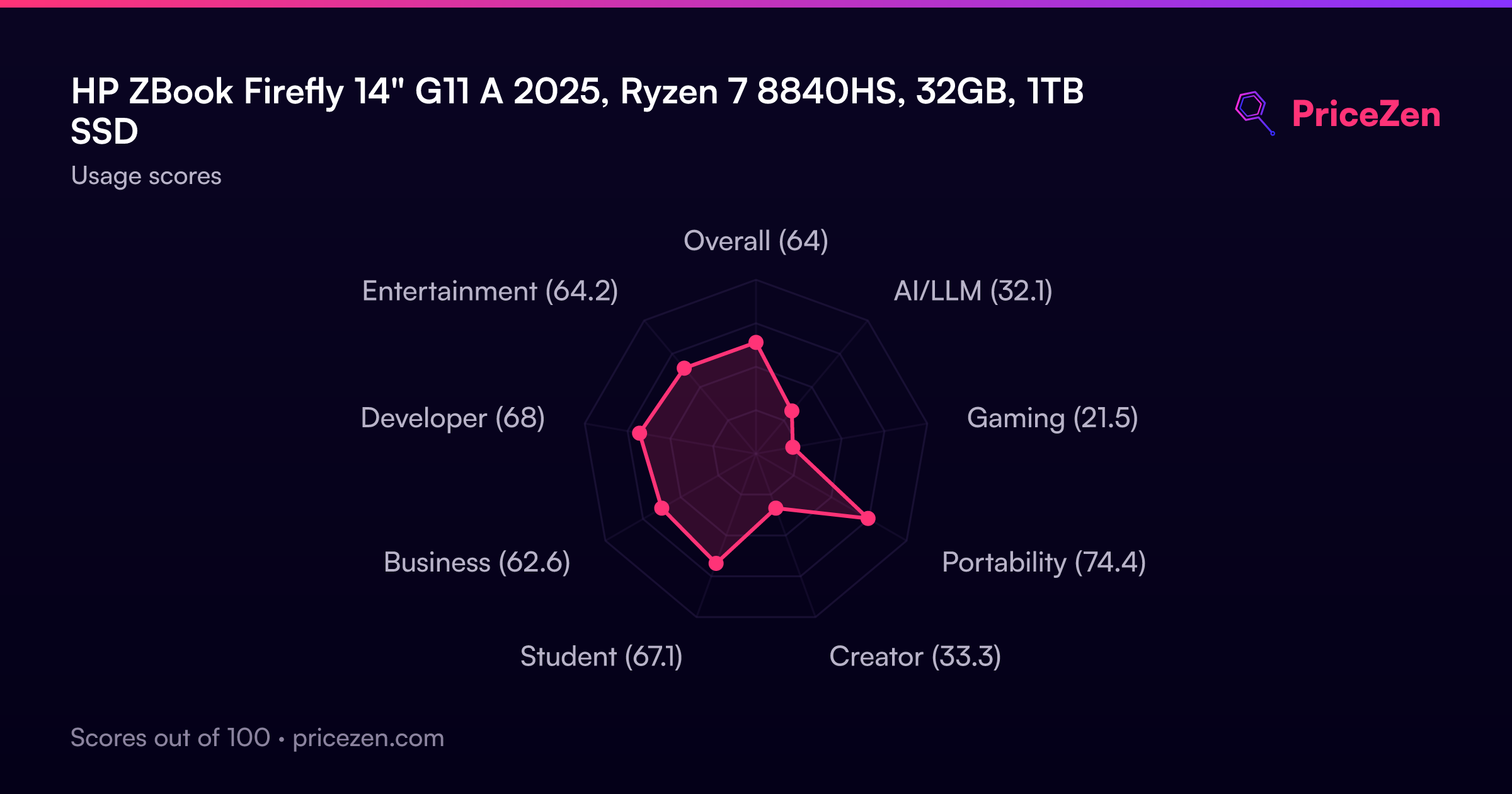
Who's this for? Think developers who need serious RAM headroom without a discrete GPU eating battery life, students running VMs or compiling code on the go, and professionals who want ISV-certified reliability in a bag-friendly package. Our scoring model rates it strongest for compact use cases (74.6/100), followed by student workloads (69/100) and development (68.1/100). The port selection backs that up: Thunderbolt, two USB-C, two USB-A, HDMI 2.0b, and Wi-Fi 6E means you're not living the dongle life.
What makes it interesting is the tension between its strengths and its weak spots. You get leading RAM capacity and strong CPU muscle, but the display (300 nits, 45% NTSC) is merely solid, and the integrated Radeon 780M won't satisfy anyone hoping to game after hours. It's a focused tool, not a do-everything machine, and that focus is either exactly what you need or a dealbreaker depending on your workflow.
Common Questions
Q: Can I upgrade the RAM later, or am I stuck with 32GB?
The Firefly uses two SoDIMM slots, both currently filled with 16GB sticks for 32GB total. You can swap them for higher-capacity modules, but you'd be replacing rather than adding. It's not soldered, which is a genuine advantage over many thin-and-light competitors, but plan for the cost of new sticks if you ever need 64GB.
Q: Is the display good enough for photo or video editing?
Honestly, no. At 45% NTSC color gamut and 300 nits brightness, this panel falls behind most competitors for color-critical work. It's fine for code, documents, and video calls, but if accurate color representation matters to your workflow, you'll want an external monitor or a different laptop entirely.
Q: How does the battery hold up for a full workday?
The 56Wh battery paired with the efficient Ryzen 7 8840HS and integrated graphics should handle productivity workloads reasonably well, since there's no power-hungry discrete GPU draining cells. That said, 56Wh isn't massive for a 14" machine, so heavy compilation or sustained multi-threaded loads will eat into runtime faster than light browsing.
Q: Why is this called a workstation if it only has integrated graphics?
HP's ZBook line targets ISV-certified professional workflows, security features (this is the Wolf Pro Security Edition), and enterprise manageability rather than raw GPU power. The workstation label here is about reliability certifications and business features, not 3D rendering capability. If you need GPU-accelerated CAD or simulation, look at ZBook models with discrete Quadro or Radeon Pro graphics instead.
Who Should Skip This
Skip this if you do any color-sensitive creative work. The 45% NTSC panel is a real letdown for photo editing, video grading, or design work where color accuracy matters, and no amount of CPU power fixes a mediocre display. The Samsung Galaxy Book5 Pro 14" or Dell Premium 14.5" are worth cross-shopping if a better screen is non-negotiable.
Also skip it if you want to game, even casually. The gaming score of 21.6/100 tells you everything: the Radeon 780M is an integrated chip doing its best, but it's not built for modern titles at playable settings. The ASUS ROG Zephyrus 14" exists in roughly the same size class and will actually let you play games. And if CAD 2,154 feels steep for a machine without a discrete GPU, trust that instinct. You're paying for enterprise features you may not need.
Verdict
If you're a developer, IT professional, or student who needs a Windows workstation that fits in a small bag and won't buckle under heavy multitasking, the ZBook Firefly G11 A earns its spot. The 32GB RAM, strong CPU, generous ports, and 1.41kg weight make it a genuinely practical daily driver for code, containers, and productivity. The 4.3/5 customer rating across 20 reviews suggests owners are generally happy with the package, even if our reliability ranking raises a flag worth watching.
But if your work touches color grading, 3D rendering, or anything GPU-intensive, this machine's integrated Radeon 780M and mediocre display will frustrate you daily. And if you're price-sensitive, CAD 2,154 for an iGPU laptop is a tough sell when the competition offers more visual punch for similar money. Buy it for what it is: a compact, RAM-loaded, port-rich Windows workhorse. Don't buy it hoping it'll moonlight as a creative studio or gaming rig.
Usage Scores
- कुल64.2
- AI/LLM32.2
- गेमिंग21.6
- पोर्टेबिलिटी74.6
- क्रिएटर33.5
- छात्र69
- बिज़नेस62.5
- डेवलपर68.1
- मनोरंजन64.8