Microsoft Surface Laptop 13.5" 1951 2021, Core i7-1185G7, 16GB, 256GB SSD, Black
The Intel Core i7-1185G7 with Iris Xe graphics handles everyday productivity and light multitasking, while the 13.5-inch 3:2 PixelSense touchscreen offers extra vertical space for documents. The 720p camera with Windows Hello and Studio Mics make video calls clear, and the build is solid and reliable. Best for students or business users who need a portable, well-built laptop for note-taking, web browsing, and office work, not for gaming.

अभी किसी विक्रेता की मौजूदा कीमत नहीं है
एक नज़र में
The 30-Second Version
A gorgeous 3:2 touchscreen strapped to aging internals and a laughably small SSD, all for $340. Buy it for the screen, not the i7 badge.
Pros & Cons
खूबियाँ
- That 3:2 2256x1504 touchscreen is the whole point, and it's well above average 87th
- $340 for 16GB of RAM and a premium chassis is a standout price 83rd
- Windows Hello face login plus Studio Mics make video calls painless 82nd
- Compact and reliable scores both sit in the top fifth of our rankings 81st
कमियाँ
- 256GB SSD is a real letdown, bottom sixth of every laptop we track
- One USB-C, one USB-A, and no Thunderbolt. Bring a dongle budget
- The i7-1185G7 is a 4-core chip that falls behind most current laptops
- Grade B refurb means cosmetic wear you can't preview
मालिकों की राय
The Word on the Street
प्रमाण
Performance
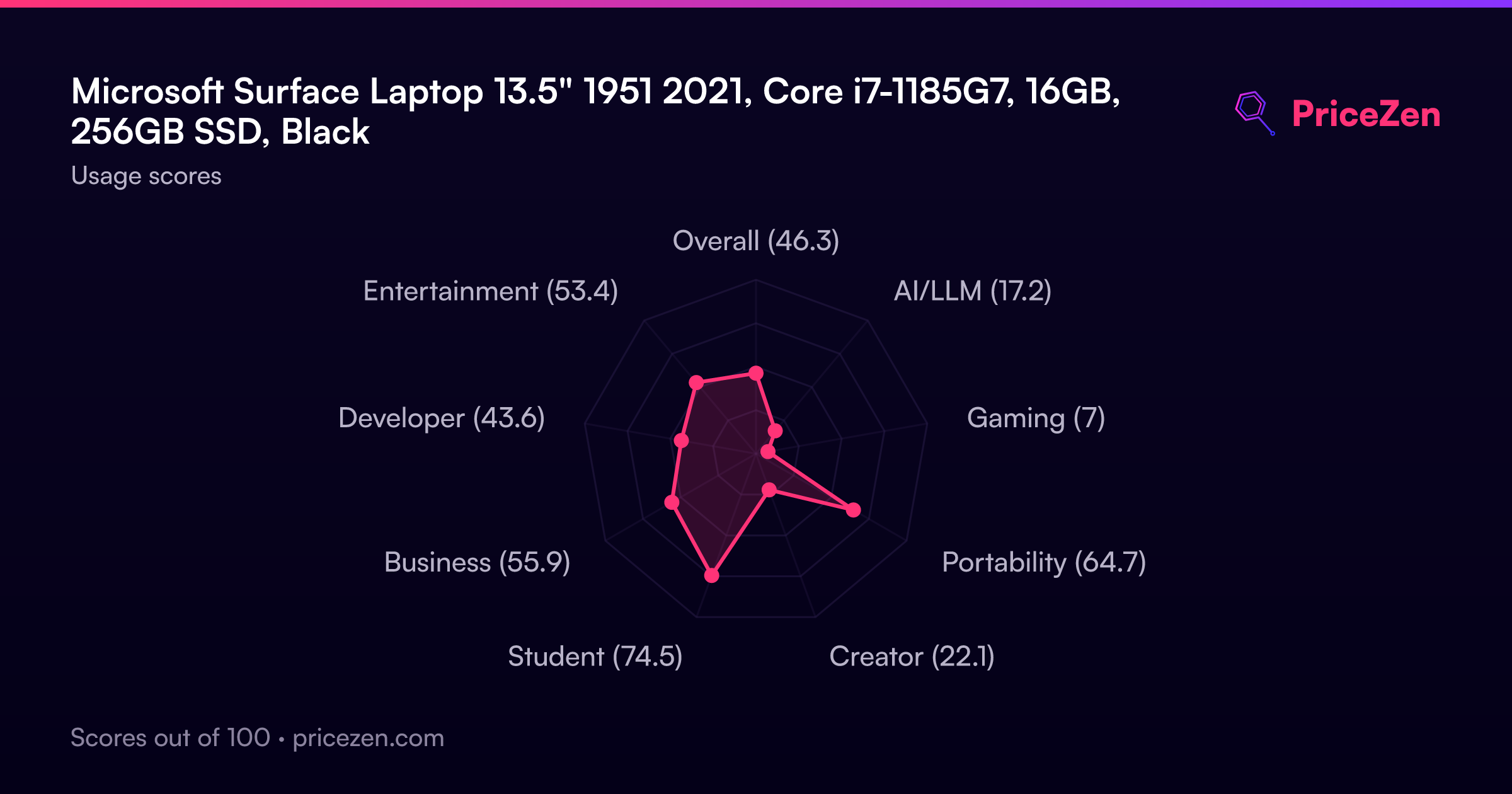
The surprise here is how lopsided the profile is. Screen ranks in the 81st percentile, reliability 82nd, compactness 83rd, and affordability 87th, so the things you actually touch and look at are strong. Then you hit the internals: CPU sits at the 35th percentile and RAM at the 36th, meaning that "i7" label is doing a lot of heavy lifting for a 1.2GHz base 4-core part. Iris Xe integrated graphics land about average for laptops overall, which is fine for video and light photo work and nothing else. Our gaming score is 7.1 out of 100, one of the worst we've seen. And 256GB fills up fast once Windows 11 Pro takes its cut.
Specifications
Full Specifications
Processor
| CPU | Intel Core i7 1185G7 |
| Cores | 4 |
| Frequency | 1.2 GHz |
| L3 Cache | 12 MB |
Graphics
| GPU | Intel Iris Xe Graphics |
| Type | Integrated |
| VRAM Type | Shared |
Memory & Storage
| RAM | 16 GB |
| Storage | 256 GB |
| Storage Type | SSD |
Display
| Size | 13.5" |
| Resolution | 2256x1504 |
| Panel | IPS |
Connectivity
| USB-C Ports | 1 |
| USB Ports | 1 |
| HDMI | No |
| Bluetooth | Yes |
Physical
| OS | Windows 11 Pro |
vs Competition
Cross-shop the Apple MacBook Air 13.3" M1 first if you can stretch the budget, because this Surface's CPU ranking at the 35th percentile is exactly where an older 4-core Intel loses ground. The HP OmniBook X Flip 14-fm0023dx and Lenovo Yoga 7 14" 83JR0001US are the ones to look at if you want a convertible without giving up modern internals, though this Surface still wins on price and its 3:2 panel is taller for document work. The ASUS ExpertBook 14" P5405CSA-DH54 is the better call for business buyers, since our business score here is only 55.7 and the port situation is a genuine problem at a desk. Samsung's Galaxy Book4 Edge 14" NP940XMA-KB1US is worth a look if you want something current rather than a 2021 refurb.
| Spec | Microsoft Surface Laptop 13.5" 1951 | Apple MacBook Pro 14.2" M4 Max | ASUS ROG Zephyrus 14" GA403WW-G14.R95080 | Lenovo Legion Pro 7i Gen 10 16" | HP OMEN Transcend | Samsung Galaxy Book5 Pro 14" NP944XHA-KG3US |
|---|---|---|---|---|---|---|
| CPU | Intel Core i7 1185G7 | Apple M4 Max | AMD Ryzen AI 9 HX 370 | Intel Core Ultra 9 275HX | Intel Core Ultra 9 285H | Intel Core Ultra 7 258V |
| RAM (GB) | 16 | 64 | 32 | 32 | 32 | 32 |
| Storage (GB) | 256 | 4096 | 2048 | 1024 | 1024 | 1024 |
| Screen | 13.5" 2256x1504 | 14.2" 3024x1964 | 14" 2880x1800 | 16" 2560x1600 | 14" 2880x1800 | 14" 2880x1800 |
| GPU | Intel Iris Xe Graphics | Apple (40-Core) | NVIDIA GeForce RTX 5080 | NVIDIA GeForce RTX 5070 Ti | NVIDIA GeForce RTX 5070 | Intel Arc Graphics 140V |
| OS | Windows 11 Pro | macOS | Windows 11 Home | Windows 11 Home | Windows 11 Home | Windows 11 Pro |
| Weight (kg) | - | 1.6 | 1.6 | 2.7 | 1.6 | 1.2 |
| Battery (Wh) | - | 72 | - | 99 | 71 | 63 |
| Compare | Compare | Compare | Compare | Compare |
| उत्पाद | CPU | GPU | RAM | पोर्ट | स्क्रीन | पोर्टेबिलिटी | स्टोरेज | विश्वसनीयता | Affordability |
|---|---|---|---|---|---|---|---|---|---|
| Microsoft Surface Laptop 13.5" 1951 | 34.8 | 47.7 | 36.1 | 21.7 | 81.2 | 83.3 | 15.7 | 82 | 86.9 |
| Apple MacBook Pro 14.2" M4 Max Compare | 93.7 | 91.6 | 95.7 | 73.2 | 99.3 | 68.8 | 98.5 | 98.3 | 1.7 |
| ASUS ROG Zephyrus 14" GA403WW-G14.R95080 Compare | 91.2 | 98.3 | 90.9 | 89.3 | 96.5 | 73.6 | 89.7 | 60.6 | 5.7 |
| Lenovo Legion Pro 7i Gen 10 16" Compare | 97.2 | 96.6 | 89 | 97.2 | 95.6 | 9.5 | 79.2 | 82 | 5.5 |
| HP OMEN Transcend Compare | 90.1 | 93.6 | 89.7 | 89.3 | 96.5 | 72.2 | 65.2 | 33.6 | 8.4 |
| Samsung Galaxy Book5 Pro 14" NP944XHA-KG3US Compare | 65.8 | 69.7 | 79.5 | 83.1 | 91.5 | 89.5 | 79.2 | 82 | 20 |
कीमत
Value & Pricing
Worth it, with eyes open. $340 lands in the 87th percentile for affordability, and you're getting a touchscreen panel and build quality that usually cost far more. Just accept that you'll be managing storage carefully and living with a dongle. If those two things sound like dealbreakers, spend more elsewhere.
और पढ़ें
Overview
At $340, this refurbished Surface Laptop 4 is one of the cheapest ways to get a genuinely good screen into your backpack. That 13.5" 2256x1504 PixelSense panel in a 3:2 aspect ratio sits well above average in our rankings, and it's the reason to buy this thing. Taller than a standard widescreen, touch-enabled with 10-point multi-touch and Surface Pen support, and paired with Windows Hello face login. For reading, writing, spreadsheets and lecture notes, that vertical space matters more than any spec sheet number.
The catch is that you're buying a Grade B refurb from 2021 with a 256GB SSD and a port selection that borders on insulting. Our scoring model puts storage in the bottom sixth of all laptops we track and ports even lower. The Core i7-1185G7 badge sounds premium, but it's a 4-core chip that lands below the middle of the pack today. Buy it for the display and the price, not the sticker on the CPU.
Common Questions
Q: Is 256GB enough?
For documents, browser tabs and cloud storage, yes. For a game library or video projects, absolutely not. Storage ranks in the 16th percentile here, so plan on external or cloud storage from day one.
Q: Can I game on it?
No. Our gaming score is 7.1 out of 100 with Iris Xe integrated graphics. Older indie titles and browser games, sure. Anything modern, forget it.
Q: What does Grade B refurbished actually mean?
It's a used 2021 unit with visible cosmetic wear, sold at $340 instead of new pricing. Functionally it's the same machine, cosmetically it won't be pristine. That trade is the entire value proposition.
Who Should Skip This
If you need ports, storage space, or a laptop that plays games, this isn't it. One USB-C without Thunderbolt and a 256GB drive will make you miserable within a month. Go look at the ASUS ExpertBook 14" P5405CSA-DH54 for desk work or the MacBook Air 13.3" M1 if you want something that'll still feel quick years from now.
Verdict
Buy it if you're a student or a writer who wants a great screen for as little money as possible. Our student score of 76.2 is the highest use-case rating this thing gets, and it earns it: tall touchscreen, face login, solid reliability ranking, $340. Skip it if you need storage headroom, ports, or any gaming at all. This is a focused machine, and pretending otherwise is how you end up disappointed.
Usage Scores
- कुल46.3
- AI/LLM17.2
- गेमिंग7
- पोर्टेबिलिटी64.7
- क्रिएटर22.1
- छात्र74.4
- बिज़नेस55.8
- डेवलपर43.6
- मनोरंजन53.3