Lenovo ThinkStation 30GS00GRUS 2025, Core i7-14700, 16GB, 1TB SSD
The 2.1 GHz Intel Core i7 20-core processor paired with 16GB of 4400 MHz DDR5 RAM handles multi-threaded office workloads without stutter, while the 512GB M.2 NVMe PCIe 4.0 SSD ensures fast boot and file access. Its 750W PSU and compact tower design with Wi-Fi 6E and multiple USB-A ports make it a practical desk companion for business environments. Best for home-office or business users running spreadsheets, databases, and light content creation, not for gaming or GPU-heavy tasks.

अभी किसी विक्रेता की मौजूदा कीमत नहीं है
हमने इसे पहले यहाँ देखा था। आज की कीमत स्टोर पर देखें।











एक नज़र में
The 30-Second Version
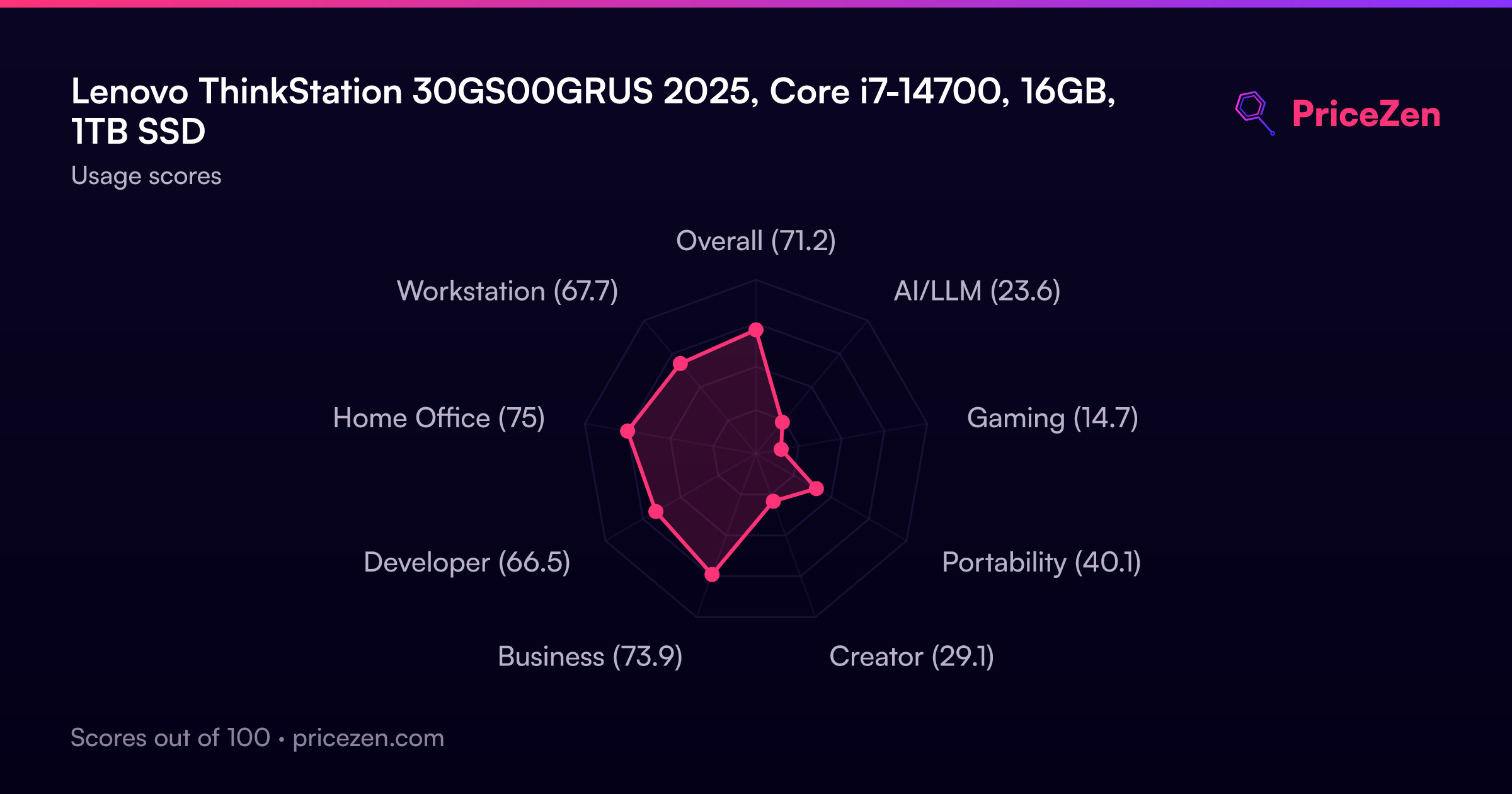
Strong 20-core CPU and best-in-class ports wrapped around integrated graphics that score 14.9 for gaming. Our model gives it 70.8 overall, with home office its best fit at 74.5. Worth USD 2,479 for CPU-heavy office work and the included three-year support, not for anything visual.
Pros & Cons
खूबियाँ
- 20-core i7-14700 is well above average for this class. 87th
- Port selection is one of the best around, eight USB-A plus HDMI 2.1 and DisplayPort. 82nd
- Three years of Lenovo Premier Support included. 70th
- Wi-Fi 6E, SD card reader and a keyboard and mouse in the box. 69th
कमियाँ
- Integrated UHD 770 graphics drag the whole thing down.
- 16GB of RAM is merely average for a machine at this price.
- Gaming score of 14.9 is basically a non-starter.
- USD 2,479 is steep for a build with no discrete GPU.
प्रमाण
Performance
The CPU is the story here: a 20-core 14th Gen i7-14700 at 2.1GHz base lands well above average against everything else in this category (82nd percentile). Ports are a standout too, sitting at the 87th percentile with eight USB-A, a USB-C, HDMI 2.1, DisplayPort 1.4, an SD card reader, 1GbE and Wi-Fi 6E. Storage is solid rather than special, and 16GB of DDR5 at 4400MHz is only about average for a workstation now. The weak spot is graphics: UHD 770 ranks in the bottom third, so anything GPU-heavy is off the table. There's a 750W power supply in there doing very little work, which is either wasted headroom or an upgrade path depending on your mood.
Specifications
Full Specifications
Processor
| CPU | Intel Core i7 14700 |
| Cores | 20 |
| Frequency | 2.1 GHz |
| L3 Cache | 33 MB |
Graphics
| GPU | Intel UHD Graphics 770 |
| Type | Integrated |
| VRAM Type | Shared |
Memory & Storage
| RAM | 16 GB |
| RAM Generation | DDR5 |
| Storage | 1 TB |
| Storage Type | NVMe SSD |
Build
| Form Factor | workstation |
| PSU | 750 |
| Weight | 13.6 kg / 30.0 lbs |
Connectivity
| USB-C Ports | 1 |
| USB Ports | 8 |
| HDMI | 1x HDMI 2.1 |
| DisplayPort | 2x DisplayPort 1.4 |
| Wi-Fi | Wi-Fi 6E |
| Bluetooth | Bluetooth 5.1 |
| Ethernet | Gigabit Ethernet |
System
| OS | Windows 11 Pro |
vs Competition
Cross-shop carefully, because the alternatives here go very different directions. The Apple Mac Studio M5 Max is the pick if your work leans on graphics or media and you're fine leaving Windows behind. The HP OMEN GT16-0364, ASUS ROG GM700 and MSI Aegis ZS2 A9NVP-1407US all make more sense if you want a machine that can actually render or game after hours, since this Lenovo's UHD 770 sits in the bottom third of the category while its CPU sits near the top. The Dell Desktop ECT1250 is the closer fight for plain office duty, and there the Lenovo's argument is its 20 cores, its leading port count and that Premier Support coverage rather than raw speed.
| Spec | Lenovo ThinkStation 30GS00GRUS | Apple Mac Studio M5 Max | HP OMEN GT16-0364 | Dell Desktop ECT1250 | ASUS ROG GM700 | MSI Aegis ZS2 A9NVP-1407US |
|---|---|---|---|---|---|---|
| CPU | Intel Core i7 14700 | Apple M5 Max | AMD Ryzen 7 8700F | Intel Core Ultra 7 265 | AMD Ryzen 7 9800X3D | AMD Ryzen 9 9900X |
| RAM (GB) | 16 | 48 | 32 | 32 | 32 | 32 |
| Storage (GB) | 1024 | 1024 | 1024 | 2048 | 2048 | 2048 |
| GPU | Intel UHD Graphics 770 | Apple (40-Core) | NVIDIA GeForce RTX 5070 | Intel UHD Graphics | NVIDIA GeForce RTX 5070 Ti | NVIDIA GeForce RTX 5070 |
| Form Factor | workstation | mini | mid-tower | sff | mid-tower | mid-tower |
| Psu W | 750 | 480 | 850 | 180 | 850 | 750 |
| OS | Windows 11 Pro | macOS | Windows 11 Home | Windows 11 Home | Windows 11 Home | Windows 11 Home |
| Compare | Compare | Compare | Compare | Compare |
| उत्पाद | CPU | GPU | RAM | पोर्ट | स्टोरेज | विश्वसनीयता |
|---|---|---|---|---|---|---|
| Lenovo ThinkStation 30GS00GRUS | 82.3 | 36.5 | 48.2 | 87.3 | 68.6 | 70.3 |
| Apple Mac Studio M5 Max Compare | 95.7 | 84.9 | 95 | 89.1 | 68.6 | 99.3 |
| HP OMEN GT16-0364 Compare | 69.3 | 90.6 | 87 | 97.9 | 53.3 | 70.3 |
| Dell Desktop ECT1250 Compare | 88.1 | 60 | 81.6 | 75 | 82.5 | 70.3 |
| ASUS ROG GM700 Compare | 80.3 | 94.6 | 81.6 | 96.1 | 90 | 37.8 |
| MSI Aegis ZS2 A9NVP-1407US Compare | 92.3 | 90.6 | 87 | 90.4 | 82.5 | 37.8 |
कीमत
Value & Pricing
At USD 2,479 from B&H Photo (CAD 3,500 to 3,556 north of the border, MXN 46,599 in Mexico), you're paying for the CPU, the chassis, the port array and three years of Premier Support. That support contract is real money for a business, and if your workload is CPU-bound it's a defensible buy. But you're spending workstation money and getting integrated graphics and middling RAM, so the value case falls apart the second your work touches a GPU.
और पढ़ें
Overview
This is a ThinkStation P3 Tower with a genuinely strong CPU and no graphics card. The Core i7-14700 packs 20 cores, the SSD is NVMe PCIe 4.0, and you get Windows 11 Pro plus three years of Lenovo Premier Support in the box. Graphics are handled by Intel's integrated UHD 770, which tells you exactly who this machine is for.
Our scoring puts it at 70.8 overall, with home office at 74.5 and business at 73.4. Gaming sits at 14.9, and that's not a typo. It's a desk-bound workhorse for spreadsheets, code, VMs and browser tabs by the dozen, sold at B&H Photo for USD 2,479.
Common Questions
Q: Can I add a graphics card later?
There's a 750W power supply in the chassis, which is far more than the integrated UHD 770 needs, so there's power headroom to work with. Check the specific chassis and slot layout with Lenovo before you commit to a card.
Q: Is 16GB of RAM enough for workstation use?
For office apps, browsing and light development, yes. Our data puts this config's memory right around the category average, so heavy VM or large-dataset users should plan on more.
Q: Will this handle gaming or video editing?
Not really. The gaming score is 14.9 out of 100 and the UHD 770 graphics rank in the bottom third of the category, so GPU-heavy work is the wrong ask for this build.
Who Should Skip This
If you edit video, model in 3D, or want to game on the same box, look elsewhere. The integrated UHD 770 is a weak spot in our rankings and no amount of CPU cores fixes that. Same goes if you need lots of memory on day one, since 16GB is only average here.
Verdict
Buy it if you run a business or a home office where the work is compiling, calculating, virtualizing or juggling documents, and you want a supported machine that IT can trust for three years. The CPU and connectivity carry it. Skip it if a single part of your job involves 3D, video timelines or games, because the integrated graphics will bottleneck you long before the processor breaks a sweat.
Usage Scores
- कुल70.8
- AI/LLM23.7
- गेमिंग14.9
- पोर्टेबिलिटी39.9
- क्रिएटर29.1
- बिज़नेस73.4
- डेवलपर66.2
- Home Office74.5
- Workstation67.7